Solved How To Get The Password Help Please!

rishalchand

New member
Local time
1:07 AM
Messages
3
Location
FijiIslands
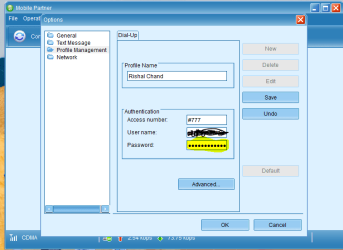
i have got my internet broadband modem HUAWELI Mobile Connect.
its program is Mobile Partner which i installed and i have a account user name n password in (dots)
i uninstalled the program .. when i reinstalled it again the account was there already,,
my Q 1.Where is the user name n password stored in the computer
2.is there anyway to copy the (dots) password,
3.any way to see the dots .. plz help
additional infor- i can copy the user name but cant copy the password ,any way to do something to make it copy that, or view where is it stored ,, to retrieve it
some photos of the program..
1111.PNG
4.PNG
 

My Computer My Computer

Computer type
Laptop
Computer Manufacturer/Model Number
Toshiba
OS
Windows 7 Ultimate x32(86)
Antivirus
avast! Internet Security
Browser
Mozilla Firefox
Hello and welcome rischal mate the only thing I can suggest to get photos and docs off that drive is to use this

BOOTABLEUBUNTU

Make a bootable Ubuntu disk http://www.ubuntu.com/download

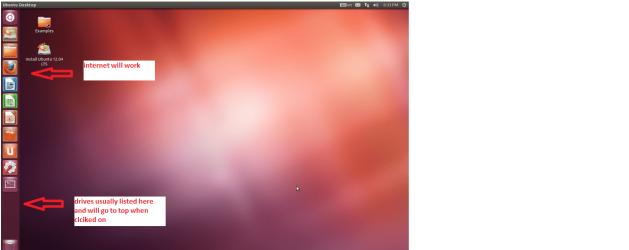
Set the BIOS to boot from theoptical when the machine boots it will show you a screen with TRY or INSTALL> select TRY

When it is finished - it takes verylittle time you will get a screen like in the pic .

Open the drive you want > Userand dig down until you get to the data / settings you may be able to copy /paste the material you want to an external source or other installed drive doingthis.

I am not sure if it will but I haverecovered tons of data etc using this method both on "dead" or justplain drives that you cannot get data from using Windows.
 

Attachments

  • Ubuntu screen.PNG
    Ubuntu screen.PNG
    123.3 KB · Views: 0

My Computer My Computer

Computer type
PC/Desktop
Computer Manufacturer/Model Number
Own build (new) Desk1 / Asus ROG Win 7 / Desk2 1st build
OS
Desk1 7 Home Prem / Desk2 10 Pro / Main lap Asus ROG 10 Pro 2 laptop Toshiba 7 Pro Asus P2520 7 & 10
CPU
Desk1 i5 3750K / Laptop i7 GTX 860M / Desk2 i5 2500
Motherboard
Desk1 Asus P877-V / Desk2 Gigabyte H67 UD3H / Laptop ?
Memory
Desk1 8GB (1866) / Desk2 16GB (1333) / Laptop 8Gb DDR3
Graphics Card(s)
Desk 1& 2NVidia GTX 650 & Laptops on board Intel
Sound Card
Desk 1 & 2 -XONAR DG Realtek High Def audio Laptop
Monitor(s) Displays
Desk 1 Benq HD 2450 / Desk2 Philips 24" / Laptop 17.5"
Screen Resolution
1920x1080 D1 & D2 & Laptop 1
Hard Drives
Desk1 Samsung 120GB 830 SSD
Asus ROG 256GB 850 Pro SSD
Desk2 Samsung 840 256 SSD
Toshiba 120GB EVO
PSU
Desk 1 Corsair HX 1050/ Laptop ? / Desk 2 Corsair HX 650
Case
Desk 1 Cooler HAF XM ? Toshiba laptop / Desk2 Coolermaster
Cooling
Fans on all Desk1 -2 Desk2 - all Coolermasters 5 Laptop ?
Keyboard
Desk 1 MS Sidewinder X6 Desk 2 MS Sidewinder X 4
Mouse
Desk 1&2 - Gigabyte MS 900 gamer - laptop - Logitec wireless
Internet Speed
ADSL2+
Other Info
One other Desktop (tester) and spare Toshba laptop both with SSD's
Running Kaspersky 2016 ISS on all machines config'd identically
Logitec audio stereo systems on each machine (x3)
Canon MG5250MFC
Router/modem TP-Link running WPA2SK
It is highly doubtful you will be able to recover the password. Modern software does not store passwords. That idea was abandoned a long time ago.
 

My Computer My Computer

Computer type
PC/Desktop
Computer Manufacturer/Model Number
HP
OS
Windows 7 Pro 64 bit
CPU
Xeon W3520
Memory
8 GB
Graphics Card(s)
Nvidia Geforce 210
Back
Top