How to hide bubble list?

lnm

New member
Local time
11:35 PM
Messages
14
Hello,

I am new using 7, i had to transfer from XP to 7.

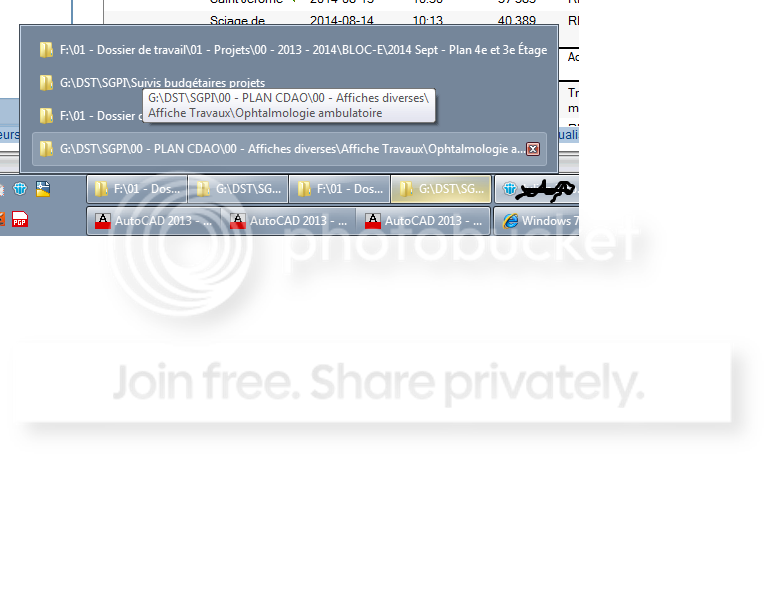
I have various questions about configuration like the following. Has you can see inside the image, there is a list inside a bubble showing up.

My question is: How to hide this list? Prevent windows from showing it.

Thanks.
 

My Computer

Computer type
PC/Desktop
Computer Manufacturer/Model Number
Lenovo ThinkCenter Mseries
OS
Windows 7 64 bit
CPU
i7-2600 - 3.40 ghz
Memory
8 gb
Graphics Card(s)
NVIDIA Quadro FX 380 LP
Hard Drives
ATA WDC WD5000AAKX-0 SCSI
Antivirus
officescan
Browser
IE 8.0.7601.17514

My Computer

Computer type
PC/Desktop
Computer Manufacturer/Model Number
Self built custom
OS
64-bit Windows 11 Pro for Workstations
CPU
Intel i7-8700K OC'd to 5 GHz
Motherboard
ASUS ROG Maximus XI Formula Z390
Memory
64 GB (4x16GB) G.SKILL TridentZ RGB DDR4 3600 MHz
Graphics Card(s)
ASUS ROG-STRIX-GTX1080TI-O11G-GAMING
Sound Card
Integrated
Monitor(s) Displays
2 x Samsung Odyssey G7 27"
Screen Resolution
2560x1440
Hard Drives
1TB Samsung 990 PRO M.2,
4TB Samsung 990 PRO PRO M.2,
TerraMaster F8 SSD Plus NAS
PSU
Seasonic Prime Titanium 850W
Case
Thermaltake Core P3
Cooling
Corsair Hydro H115i
Keyboard
Logitech wireless K800
Mouse
Logitech MX Master 4
Internet Speed
2 Gb/s Download and 100 Mb/s Upload
Antivirus
Malwarebyte Anti-Malware Premium
Browser
Google Chrome
Other Info
Logitech Z625 speaker system,
Logitech BRIO 4K Pro webcam,
HP Color LaserJet Pro MFP M477fdn,
APC SMART-UPS RT 1000 XL - SURT1000XLI,
Galaxy S23 Plus phone
Ok thanks, i see i have to install things or play into the registery, i can't do it right now because i have a user status, i need to do it with an administrator.

This is on HOLD for now.

=======================

I have 2 other things i would like to know if it's possible to tweek or restore:

#1 this is actually driving me crazy.

Has you see inside the image, the windows 7 file manager, i have difficulties catching the center bar to adjust width between the disks to the left and the files to the right.

I have to aim with my mouse, is there a tweek for that also ? for me to grab the bar with less aiming ? ...


#2. I also miss a tool (a lot) from the XP file manager, I still try to hope it's only hidden somewhere in 7, it's the back to parent directory fonction. That was a good tool. Is there any way to get this tool back?

Thanks


My Computer

Computer type
PC/Desktop
Computer Manufacturer/Model Number
Lenovo ThinkCenter Mseries
OS
Windows 7 64 bit
CPU
i7-2600 - 3.40 ghz
Memory
8 gb
Graphics Card(s)
NVIDIA Quadro FX 380 LP
Hard Drives
ATA WDC WD5000AAKX-0 SCSI
Antivirus
officescan
Browser
IE 8.0.7601.17514
Q1) Not that I'm aware of. You pretty much will need to move the pointer on the line until it turns into a double arrow to then drag the border where you want.

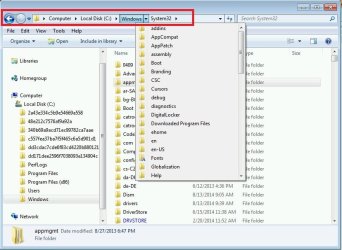
Q2) If you like, you can use the address bar, bread crumbs, or navigation pane to make going back to the parent or any other directory. For example, you could click on Windows in the address bar below to go back to it, or click on one of the arrows in the path bread crumb to select a folder to go to. The big arrow on the far right will take you back one directory.

address-bar.jpg
 
Last edited:

My Computer

Computer type
PC/Desktop
Computer Manufacturer/Model Number
Self built custom
OS
64-bit Windows 11 Pro for Workstations
CPU
Intel i7-8700K OC'd to 5 GHz
Motherboard
ASUS ROG Maximus XI Formula Z390
Memory
64 GB (4x16GB) G.SKILL TridentZ RGB DDR4 3600 MHz
Graphics Card(s)
ASUS ROG-STRIX-GTX1080TI-O11G-GAMING
Sound Card
Integrated
Monitor(s) Displays
2 x Samsung Odyssey G7 27"
Screen Resolution
2560x1440
Hard Drives
1TB Samsung 990 PRO M.2,
4TB Samsung 990 PRO PRO M.2,
TerraMaster F8 SSD Plus NAS
PSU
Seasonic Prime Titanium 850W
Case
Thermaltake Core P3
Cooling
Corsair Hydro H115i
Keyboard
Logitech wireless K800
Mouse
Logitech MX Master 4
Internet Speed
2 Gb/s Download and 100 Mb/s Upload
Antivirus
Malwarebyte Anti-Malware Premium
Browser
Google Chrome
Other Info
Logitech Z625 speaker system,
Logitech BRIO 4K Pro webcam,
HP Color LaserJet Pro MFP M477fdn,
APC SMART-UPS RT 1000 XL - SURT1000XLI,
Galaxy S23 Plus phone
Q1. Frequently on many such windows there is a limit as to how far either direction you can drag it, probably to keep from hiding one side or the other.
 

My Computer

Computer type
PC/Desktop
Computer Manufacturer/Model Number
Customs, Dell, Gateway, HP, Toshiba, Acer, ASUS
OS
Windows 7 Ultimate 64-bit, Windows 8.1 64-bit, Mac OS X 10.10, Linux Mint 17, Windows 10 Pro TP
Keyboard
Microsoft
Mouse
Microsoft
Berton,

The distance is not really important, i have problems catching the bar with the double arrow. But i changed the size of the windows inside my left screen, i use bigger windows so i need less to adjust from the inside.

Brink

Ok thanks, i am using the bar has in the red rectangle you suggested to me. It's doing a fine job after all, after a few hours of work it's getting automatic but still i have to read some text in various lenght to pick the parent folder, which takes a little bit more brain power then just clicking back to parent.

But it's ok.
 

My Computer

Computer type
PC/Desktop
Computer Manufacturer/Model Number
Lenovo ThinkCenter Mseries
OS
Windows 7 64 bit
CPU
i7-2600 - 3.40 ghz
Memory
8 gb
Graphics Card(s)
NVIDIA Quadro FX 380 LP
Hard Drives
ATA WDC WD5000AAKX-0 SCSI
Antivirus
officescan
Browser
IE 8.0.7601.17514
Back
Top