How to hide desktop.ini on desktop?

mmo

New member
Member
Local time
9:48 PM
Messages
55
On my system I have configured Explorer such, that it displays hidden and system files.
Since I did that, I see two desktop.ini files on my desktop.

How can I hide those (just on the desktop)? And why are there two desktop.ini files displayed?

Michael
 

My Computer My Computer

At a glance

2x Windows 7
Computer Manufacturer/Model Number
Lenovo T60p & Motion Computing LE1700
OS
2x Windows 7
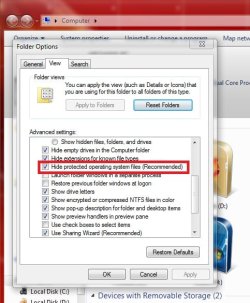
Open an explorer window, click on Organise > Folder and Search options > view. If the red marked box is unchecked, check it.

http://www.sevenforums.com/tutorials/394-hidden-files-folders-show-hide.html


However, there should be only one desktop.ini file. If it reproduces, and begins to spread in other system folders, and accompanied with others like recycle.bin etc, get a malware /virus scan as early as possible.
 

Attachments

  • Untitled.jpg
    Untitled.jpg
    48.2 KB · Views: 588
Last edited by a moderator:

My Computer My Computer

At a glance

Microsoft Windows 10 Pro Insider Preview 64-bitIntel(R) Core(TM) i3-4130 CPU @ 3.40GHzCorsair Vengence 4GB x2 (8.00GB Dual-Channel ...2047MB GeForce GTS 450 (ZOTAC International)
Computer type
PC/Desktop
Computer Manufacturer/Model Number
Self Assembled
OS
Microsoft Windows 10 Pro Insider Preview 64-bit
CPU
Intel(R) Core(TM) i3-4130 CPU @ 3.40GHz
Motherboard
Gigabyte Technology Co., Ltd. B85M-D3H
Memory
Corsair Vengence 4GB x2 (8.00GB Dual-Channel DDR3 @ 798MHz)
Graphics Card(s)
2047MB GeForce GTS 450 (ZOTAC International)
Sound Card
Onboard (Realtek High Definition Audio)
Monitor(s) Displays
LG Flatron E2040T
Screen Resolution
1600x900
Hard Drives
Western Digital 1 TB
Seagate 500 GB
PSU
Corsair VS550
Case
Cooler Master K380
Cooling
Cooler Master Seidon 120V Plus
Keyboard
Logitech MK260r
Mouse
Logitech MK260r
Internet Speed
PMPL Broadband
Antivirus
Windows Defender + MBAM
Browser
Firefox
Other Info
Dell Studio 15" Laptop
I like to see the hidden system files, so I don't want ALL of them hidden and could find no way to just hide these two.

OK, so maybe I did the wrong thing ... but I just deleted them.

Been two weeks now -- no Ill effects that I notice.
 

My Computer My Computer

At a glance

Win7 Pro 32-bit, Win8 Pro 32-bitAMD Phenom II X6 1090T4GB ddr3 1300AMD HD 4290 onboard
Computer type
PC/Desktop
Computer Manufacturer/Model Number
Custom
OS
Win7 Pro 32-bit, Win8 Pro 32-bit
CPU
AMD Phenom II X6 1090T
Motherboard
Gigabyte
Memory
4GB ddr3 1300
Graphics Card(s)
AMD HD 4290 onboard
Sound Card
Builtin Realtek HD Audio
Monitor(s) Displays
Samsung 24" widescreen, LG 23" widescreen
Screen Resolution
1920x1200/1920x1080
Hard Drives
Kingston 256GB SSD
Keyboard
Logitech Illuminated Keyboard
Mouse
Logitech M705 wireless mouse
Antivirus
Norton Av 2013
Browser
IE v10
you could always hide desktop icon's.. not sure the consequences for deleteing them, but they may return. system files usually do.
 

My Computer My Computer

At a glance

windows 7AMD Phenom II x3 Black Edition 720OCZ Gold XTC DDR2 1066 2GB x2BFG NVidia GTX 260
OS
windows 7
CPU
AMD Phenom II x3 Black Edition 720
Motherboard
ASUS M3N72-D
Memory
OCZ Gold XTC DDR2 1066 2GB x2
Graphics Card(s)
BFG NVidia GTX 260
Monitor(s) Displays
Samsung 42" Plasma 1920x1080
Hard Drives
WDC 2TB
Segate Free Agent 3TB
PSU
OCZ XTreme 600w
Case
Antec 300
Cooling
Air x4 12" antec fans
I have a desktop.ini file appearing in every single folder of my machine and I want them hidden. I need to have hidden system files displayed so I can't use that option in Windows Explorer.

Someone suggested that having a desktop.ini file in folders other than the desktop is a symptom of malware however, in my case at least, I doubt that because if I read the content of the file it shows harmless items:
[.ShellClassInfo]
LocalizedResourceName=@%SystemRoot%\system32\shell32.dll,-21779
InfoTip=@%SystemRoot%\system32\shell32.dll,-12688
IconResource=%SystemRoot%\system32\imageres.dll,-113
IconFile=%SystemRoot%\system32\shell32.dll
IconIndex=-236
I should add this never happened with Vista Ultimate despite my having hidden system files displayed.

Ideally, it would be wonderful if Microsoft could make it possible to hide individual files and/or file types.
 

My Computer My Computer

At a glance

Windows 7 Ultimate x64i7 Q8408 GB2 x ATI Radeon H5780
Computer Manufacturer/Model Number
Alienware M17x R2
OS
Windows 7 Ultimate x64
CPU
i7 Q840
Motherboard
M17x
Memory
8 GB
Graphics Card(s)
2 x ATI Radeon H5780
Sound Card
ATI HD Audio
Hard Drives
2 x 500 GB in RAID 0
Ideally, it would be wonderful if Microsoft could make it possible to hide individual files and/or file types.

They did! But you have it set to show hidden files....so you want a third option but of course you would turn that off to...When will it stop? Do they need 10 levels of different "hidden" flags for folders and files? There are currently two flags that control the hidden-ness "Hidden" and "System" (System must be combined with Hidden to actually hide).

Now this begs the question. Why do you need to see hidden system files all the time?
 

My Computer My Computer

At a glance

Windows 10 Pro (x64)Intel Core i7-3930K (3.2GHz - 4.5GHz)4x Samsung 4GB PC3-12800 DDR3 (16GB 1600MHz)Nvidia Geforce GTX 690
Computer type
PC/Desktop
Computer Manufacturer/Model Number
Alienware Aurora ALX R4
OS
Windows 10 Pro (x64)
CPU
Intel Core i7-3930K (3.2GHz - 4.5GHz)
Motherboard
Alienware Aurora-R4 x79
Memory
4x Samsung 4GB PC3-12800 DDR3 (16GB 1600MHz)
Graphics Card(s)
Nvidia Geforce GTX 690
Sound Card
SteelSeries Siberia Elite
Monitor(s) Displays
Dell UltraSharp U3011
Screen Resolution
2560x1600
Hard Drives
Samsung 850 Pro 256 GB, Seagate 1TB Desktop Hybrid HDD, 2x Western Digital 4TB Green HDD
PSU
875W Some Dell PSU <.<
Case
Alienware Aurora ALX
Cooling
Custom Liquid Cooling (EK CPU & GPU blocks) dual EK 480RAD
Keyboard
Logitech G710+ Mechanical
Mouse
Logitech G700s
Internet Speed
Verizon Fios (50 mbps average)
Other Info
Server: Intel NUC D54250WYK: i5-4250U, 16GB, 256 GB mSATA, Windows Server 2012 R2
Why do you need to see hidden system files all the time?

Because I need access to the content of the System32 folder, more specifically the shell32.dll and hosts files.

I discovered that the problem is not with Windows Explorer but Xplorer2. The programmer has decided that there should be no difference between hidden and system files, either they are hidden or they are not. Users of this program have asked him to change that and at least respect the way Microsoft configured it but he won't.
 

My Computer My Computer

At a glance

Windows 7 Ultimate x64i7 Q8408 GB2 x ATI Radeon H5780
Computer Manufacturer/Model Number
Alienware M17x R2
OS
Windows 7 Ultimate x64
CPU
i7 Q840
Motherboard
M17x
Memory
8 GB
Graphics Card(s)
2 x ATI Radeon H5780
Sound Card
ATI HD Audio
Hard Drives
2 x 500 GB in RAID 0
"C:\Windows\System32\shell32.dll" is not hidden
"C:\Windows\System32\drivers\etc\hosts" is not hidden

Neither of those files require the setting in question to be disabled. So as you pointed out. The problem is not this setting but the fact that you are using a third-party viewer. Simple enough.

Btw, the only system files that have both system and hidden are desktop.ini files, and special files that reside outside of C:\Windows. Like the User's registry (NTUSER.DAT) Other then that most if not all system files are not hidden. (Unless you use third-party clients but that is unsupported to begin with.)
 

My Computer My Computer

At a glance

Windows 10 Pro (x64)Intel Core i7-3930K (3.2GHz - 4.5GHz)4x Samsung 4GB PC3-12800 DDR3 (16GB 1600MHz)Nvidia Geforce GTX 690
Computer type
PC/Desktop
Computer Manufacturer/Model Number
Alienware Aurora ALX R4
OS
Windows 10 Pro (x64)
CPU
Intel Core i7-3930K (3.2GHz - 4.5GHz)
Motherboard
Alienware Aurora-R4 x79
Memory
4x Samsung 4GB PC3-12800 DDR3 (16GB 1600MHz)
Graphics Card(s)
Nvidia Geforce GTX 690
Sound Card
SteelSeries Siberia Elite
Monitor(s) Displays
Dell UltraSharp U3011
Screen Resolution
2560x1600
Hard Drives
Samsung 850 Pro 256 GB, Seagate 1TB Desktop Hybrid HDD, 2x Western Digital 4TB Green HDD
PSU
875W Some Dell PSU <.<
Case
Alienware Aurora ALX
Cooling
Custom Liquid Cooling (EK CPU & GPU blocks) dual EK 480RAD
Keyboard
Logitech G710+ Mechanical
Mouse
Logitech G700s
Internet Speed
Verizon Fios (50 mbps average)
Other Info
Server: Intel NUC D54250WYK: i5-4250U, 16GB, 256 GB mSATA, Windows Server 2012 R2
Regretfully, despite several 3rd party Windows Explorer replacements being made available, Microsoft still has not understood that dual pane viewers are what most people want/require. This is one of the main reasons I never use Windows Explorer.
 

My Computer My Computer

At a glance

Windows 7 Ultimate x64i7 Q8408 GB2 x ATI Radeon H5780
Computer Manufacturer/Model Number
Alienware M17x R2
OS
Windows 7 Ultimate x64
CPU
i7 Q840
Motherboard
M17x
Memory
8 GB
Graphics Card(s)
2 x ATI Radeon H5780
Sound Card
ATI HD Audio
Hard Drives
2 x 500 GB in RAID 0
Well if "most" people wanted that, it would have been implemented. But sadly on the internet "most" is actually the minority when it comes to the user base of Windows. Its a hard pill to swallow for us tech geeks, but the normal people out number us greatly. And they get the royal treatment first.
 

My Computer My Computer

At a glance

Windows 10 Pro (x64)Intel Core i7-3930K (3.2GHz - 4.5GHz)4x Samsung 4GB PC3-12800 DDR3 (16GB 1600MHz)Nvidia Geforce GTX 690
Computer type
PC/Desktop
Computer Manufacturer/Model Number
Alienware Aurora ALX R4
OS
Windows 10 Pro (x64)
CPU
Intel Core i7-3930K (3.2GHz - 4.5GHz)
Motherboard
Alienware Aurora-R4 x79
Memory
4x Samsung 4GB PC3-12800 DDR3 (16GB 1600MHz)
Graphics Card(s)
Nvidia Geforce GTX 690
Sound Card
SteelSeries Siberia Elite
Monitor(s) Displays
Dell UltraSharp U3011
Screen Resolution
2560x1600
Hard Drives
Samsung 850 Pro 256 GB, Seagate 1TB Desktop Hybrid HDD, 2x Western Digital 4TB Green HDD
PSU
875W Some Dell PSU <.<
Case
Alienware Aurora ALX
Cooling
Custom Liquid Cooling (EK CPU & GPU blocks) dual EK 480RAD
Keyboard
Logitech G710+ Mechanical
Mouse
Logitech G700s
Internet Speed
Verizon Fios (50 mbps average)
Other Info
Server: Intel NUC D54250WYK: i5-4250U, 16GB, 256 GB mSATA, Windows Server 2012 R2
You can set up windows explorer to "toggle" hidden files so that you only see them when you want to. Just install StExBar;

Stefan's Tools

<http://tools.tortoisesvn.net/StExBar.html>

Many third party file managers also allow one to toggle these files.

Regards....Mike Connor
 

My Computer My Computer

At a glance

Several, including Windows 7 x64 Ultimate
OS
Several, including Windows 7 x64 Ultimate
You have two desktop.ini on the desktop because one resides on your desktop, the other on the public desktop.
 
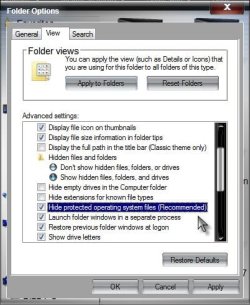
To hide the .ini files, make sure you have Hide protected operating system files (Recommended) checked in your folder view options.

Hide.jpg

A Guy
 

My Computer My Computer

At a glance

Windows 10 Home x64INTEL Core i5-750 Quad-Core 3.37GHzHyperX Fury Black Series 8GB (2 x 4GB) 1866MhzEVGA GeForce GTX 750 Superclocked 1GB 128-Bit...
Computer type
PC/Desktop
OS
Windows 10 Home x64
CPU
INTEL Core i5-750 Quad-Core 3.37GHz
Motherboard
ASUS P7P55D
Memory
HyperX Fury Black Series 8GB (2 x 4GB) 1866Mhz
Graphics Card(s)
EVGA GeForce GTX 750 Superclocked 1GB 128-Bit GDDR5
Monitor(s) Displays
LG 32MA68HY 32" IPS
Screen Resolution
1920 x 1080
Hard Drives
Samsung 840 Evo 120GB, SEAGATE 500GB Barracuda® 7200.12, SATA 3 Gb/s, 7200 RPM, 16MB cache
PSU
ANTEC TruePower New TP-550, 80 PLUS, 550W
Case
ANTEC Three Hundred Illusion
Cooling
COOLER MASTER Hyper 212 Plus, 4 x 120mm 1 x 140mm Noctua's
Internet Speed
85 + Mbps
Antivirus
Avast
Browser
Vivaldi
To hide the .ini files, make sure you have Hide protected operating system files (Recommended) checked in your folder view options.

Uh, he wants to be able to see hidden and protected operating system files, just not on the desktop.

"On my system I have configured Explorer such, that it displays hidden and system files."
 
Simply hide the system files until you need them, then change the setting to show the system files. Personally I do choose show hidden files (just not system files).
 

My Computer My Computer

At a glance

Windows 7 Ultimate x64Q6600 @2.4ghz (G0 stepping)8 gb OCZ vista essential sli PC-6400Dual 9800gt in SLI mode
Computer Manufacturer/Model Number
Systemax N2000 Gaming PC
OS
Windows 7 Ultimate x64
CPU
Q6600 @2.4ghz (G0 stepping)
Motherboard
XFX nforce 680i LT
Memory
8 gb OCZ vista essential sli PC-6400
Graphics Card(s)
Dual 9800gt in SLI mode
Sound Card
Integrated 8.1 High Definition Audio
Monitor(s) Displays
Dual Sceptre x246w 24 inch monitors
Screen Resolution
1920 x 1200 each monitor
Hard Drives
500 GB SATA II / 7500 rpm
PSU
Cooler Master Real Power Pro 1250W
Case
N2000 server tower
Cooling
Thermaltake Bigwater 760 is
Keyboard
MS Intelitype 6000 v2.0
Mouse
MS Intelipoint 6000
Internet Speed
Wi-power 1.5GB up / 512k down
Other Info
Windows 7 Ultimate x64, Windows 7 Pro x64, Windows Home Premium X86, Windows XP pro, Windows Home Server x86, Ubuntu 10.4 x86 and x64, Ubuntu server 10.4, SQL Server 2005, MySQL 5.0
Why so difficult?
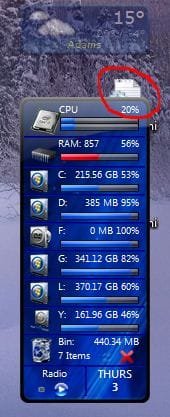
I just hide those (and other stuff) behind my Sidebar gadgets ( I pulled it up a little for demonstration purposes but you get my drift ;)
Capture.JPG

-DG
 

My Computer My Computer

At a glance

Windows 7 Ultimate x86DualCore AMD Athlon 64 X2, 2600 MHz 5200+Samsung 2GB DDR2Onboard NVIDIA GeForce 6150SE nForce 430
Computer Manufacturer/Model Number
HP m8000n
OS
Windows 7 Ultimate x86
CPU
DualCore AMD Athlon 64 X2, 2600 MHz 5200+
Motherboard
Asus M2N68-LA (Narra)
Memory
Samsung 2GB DDR2
Graphics Card(s)
Onboard NVIDIA GeForce 6150SE nForce 430
Sound Card
Onboard nVIDIA nForce 6100-430 (MCP61P)
Monitor(s) Displays
Westinghouse 19" LED
Screen Resolution
1280x1024
Hard Drives
SATA II Seagate Barracuda 500GB
USB II WD Elements 500GB
USB II WD My Book 1TB
USB II WD My Book 2TB
PSU
Stock (HP)
Case
Stock (HP)
Cooling
Stock
Keyboard
Logitech Classic KB 200
Mouse
Standard HP opticle USB mouse
Well, if you really want a clean desktop the cheeky answer is: right-click on desktop > View: untick "Show desktop icons"

Otherwise, if you want to leave the "Hide operating system files.." unticked all the time, you're stuck with those .ini files.

I was sick of drilling into folder options everytime to change this setting, and couldn't find a reg tweak that worked, so I made an autohotkey macro that takes me straight there, just have to tick or untick. Is anyone using a better way to do this?
 

My Computer My Computer

At a glance

Windows 7
OS
Windows 7
Sorry for digging up reaaaaally old thread...

Have the same problem.
My question is: if I'm unable to hide those two icons on desktop only, why on earth there is a section "Folder views" with highly unusable buttons, and specifically "Apply to folders"...
From XP times the changes made in the "View" tab was applied ONLY to folder currently open in Windows Explorer. Only after clicking "Apply to folders" it was made universal throughout Windows.

Or I'm missing something?
 

My Computer My Computer

At a glance

Windows 7 Pro x64
Computer type
PC/Desktop
Computer Manufacturer/Model Number
Dell
OS
Windows 7 Pro x64
This is silly

Like acepl, sorry to jump on such an old thread, but this issue still exists and I'm really looking for a solution.

There are very valid reasons to want to view system and hidden files/directories. I'm a developer and I need access to the AppData folder under the user profile and/or the ProgramData directory off of root.

So I have "Show hidden files, folders and drives" checked for all folder views. This, of course, exposes the desktop.ini icon(s) on the Desktop (and yes, I have two... because, as someone said, one comes from the shared/pubic desktop and the other from the desktop of the current user profile).

The problem really is that Windows no longer seems to adhere to the individual folder views I try to set up. Used to be I could go into the view settings for a particular folder, and make changes to just that view, and it wouldn't be propagated to other folders unless I clicked on "Apply to Folders". But now, it seems that whatever changes I make to a view get applied to all folders whether I click that button or not.

For instance, I went to the desktop folder and made the change to hide hidden files, wanting it to be applied to just the desktop folder, but instead hidden files were no longer shown in ANY folder views.

This doesn't seem that difficult, and isn't the "10 layers deep" complexity that has been stated here. It's simply a matter of being able to apply different settings to different folder views... like we used to be able to do. Period.

Maybe there's a Windows 7 power tool that restores this ability (and actually makes the "Apply to folders" button mean something?


EDIT: Finally found a solution buried in my Google results.
Nevermore Be Bothered by Desktop.ini | A High-Tech Blech!

Basically use RegEdit to create a new DWORD key
HKEY_LOCAL_MACHINE\SOFTWARE\Microsoft\Windows\CurrentVersion\Policies\Explorer\UseDesktopIniCache
and set it to 0 (zero)

Delete any existing desktop.ini files on the desktop, and they will never reappear.

 
Last edited:

My Computer My Computer

At a glance

Windows 7 Professional, SP1, 64-bitInter Xeon E3-1240 V2 @ 3.40GHz8 GBNVIDIA Quadro 6000
Computer type
PC/Desktop
Computer Manufacturer/Model Number
Dell
OS
Windows 7 Professional, SP1, 64-bit
CPU
Inter Xeon E3-1240 V2 @ 3.40GHz
Memory
8 GB
Graphics Card(s)
NVIDIA Quadro 6000
Antivirus
Panda Endpoint
Browser
Chrome (most of the time)
I do not know what you are going on about ProfessorC, the "Show hidden files" is not tied a Folder View state, it is a global setting that effects what Windows Explorer will show. This is how it was in every version of Windows. I do not know where you got the idea that it was tied to the folder's view state. But that never was the case.

Now as for hiding desktop.ini files, it is simple. Leave "Hide System Files" on. Done.
 

My Computer My Computer

At a glance

Windows 10 Pro (x64)Intel Core i7-3930K (3.2GHz - 4.5GHz)4x Samsung 4GB PC3-12800 DDR3 (16GB 1600MHz)Nvidia Geforce GTX 690
Computer type
PC/Desktop
Computer Manufacturer/Model Number
Alienware Aurora ALX R4
OS
Windows 10 Pro (x64)
CPU
Intel Core i7-3930K (3.2GHz - 4.5GHz)
Motherboard
Alienware Aurora-R4 x79
Memory
4x Samsung 4GB PC3-12800 DDR3 (16GB 1600MHz)
Graphics Card(s)
Nvidia Geforce GTX 690
Sound Card
SteelSeries Siberia Elite
Monitor(s) Displays
Dell UltraSharp U3011
Screen Resolution
2560x1600
Hard Drives
Samsung 850 Pro 256 GB, Seagate 1TB Desktop Hybrid HDD, 2x Western Digital 4TB Green HDD
PSU
875W Some Dell PSU <.<
Case
Alienware Aurora ALX
Cooling
Custom Liquid Cooling (EK CPU & GPU blocks) dual EK 480RAD
Keyboard
Logitech G710+ Mechanical
Mouse
Logitech G700s
Internet Speed
Verizon Fios (50 mbps average)
Other Info
Server: Intel NUC D54250WYK: i5-4250U, 16GB, 256 GB mSATA, Windows Server 2012 R2
Back
Top