
How to i get the screen resolution right on my tv.

TheChef

Banned
Local time
1:25 PM
Messages
11
Hey guys, i got an HP Pavilion dv6 15'' screen. And an 26 '' LCD tv from Sharp. And when i got it up on the tv, the picture is overfilled. It`s verry annoying. Any help ? I used every settings on my graphics car. Nothing help.:cry:
 

My Computer My Computer

At a glance

Windows 7 Ultimate 32 bitIntel i3-2310M 2.10MHz Dual Core8GB DDR3AMD Radeon 6490 M
Computer Manufacturer/Model Number
hp Pavilion dv6-6110so
OS
Windows 7 Ultimate 32 bit
CPU
Intel i3-2310M 2.10MHz Dual Core
Motherboard
Hewlett-Packard 3581
Memory
8GB DDR3
Graphics Card(s)
AMD Radeon 6490 M
Sound Card
IDT High Definiton Audio
Monitor(s) Displays
Sharp 26'' LCD tv.
Screen Resolution
1366x 768
Hard Drives
Western Digital Scorpio Blue WD6400BPVT.
Other Info
It`s a laptop for those who dont know
What do you mean "overfilled"? How are you connecting the LCD to the laptop? How are you extending the laptop to the TV?
 

My Computer My Computer

At a glance

Windows 7 Ultimate 64 bitAMD Phenom II X4 965 Black EditionGSkill 4 X 2 GB PC 8500XFX Radeon HD 6790 D
Computer Manufacturer/Model Number
Custom built
OS
Windows 7 Ultimate 64 bit
CPU
AMD Phenom II X4 965 Black Edition
Motherboard
Gigabyte GA-MA790X-DS4
Memory
GSkill 4 X 2 GB PC 8500
Graphics Card(s)
XFX Radeon HD 6790 D
Sound Card
On board RealTek HD
Monitor(s) Displays
Dual monitors:Samsung SyncMaster S20B300
Screen Resolution
1600 X 900
Hard Drives
Seagate Barracuda 1TB (primary)
Seagate Barracuda 2 X 320 GB
PSU
Ultra X4 750 watt fully modular
Case
Thermaltake Overseer RX 1 full tower
Cooling
Core-Contact 92 mm CPU Cooler
Keyboard
Logitech G510
Mouse
Razor DeathAdder
Internet Speed
50/5 Mbps UL/DL
Other Info
Optical: Super Muliti DVD burner w/lightscribe, Hauppauge WinTV HVR-1800
Hey guys, i got an HP Pavilion dv6 15'' screen. And an 26 '' LCD tv from Sharp. And when i got it up on the tv, the picture is overfilled. It`s verry annoying. Any help ? I used every settings on my graphics car. Nothing help.:cry:

First fill out your system specs below or sadly the help you need will be slim to none

Whole system specs i might add and what Video card and so far what have you been doing for it to over extend the display ?
 

My Computer My Computer

At a glance

Windows 10 Home Premium 64bit sp1Intel I7-6700K @ 4.6 Ghz 1.344 volts everyday OC32GB G-Skill TridentZ 3200mhz 16-18-18-38 DDR4Sli Gigabyte Windforce GTX 980 G1
Computer type
PC/Desktop
Computer Manufacturer/Model Number
CoreI7-6700K MrFingerIII Special Builds
OS
Windows 10 Home Premium 64bit sp1
CPU
Intel I7-6700K @ 4.6 Ghz 1.344 volts everyday OC
Motherboard
Asrock Fatality K6 Z170 Socket 1151
Memory
32GB G-Skill TridentZ 3200mhz 16-18-18-38 DDR4
Graphics Card(s)
Sli Gigabyte Windforce GTX 980 G1
Sound Card
AC97 Creative Rage Tactic 3D Headphones Bluetooth
Monitor(s) Displays
27" Asus ROG Swift PG278Q G-Sync 48" Vizio Smart HD TV
Screen Resolution
2560x1440p 27"- 48" Currently Gaming at 2560x1440p Res 2K
Hard Drives
250GB Samsung Evo840SSD Seagate baracuda 500 GB WD Mybook 500Gb 1TB Seagate Barracuda
PSU
HX1050w Corsair Silver 80plus certified crosfire/sli
Case
Enthod Pro Full Tower
Cooling
Corsair H110i GT 280 mm High Performance WaterBlock
Keyboard
Logitech wireless keyboard
Mouse
Logitech wireless mouse
Internet Speed
Cox Cable 100+ mb
Antivirus
WebRoot Spysweeper with Antivirus
Browser
IE-10, Chrome, Opera
Other Info
My Other Rig is a AMD FX8320E @4.6Ghz 16GB Ballistic Sport Ram
Mobo Asrock Fatality 990FX 120GB OCZ SSD 1TB Seagate Barracuda Corsair H75 Cooling PSU Corsair CX750
GPU GTX Gigabyte 970G1
What do you mean "overfilled"? How are you connecting the LCD to the laptop? How are you extending the laptop to the TV?

I using an HDMI cable to the tv, when i mean overfilled i mean the picture from the tv is over sized. ( Don`t know sized it`s correct written)
 

My Computer My Computer

At a glance

Windows 7 Ultimate 32 bitIntel i3-2310M 2.10MHz Dual Core8GB DDR3AMD Radeon 6490 M
Computer Manufacturer/Model Number
hp Pavilion dv6-6110so
OS
Windows 7 Ultimate 32 bit
CPU
Intel i3-2310M 2.10MHz Dual Core
Motherboard
Hewlett-Packard 3581
Memory
8GB DDR3
Graphics Card(s)
AMD Radeon 6490 M
Sound Card
IDT High Definiton Audio
Monitor(s) Displays
Sharp 26'' LCD tv.
Screen Resolution
1366x 768
Hard Drives
Western Digital Scorpio Blue WD6400BPVT.
Other Info
It`s a laptop for those who dont know
What do you mean "overfilled"? How are you connecting the LCD to the laptop? How are you extending the laptop to the TV?

I using an HDMI cable to the tv, when i mean overfilled i mean the picture from the tv is over sized. ( Don`t know sized it`s correct written)


Again what Video card is being used because AMD/Nvidia have different ways of scaling we can help you further if you fill the specs out and give us what kind of GPU were dealing with

you can tell us HDMI VGA DVI all day long but the problem is the video card and machine running it not the cables
 

My Computer My Computer

At a glance

Windows 10 Home Premium 64bit sp1Intel I7-6700K @ 4.6 Ghz 1.344 volts everyday OC32GB G-Skill TridentZ 3200mhz 16-18-18-38 DDR4Sli Gigabyte Windforce GTX 980 G1
Computer type
PC/Desktop
Computer Manufacturer/Model Number
CoreI7-6700K MrFingerIII Special Builds
OS
Windows 10 Home Premium 64bit sp1
CPU
Intel I7-6700K @ 4.6 Ghz 1.344 volts everyday OC
Motherboard
Asrock Fatality K6 Z170 Socket 1151
Memory
32GB G-Skill TridentZ 3200mhz 16-18-18-38 DDR4
Graphics Card(s)
Sli Gigabyte Windforce GTX 980 G1
Sound Card
AC97 Creative Rage Tactic 3D Headphones Bluetooth
Monitor(s) Displays
27" Asus ROG Swift PG278Q G-Sync 48" Vizio Smart HD TV
Screen Resolution
2560x1440p 27"- 48" Currently Gaming at 2560x1440p Res 2K
Hard Drives
250GB Samsung Evo840SSD Seagate baracuda 500 GB WD Mybook 500Gb 1TB Seagate Barracuda
PSU
HX1050w Corsair Silver 80plus certified crosfire/sli
Case
Enthod Pro Full Tower
Cooling
Corsair H110i GT 280 mm High Performance WaterBlock
Keyboard
Logitech wireless keyboard
Mouse
Logitech wireless mouse
Internet Speed
Cox Cable 100+ mb
Antivirus
WebRoot Spysweeper with Antivirus
Browser
IE-10, Chrome, Opera
Other Info
My Other Rig is a AMD FX8320E @4.6Ghz 16GB Ballistic Sport Ram
Mobo Asrock Fatality 990FX 120GB OCZ SSD 1TB Seagate Barracuda Corsair H75 Cooling PSU Corsair CX750
GPU GTX Gigabyte 970G1
go to : Control Panel\All Control Panel Items\Display\Screen Resolution
and change the TV resolution, you can also simply use win+P and change the screen appearance.
 

My Computer My Computer

At a glance

Windows 7 Ultimate x64core i7.
OS
Windows 7 Ultimate x64
CPU
core i7.
What do you mean "overfilled"? How are you connecting the LCD to the laptop? How are you extending the laptop to the TV?

I using an HDMI cable to the tv, when i mean overfilled i mean the picture from the tv is over sized. ( Don`t know sized it`s correct written)


Again what Video card is being used because AMD/Nvidia have different ways of scaling we can help you further if you fill the specs out and give us what kind of GPU were dealing with

you can tell us HDMI VGA DVI all day long but the problem is the video card and machine running it not the cables
I`m using a Radeon 7490 HD GPU.
 

My Computer My Computer

At a glance

Windows 7 Ultimate 32 bitIntel i3-2310M 2.10MHz Dual Core8GB DDR3AMD Radeon 6490 M
Computer Manufacturer/Model Number
hp Pavilion dv6-6110so
OS
Windows 7 Ultimate 32 bit
CPU
Intel i3-2310M 2.10MHz Dual Core
Motherboard
Hewlett-Packard 3581
Memory
8GB DDR3
Graphics Card(s)
AMD Radeon 6490 M
Sound Card
IDT High Definiton Audio
Monitor(s) Displays
Sharp 26'' LCD tv.
Screen Resolution
1366x 768
Hard Drives
Western Digital Scorpio Blue WD6400BPVT.
Other Info
It`s a laptop for those who dont know
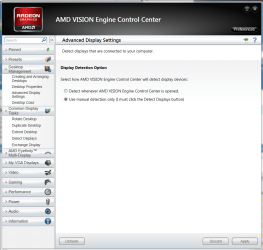
OK now we are on to something
Open up the CCC for the AMD graphics

Now if you look on the left where it shows displays and settings you will want to look for the Scaling option right now mine will not show because im already at a fixed resolution

what you need to do with the picture that is shown is find the scaling feature reduce the size then save it with the CCC so next time it will just reconize it
 

Attachments

  • ccc.PNG
    ccc.PNG
    71.9 KB · Views: 7

My Computer My Computer

At a glance

Windows 10 Home Premium 64bit sp1Intel I7-6700K @ 4.6 Ghz 1.344 volts everyday OC32GB G-Skill TridentZ 3200mhz 16-18-18-38 DDR4Sli Gigabyte Windforce GTX 980 G1
Computer type
PC/Desktop
Computer Manufacturer/Model Number
CoreI7-6700K MrFingerIII Special Builds
OS
Windows 10 Home Premium 64bit sp1
CPU
Intel I7-6700K @ 4.6 Ghz 1.344 volts everyday OC
Motherboard
Asrock Fatality K6 Z170 Socket 1151
Memory
32GB G-Skill TridentZ 3200mhz 16-18-18-38 DDR4
Graphics Card(s)
Sli Gigabyte Windforce GTX 980 G1
Sound Card
AC97 Creative Rage Tactic 3D Headphones Bluetooth
Monitor(s) Displays
27" Asus ROG Swift PG278Q G-Sync 48" Vizio Smart HD TV
Screen Resolution
2560x1440p 27"- 48" Currently Gaming at 2560x1440p Res 2K
Hard Drives
250GB Samsung Evo840SSD Seagate baracuda 500 GB WD Mybook 500Gb 1TB Seagate Barracuda
PSU
HX1050w Corsair Silver 80plus certified crosfire/sli
Case
Enthod Pro Full Tower
Cooling
Corsair H110i GT 280 mm High Performance WaterBlock
Keyboard
Logitech wireless keyboard
Mouse
Logitech wireless mouse
Internet Speed
Cox Cable 100+ mb
Antivirus
WebRoot Spysweeper with Antivirus
Browser
IE-10, Chrome, Opera
Other Info
My Other Rig is a AMD FX8320E @4.6Ghz 16GB Ballistic Sport Ram
Mobo Asrock Fatality 990FX 120GB OCZ SSD 1TB Seagate Barracuda Corsair H75 Cooling PSU Corsair CX750
GPU GTX Gigabyte 970G1
OK now we are on to something
Open up the CCC for the AMD graphics

Now if you look on the left where it shows displays and settings you will want to look for the Scaling option right now mine will not show because im already at a fixed resolution

what you need to do with the picture that is shown is find the scaling feature reduce the size then save it with the CCC so next time it will just reconize it

I have open CCC and i clicked it, and nothing happen. i am so f****** pissed right now. Same shit over and over again
 

My Computer My Computer

At a glance

Windows 7 Ultimate 32 bitIntel i3-2310M 2.10MHz Dual Core8GB DDR3AMD Radeon 6490 M
Computer Manufacturer/Model Number
hp Pavilion dv6-6110so
OS
Windows 7 Ultimate 32 bit
CPU
Intel i3-2310M 2.10MHz Dual Core
Motherboard
Hewlett-Packard 3581
Memory
8GB DDR3
Graphics Card(s)
AMD Radeon 6490 M
Sound Card
IDT High Definiton Audio
Monitor(s) Displays
Sharp 26'' LCD tv.
Screen Resolution
1366x 768
Hard Drives
Western Digital Scorpio Blue WD6400BPVT.
Other Info
It`s a laptop for those who dont know
OK now we are on to something
Open up the CCC for the AMD graphics

Now if you look on the left where it shows displays and settings you will want to look for the Scaling option right now mine will not show because im already at a fixed resolution

what you need to do with the picture that is shown is find the scaling feature reduce the size then save it with the CCC so next time it will just reconize it

I have open CCC and i clicked it, and nothing happen. i am so f****** pissed right now. Same shit over and over again
would you attach your Screen Resolution screen shot here
 

My Computer My Computer

At a glance

Windows 7 Ultimate x64core i7.
OS
Windows 7 Ultimate x64
CPU
core i7.
OK now we are on to something
Open up the CCC for the AMD graphics

Now if you look on the left where it shows displays and settings you will want to look for the Scaling option right now mine will not show because im already at a fixed resolution

what you need to do with the picture that is shown is find the scaling feature reduce the size then save it with the CCC so next time it will just reconize it

I have open CCC and i clicked it, and nothing happen. i am so f****** pissed right now. Same shit over and over again


First Calm down when you get angry it doesn't help go over the CCC again you can choose detect display im sure if you take your time it will work itself out but don't loose your cool

I'm saying this because it is a simple issue nothing to boil over we will work you through it
 

My Computer My Computer

At a glance

Windows 10 Home Premium 64bit sp1Intel I7-6700K @ 4.6 Ghz 1.344 volts everyday OC32GB G-Skill TridentZ 3200mhz 16-18-18-38 DDR4Sli Gigabyte Windforce GTX 980 G1
Computer type
PC/Desktop
Computer Manufacturer/Model Number
CoreI7-6700K MrFingerIII Special Builds
OS
Windows 10 Home Premium 64bit sp1
CPU
Intel I7-6700K @ 4.6 Ghz 1.344 volts everyday OC
Motherboard
Asrock Fatality K6 Z170 Socket 1151
Memory
32GB G-Skill TridentZ 3200mhz 16-18-18-38 DDR4
Graphics Card(s)
Sli Gigabyte Windforce GTX 980 G1
Sound Card
AC97 Creative Rage Tactic 3D Headphones Bluetooth
Monitor(s) Displays
27" Asus ROG Swift PG278Q G-Sync 48" Vizio Smart HD TV
Screen Resolution
2560x1440p 27"- 48" Currently Gaming at 2560x1440p Res 2K
Hard Drives
250GB Samsung Evo840SSD Seagate baracuda 500 GB WD Mybook 500Gb 1TB Seagate Barracuda
PSU
HX1050w Corsair Silver 80plus certified crosfire/sli
Case
Enthod Pro Full Tower
Cooling
Corsair H110i GT 280 mm High Performance WaterBlock
Keyboard
Logitech wireless keyboard
Mouse
Logitech wireless mouse
Internet Speed
Cox Cable 100+ mb
Antivirus
WebRoot Spysweeper with Antivirus
Browser
IE-10, Chrome, Opera
Other Info
My Other Rig is a AMD FX8320E @4.6Ghz 16GB Ballistic Sport Ram
Mobo Asrock Fatality 990FX 120GB OCZ SSD 1TB Seagate Barracuda Corsair H75 Cooling PSU Corsair CX750
GPU GTX Gigabyte 970G1
Im so pissed. Just re installing windows 8. Hope that help, but i dont have a 7490HD. I got an HD 6490 M.
 

My Computer My Computer

At a glance

Windows 7 Ultimate 32 bitIntel i3-2310M 2.10MHz Dual Core8GB DDR3AMD Radeon 6490 M
Computer Manufacturer/Model Number
hp Pavilion dv6-6110so
OS
Windows 7 Ultimate 32 bit
CPU
Intel i3-2310M 2.10MHz Dual Core
Motherboard
Hewlett-Packard 3581
Memory
8GB DDR3
Graphics Card(s)
AMD Radeon 6490 M
Sound Card
IDT High Definiton Audio
Monitor(s) Displays
Sharp 26'' LCD tv.
Screen Resolution
1366x 768
Hard Drives
Western Digital Scorpio Blue WD6400BPVT.
Other Info
It`s a laptop for those who dont know
Im so pissed. Just re installing windows 8. Hope that help, but i dont have a 7490HD. I got an HD 6490 M.
Ok well good luck and take it easy hope you get it going while you still have your hair :p

@MMKARIMI Just doing my part and thank you as well for jumping in :D
 

My Computer My Computer

At a glance

Windows 10 Home Premium 64bit sp1Intel I7-6700K @ 4.6 Ghz 1.344 volts everyday OC32GB G-Skill TridentZ 3200mhz 16-18-18-38 DDR4Sli Gigabyte Windforce GTX 980 G1
Computer type
PC/Desktop
Computer Manufacturer/Model Number
CoreI7-6700K MrFingerIII Special Builds
OS
Windows 10 Home Premium 64bit sp1
CPU
Intel I7-6700K @ 4.6 Ghz 1.344 volts everyday OC
Motherboard
Asrock Fatality K6 Z170 Socket 1151
Memory
32GB G-Skill TridentZ 3200mhz 16-18-18-38 DDR4
Graphics Card(s)
Sli Gigabyte Windforce GTX 980 G1
Sound Card
AC97 Creative Rage Tactic 3D Headphones Bluetooth
Monitor(s) Displays
27" Asus ROG Swift PG278Q G-Sync 48" Vizio Smart HD TV
Screen Resolution
2560x1440p 27"- 48" Currently Gaming at 2560x1440p Res 2K
Hard Drives
250GB Samsung Evo840SSD Seagate baracuda 500 GB WD Mybook 500Gb 1TB Seagate Barracuda
PSU
HX1050w Corsair Silver 80plus certified crosfire/sli
Case
Enthod Pro Full Tower
Cooling
Corsair H110i GT 280 mm High Performance WaterBlock
Keyboard
Logitech wireless keyboard
Mouse
Logitech wireless mouse
Internet Speed
Cox Cable 100+ mb
Antivirus
WebRoot Spysweeper with Antivirus
Browser
IE-10, Chrome, Opera
Other Info
My Other Rig is a AMD FX8320E @4.6Ghz 16GB Ballistic Sport Ram
Mobo Asrock Fatality 990FX 120GB OCZ SSD 1TB Seagate Barracuda Corsair H75 Cooling PSU Corsair CX750
GPU GTX Gigabyte 970G1
all you had to do was yank the lead to telly out.

Restart pc - so it only finds monitor.

Turn off puta/ plug in but do not switch on telly.

When puta is running on Monitor

Switch on TV/put it on correct HDMi setting with remote

Graphic card should 'rediscover' hdmi/TV and set up correct screen res

Help available from there if it doesn't discover correctly.
(You may have incorrect HDMI lead which should be 1.3C or 1.4)
 

My Computer My Computer

At a glance

WIN7 Ultimate 64bitAMD FX8150/Trinity A10-5700G-Skill 2400 x2 @ 1866 (both pc's)Sapphire (factory OC version) AMD 7770
Computer type
PC/Desktop
Computer Manufacturer/Model Number
D.I.Y.
OS
WIN7 Ultimate 64bit
CPU
AMD FX8150/Trinity A10-5700
Motherboard
Asus Sabertooth v.1 /Asus F2A85-M Pro
Memory
G-Skill 2400 x2 @ 1866 (both pc's)
Graphics Card(s)
Sapphire (factory OC version) AMD 7770
Sound Card
onboard
Monitor(s) Displays
T260 Samsung
Screen Resolution
1920x1080
Hard Drives
Western Digital Sata 2TB/1TB Caviar Blacks
Buffalo 1TB usb (excellent drive)
PSU
Be-Quiet 700W E-9/Be-Quiet 550W E-9(E-9 = built by FSP)
Case
Antec P183/Antec P180mini
Cooling
x2 Xigmatek SXHH7-U01 + C-Master R4-EXBB-20PK-R0 120mm Fans
Keyboard
Cherry
Mouse
MS Explorer 3.0
Other Info
LG Blu ray combo
Pioneer 207D/208 Blu ray burners
Back
Top