
How to identify device in error?

Guy Scharf

New member
Power User
Local time
7:53 AM
Messages
77
Location
WA
I am seeing Event 11 errors in my system log. How can I determine which device this error refers to? In this case, how do I determine what "Ide\IdePort5" refers to?

Thanks.

Log Name: System
Source: atapi
Date: 9/27/2009 4:49:07 PM
Event ID: 11
Task Category: None
Level: Error
Keywords: Classic
User: N/A
Computer: Orca
Description:
The driver detected a controller error on \Device\Ide\IdePort5.
Event Xml:
<Event xmlns="http://schemas.microsoft.com/win/2004/08/events/event">
<System>
<Provider Name="atapi" />
<EventID Qualifiers="49156">11</EventID>
<Level>2</Level>
<Task>0</Task>
<Keywords>0x80000000000000</Keywords>
<TimeCreated SystemTime="2009-09-27T23:49:07.540390100Z" />
<EventRecordID>4835</EventRecordID>
<Channel>System</Channel>
<Computer>Orca</Computer>
<Security />
</System>
<EventData>
<Data>\Device\Ide\IdePort5</Data>
<Binary>0000100001000000000000000B0004C002000000850100C00000000000000000000000000000000001000000000000000000000004100000</Binary>
</EventData>
</Event>
 

My Computer

Computer Manufacturer/Model Number
home-built
OS
Win 7-32, XP Pro-32
CPU
Xeon 3070 (2.66 GHz)
Motherboard
Asus P5W DH Deluxe, BIOS 2901
Memory
4 GB
Graphics Card(s)
PowerColor ATI Radeon HD 5750 (fanless)
Sound Card
on-board
Monitor(s) Displays
Dell U2711
Screen Resolution
2560x1440
Hard Drives
All SATA:
ICH7R (AHCI): 1 Intel X-25M 80GB SSD, 2 Samsung HD103UJ 1TB, 1 Seagate ST3750330MS 750GB;
JMB363: Samsung SH-S223L DVD;
Promise TX4302: two mobile racks, normally powered off
PSU
Seasonic SS-650HT
Case
Antec P180
Cooling
Sunbeam Tuniq Tower 120, 4 120mm fans (variable rpm)
Keyboard
Lexmark IBM Type "M" - PS/2 connector
Mouse
Wacom Intous4, Logitech Wheel Mouse as backup
Internet Speed
Cable ~ 6 mbps
Other Info
DVD: Samsung SH-S223L (SATA),
SanDisk CompactFlash reader,
Epson R280 printer,
HP Laserjet 4100dtn,
Epson scanner,
NeatReceipts scanner

Laptops: Dell XPS 15 L501x, Dell E5420
- ATAPI (AT Attachment Packet Interface) is an interface between your computer and attached CD-ROM drives and tape backup drives.

Most of today's PC computers use the standard Integrated Drive Electronics (IDE) interface to address hard disk drives. ATAPI provides the additional commands needed for controlling a CD-ROM player or tape backup so that your computer can use the IDE interface and controllers to control these relatively newer device types.
ATAPI is part of the Enhanced IDE


How many do you have?
 
See my system specs. I have one SATA CD/DVD drive and no tape drives. There are five SATA hard drives spinning, one of which is not activated. On USB there is one Sandisk CF reader with no card in it. I also have virtual drives for mounting ISOs, but nothing is mounted at this time. The errors are recent. I've been running Win7 for about a week and just started seeing the errors.

Earlier versions of my system specs showed RAID 0 for two drives. I had to break the RAID array and change the Intel SATA storage from RAID to AHCI to eliminate iaStor errors.

My question is: how do I determine which physical device \Device\Ide\IdePort5 refers to?
 

My Computer

Computer Manufacturer/Model Number
home-built
OS
Win 7-32, XP Pro-32
CPU
Xeon 3070 (2.66 GHz)
Motherboard
Asus P5W DH Deluxe, BIOS 2901
Memory
4 GB
Graphics Card(s)
PowerColor ATI Radeon HD 5750 (fanless)
Sound Card
on-board
Monitor(s) Displays
Dell U2711
Screen Resolution
2560x1440
Hard Drives
All SATA:
ICH7R (AHCI): 1 Intel X-25M 80GB SSD, 2 Samsung HD103UJ 1TB, 1 Seagate ST3750330MS 750GB;
JMB363: Samsung SH-S223L DVD;
Promise TX4302: two mobile racks, normally powered off
PSU
Seasonic SS-650HT
Case
Antec P180
Cooling
Sunbeam Tuniq Tower 120, 4 120mm fans (variable rpm)
Keyboard
Lexmark IBM Type "M" - PS/2 connector
Mouse
Wacom Intous4, Logitech Wheel Mouse as backup
Internet Speed
Cable ~ 6 mbps
Other Info
DVD: Samsung SH-S223L (SATA),
SanDisk CompactFlash reader,
Epson R280 printer,
HP Laserjet 4100dtn,
Epson scanner,
NeatReceipts scanner

Laptops: Dell XPS 15 L501x, Dell E5420
I am still interested in knowing the answer, in general, of how to know which physical device a unix-like \device name refers to. While that information may not be needed to interpret this error, it may be useful in the future.
 

My Computer

Computer Manufacturer/Model Number
home-built
OS
Win 7-32, XP Pro-32
CPU
Xeon 3070 (2.66 GHz)
Motherboard
Asus P5W DH Deluxe, BIOS 2901
Memory
4 GB
Graphics Card(s)
PowerColor ATI Radeon HD 5750 (fanless)
Sound Card
on-board
Monitor(s) Displays
Dell U2711
Screen Resolution
2560x1440
Hard Drives
All SATA:
ICH7R (AHCI): 1 Intel X-25M 80GB SSD, 2 Samsung HD103UJ 1TB, 1 Seagate ST3750330MS 750GB;
JMB363: Samsung SH-S223L DVD;
Promise TX4302: two mobile racks, normally powered off
PSU
Seasonic SS-650HT
Case
Antec P180
Cooling
Sunbeam Tuniq Tower 120, 4 120mm fans (variable rpm)
Keyboard
Lexmark IBM Type "M" - PS/2 connector
Mouse
Wacom Intous4, Logitech Wheel Mouse as backup
Internet Speed
Cable ~ 6 mbps
Other Info
DVD: Samsung SH-S223L (SATA),
SanDisk CompactFlash reader,
Epson R280 printer,
HP Laserjet 4100dtn,
Epson scanner,
NeatReceipts scanner

Laptops: Dell XPS 15 L501x, Dell E5420
I am still interested in knowing the answer, in general, of how to know which physical device a unix-like \device name refers to. While that information may not be needed to interpret this error, it may be useful in the future.

This utility allows you to browse the Object Manager namespace, including \devices: WinObj

Not all devices map directly to hardware.
 

My Computer

Computer Manufacturer/Model Number
Multiple machines in various stages of decomposition.
OS
Win7x64
Thank you. WinObj is very interesting.
 

My Computer

Computer Manufacturer/Model Number
home-built
OS
Win 7-32, XP Pro-32
CPU
Xeon 3070 (2.66 GHz)
Motherboard
Asus P5W DH Deluxe, BIOS 2901
Memory
4 GB
Graphics Card(s)
PowerColor ATI Radeon HD 5750 (fanless)
Sound Card
on-board
Monitor(s) Displays
Dell U2711
Screen Resolution
2560x1440
Hard Drives
All SATA:
ICH7R (AHCI): 1 Intel X-25M 80GB SSD, 2 Samsung HD103UJ 1TB, 1 Seagate ST3750330MS 750GB;
JMB363: Samsung SH-S223L DVD;
Promise TX4302: two mobile racks, normally powered off
PSU
Seasonic SS-650HT
Case
Antec P180
Cooling
Sunbeam Tuniq Tower 120, 4 120mm fans (variable rpm)
Keyboard
Lexmark IBM Type "M" - PS/2 connector
Mouse
Wacom Intous4, Logitech Wheel Mouse as backup
Internet Speed
Cable ~ 6 mbps
Other Info
DVD: Samsung SH-S223L (SATA),
SanDisk CompactFlash reader,
Epson R280 printer,
HP Laserjet 4100dtn,
Epson scanner,
NeatReceipts scanner

Laptops: Dell XPS 15 L501x, Dell E5420
Same problem

Guy,

I am having the exactly same problem and drives me crazy.
Please help if you have found any workaround.
 

My Computer

OS
w7 Ultimate 32bit
CPU
q6700
Motherboard
P5w DH deluxe
Memory
4gb
Graphics Card(s)
HD5850 Sapphire
Sound Card
Realtek
Monitor(s) Displays
Samsung XL2370
Screen Resolution
1920*1080
Hard Drives
WD EADS 1TB
WD 500GB
PSU
BeQuiet 550w
Case
Silverstone LC20M
Cooling
3 case 80mm fans, 2 power 80 fans, Zalman9500Led
Keyboard
Microsoft wireless laser 7000
Mouse
Microsoft wireless laser 7000
Internet Speed
12gb
I'm having this same problem and can't figure out the cause. Whenever im doing random stuff my computer will freeze for about 30 seconds or so and when i check the event viewer i get the following error:

Error Source: atapi
Event ID" 11
The Device detected a controller error on \Device\Ide\IdePort5

I thought it was my cd-rom drive so i replaced an SATA cd-rom with an ide cd-rom i had laying around. Figured this would check the cd-rom, the cables, and the sata connection on the mobo.

Then i checked my hard drives. i removed all drives and put in a single new sata drive with a clean installation of windows 7 and am still getting this problem. I've also swapped the SATA cables out with new ones as well.

Anyone have any ideas as to what the problem may be?
 

My Computer

OS
Windows 7 Ultimate x64
CPU
AMD FX-8150 Zambezi 3.6GHz Socket AM3+ 125W Eight-Core
Motherboard
ASUS M5A97 AM3+ AMD 970 SATA 6Gb/s USB 3.0 with UEFI BIOS
Memory
G.SKILL Ripjaws Series 8GB (2 x 4GB) DDR3 1600 SDRAM
Graphics Card(s)
EVGA 01G-P3-N880-AR GeForce 9800 GTX+ 1GB 256-bit GDDR3
Sound Card
Integrated Realtek ALC887 8 Channel
Monitor(s) Displays
2 x ASUS VW246H 24" 2ms(GTG) Widescreen LCD
Screen Resolution
2 x 1920x1080
Hard Drives
-OCZ Vertex 2 OCZSSD2-2VTXE60G 2.5" 55GB SSD (Windows)
///-WD Caviar Blue WD6400AAKS 640GB 7200 RPM SATA 3.0Gb/s (Documents/pics/etc)
///-WD Caviar Blue WD1600AAJS 160GB 7200 RPM SATA 3.0Gb/s (Program files)
PSU
OCZ ModXStream Pro 700W Modular High Perf Power Supply
Case
Rosewill DESTROYER Black Gaming ATX Mid Tower Computer Case
Cooling
Stock fans (the case has like 4)
Mouse
RAZER Black Wired Laser Naga Special Edition Gaming Mouse
Internet Speed
Verizon Fios (I forget but its not the slowest they have)
From the 30 seconds, I'm guessing it is trying to access the drive, and then timing out.

Does it still happen if you have a disk in (or out if you currently have)?

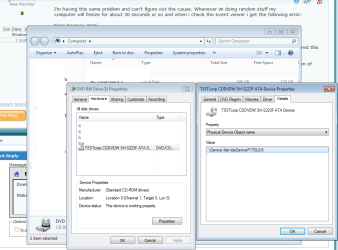
Check your config like in my screenshot, should explain it.
 

Attachments

  • drives.png
    drives.png
    34.9 KB · Views: 469

My Computer

OS
W764BitEnt. 2K8R2 XPSP3
Any overclocking on your system or tight timings in DRAM?
 

My Computer

OS
w7 Ultimate 32bit
CPU
q6700
Motherboard
P5w DH deluxe
Memory
4gb
Graphics Card(s)
HD5850 Sapphire
Sound Card
Realtek
Monitor(s) Displays
Samsung XL2370
Screen Resolution
1920*1080
Hard Drives
WD EADS 1TB
WD 500GB
PSU
BeQuiet 550w
Case
Silverstone LC20M
Cooling
3 case 80mm fans, 2 power 80 fans, Zalman9500Led
Keyboard
Microsoft wireless laser 7000
Mouse
Microsoft wireless laser 7000
Internet Speed
12gb
@Thelen

I'll have to check these both out later tonight. thanks


@abax2000

My system can be OC'd but I have never tried and i dont know anything about DRAM timings

I'm gonna try Thelen's suggestions first and see if i come up with anything.

Thank you both for replying.
 

My Computer

OS
Windows 7 Ultimate x64
CPU
AMD FX-8150 Zambezi 3.6GHz Socket AM3+ 125W Eight-Core
Motherboard
ASUS M5A97 AM3+ AMD 970 SATA 6Gb/s USB 3.0 with UEFI BIOS
Memory
G.SKILL Ripjaws Series 8GB (2 x 4GB) DDR3 1600 SDRAM
Graphics Card(s)
EVGA 01G-P3-N880-AR GeForce 9800 GTX+ 1GB 256-bit GDDR3
Sound Card
Integrated Realtek ALC887 8 Channel
Monitor(s) Displays
2 x ASUS VW246H 24" 2ms(GTG) Widescreen LCD
Screen Resolution
2 x 1920x1080
Hard Drives
-OCZ Vertex 2 OCZSSD2-2VTXE60G 2.5" 55GB SSD (Windows)
///-WD Caviar Blue WD6400AAKS 640GB 7200 RPM SATA 3.0Gb/s (Documents/pics/etc)
///-WD Caviar Blue WD1600AAJS 160GB 7200 RPM SATA 3.0Gb/s (Program files)
PSU
OCZ ModXStream Pro 700W Modular High Perf Power Supply
Case
Rosewill DESTROYER Black Gaming ATX Mid Tower Computer Case
Cooling
Stock fans (the case has like 4)
Mouse
RAZER Black Wired Laser Naga Special Edition Gaming Mouse
Internet Speed
Verizon Fios (I forget but its not the slowest they have)
Back
Top