How to identiify the driver names of a pen tablet

pintree3

Mich
Member
VIP
Local time
7:35 AM
Messages
394
Location
Canada
I have a Genius G-Pen_F350 slim Tablet

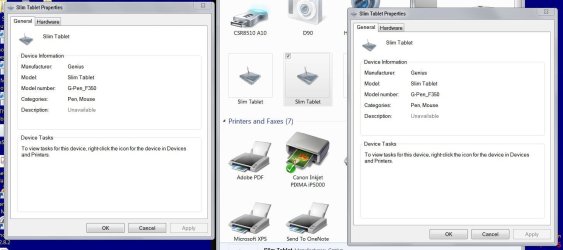
I can see 2 instances of it when I go to my Windows 7 -->Control Panel -> ''Devices and Printers''

BUT they both can NOT be removed from there.
and in ''Device Manager'' I do not see it/them. I am assuming therefore that in 'Device Manager' it has another name. Under what name would it be?

How can I remove all drivers and everything else associated with it please-since I do not know what else they could be called? I did write to Genius, but they are on holiday or something

Thank you
 

My Computer My Computer

At a glance

Windows 7 Home Premium 64Intel Core i5 760 @ 2800MHz12288MBAMD Radeon HD 7800 Series
Computer type
PC/Desktop
Computer Manufacturer/Model Number
OEM Designed by me :-)
OS
Windows 7 Home Premium 64
CPU
Intel Core i5 760 @ 2800MHz
Motherboard
Asus P7P55D-E LX
Memory
12288MB
Graphics Card(s)
AMD Radeon HD 7800 Series
Sound Card
ASUS Xonar DG
Monitor(s) Displays
ViewSonic VX2453 Series, HDMI 1080p Full HD
Screen Resolution
1920X1080
Hard Drives
Samsung SSD 840 EVO 250GB& two others
PSU
Tagan BZ Series, TG800-BZ 800W
Keyboard
Logitech MK250
Mouse
Logitech M310
Internet Speed
toppest, mostest :-) <-- bad, but fun English
Browser
Firefox, Crrome, IE
Look under HID Devices what is listed there ? ... Have a look in Programs and Features should be able to Uninstall from there .. See what is also listed under Imaging ...
 

My Computer My Computer

At a glance

windows 7 home 64bitINTEL-CORE I716GB
Computer Manufacturer/Model Number
W530-3630QM1
OS
windows 7 home 64bit
CPU
INTEL-CORE I7
Memory
16GB
Hard Drives
750GB
Browser
Chrome
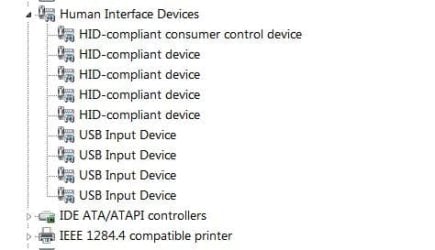
Thanks for your help. The software to uninstall in in 'Programs and Features' is called 'Macro Key Manager' and this was uninstalled prior to asking my question. Genius, the maker of the tablet, finally replied a minute ago, and they asked me to remove this as well--which, as mentioned, had already been done anyway. Meanwhile see attached photos you will see that all still exists. And HID has nothing specifically named.
 

Attachments

  • G-PenTablet.JPG
    G-PenTablet.JPG
    90.7 KB · Views: 2
  • HID.JPG
    HID.JPG
    24.2 KB · Views: 6

My Computer My Computer

At a glance

Windows 7 Home Premium 64Intel Core i5 760 @ 2800MHz12288MBAMD Radeon HD 7800 Series
Computer type
PC/Desktop
Computer Manufacturer/Model Number
OEM Designed by me :-)
OS
Windows 7 Home Premium 64
CPU
Intel Core i5 760 @ 2800MHz
Motherboard
Asus P7P55D-E LX
Memory
12288MB
Graphics Card(s)
AMD Radeon HD 7800 Series
Sound Card
ASUS Xonar DG
Monitor(s) Displays
ViewSonic VX2453 Series, HDMI 1080p Full HD
Screen Resolution
1920X1080
Hard Drives
Samsung SSD 840 EVO 250GB& two others
PSU
Tagan BZ Series, TG800-BZ 800W
Keyboard
Logitech MK250
Mouse
Logitech M310
Internet Speed
toppest, mostest :-) <-- bad, but fun English
Browser
Firefox, Crrome, IE
Select each HID compliant device right click and select Property's ...

Under the General Tab .. What are they listed as also look in the Event Tab ..
 

My Computer My Computer

At a glance

windows 7 home 64bitINTEL-CORE I716GB
Computer Manufacturer/Model Number
W530-3630QM1
OS
windows 7 home 64bit
CPU
INTEL-CORE I7
Memory
16GB
Hard Drives
750GB
Browser
Chrome
Thanks maxie:
In Device Manager I have
HID-Compliant consumer control device
Device type: Human Interface Devices
Manufacturer: Microsoft
Location: on USB device
HID-Compliant device
Device type: Human Interface Devices
Manufacturer: (Standard system devices)
Location: on USB device
HID-Compliant device -same as directly above
HID-Compliant device -same as above except Manufacturer: ENE
USB input device -same as 1st above except Location:Port_#0001.Hub_#0005
USB input device -same as 1st above except Location:0000.001d.0000.001.003.000.000.000.000
USB input device -same as directly above Location:0000.001d.0000.001.003.000.000.000.000
USB input device -same as 1st above except Location: Port_#0008.Hub_#0004

As to the 'Event Tab' there is no such tab.
The first HIDs have these tabs: General, Driver, Details, Power Management
The other 4 HIDs listed as 'USB input device' only have: General, Driver, Details

The above is in Device Manager. If I go to 'Devices and Printers then go to Properties -> Hardware and choose one of the devices listed there, in doing so, under Details all I will find is the list mentioned above. Here to I see no 'Event Tab'
 

My Computer My Computer

At a glance

Windows 7 Home Premium 64Intel Core i5 760 @ 2800MHz12288MBAMD Radeon HD 7800 Series
Computer type
PC/Desktop
Computer Manufacturer/Model Number
OEM Designed by me :-)
OS
Windows 7 Home Premium 64
CPU
Intel Core i5 760 @ 2800MHz
Motherboard
Asus P7P55D-E LX
Memory
12288MB
Graphics Card(s)
AMD Radeon HD 7800 Series
Sound Card
ASUS Xonar DG
Monitor(s) Displays
ViewSonic VX2453 Series, HDMI 1080p Full HD
Screen Resolution
1920X1080
Hard Drives
Samsung SSD 840 EVO 250GB& two others
PSU
Tagan BZ Series, TG800-BZ 800W
Keyboard
Logitech MK250
Mouse
Logitech M310
Internet Speed
toppest, mostest :-) <-- bad, but fun English
Browser
Firefox, Crrome, IE
Have a look for Hidden Devices it will be under View in the Device Manager ..
 

My Computer My Computer

At a glance

windows 7 home 64bitINTEL-CORE I716GB
Computer Manufacturer/Model Number
W530-3630QM1
OS
windows 7 home 64bit
CPU
INTEL-CORE I7
Memory
16GB
Hard Drives
750GB
Browser
Chrome
Back
Top