
You are using an out of date browser. It may not display this or other websites correctly.
You should upgrade or use an alternative browser.
You should upgrade or use an alternative browser.
How to Include Desktop in Breadcrumbs?
- Thread starter xichael
- Start date

- Local time
- 11:53 AM
- Messages
- 1,299
Hi xichael,
I don't think that's possible, but it's easy to get back to the desktop in 1 click by clicking 'Desktop' in the left-hand folder pane in Explorer, under "Favorites".
Cheers,
Walker
Windows Outreach Team
EDIT: Sorry, its official name is the Navigation pane.
I don't think that's possible, but it's easy to get back to the desktop in 1 click by clicking 'Desktop' in the left-hand folder pane in Explorer, under "Favorites".
Cheers,
Walker
Windows Outreach Team
EDIT: Sorry, its official name is the Navigation pane.
My Computer
- Computer Manufacturer/Model Number
- HP Pavilion dm3 (netbook) *** 27" iMac (Dual-Boot)
- OS
- Windows 7 Home Premium (64-bit) *** Windows XP SP3 (32-bit), OSX 10.6
- CPU
- AMD Athlon Neo X2 1.6GHz *** Intel Core i7 Quad Core 2.8GHz
- Memory
- 4.00 GB *** 4.00 GB
- Graphics Card(s)
- ATI Radeon HD 3200, 384MB *** ATI Radeon HD 4850, 1GB
- Sound Card
- ATI High Definition Audio *** ATI High Definition Audio
- Monitor(s) Displays
- LG Flatron W2053TX
- Screen Resolution
- 1600 x 900 (monitor), 1266 x 768 (laptop) *** 2560 x 1440
- Hard Drives
- 300 GB SATA (internal), 500 GB HP SimpleSave (external) *** 1 TB SATA (internal), 160 GB LaCie (external)
- Mouse
- Logitech Cordless Optical Mouse for Notebooks
- Internet Speed
- Broadband

- Local time
- 11:53 AM
- Messages
- 59
I wish it was one click, but I almost always have to scroll up to get to the icon. I really miss the "up" button at times like these. They want us to use breadcrumbs instead, but then exclude access to one of the most important folders, even when you're just one directory in from it.it's easy to get back to the desktop in 1 click by clicking 'Desktop' in the Navigation pane.
There's got to be some way to make this possible...
My Computer
- OS
- 7

Hello Xichael,
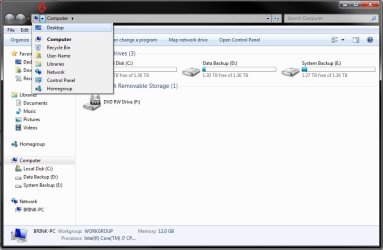
In addition to the above, you could do it in two clicks by clicking on the first arrow in the Windows Explorer address bar, then click on Desktop.
Hope this helps,
Shawn
In addition to the above, you could do it in two clicks by clicking on the first arrow in the Windows Explorer address bar, then click on Desktop.
Shawn
My Computer
- Computer type
- PC/Desktop
- Computer Manufacturer/Model Number
- Self built custom
- OS
- 64-bit Windows 11 Pro for Workstations
- CPU
- Intel i7-8700K OC'd to 5 GHz
- Motherboard
- ASUS ROG Maximus XI Formula Z390
- Memory
- 64 GB (4x16GB) G.SKILL TridentZ RGB DDR4 3600 MHz
- Graphics Card(s)
- ASUS ROG-STRIX-GTX1080TI-O11G-GAMING
- Sound Card
- Integrated
- Monitor(s) Displays
- 2 x Samsung Odyssey G7 27"
- Screen Resolution
- 2560x1440
- Hard Drives
- 1TB Samsung 990 PRO M.2,
4TB Samsung 990 PRO PRO M.2,
TerraMaster F8 SSD Plus NAS
- PSU
- Seasonic Prime Titanium 850W
- Case
- Thermaltake Core P3
- Cooling
- Corsair Hydro H115i
- Keyboard
- Logitech wireless K800
- Mouse
- Logitech MX Master 4
- Internet Speed
- 2 Gb/s Download and 100 Mb/s Upload
- Antivirus
- Malwarebyte Anti-Malware Premium
- Browser
- Google Chrome
- Other Info
- Logitech Z625 speaker system,
Logitech BRIO 4K Pro webcam,
HP Color LaserJet Pro MFP M477fdn,
APC SMART-UPS RT 1000 XL - SURT1000XLI,
Galaxy S23 Plus phone
- Local time
- 11:53 AM
- Messages
- 59
Thanks Shawn. I'm aware of that, but it's still far from the convenience of a breadcrumb/button. It just really should be there. I can't imagine why they'd omit such a basic, obviously useful feature. When I go to try to use it a dozen times a day, and find it missing, it just really starts to get to me.
My Computer
- OS
- 7
- Local time
- 11:53 AM
- Messages
- 1,299
Yeah that's one of the head-scratchers for me too, I had the same fakeout moments early on in Win7 too. You'll get used to it though  It sort of makes sense when you think about it like a folder tree: the Desktop is just a folder within C:\Users\*username*\ and not really a "higher" level of organization than anything else. It's basically a shortcut dump, like Quick Launch. That's how I think about it, anyway...
Walker
Windows Outreach Team
It sort of makes sense when you think about it like a folder tree: the Desktop is just a folder within C:\Users\*username*\ and not really a "higher" level of organization than anything else. It's basically a shortcut dump, like Quick Launch. That's how I think about it, anyway...Walker
Windows Outreach Team
My Computer
- Computer Manufacturer/Model Number
- HP Pavilion dm3 (netbook) *** 27" iMac (Dual-Boot)
- OS
- Windows 7 Home Premium (64-bit) *** Windows XP SP3 (32-bit), OSX 10.6
- CPU
- AMD Athlon Neo X2 1.6GHz *** Intel Core i7 Quad Core 2.8GHz
- Memory
- 4.00 GB *** 4.00 GB
- Graphics Card(s)
- ATI Radeon HD 3200, 384MB *** ATI Radeon HD 4850, 1GB
- Sound Card
- ATI High Definition Audio *** ATI High Definition Audio
- Monitor(s) Displays
- LG Flatron W2053TX
- Screen Resolution
- 1600 x 900 (monitor), 1266 x 768 (laptop) *** 2560 x 1440
- Hard Drives
- 300 GB SATA (internal), 500 GB HP SimpleSave (external) *** 1 TB SATA (internal), 160 GB LaCie (external)
- Mouse
- Logitech Cordless Optical Mouse for Notebooks
- Internet Speed
- Broadband
- Local time
- 11:53 AM
- Messages
- 59
Desktop is just a folder within C:\Users\*username*\ and not really a "higher" level of organization than anything else.
Computer isn't an actual directory at all, yet when you're in C:\ it's still right there in the breadcrumbs.
Though Desktop isn't actually a higher directory than some of the things appearing below it in the navigation pane, it's still one directory up from anything actually on the desktop. It ought to be accessible via breadcrumbs just like every other parent folder.
It's basically a shortcut dump, like Quick Launch. That's how I think about it, anyway.
I keep most of my files there, rather than in my Users directory. My desktop has no shortcuts. I think of it as the one directory with the added benefit of being always open under all your windows, and always expanded in the navigation pane. It seems to me the perfect place to keep files... If only you could get to it via breadcrumbs.
My Computer
- OS
- 7
- Local time
- 11:53 AM
- Messages
- 1,299
I think of it as the one directory with the added benefit of being always open under all your windows, and always expanded in the navigation pane. It seems to me the perfect place to keep files... If only you could get to it via breadcrumbs.
But they are in your Users directory! I really like that about the Desktop - as you said, it's the most easily accessible place on your computer, but it still exists as a Users subfolder because its contents are unique to your User account.I keep most of my files there, rather than in my Users directory.
I agree about the breadcrumbs, it seems like they just did it that way for consistency... you only ever see one of those abstract "folders" (Favorites, Libraries, Computer, Network) in the breadcrumbs at a time. I suppose you could create a new Library called Desktop and include C:\Users\*username*\Desktop as a folder within it. If you used that anytime you wanted to access Desktop files in Explorer (instead of using the Desktop shortcut under 'Favorites') then you'll always see 'Libraries > Desktop' in the breadcrumbs.
Walker
Windows Outreach Team
My Computer
- Computer Manufacturer/Model Number
- HP Pavilion dm3 (netbook) *** 27" iMac (Dual-Boot)
- OS
- Windows 7 Home Premium (64-bit) *** Windows XP SP3 (32-bit), OSX 10.6
- CPU
- AMD Athlon Neo X2 1.6GHz *** Intel Core i7 Quad Core 2.8GHz
- Memory
- 4.00 GB *** 4.00 GB
- Graphics Card(s)
- ATI Radeon HD 3200, 384MB *** ATI Radeon HD 4850, 1GB
- Sound Card
- ATI High Definition Audio *** ATI High Definition Audio
- Monitor(s) Displays
- LG Flatron W2053TX
- Screen Resolution
- 1600 x 900 (monitor), 1266 x 768 (laptop) *** 2560 x 1440
- Hard Drives
- 300 GB SATA (internal), 500 GB HP SimpleSave (external) *** 1 TB SATA (internal), 160 GB LaCie (external)
- Mouse
- Logitech Cordless Optical Mouse for Notebooks
- Internet Speed
- Broadband