How to increase size of a partition?

Kratos Aurion

New member
Member
Local time
7:45 AM
Messages
45
Location
Loulé, Portugal
Hi.
I was planning on doing a fresh Windows 8 install on my ASUS N53Jq, with all the necessary/recommended drivers/software on an external flash drive. And I was wondering if it would be possible to up the size of my OS partition? (C) Because it's only 149GB, and the apps I need to install there are quite huge (office, vegas, premiere, photoshop, illustrator, corel, etc.)

But before I do it, I also wanted to know if there's any advantage in having two partitions (OS and DATA, on my laptop). Does it decrease performance, since it makes the disk read stuff back and forth? Maybe I should just stick with only one partition for everything, is that better or worse?

Sorry for all the questions, I wanted to ground myself better with this:
- what free software can I use?
- Do I change partition sizes before or after the fresh Windows 8 install?

Here's my HDD specs, if needed (SIW Home Edition 2013):

Property Value
JOAO-PC (ASUSTeK Computer Inc. N53Jq)
Disk 0
Manufacturer Western Digital
Model WDC WD6400BEVT-80A0RT0
Size 640.1 GB
Firmware Version 01.01A01
Serial Number WD-WXB1A3079876
Rotational Speed 5400 RPM
Form Factor Not Available
Interface Serial ATA
Standard ATA8-ACS | ----
Advanced Format Supported Not Available
Transfer Mode (Current / Max) SATA-300 / SATA-300
Features S.M.A.R.T., APM, 48bit LBA, NCQ, AAM (Disabled)
Power Cycle Count 2055
Temperature 38 C (100 F)
Drive Letter(s) C: D:
Controller Buffer Size on Drive 8192 KB
Queue Depth 32
Removable No
Cache Enabled (Read / Write) Yes / Yes
SMART Support Yes

I think that's it. I'd really appreciate if someone could help me and, maybe, explain to me what's the best partition setup for a app heavy user (vegas, photoshop) but also a heavy file storing user (game recordings and other personal files).

Thank you for your time.
 

My Computer My Computer

At a glance

Windows 7 Home Premium x64Intel Core i7-740QM, 1.73GHz6GBNvidia Geforce GT 425M ; VRAM: 1GB
Computer Manufacturer/Model Number
Asus N53JQ-SX145V
OS
Windows 7 Home Premium x64
CPU
Intel Core i7-740QM, 1.73GHz
Memory
6GB
Graphics Card(s)
Nvidia Geforce GT 425M ; VRAM: 1GB
Monitor(s) Displays
15.6" HD/LED BL
Screen Resolution
1366x768
Hard Drives
640GB (C & D):
-C: 149GB
-D: 425GB
Ah, you again. :D

For a conventional HDD it does not impact performance (Cannot speak for SSDs as I never had a big enough one to be worth partitioning). I have a 320 GB HDD partitioned with a C of 100 GB and the rest in D.

You can install stuff to any partition and it will work fine. I have bulk of games and programs in D.

I personally think it's better this way because you are sure that the system files remain confined in the faster areas of the disk (the closer to the beginning of it the better), and because it helps dramatically reduce the disk check and defrag downtimes (as to run a good disk check and defrag of C your PC is not usable until it has finished, while non-system drives can be checked and defragged while the PC is in use, although a disk check will prevent the use of programs installed on the checked partition anyway)

There is nothing wrong in having 3 or even 4 different partitions if you want to keep installed stuff separate from dumb data, but I think a two-partition setup is best.
C at less than 100 GB with system and critical apps (internet, office, odds and ends)
D at whatever else with non-critical apps (games) and other random stuff.

Note, D is set as logical partition, not primary partition. Technically if you have the 100 MB "system reserved" partition you can turn C into a logical partition as well, as you can only have 4 primary partitions per MBR disk (any HDD with less than 2 TB is a MBR one) but any number of logical partitions you want.

- what free software can I use?
AOMEI partition assistant is a good one. EASEUS partition master has more features but adds quite a bit of bloat (the trial of their data-recovery app and other stuff from EASEUS, and adds itself to startup for no reason).

- Do I change partition sizes before or after the fresh Windows 8 install?
You can do both. Either will ask to reboot as it will be altering the system partition, and will boot themselves instead of Windows to do the task at hand, then reboot into Windows again.
 

My Computer My Computer

At a glance

Win 7 Pro 64-bit 7601AMD Phenom 9650 QuadCore, revision DR-B35 GB yes I run 2x 2GB and 1x 1GB, different b...NVIDIA GeForce 9800 GT 512 Mb, unknown manufa...
Computer type
PC/Desktop
Computer Manufacturer/Model Number
custom built
OS
Win 7 Pro 64-bit 7601
CPU
AMD Phenom 9650 QuadCore, revision DR-B3
Motherboard
ASUS M4A78
Memory
5 GB yes I run 2x 2GB and 1x 1GB, different brand, spank me.
Graphics Card(s)
NVIDIA GeForce 9800 GT 512 Mb, unknown manufacturer.
Sound Card
Crappy Realtek Integrated Audio
Monitor(s) Displays
Fujitsu Siemens P19-3P
Screen Resolution
1280 x 1024 x 32 bits @ 60 Hz Oh yeah, 4:3 rocks!
Hard Drives
(1) MAXTOR S TM3320613AS SATA Disk Device (2) STM35004 18AS SATA Disk Device (3) TOSHIBA USB 2.5"-HDD
PSU
whatever, around 450w
Case
Scavenged from old company PC, 10+ years old
Cooling
CPU fan, GPU fan, case fan, nothing fancy
Keyboard
Microsoft, PS/2, white.
Mouse
Optical, logitec.
Internet Speed
effective max speeds: 70-ish kB/s down 30-ish kB/s up
Antivirus
Avira, free edition.
Browser
Firefox with FXChrome to make it look like Google Chrome :P
Other Info
Was discarded by previous owner due to "horrible performance".
Was running Win Xp from a IDE drive. Yeah. Was a pain.
SATA II drive and Win7 and it zips away! Yay!
Hahah hi, how's it going? xD

Thanks for all the info. So from what I understood is that with two partitions i can install any app where I want and it won't impact performance, either for the better or worse? I always had the notion of apps on the OS partition functioning faster than if in a seperate partition :S

What is the logical reason for making the OS partition so small? Doesn't the PC get slower the less free space the OS partition has? Maybe the reason why I have these notions is that i'm looking at partitions like they were actual seperate HDD's xD

I wanted to do this with an SSD, don't know if you remember, but the one I want is still insanely expensive and maybe i'll wait for it to drop when the new version comes out. That idea of having an SSD in my HDD's place and the HDD in my DVD writter's place would be PERFECT for me, but I guess that idea will have to wait a bit...

Thank you so much for the info. Have to spread rep around before giving you, gonna take awhile...
 

My Computer My Computer

At a glance

Windows 7 Home Premium x64Intel Core i7-740QM, 1.73GHz6GBNvidia Geforce GT 425M ; VRAM: 1GB
Computer Manufacturer/Model Number
Asus N53JQ-SX145V
OS
Windows 7 Home Premium x64
CPU
Intel Core i7-740QM, 1.73GHz
Memory
6GB
Graphics Card(s)
Nvidia Geforce GT 425M ; VRAM: 1GB
Monitor(s) Displays
15.6" HD/LED BL
Screen Resolution
1366x768
Hard Drives
640GB (C & D):
-C: 149GB
-D: 425GB
I always had the notion of apps on the OS partition functioning faster than if in a seperate partition :S
There is no reason for that. Data still comes from the same hardware through the same ports. The difference from C and D in the examples above are only in the file addresses that windows 7 uses to know where stuff is. For example in D I have a Program Files and a Program Files x86 (the default folders where programs are installed in C, in your case should have a Portuguese name)

If D was another disk, then it could be theoretically faster, as whatever is coming from D does not have to share the same bandwith as the stuff the OS is doing with C at the moment (which is not a lot actually, unless you are indexing, but that's a temporary thing as it eventually finishes)

What is the logical reason for making the OS partition so small?
Speeding up maintenance, mainly. It did save me some headaches back in XP days when the OS was far less stable, and I carried over the practice.

Every now and then I do a full checkdisk and a defrag (and every time it finds some stuff placed in the wrong place or wrong index entries or whatnot). Both put out of commission the PC until they are finished (as you cannot do either on the C system partition if windows 7 is loaded). Doing this on a 100 GB partition is 5x faster than doing this on a 500 GB partition, for obvious reasons. If you have a 2 TB HDD the process can literally take days.

This also allows me to defrag and full checkdisk D and other BIG partitions/HDDs while I am surfing the net or doing other stuff, as I have installed critical programs (Internet browsers, VLC, whatever) in C.

Also, in case windows 7 dies for some reason, I can format C and reinstall windows and all my data in the other partition won't be touched. Programs will require reinstallation but I'll have all my settings intact (although some programs like to put their settings and savefiles in My Documents folder).

Again this is useful in case I suddenly decide to dual-boot, as I only need to resize the Data partition and drop a new partition in the free space. While I am resizing D I can still use programs I installed on C, so I can watch a movie or surf the net while it is doing its job.

Doesn't the PC get slower the less free space the OS partition has?
This is true to some extent, but as long as there is 10-15 GB of free space in C you are fine. When you see the blue bar in My Computer turn red, it's time to remove some stuff if it's C. For other partitions it's better to leave 5-10 GB of space free for defrag to work at a decent speed (as defragging is basically moving data around, and needs some space to use as cache).

In some cases that was due to imperfect technology in the first few generations of SSDs.

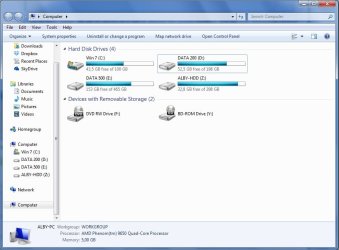
This is a pic of my PC's My Computer window
My Computer.jpg
As you can see, 100 GB is more than enough for C. Then there is D that is the Data 200 and another 500 GB disk called Data 500 containing all backups and other dumb data.
ALBY HDD is a usb drive I use as secondary backup for my stuff.

Maybe the reason why I have these notions is that i'm looking at partitions like they were actual seperate HDD's xD
Yeah, it's weird. It doesn't help that the OS treats every partition as if it was a different disk, even when it is not. :confused:
 

My Computer My Computer

At a glance

Win 7 Pro 64-bit 7601AMD Phenom 9650 QuadCore, revision DR-B35 GB yes I run 2x 2GB and 1x 1GB, different b...NVIDIA GeForce 9800 GT 512 Mb, unknown manufa...
Computer type
PC/Desktop
Computer Manufacturer/Model Number
custom built
OS
Win 7 Pro 64-bit 7601
CPU
AMD Phenom 9650 QuadCore, revision DR-B3
Motherboard
ASUS M4A78
Memory
5 GB yes I run 2x 2GB and 1x 1GB, different brand, spank me.
Graphics Card(s)
NVIDIA GeForce 9800 GT 512 Mb, unknown manufacturer.
Sound Card
Crappy Realtek Integrated Audio
Monitor(s) Displays
Fujitsu Siemens P19-3P
Screen Resolution
1280 x 1024 x 32 bits @ 60 Hz Oh yeah, 4:3 rocks!
Hard Drives
(1) MAXTOR S TM3320613AS SATA Disk Device (2) STM35004 18AS SATA Disk Device (3) TOSHIBA USB 2.5"-HDD
PSU
whatever, around 450w
Case
Scavenged from old company PC, 10+ years old
Cooling
CPU fan, GPU fan, case fan, nothing fancy
Keyboard
Microsoft, PS/2, white.
Mouse
Optical, logitec.
Internet Speed
effective max speeds: 70-ish kB/s down 30-ish kB/s up
Antivirus
Avira, free edition.
Browser
Firefox with FXChrome to make it look like Google Chrome :P
Other Info
Was discarded by previous owner due to "horrible performance".
Was running Win Xp from a IDE drive. Yeah. Was a pain.
SATA II drive and Win7 and it zips away! Yay!
Hmm, that basically answers all my questions...once again, thanks for everything.

I'll make the OS partition about 80GB (C) then, and all the bulk to another one (D). With this setting I should be okay right? I always hate when Windows starts filling up my OS partition over time for no reason, with god knows what, that's why I get worried with making C so small...

I'll make it after I install windows 8, using the app you said. I'll get back after i'm done :)
 

My Computer My Computer

At a glance

Windows 7 Home Premium x64Intel Core i7-740QM, 1.73GHz6GBNvidia Geforce GT 425M ; VRAM: 1GB
Computer Manufacturer/Model Number
Asus N53JQ-SX145V
OS
Windows 7 Home Premium x64
CPU
Intel Core i7-740QM, 1.73GHz
Memory
6GB
Graphics Card(s)
Nvidia Geforce GT 425M ; VRAM: 1GB
Monitor(s) Displays
15.6" HD/LED BL
Screen Resolution
1366x768
Hard Drives
640GB (C & D):
-C: 149GB
-D: 425GB
it should fill some % of it with restore points, but it should not use more than 5-10 GB for restore points on a partition of that size.
 

My Computer My Computer

At a glance

Win 7 Pro 64-bit 7601AMD Phenom 9650 QuadCore, revision DR-B35 GB yes I run 2x 2GB and 1x 1GB, different b...NVIDIA GeForce 9800 GT 512 Mb, unknown manufa...
Computer type
PC/Desktop
Computer Manufacturer/Model Number
custom built
OS
Win 7 Pro 64-bit 7601
CPU
AMD Phenom 9650 QuadCore, revision DR-B3
Motherboard
ASUS M4A78
Memory
5 GB yes I run 2x 2GB and 1x 1GB, different brand, spank me.
Graphics Card(s)
NVIDIA GeForce 9800 GT 512 Mb, unknown manufacturer.
Sound Card
Crappy Realtek Integrated Audio
Monitor(s) Displays
Fujitsu Siemens P19-3P
Screen Resolution
1280 x 1024 x 32 bits @ 60 Hz Oh yeah, 4:3 rocks!
Hard Drives
(1) MAXTOR S TM3320613AS SATA Disk Device (2) STM35004 18AS SATA Disk Device (3) TOSHIBA USB 2.5"-HDD
PSU
whatever, around 450w
Case
Scavenged from old company PC, 10+ years old
Cooling
CPU fan, GPU fan, case fan, nothing fancy
Keyboard
Microsoft, PS/2, white.
Mouse
Optical, logitec.
Internet Speed
effective max speeds: 70-ish kB/s down 30-ish kB/s up
Antivirus
Avira, free edition.
Browser
Firefox with FXChrome to make it look like Google Chrome :P
Other Info
Was discarded by previous owner due to "horrible performance".
Was running Win Xp from a IDE drive. Yeah. Was a pain.
SATA II drive and Win7 and it zips away! Yay!
The performance differ depending on where on the platters the data is located. The outer tracks performs better than the inner ones. So the first partition will always be the fastest.
 

My Computer My Computer

At a glance

Windows
OS
Windows
uhm, I think you have a typo. You swapped "inner" and "outer" in your post. The tracks closer to the beginning of the platter (HDD's spinning disk) rotate faster than the tracks at the outer rims of the platter. They are shorter and have to do a full rotation in the same time as the longer ones at the rim of the platter.
 

My Computer My Computer

At a glance

Win 7 Pro 64-bit 7601AMD Phenom 9650 QuadCore, revision DR-B35 GB yes I run 2x 2GB and 1x 1GB, different b...NVIDIA GeForce 9800 GT 512 Mb, unknown manufa...
Computer type
PC/Desktop
Computer Manufacturer/Model Number
custom built
OS
Win 7 Pro 64-bit 7601
CPU
AMD Phenom 9650 QuadCore, revision DR-B3
Motherboard
ASUS M4A78
Memory
5 GB yes I run 2x 2GB and 1x 1GB, different brand, spank me.
Graphics Card(s)
NVIDIA GeForce 9800 GT 512 Mb, unknown manufacturer.
Sound Card
Crappy Realtek Integrated Audio
Monitor(s) Displays
Fujitsu Siemens P19-3P
Screen Resolution
1280 x 1024 x 32 bits @ 60 Hz Oh yeah, 4:3 rocks!
Hard Drives
(1) MAXTOR S TM3320613AS SATA Disk Device (2) STM35004 18AS SATA Disk Device (3) TOSHIBA USB 2.5"-HDD
PSU
whatever, around 450w
Case
Scavenged from old company PC, 10+ years old
Cooling
CPU fan, GPU fan, case fan, nothing fancy
Keyboard
Microsoft, PS/2, white.
Mouse
Optical, logitec.
Internet Speed
effective max speeds: 70-ish kB/s down 30-ish kB/s up
Antivirus
Avira, free edition.
Browser
Firefox with FXChrome to make it look like Google Chrome :P
Other Info
Was discarded by previous owner due to "horrible performance".
Was running Win Xp from a IDE drive. Yeah. Was a pain.
SATA II drive and Win7 and it zips away! Yay!
No swapping occurred. The speed is the same, but the number of sectors in each track differ. More sectors per rotation means more data.
 

My Computer My Computer

At a glance

Windows
OS
Windows
Back
Top