How do I increase size of C:Drive by partitioning D:Drive

Fishfingers

New member
Local time
8:50 AM
Messages
2
Hi I'm not very familiar with HDDs and partition software so if there is an explanation, doing it in plain English or step by step would be appreciated.

Windows 7 32 bit

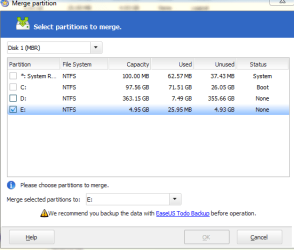
My boot drive and the one with most off my stuff is C but it only has around 25GBs out of 97GB left. My D drive currently has around 360GB/368GB free and I'd like to resize it and merge the unallocated space with C drive. I tried using the built in Windows disk manager and after no success I downloaded 'EaseUS partition manager' but it runs into the exact same problem as windows:

I can resize D drive and make some unallocated space, for example decreasing D by 10GB and getting the same amount as unallocated space but on both the downloaded and windows partition manager I cannot merge the unallocated space with C drive. It doesn't give me an error it just doesn't appear as an option. I can merge the unallocated space back with D drive and restore it to original size but I can't add it to C. Curiously I can merge C with the whole of D drive as an option (but I'm not going to do that). Here's a screenie of the downloaded software I'll put more info on if requested. Any help would be awesome as my C drive free space is shrinking rapidly due to game patches etc...


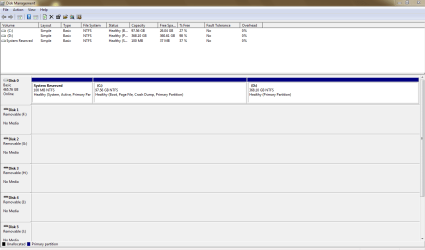
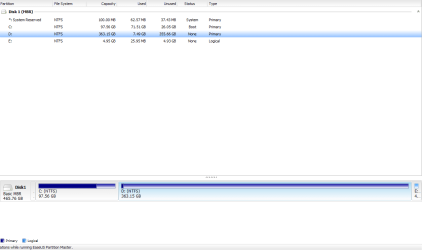
E: is just a partition from D: I made. It can remerge with D but it cannot do so with C. As you can see, when I tick the box of E: to merge the C: box instantly greys out. Last image is a screenshot from Windows disk management, here I've gotten rid of E: by merging it back with D:.
 

Attachments
  • Capture.PNG
    Capture.PNG
    12.7 KB · Views: 11
  • Capture2.PNG
    Capture2.PNG
    12.6 KB · Views: 14
  • Capture3.PNG
    Capture3.PNG
    22.7 KB · Views: 15

My Computer My Computer

At a glance

Windows 7 Professional 32 bit
OS
Windows 7 Professional 32 bit
There used to be a time where you couldn't merge, extend or remove individual partitions at all without the use of often expensive third party software or some very in-depth technical know how.

I believe I have done something similar to what you are trying to achieve with software called partition merger or something along those lines, but I recommend you avoid this type of thing altogether in the future.
 

My Computer My Computer

At a glance

Windows 8 Pro x64i7 3820 @ 4.68GHzF3-12800CL9D-8GBXL (32GB)GTX 480 SLI
Computer type
PC/Desktop
OS
Windows 8 Pro x64
CPU
i7 3820 @ 4.68GHz
Motherboard
ASUS Rampage IV Extreme RoG BF3
Memory
F3-12800CL9D-8GBXL (32GB)
Graphics Card(s)
GTX 480 SLI
Sound Card
Auzentech X-Fi HomeTheater HD
Monitor(s) Displays
Sony 32V5500
Screen Resolution
1920 x 1080
Hard Drives
LSI MR9260-4i (RAID10):
Toshiba DT01ACA300 x 4
iaStorA:
OCZ Vertex Enterprise 120GB
ST3500320AS 500GB
Intel 520 Series 120GB
PSU
OCZ ZX 1250W
Case
HAF X
Cooling
H80
Keyboard
Cyborg V.7
Mouse
Razer Lachesis 3.5G 5600dpi
Internet Speed
23296kbps ds / 812kbps us ADSL2+
Browser
Mozilla/5.0 (Windows NT 6.3; Win64; x64; rv:32.0) Gecko/2010
Other Info
AverMedia C127 Game Broadcaster HD
YA LuzTeTT said it correct, the 3rd party software can damage your system and its a great risk to use them.
But if u still want to try, then,use PartitionWizard tool to do this.
Your c drive is boot partition so u cant do things on it easily.. So ,with the help of above software modify the disk to logical first then u will be able to merge it with unallocated partition from D: ..
Hope this help..:)
Again i say, u are gonaa use 3rd party app,so U may be at risk.. !!
 

My Computer My Computer

At a glance

windows 7 Ultimate 64bitIntel Core i5 3rd generation4GB1GB nvidia
OS
windows 7 Ultimate 64bit
CPU
Intel Core i5 3rd generation
Memory
4GB
Graphics Card(s)
1GB nvidia
just resize D by making some unallocated space to the LEFT (not to right) side of D. after that you can extend C in win7 disk management
 

My Computer My Computer

At a glance

Microsoft Windows 7 Home Premium 64-bits 7601...Intel(R) Core(TM) i3 CPU M 370 @ 2.40GHz4,00 GBATI Mobility Radeon HD 5400 Series
Computer type
Laptop
Computer Manufacturer/Model Number
ACER ASPIRE 5742G
OS
Microsoft Windows 7 Home Premium 64-bits 7601 Multiprocessor Free Service Pack 1
CPU
Intel(R) Core(TM) i3 CPU M 370 @ 2.40GHz
Motherboard
Acer Aspire 5742G
Memory
4,00 GB
Graphics Card(s)
ATI Mobility Radeon HD 5400 Series
Sound Card
(1) AMD High Definition Audio Device (2) Realtek High Defi
Screen Resolution
1366 x 768 x 32 bits (4294967296 colors) @ 60 Hz
Hard Drives
WDC WD5000BEVT-22ZAT0
BTW you can only add space to a partition that is adjacent to that partition! C and E can't be merged... they are not adjacent to each other. So what I told you in my last post... resize D by shrinking it on the LEFT side, so creating unallocated space in front of D (so just after C). Then resize C so it uses the unallocated space (last step can be done in win7 disk management)
 

My Computer My Computer

At a glance

Microsoft Windows 7 Home Premium 64-bits 7601...Intel(R) Core(TM) i3 CPU M 370 @ 2.40GHz4,00 GBATI Mobility Radeon HD 5400 Series
Computer type
Laptop
Computer Manufacturer/Model Number
ACER ASPIRE 5742G
OS
Microsoft Windows 7 Home Premium 64-bits 7601 Multiprocessor Free Service Pack 1
CPU
Intel(R) Core(TM) i3 CPU M 370 @ 2.40GHz
Motherboard
Acer Aspire 5742G
Memory
4,00 GB
Graphics Card(s)
ATI Mobility Radeon HD 5400 Series
Sound Card
(1) AMD High Definition Audio Device (2) Realtek High Defi
Screen Resolution
1366 x 768 x 32 bits (4294967296 colors) @ 60 Hz
Hard Drives
WDC WD5000BEVT-22ZAT0
I tried using the built in Windows disk manager and after no success I downloaded 'EaseUS partition manager' but it runs into the exact same problem as windows:

Use Partition Wizard bootable disk; the last item listed on this page. Boot from it. Shrink D and add the space to C. You can't do that with the Windows tool.

Free download Magic Partition Manager Software, partition magic alternative, free partition magic, partition magic Windows 7 and server partition software - Partition Wizard Online
 

My Computer My Computer

At a glance

Windows 7 Home Premium SP1, 64-bitIntel Skylake i5-6600K, not overclocked8 GB HyperX DDR4-2666 (2 x 4 GB)none; graphics are integrated on CPU
Computer type
PC/Desktop
Computer Manufacturer/Model Number
Ignatz Special; 4 speed manual gearbox; factory air conditioning; one of one
OS
Windows 7 Home Premium SP1, 64-bit
CPU
Intel Skylake i5-6600K, not overclocked
Motherboard
AsRock Z170M Extreme 4, micro ATX
Memory
8 GB HyperX DDR4-2666 (2 x 4 GB)
Graphics Card(s)
none; graphics are integrated on CPU
Sound Card
onboard: Realtek ALC1150; external: USB Behringer UF0-202
Monitor(s) Displays
Dell S2340M 23 inch IPS
Screen Resolution
1600 x 900
Hard Drives
System: Crucial MX100 series SSD, 128 GB;
Data: Samsung Spinpoint 103SJ, 1 TB;
Backup: WD Caviar Green WD30EZRX-00D8PB0, 3 TB
PSU
Rosewill SilentNight 500 watt fanless, semi-modular
Case
Antec Solo II
Cooling
Noctua NH-U12S; Noctua F12 intake, Noctua S12A exhaust
Keyboard
Microsoft 200 6JH-00001 USB
Mouse
Dell or Microsoft optical wired; USB
Antivirus
Microsoft Security Essentials and Malwarebytes Premium
Browser
Pale Moon
Other Info
All fans PWM; speeds at idle: CPU circa 500 rpm; intake circa 600 rpm; exhaust circa 600 rpm; CPU temps 27 idle and 47 C load in a warm room (27 C/81 F) when running Intel Extreme Tuning Utility stress test.
Thanks I tried the partition manager again but I created the unallocated space to the left instead of the right (which was what I was doing wrong) and I could subsequently merge it with C. I chose just 5GB and it worked but would there be any detrimental effects (other than possible file corruption) to adding a larger amount (say 70GB) from D to C?

Edit: Can performance decrease happen because of this?
 
Last edited:

My Computer My Computer

At a glance

Windows 7 Professional 32 bit
OS
Windows 7 Professional 32 bit
No problem, I would load the C partition with maybe 200GB from the D since it's largely unused.
 

My Computer My Computer

At a glance

Windows 7 Ultimate X64 SP1Intel i5-2550K, Differing ~4.4-4.8GHz No buil...16GB G.Skill Sniper 1866MHz @ 2133MHz 2x8GBASUS GTX650TIB-DC2OC-2GD5, (650TI Boost)
Computer type
PC/Desktop
Computer Manufacturer/Model Number
Home Built Desktop By DataTech
OS
Windows 7 Ultimate X64 SP1
CPU
Intel i5-2550K, Differing ~4.4-4.8GHz No built in GPU
Motherboard
ASUS P8Z68-V PRO/GEN3
Memory
16GB G.Skill Sniper 1866MHz @ 2133MHz 2x8GB
Graphics Card(s)
ASUS GTX650TIB-DC2OC-2GD5, (650TI Boost)
Sound Card
Onboard Realtek 5-1
Monitor(s) Displays
Samsung P2570HD
Screen Resolution
1920x1080
Hard Drives
Samsung 840 Pro 256GB SSD for OS, 500GB Seagate Constellation (Enterprise drive) for Data
PSU
Corsair HX650W
Case
Inwin Dragon Rider
Cooling
Hyper 212 EVO w/two Noctua fans, push-pull, @1300 RPM
Keyboard
E-Z Eyes, bright yellow keys with large characters
Mouse
steelseries SENSEI Laser Pro Gaming
Internet Speed
48-51Mbs Mbs down, 11 Mbs up Xfinity Cable
Antivirus
Norton Internet Security 2013
Browser
IE 10, Opera, Pale Moon if needed
Other Info
4 case fans, LG BluRay-RE, ASUS DVD-RW, Mr. Fusion power supply, 1.21 gigawatts.
Back
Top