how to install a 32 bit os on a 64 bit os computer

artstat121

New member
Local time
3:28 PM
Messages
2
I am using a 64 bit windows 7 home premium 64 bit OS on a on a hp p6310f model computer and i want to be able to run 32 bit programs on the computer. Hoe can i do this and please post with simple step by step instructions.
 

My Computer My Computer

At a glance

windows 7 home premium 64bit6b ddr3nvidea gforce 9100
Computer Manufacturer/Model Number
HP p6310f
OS
windows 7 home premium 64bit
Memory
6b ddr3
Graphics Card(s)
nvidea gforce 9100
Sound Card
Realtek
Screen Resolution
480
You can run 32 bit applications on your computer as it is. It is already set up with everything it needs fro running them.
 

My Computer My Computer

At a glance

Windows 7 x64 Ultimate SP1Core i7-2630QM6 GB DDR3Nvidia GT 540M / Intel HD 3000 - Optimus swit...
Computer Manufacturer/Model Number
Asus N73SV
OS
Windows 7 x64 Ultimate SP1
CPU
Core i7-2630QM
Motherboard
Intel HM 65
Memory
6 GB DDR3
Graphics Card(s)
Nvidia GT 540M / Intel HD 3000 - Optimus switching
Sound Card
HD Audio (Intel Azalia/Realtek) ALC269
Monitor(s) Displays
LED flat panel
Screen Resolution
1920 x 1080
Hard Drives
2x Seagate Momentus 640 GB - 1,28 TB in total
Internet Speed
4 MB/256 kbps
Other Info
External HDs

WD Elements 1,5 TB
WD MyBook 500 GB
Welcome to Windows Seven Forums.

You don't need to install Windows 7 32-Bit.

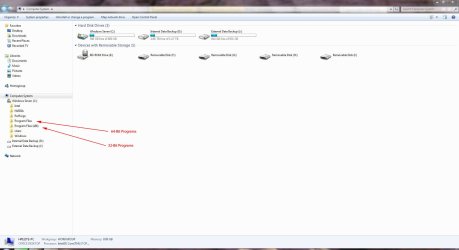
When you are using Windows 7 64-Bit, any 32-bit applications will reside under Program Files (x86) whilst any 64-bit applications will default to Program Files - see screenshot below.

Programs.JPG
 

My Computer My Computer

At a glance

Windows 7 Ultimate SP1 64-BitIntel Core i7 870 @ 2.93GHz8Gb Dual-Channel DDR3 @ 664MHznVidia GeForce GTX 460 1024MB dedicated RAM
Computer Manufacturer/Model Number
HP Pavilion Elite 495UK
OS
Windows 7 Ultimate SP1 64-Bit
CPU
Intel Core i7 870 @ 2.93GHz
Motherboard
MSI 2A9C (CPU1)
Memory
8Gb Dual-Channel DDR3 @ 664MHz
Graphics Card(s)
nVidia GeForce GTX 460 1024MB dedicated RAM
Sound Card
Realtek HD Audio
Monitor(s) Displays
HP2310i
Screen Resolution
1920 x 1080
Hard Drives
1x1954GB Hitachi HDS22020ALA 330 (RAID), 1x1954GB Hitachi External for backup and storage
PSU
460W
Case
HP Elite
Cooling
Air cooled
Keyboard
Logitech K750 solar-powered keyboard
Mouse
Logitech Wireless M180 mouse
Internet Speed
2Mb
Other Info
Pure Avanti Flow Internet Radio with iPod Dock, 64Gb iPod, HP USB Speakers, Sony MDR-V500 Headphones, Sony Vaio F-Series Laptop
thank you for the replys but i am trying to run old 95 games and keep getting a non-compatability error
 

My Computer My Computer

At a glance

windows 7 home premium 64bit6b ddr3nvidea gforce 9100
Computer Manufacturer/Model Number
HP p6310f
OS
windows 7 home premium 64bit
Memory
6b ddr3
Graphics Card(s)
nvidea gforce 9100
Sound Card
Realtek
Screen Resolution
480

My Computer My Computer

At a glance

Windows 7 Ultimate SP1 64-BitIntel Core i7 870 @ 2.93GHz8Gb Dual-Channel DDR3 @ 664MHznVidia GeForce GTX 460 1024MB dedicated RAM
Computer Manufacturer/Model Number
HP Pavilion Elite 495UK
OS
Windows 7 Ultimate SP1 64-Bit
CPU
Intel Core i7 870 @ 2.93GHz
Motherboard
MSI 2A9C (CPU1)
Memory
8Gb Dual-Channel DDR3 @ 664MHz
Graphics Card(s)
nVidia GeForce GTX 460 1024MB dedicated RAM
Sound Card
Realtek HD Audio
Monitor(s) Displays
HP2310i
Screen Resolution
1920 x 1080
Hard Drives
1x1954GB Hitachi HDS22020ALA 330 (RAID), 1x1954GB Hitachi External for backup and storage
PSU
460W
Case
HP Elite
Cooling
Air cooled
Keyboard
Logitech K750 solar-powered keyboard
Mouse
Logitech Wireless M180 mouse
Internet Speed
2Mb
Other Info
Pure Avanti Flow Internet Radio with iPod Dock, 64Gb iPod, HP USB Speakers, Sony MDR-V500 Headphones, Sony Vaio F-Series Laptop
If they're not 16 bit then try installing them in an earlier OS's Compatibility Mode.

This tricks the program into thinking it is being installed on the legacy OS whose mode is chosen. Start with XP SP2 and work backward for really old programs.
 
Back
Top