
How to install "My Documents" folder in 2nd drive

antares

New member
Member
VIP
Local time
9:00 PM
Messages
207
Hi all, in order to optimize the main OS SSD I want to install the "My Documents" folder (or its equivalent in Windows 7) in my 2nd internal data drive as it occupies a lot of space in my main OS SSD drive. How can I do this? Thanks
 

My Computer My Computer

Computer type
PC/Desktop
Computer Manufacturer/Model Number
Dell Dimension 8200/Personal Build
OS
Windows XP Professional SP3/Windows 7 Ultimate x64
CPU
Intel Pentium 4 3.06GHz Northwood/Intel Core i7 3770K
Motherboard
North Bridge:Intel Tehama i850(E)/Asus P8Z77-V Deluxe
Memory
2 Gb RDRAM Dual Channel/GSkill 32GB DDR3 1866
Graphics Card(s)
ATI ALL-IN-WONDER X800 XT AGP/MSI GTX 660 Ti PE
Sound Card
Voyetra Turtle Beach Santa Cruz PCI/Onboard Realtek HD
Monitor(s) Displays
Viewsonic VP230mb ViewPanel
Screen Resolution
1600x1200 32bit
Hard Drives
Western Digital 500Gb IDE drive (main drive) (XP PC)/Samsung 512GB 840 Pro Series SSD main+Western Digital Caviar Black 2 TB SATA III 7200 RPM 64 MB Cache as 2nd internal (Win 7 PC)
PSU
Dell OEM/Thermaltake Toughpower Grand 850W TPG-850M
Case
Dell OEM/Corsair Obsidian 650DW-1 Midtower
Cooling
Dell OEM/Noctua NH-D14
Keyboard
Dell Multimedia keyboard
Mouse
Logitech Cordless MouseMan® Optical M-RM63

My Computer My Computer

Computer type
Laptop
Computer Manufacturer/Model Number
Hewlett-Packard/G62-107SA Notebook
OS
Microsoft Windows 7 Home Premium 64-bit Service Pack 1
CPU
Intel(R) Core(TM) i3 CPU M 330 @ 2.13GHz
Motherboard
Hewlett-Packard 1425
Memory
8 GB DDR3
Graphics Card(s)
Intel(R) HD Graphics
Sound Card
Realtek High Definition Audio
Monitor(s) Displays
Builtin
Screen Resolution
1366 x 768 x 32 bits (4294967296 colors) @ 60 Hz
Hard Drives
250 GB SATA Hard Disk Drive 7200 rpm
2TB Seagate GoFlex USB 2 Drive
1TB Iomega Prestige USB 2 Drive
1.5TB Iomega Prestige USB 2 Drive (Samsung)
2TB WD MyBook Live NAS.
Mouse
Logitech Anywhere MX
Internet Speed
152 Mbs download 10 Mbs upload
Antivirus
Norton 360
Browser
Chrome
The simplest is to just move your documents onto the other disk and include the folder created in the documents library.
You mean create a new folder in the 2nd drive, cut/paste the entire documents library onto this new folder and then create a shortcut to this new folder in the original documents library?
Slightly more complicated you can follow this tutorial to move the default My Documents location. http://www.sevenforums.com/tutorials/18629-user-folders-change-default-location.html

If you want to move your entire user profile follow this tutorial. http://www.sevenforums.com/tutorials/87555-user-profile-change-default-location.html
Which of these two is the more stable/recommended one? Thanks
 

My Computer My Computer

Computer type
PC/Desktop
Computer Manufacturer/Model Number
Dell Dimension 8200/Personal Build
OS
Windows XP Professional SP3/Windows 7 Ultimate x64
CPU
Intel Pentium 4 3.06GHz Northwood/Intel Core i7 3770K
Motherboard
North Bridge:Intel Tehama i850(E)/Asus P8Z77-V Deluxe
Memory
2 Gb RDRAM Dual Channel/GSkill 32GB DDR3 1866
Graphics Card(s)
ATI ALL-IN-WONDER X800 XT AGP/MSI GTX 660 Ti PE
Sound Card
Voyetra Turtle Beach Santa Cruz PCI/Onboard Realtek HD
Monitor(s) Displays
Viewsonic VP230mb ViewPanel
Screen Resolution
1600x1200 32bit
Hard Drives
Western Digital 500Gb IDE drive (main drive) (XP PC)/Samsung 512GB 840 Pro Series SSD main+Western Digital Caviar Black 2 TB SATA III 7200 RPM 64 MB Cache as 2nd internal (Win 7 PC)
PSU
Dell OEM/Thermaltake Toughpower Grand 850W TPG-850M
Case
Dell OEM/Corsair Obsidian 650DW-1 Midtower
Cooling
Dell OEM/Noctua NH-D14
Keyboard
Dell Multimedia keyboard
Mouse
Logitech Cordless MouseMan® Optical M-RM63
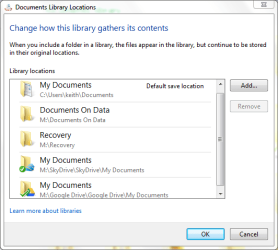
Not quite. If you create a documents folder on your second drive. Then move your documents into it. You can include the new folder in your documents library as in this tutorial. http://www.sevenforums.com/tutorials/585-library-include-folder.html. This is the way I do it. My documents library has 5 folders included in it. Only one of these is on the Windows disk, the normal My Documents folder as some programs insist on using this.
screenshot211_2012-07-31.png


I've never had the need to use either of those methods so I will leave it to others to comment.
 

My Computer My Computer

Computer type
Laptop
Computer Manufacturer/Model Number
Hewlett-Packard/G62-107SA Notebook
OS
Microsoft Windows 7 Home Premium 64-bit Service Pack 1
CPU
Intel(R) Core(TM) i3 CPU M 330 @ 2.13GHz
Motherboard
Hewlett-Packard 1425
Memory
8 GB DDR3
Graphics Card(s)
Intel(R) HD Graphics
Sound Card
Realtek High Definition Audio
Monitor(s) Displays
Builtin
Screen Resolution
1366 x 768 x 32 bits (4294967296 colors) @ 60 Hz
Hard Drives
250 GB SATA Hard Disk Drive 7200 rpm
2TB Seagate GoFlex USB 2 Drive
1TB Iomega Prestige USB 2 Drive
1.5TB Iomega Prestige USB 2 Drive (Samsung)
2TB WD MyBook Live NAS.
Mouse
Logitech Anywhere MX
Internet Speed
152 Mbs download 10 Mbs upload
Antivirus
Norton 360
Browser
Chrome
Back
Top