How to install printer over network?

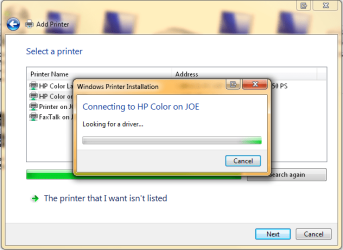
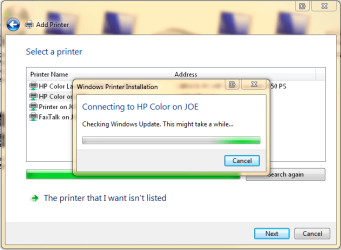
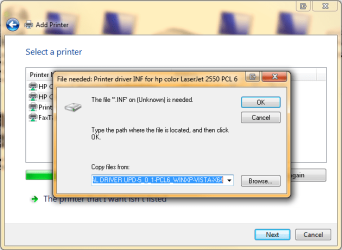
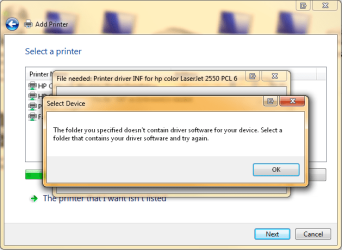
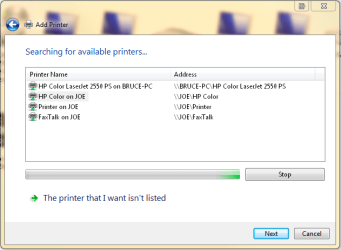
Here you go, Aem. This is with the printer attached to the XP 32-bit machine, trying to install it over the network on the W7 64-bit machine. The last two shots show the loop I get stuck in. After Windows fails to find a driver either locally or on the internet (despite the fact that if I plug the printer into this computer it works fine), it asks me to point it to an inf file. No matter where I point it, it says it "doesn't contain software for your device", leaving me no option but to cancel. It never allows me to select a printer from a list.
 

Attachments
  • Capture1.PNG
    Capture1.PNG
    18.8 KB · Views: 23
  • Capture2.PNG
    Capture2.PNG
    26.1 KB · Views: 15
  • Capture3.PNG
    Capture3.PNG
    26.1 KB · Views: 21
  • Capture4.PNG
    Capture4.PNG
    28.2 KB · Views: 17
  • Capture5.PNG
    Capture5.PNG
    26 KB · Views: 19
  • Capture6.PNG
    Capture6.PNG
    31.3 KB · Views: 30

My Computer

OS
Windows 7 64
CPU
Intel i7 860
Motherboard
DFI LanParty DKP55T3eH9e1
Memory
Gskills 4 gb
Graphics Card(s)
Radeon HD 5870
Sound Card
onboard
Monitor(s) Displays
Four
Hard Drives
7 TB
PSU
Corsair 750w
Case
Cooler Master CM690
Cooling
Cooler Master Hyper 212 Plus
I dont know why you ignored me last time, but install the VISTA drivers on the XP machine (NOT THE PLUG AND PLAY) and then your 7 machine will be able to download the drivers the way your trying to...
 

My Computer

Computer Manufacturer/Model Number
Toshiba
OS
Windoze 7
CPU
AMD Turion x2 x64
Sorry, MagicK; I didn't ignore you, but forgot to reply.

I've tried to get Vista drivers (both 32 and 64 bit) from HP.com, but when I select those OSs all they offer for my Color Laserjet 2550L are their "Universal Printer Drivers"...and when I click on the link for any of the three drivers offered, I just get a "file or folder doesn't exist error"...so I was unable to do as you suggested.
 

My Computer

OS
Windows 7 64
CPU
Intel i7 860
Motherboard
DFI LanParty DKP55T3eH9e1
Memory
Gskills 4 gb
Graphics Card(s)
Radeon HD 5870
Sound Card
onboard
Monitor(s) Displays
Four
Hard Drives
7 TB
PSU
Corsair 750w
Case
Cooler Master CM690
Cooling
Cooler Master Hyper 212 Plus
Bump?
 

My Computer

OS
Windows 7 64
CPU
Intel i7 860
Motherboard
DFI LanParty DKP55T3eH9e1
Memory
Gskills 4 gb
Graphics Card(s)
Radeon HD 5870
Sound Card
onboard
Monitor(s) Displays
Four
Hard Drives
7 TB
PSU
Corsair 750w
Case
Cooler Master CM690
Cooling
Cooler Master Hyper 212 Plus
Looks like they changed the drivers a little bit.

Connect the printer to the XP machine
Id try installing http://h20000.www2.hp.com/bizsuppor...wEnvOID=2093&swLang=8&taskId=135&mode=4&idx=0 that on the XP machine install like this: First time Driver installation: Policy is disabled
When using the Add Printer Wizard or the Install.exe file to install the UPD 5.0.1 for the first time on a PC, the default behavior will be that the Policy management is disabled. This means that the UPD will not search for management policy information created either by the Managed Printer Administrator software, or by the Active Directory group policy object


then try to network with the 7 machine

http://h20000.www2.hp.com/bizsuppor...wEnvOID=2093&swLang=8&taskId=135&mode=4&idx=0
 

My Computer

Computer Manufacturer/Model Number
Toshiba
OS
Windoze 7
CPU
AMD Turion x2 x64
Ok can you advise what is in the drivers folder? Is it an .exe that extracts and installs the driver when you install manually?

I would like to see what is in this .exe zip file. The .inf file that the system is trying to use is evident that it isn't the correct one (ie 32Bit vs 64bit). sometime the system will select the .inf file that it finds to be a matching with the OS however, it might not know that the system needs a 64Bit etc.
 

My Computer

Computer Manufacturer/Model Number
Lenovo ThinkPad T60
OS
Windows 7 Ultimate 64Bit
CPU
GenuineIntel Intel(R) Core(TM) DuoCore T2400 @ 1.83GHz
Motherboard
Intel(R) 82801G (ICH7 Family)
Memory
2.00 GB
Graphics Card(s)
Mobile Intel(R) 945 Express Chipset
Sound Card
SoundMAX Integrated Digital HD Audio
Monitor(s) Displays
ThinkPad Display
Screen Resolution
1400x1050
Hard Drives
100Gb SATA
Keyboard
Standard Keyboard
Mouse
HID-compliant Mouse
Internet Speed
Cable Broadband - 54Mbps
Other Info
Intel(R) PRO/1000 PL Network Connection
11a/b/g Wireless LAN Mini PCI Express Adapter
MagicK, I just tried to download the file from that link you gave me, and again got a "No such file or directory" error.

I'll try calling HP tomorrow to see if there's some way to get it.

(I also notice your link went to the PCL5 driver...is that the correct one? I have no idea...)
 

My Computer

OS
Windows 7 64
CPU
Intel i7 860
Motherboard
DFI LanParty DKP55T3eH9e1
Memory
Gskills 4 gb
Graphics Card(s)
Radeon HD 5870
Sound Card
onboard
Monitor(s) Displays
Four
Hard Drives
7 TB
PSU
Corsair 750w
Case
Cooler Master CM690
Cooling
Cooler Master Hyper 212 Plus
MagicK, I just tried to download the file from that link you gave me, and again got a "No such file or directory" error.

I'll try calling HP tomorrow to see if there's some way to get it.

(I also notice your link went to the PCL5 driver...is that the correct one? I have no idea...)

As long as it is the right driver for the right OS and model printer, it should work.

I also get the same error,, it is a problem on HP's website.
 

My Computer

Computer Manufacturer/Model Number
Self Built
OS
Win 7 Ultimate 32bit
CPU
C2D E6600 2.4Ghz
Motherboard
Intel D965WH
Memory
4G Kingston KHX5400D2
Graphics Card(s)
EVGA GTX 570 HD SC (012-P3-1573-KR)
Sound Card
On-Board
Monitor(s) Displays
Samsung 226BW
Screen Resolution
1680 x 1050
Hard Drives
2 x 250 Seagate Barracuda
2 x 500 Seagate Barracuda (Raid1)
PSU
Corsair TX750W
Case
In-Win C589
Cooling
Stock Intel Cooling
As long as it is the right driver for the right OS and model printer, it should work.

Well, it's their "universal" driver... :D
 

My Computer

OS
Windows 7 64
CPU
Intel i7 860
Motherboard
DFI LanParty DKP55T3eH9e1
Memory
Gskills 4 gb
Graphics Card(s)
Radeon HD 5870
Sound Card
onboard
Monitor(s) Displays
Four
Hard Drives
7 TB
PSU
Corsair 750w
Case
Cooler Master CM690
Cooling
Cooler Master Hyper 212 Plus
Well,, Universal doesn't always mean Universal. It's that English language thing. all the vowels and sometimes y

They don't all work with all printers,,,,
 

My Computer

Computer Manufacturer/Model Number
Self Built
OS
Win 7 Ultimate 32bit
CPU
C2D E6600 2.4Ghz
Motherboard
Intel D965WH
Memory
4G Kingston KHX5400D2
Graphics Card(s)
EVGA GTX 570 HD SC (012-P3-1573-KR)
Sound Card
On-Board
Monitor(s) Displays
Samsung 226BW
Screen Resolution
1680 x 1050
Hard Drives
2 x 250 Seagate Barracuda
2 x 500 Seagate Barracuda (Raid1)
PSU
Corsair TX750W
Case
In-Win C589
Cooling
Stock Intel Cooling
I have had good luck & bad luck networking printers with Win7.

Sometimes I have to connect the printer directly to the Win7 computer & install it as a local printer. Then move it back to the other computer & try to install it over the network. Sometimes it works with some printers & sometimes it don't.

Trial & Error Testing


" Doc "
 

Attachments

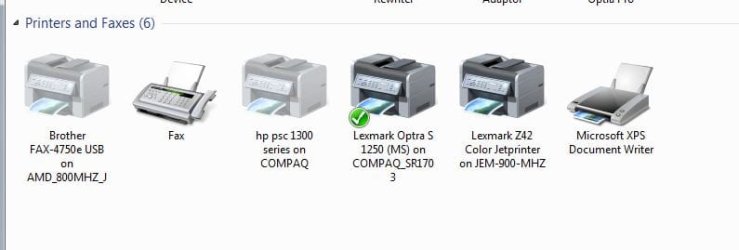
  • Network_printers.JPG
    Network_printers.JPG
    27.7 KB · Views: 73

My Computer

Computer type
PC/Desktop
Computer Manufacturer/Model Number
Built them myself, Science Experiments !
OS
Win7 Enterprise, Win7 x86 (Ult 7600), Win7 x64 Ult 7600, TechNet RTM on AMD x64 (2.8Ghz)
CPU
AMD fx8350 4ghz, AMD-32 2400mhz, AMD-64 3200mhz, AMDx64 2.8G
Motherboard
SIS 755, ECS-K8M890M-M (Ult 7600), GigaByte & others
Memory
2gb, 4gb on the Ult 7600, 4gb on Technet RTM, 32gb on FX8350
Graphics Card(s)
Draw my own Graphics, several nVidia cards
Sound Card
on motherboard
Monitor(s) Displays
19" flat scr, 28" I-Inc widescr,22" Emprex Widescr, 23" Acer
Screen Resolution
1280 x 1024, 1440 x 900, 1920 x 1080
Hard Drives
6 pata Ide HD's & 2 Sata HD's
added 80gb external on Ult 7600 computer,
numerous extra 1tb, 2TB, 3Tb SATA HD's
A collection of ext HD Docks w/ HDs
PSU
430w, 550w, 600w, 700, 800, etc
Case
All Generic Full Towers
Cooling
Open Air & a few fans, some w/ colored LEDs
Keyboard
Compaq & Dell recycled from GoodWill
Mouse
Made in China Optical Wired Mouse
Internet Speed
Fast Cable InterNet
Antivirus
AVG Free on 24 different Desktops, NO Problems!
Browser
IE 8 is preferred, but use FireFox sometimes
Other Info
Linksys Routers, switches, & Hubs
Too Many USB Flash Drives to count, Biggest is 64GB !
Eight computers in my home network.
Sixteen computers at my business network.
Linked via TeamViewer !
Lots of old used spare computer parts everywhere!
Hmm yeah I just tried to d/l the package and im getting an error too. Someone may need to call HP cause I doubt they know.
 

My Computer

Computer Manufacturer/Model Number
Toshiba
OS
Windoze 7
CPU
AMD Turion x2 x64
Maybe if you follow this post from Jimbo it will help.

Hi all

I've posted this topic so many times -- but here we go again.

(Mods perhaps a sticky here for Networking Printers)

I've posted on this before but to share Printers attached to XP computers with either X-64 or X-32 versions of Windows 7 is SIMPLE. These instructions are for the Printer attached to the XP machine (but works in reverse as well).

("Stand alone" Network printers can be done slightly similarly BTW).

assume the computers are call XPMACHINE and W7MACHINE.

1) Ensure Printer on XP machine is shared - assume it's called SHAREDPRINTER.

2) On the Network Browsing on your Windows 7 machine ensure you can "See" the Printer share.

Now on the Windows 7 machine do the following (doesn't matter if it's X-86 or x-64).

3) Control Panel==> add LOCAL (Yes LOCAL) printer. I know it's on a Network but hold your horses -- what we are actually doing is "Poodlefaking" the Windows 7 machine into thinking it's running the printer.

4) Create NEW port==>Local port

5) Portname is \\XPMACHINE\SHAREDPRINTER

6) Now Windows 7 will load a driver and you'll be able to print on the XP machine.

Simple

(For a "Network stand alone printer") at 4) chose TCPIP port
and at 5) enter the IP address.


If the printer is on the Windows 7 machine and you want to print on the XP machine then do the same instructions on the XP machine --
port name in this case will be \\W7MACHINE\SHAREDPRINTER

Cheers

jimbo
 

My Computer

Computer type
PC/Desktop
Computer Manufacturer/Model Number
Home built
OS
Windows 7 Ult, Windows 8.1 Pro,
CPU
Q9650-4.275GHz, E8600 4.5GHz, E6750-3.8GHz
Motherboard
Evga 780i FTW
Memory
G.Skill PC2 9600 1200Mhz 5 5 5 15 2T
Graphics Card(s)
GTX480
Sound Card
Asus Xonar D2
Monitor(s) Displays
HannsG
Screen Resolution
1680X1050
Hard Drives
GSkill Phoenix Pro 120GB SSD
PSU
ThermalTake Toughpower 1000Watt modular
Case
ThermalTake XaserV
Cooling
Xigmatek S1283
Keyboard
Logitech G15
Mouse
Logitech G9
Internet Speed
T1
Chev65 and Jimbo, thank you, thank you, thank you! That worked great.

Why the heck this undocumented bit of convolution is necessary I can't begin to guess, but I'm glad this part of adapting to 64-bit Windows 7 is over.

(And to tie up one loose end, I finally got the 64-bit universal drivers from HP, MagicK, but when I tried to install them on the XP machine, it wouldn't install...just gave a "(null) is not a valid Win32 application" error. But thanks for your input anyway!)
 

My Computer

OS
Windows 7 64
CPU
Intel i7 860
Motherboard
DFI LanParty DKP55T3eH9e1
Memory
Gskills 4 gb
Graphics Card(s)
Radeon HD 5870
Sound Card
onboard
Monitor(s) Displays
Four
Hard Drives
7 TB
PSU
Corsair 750w
Case
Cooler Master CM690
Cooling
Cooler Master Hyper 212 Plus
Anthony, I had a similar problem and found a fix. I have pasted below a portion of a message I left on the Hardware forums that describes how I fixed the problems. I am fairly confident that this will fix your problem.

The computer could "see" the printer on the network but said it couldn't find a driver for it. :cry:
4) I did several hours of research on the web and hit upon a solution that WORKED!
5) I selected "Add a Printer" from the Devices and Printers menu.
6) I selected "Add a LOCAL printer" (Emphasis on LOCAL, NOT NETWORK printer)
7) In the next menu I selected "Create a new port" and "Local port"
8) In the next menu where it asks "Enter a port name", I entered \\DELL8100\970Cse. ("DELL8100" is the name of the computer that shares the printer and "970Cse" is the name of the printer share) In my humble opinion the "Enter a port name" should be labeled "Enter a port PATH" instead!!!!!
9) Then I just kept hitting "Enter" until it finished.
 

My Computer

Computer Manufacturer/Model Number
Dell Studio XPS 435T/9000
OS
Windows 7 64-Bit Home Premium
CPU
Intel(R) Core(TM) i7 CPU 920 @ 2.67GHZ, 2668 Mhz, 4 Core(s)
Memory
12 GB DDR3 SDRAM at 1066 Mhz
Graphics Card(s)
NVIDIA GeForce GTX 260 1.75 GB RAM
Sound Card
Sound Blaster X-Fi Xtreme Audio
Monitor(s) Displays
Dell ST2410 24 Inch Flat Panel Display
Screen Resolution
1920 x 1080
Hard Drives
SAMSUNG HD103UJ (1TB Serial ATA 2 Hard Drive 7200 RPM)
PSU
crappy pure Sine wave ONLY PSU. Won't work with most UPS's.
Case
Tacky looking Tower but functional
Cooling
Air cooled fans
Keyboard
Dell 101 key keyboard
Mouse
Microsoft Wireless
Internet Speed
Cable
Solution!

So I was suffering from the same issue with my Vista32 lappy and Windows7 64 desktop. I was quite angry until I noticed that Windows7 has an option to install additional drivers for other computers. I tried installing the 32-bit drivers locally and had the same issue. Thus, it had to be something with the driver and windows7. Opened up the .inf file and sure enough, the driver called the printer "Canon MP160 Printer" and windows7 called it "Canon Inkjet MP160 Printer." Edited the .inf file to match the windows7 name and voila.

So here it is simply:

Download the drivers

If the printer is connected to the x64 machine, open the .inf file and look for the section titled [Model Name].

Rename "HP 2550L" to "HP Color Laserjet 2550L" or whatever your x64 machine calls it.

Try the network installation again.


If the printer's connected to the 32-bit machine, you probably just need to delete some of the words out of the 64-bit driver.
 

My Computer

OS
Windows 7 x64
Maybe if you follow this post from Jimbo it will help.

Hi all

I've posted this topic so many times -- but here we go again.

(Mods perhaps a sticky here for Networking Printers)

Hi Jimbo,

that works a treat, thank you so much...simple isn't it? when you know :)

make this sticky pleeese!!
 

My Computer

OS
win7, winXPpro, Ubuntu, win2k
Dear Chevy65/Jimbo,

You are a life saver!! I am sorry I haven't seen your other posts. I spent almost 5 hours trying to figure the same problem as Anthony2816. I exhausted all options, including going to the manufacturer web sites (getting same bloody messages), going to other forums and going down to the "geek squad" at best buys. None useful and all advises were unsure and B.S. I even bought a print server for $90 and was fuzzying with it (without success of course). Then I came across your response and it worked within "1 Minute". Wish others don't just B.S. and get to the point like your solution. Thanks so much again!!!!!
 

My Computer

OS
Windows 7 Professional X64
Back
Top