How to install w7pro xp virtualization

neorican

New member
Member
Local time
7:11 AM
Messages
43
Is there an easy step by step method of installing XP VIRTUALIZATION available-- I need it to transfer some of my stuff from old XP COMP.

Thanks,,,,,,,,,,,,,,,,Ralph
 

My Computer

Computer Manufacturer/Model Number
hp athelon quad
OS
windows 7 professional
Memory
6 g ddr3
Monitor(s) Displays
hp 23"
Hard Drives
640 and 124 on xp

My Computer

Computer type
Laptop
Computer Manufacturer/Model Number
HP ENVY 17-1150eg
OS
Windows 10 Pro x64 EN-GB
CPU
1.6 GHz Intel Core i7-720QM Processor
Memory
6 GB
Graphics Card(s)
ATI Mobility Radeon HD 5850 Graphics
Sound Card
Beats sound system with integrated subwoofer
Monitor(s) Displays
17" laptop display, 22" LED and 32" Full HD TV through HDMI
Screen Resolution
1600*900 (1), 1920*1080 (2&3)
Hard Drives
Internal: 2 x 500 GB SATA Hard Disk Drive 7200 rpm
External: 2TB for backups, 3TB USB3 network drive for media
Cooling
As Envy runs a bit warm, I have it on a Cooler Master pad
Keyboard
Logitech diNovo Media Desktop Laser (bluetooth)
Mouse
Logitech Performance Mouse MX
Internet Speed
50/10 Mbps VDSL
Antivirus
Windows Defender 4.3.9431.0
Browser
Maxthon 3.5.2., IE11
Hi Kari,

Thank you for the INFO --- Before getting started, perhaps , I can ask a few questions:

1- I understand that this this is a lengthy process---Any idea how long?
2- Are there any pitfalls along the way which can harm my computer ?
3- I noticed in the tutorial , that the process can be uninstalled--Is that easy and what happens if in the installation , I kind of mess up and want to stop --will that present a problem --

I am pretty good at getting around a computer, but not great ----Is the degree in difficulty such that I need a computer GURU?

Thank You,,,,,,,,,,,,,,, Ralph
 

My Computer

Computer Manufacturer/Model Number
hp athelon quad
OS
windows 7 professional
Memory
6 g ddr3
Monitor(s) Displays
hp 23"
Hard Drives
640 and 124 on xp
Downloading and installing Virtual PC and XP mode is not going to take very long, file size are quite moderate. To install it, it's a straight forward procedure, like installing any other software. VPC and XPM can not harm your computer, neither does the installation of them.

Just follow the instructions and install order mentioned on the download page. The third file mentioned on download page is needed only if your computer does not support hardware virtualization.

Both XP Mode and Virtual PC can easily be uninstalled.

Kari
 

My Computer

Computer type
Laptop
Computer Manufacturer/Model Number
HP ENVY 17-1150eg
OS
Windows 10 Pro x64 EN-GB
CPU
1.6 GHz Intel Core i7-720QM Processor
Memory
6 GB
Graphics Card(s)
ATI Mobility Radeon HD 5850 Graphics
Sound Card
Beats sound system with integrated subwoofer
Monitor(s) Displays
17" laptop display, 22" LED and 32" Full HD TV through HDMI
Screen Resolution
1600*900 (1), 1920*1080 (2&3)
Hard Drives
Internal: 2 x 500 GB SATA Hard Disk Drive 7200 rpm
External: 2TB for backups, 3TB USB3 network drive for media
Cooling
As Envy runs a bit warm, I have it on a Cooler Master pad
Keyboard
Logitech diNovo Media Desktop Laser (bluetooth)
Mouse
Logitech Performance Mouse MX
Internet Speed
50/10 Mbps VDSL
Antivirus
Windows Defender 4.3.9431.0
Browser
Maxthon 3.5.2., IE11
Thanks Kari--- I did it , thanks to you---

One more little item -- I can't seem to change the resolution in XP mode -- the slide for moving the resolution in settings does not move --I was able to move it to get the best pic for my eyes on W7. however- the res that works for me on w7 is 1280/766, but that is not good on XP.

Seems that the Res is the same for both w7 and xp mode-- If I cant change the xp Res , is there another way to get the pics bigger in xp?

Now that I see the XP mode in action , it is sort of similar to w7 , so the advantage is to only be able to use the old programs-\\

Thanks again,,,,,Ralph .


Downloading and installing Virtual PC and XP mode is not going file size are quite moderate. To install it, it's a straight forward procedure, like installing any other software. VPC and XPM can not harm your computer, neither does the installation of them.

Just follow the instructions and install order mentioned on the download page. The third file mentioned on download page is needed only if your computer does not support hardware virtualization.

Both XP Mode and Virtual PC can easily be uninstalled.

Kari
 

My Computer

Computer Manufacturer/Model Number
hp athelon quad
OS
windows 7 professional
Memory
6 g ddr3
Monitor(s) Displays
hp 23"
Hard Drives
640 and 124 on xp
When integration features are disabled, you can change the resolution from display properties as usual. If integration features are enabled, you can change the resolution of XP Mode simply by resizing the XP Mode window.

Kari
 

My Computer

Computer type
Laptop
Computer Manufacturer/Model Number
HP ENVY 17-1150eg
OS
Windows 10 Pro x64 EN-GB
CPU
1.6 GHz Intel Core i7-720QM Processor
Memory
6 GB
Graphics Card(s)
ATI Mobility Radeon HD 5850 Graphics
Sound Card
Beats sound system with integrated subwoofer
Monitor(s) Displays
17" laptop display, 22" LED and 32" Full HD TV through HDMI
Screen Resolution
1600*900 (1), 1920*1080 (2&3)
Hard Drives
Internal: 2 x 500 GB SATA Hard Disk Drive 7200 rpm
External: 2TB for backups, 3TB USB3 network drive for media
Cooling
As Envy runs a bit warm, I have it on a Cooler Master pad
Keyboard
Logitech diNovo Media Desktop Laser (bluetooth)
Mouse
Logitech Performance Mouse MX
Internet Speed
50/10 Mbps VDSL
Antivirus
Windows Defender 4.3.9431.0
Browser
Maxthon 3.5.2., IE11
Hi Kari,

Thanks again --Is there any reason for INTEGRATION features to be enabled?

Thanks You --- Ralph

When integration features are disabled, you can change the resolution from display properties as usual. If integration features are enabled, you can change the resolution of XP Mode simply by resizing the XP Mode window.

Kari
 

My Computer

Computer Manufacturer/Model Number
hp athelon quad
OS
windows 7 professional
Memory
6 g ddr3
Monitor(s) Displays
hp 23"
Hard Drives
640 and 124 on xp
Hi Kari,

With all these changes , I may have messed things up ---I can't get to SETTINGS , so that I can disable INTEGRATION, etc --\

When I right click on xp mode via Virtualizion from ALL PROGRAMS and click on properties , I no longer see SETTINGS - I get something that says heading WINDOWS XP MODE Properties , but ther is nothing indicating settings --

Also in XP MODE , The heading at the top center with ACTION on the lleft - No longer has TOOLS -- anda click on tools led to SETTINGS -

I have made lots of progress with your and I sure hope you can help on this one -- Thanks,,,,Ralph
 

My Computer

Computer Manufacturer/Model Number
hp athelon quad
OS
windows 7 professional
Memory
6 g ddr3
Monitor(s) Displays
hp 23"
Hard Drives
640 and 124 on xp
Integration features allow for instance direct access to host's drives, clipboard sharing i.e. copy and paste works from host to guest and vice versa, better support for external USB devices, etc.

This Wikipedia article about Virtual PC is easy to read and understand, it explains this far better than I could.

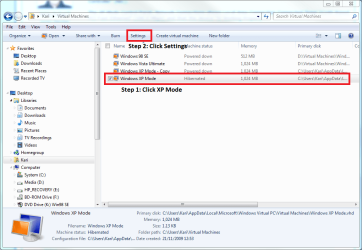
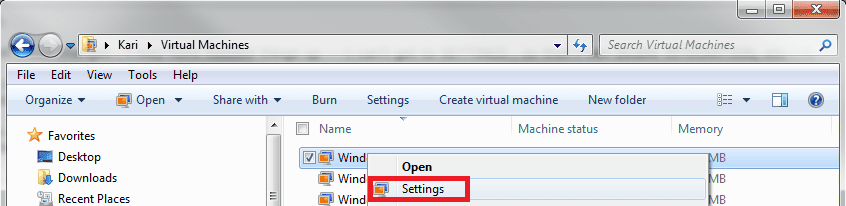
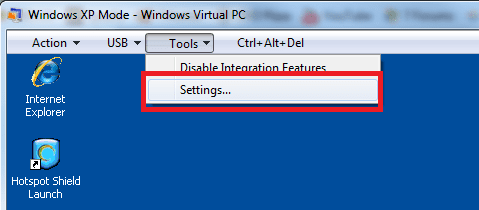
There are three ways to enter XP Mode settings:
  1. From Virtual machines folder (located in your user folder), click (choose) XP Mode and click Settings:

    XPM_settings.png
    .
  2. Right click XP Mode in the same location as in above example, and choose Settings:

    XPM_Settings_4.png
    .
  3. From the Tools menu in XP Mode window:

    XPM_settings2.png
You told that the Tools menu does not appear on your XP Mode. That is a mystery, I really don't know how that could happen. Could you post a screenshot of your screen with XP Mode running?

Please notice that XP Mode must be shut down, not hibernated, to change some of the settings.

Kari
 

My Computer

Computer type
Laptop
Computer Manufacturer/Model Number
HP ENVY 17-1150eg
OS
Windows 10 Pro x64 EN-GB
CPU
1.6 GHz Intel Core i7-720QM Processor
Memory
6 GB
Graphics Card(s)
ATI Mobility Radeon HD 5850 Graphics
Sound Card
Beats sound system with integrated subwoofer
Monitor(s) Displays
17" laptop display, 22" LED and 32" Full HD TV through HDMI
Screen Resolution
1600*900 (1), 1920*1080 (2&3)
Hard Drives
Internal: 2 x 500 GB SATA Hard Disk Drive 7200 rpm
External: 2TB for backups, 3TB USB3 network drive for media
Cooling
As Envy runs a bit warm, I have it on a Cooler Master pad
Keyboard
Logitech diNovo Media Desktop Laser (bluetooth)
Mouse
Logitech Performance Mouse MX
Internet Speed
50/10 Mbps VDSL
Antivirus
Windows Defender 4.3.9431.0
Browser
Maxthon 3.5.2., IE11
Hi Kari,

Missing TOOLs is solved -- No longer a mystery-

I solved it by Luck --- It appears that my resolution in W7 is quite low( this gives me my desired picture ). But in fooling around to get better a higher resolution , I peaked into the XPM and suddenly I saw the previously missing TOOLs in the XPM toolbar menu-- I immediately went to properties and then SETTINGS and disabled INTEGRATION and I Adjusted the XPM resolution to get my desired picture --

Anyway, this may help someone in the future, as this was probably a first --

I think it is important to say that you, personally and this FORUM are the best that there is in W7--

Thank you,, Ralph
 

My Computer

Computer Manufacturer/Model Number
hp athelon quad
OS
windows 7 professional
Memory
6 g ddr3
Monitor(s) Displays
hp 23"
Hard Drives
640 and 124 on xp
Thanks, Ralph. Nice you got it solved.
 

My Computer

Computer type
Laptop
Computer Manufacturer/Model Number
HP ENVY 17-1150eg
OS
Windows 10 Pro x64 EN-GB
CPU
1.6 GHz Intel Core i7-720QM Processor
Memory
6 GB
Graphics Card(s)
ATI Mobility Radeon HD 5850 Graphics
Sound Card
Beats sound system with integrated subwoofer
Monitor(s) Displays
17" laptop display, 22" LED and 32" Full HD TV through HDMI
Screen Resolution
1600*900 (1), 1920*1080 (2&3)
Hard Drives
Internal: 2 x 500 GB SATA Hard Disk Drive 7200 rpm
External: 2TB for backups, 3TB USB3 network drive for media
Cooling
As Envy runs a bit warm, I have it on a Cooler Master pad
Keyboard
Logitech diNovo Media Desktop Laser (bluetooth)
Mouse
Logitech Performance Mouse MX
Internet Speed
50/10 Mbps VDSL
Antivirus
Windows Defender 4.3.9431.0
Browser
Maxthon 3.5.2., IE11
Back
Top