Solved How to install Window 7 on SSD eMMC

xerone9

New member
Local time
5:24 AM
Messages
13
Hi,

Windows setup said that there is no drive in your system is there any specific driver I need to load for this drive (eMMC SSD). Many threads say windows 7 is not compatible with eMMC but I had use windows 7 in it.

I have fujitsu docomo f-07c and its windows is got corrupted. I need to install fresh copy of windows. During windows setup where it asks "where to install" it states there is no drive. unable to perform repair too.

I have tried many solutions like go to cmd in repair mode and open diskpart and the clean volumes but in diskpart it didn't show the drive and there are other solutions that get into bios and change things but I am also unable to open BIOS. I have tried all keys but it didn't open BIOS just f-12 option works for boot device.

Any helpful replies will be highly appreciated.

Thanks
 

My Computer My Computer

Computer type
Tablet
Computer Manufacturer/Model Number
Fujisu f-07c
OS
windows 7 home premium 32bit
CPU
Intel Atom z600
Motherboard
unknown
Memory
1 GB
Graphics Card(s)
intel GMA
Hard Drives
eMMC SSD
Antivirus
unknown
Browser
unknown
What is eMMC | Datalight
That's something that I learnt now.
If were using that earlier, then it would definitely have a driver somewhere on Internet.
Knowing the Hardware Id could help.
 

My Computer My Computer

Computer type
Laptop
Computer Manufacturer/Model Number
Dell XPS L502x
OS
Windows 7 Home Premium 64bit
CPU
Intel Core i7 2670QM
Motherboard
Intel HM67 Mobile Express Chipset
Memory
Samsung 8GB 1333Mhz
Graphics Card(s)
nVidia Geforce 540M GT 2GB
Sound Card
Realtek High Definition Audio
Monitor(s) Displays
15.6" Dell Standard RGB-LED Backlit Display
Screen Resolution
1366x768
Hard Drives
Seagate Momentus 2.5" 750GB HDD 5400rpm
Internet Speed
3.1 Mbits/s
Antivirus
AVG Free, Kaspersky
Browser
Google chrome
Are you using the Fujitsu Windows 7 phone disk?
 

My Computer My Computer

OS
ME/XP/Vista/Win7

I am unable to follow these steps,

Boot into BIOS setup - unable to open bios, mentioned above. ( I have read many solutions like get into bios and disable RAID or change the mode of hard drive but since when I bought it there is no way I can get into its BIOS)

UEFI (Unified Extensible Firmware Interface) - Install Windows 7 with - it is only for 64bit version the device supports 32 bit operating system

download the latest official ISO for your licensed version - unable to find it on internet.

Diskpart. Diskpart commands only shows The USB drive via which I am booting and a memory card which is present in the card slot. It dose not show 32GB SSD
. (Hirens Boot CD detects that drive (eMMC SSD) and all HDD tests results are positive there is no bad sector nothing)
 

My Computer My Computer

Computer type
Tablet
Computer Manufacturer/Model Number
Fujisu f-07c
OS
windows 7 home premium 32bit
CPU
Intel Atom z600
Motherboard
unknown
Memory
1 GB
Graphics Card(s)
intel GMA
Hard Drives
eMMC SSD
Antivirus
unknown
Browser
unknown
Are you using the Fujitsu Windows 7 phone disk?

Please explain a little further sir, PHONE DISK???

The Fujitsu docomo f-07c loox has built in eMMC SSD in which windows is installed which got corrupted. When I run setup of windows 7. The setup detects all removable media like USB from which I am booting and SD card inside f-07c card slot but it didn't/detects its SSD drive
 

My Computer My Computer

Computer type
Tablet
Computer Manufacturer/Model Number
Fujisu f-07c
OS
windows 7 home premium 32bit
CPU
Intel Atom z600
Motherboard
unknown
Memory
1 GB
Graphics Card(s)
intel GMA
Hard Drives
eMMC SSD
Antivirus
unknown
Browser
unknown
Sounds like you not using Fujitsu Windows 7 phone Recovery disk, the disk you are using may not have the hardware drivers neened to reinstall.
 

My Computer My Computer

OS
ME/XP/Vista/Win7
Sounds like you not using Fujitsu Windows 7 phone Recovery disk, the disk you are using may not have the hardware drivers neened to reinstall.

Since the windows is corrupted when it starts it automatically gets to STARTUP REPAIR. In startup repair it shows drives. Then I go to system restore and in system restore it shows an image and I am unable to repair from it too. I guess it is corrupted too. And when I got the unit the windows was in japanees I have changed it. But in repair mode everything is in japanees so it is very hard to understand.

If Windows Repair Disk is something else then kindly tell me how I can access it.

Sorry I am Noob so it is hard to understand terms

Thanks
 

My Computer My Computer

Computer type
Tablet
Computer Manufacturer/Model Number
Fujisu f-07c
OS
windows 7 home premium 32bit
CPU
Intel Atom z600
Motherboard
unknown
Memory
1 GB
Graphics Card(s)
intel GMA
Hard Drives
eMMC SSD
Antivirus
unknown
Browser
unknown
@Gregrocker

Sorry I didn't mentioned it earlier that it is Windows Phone. Well it behaves just like normal windows I installed all same stuff I installed in my laptop windows so I thought that the installation behaviour would be same too that is why I thought that mentioning is not necessary
 

My Computer My Computer

Computer type
Tablet
Computer Manufacturer/Model Number
Fujisu f-07c
OS
windows 7 home premium 32bit
CPU
Intel Atom z600
Motherboard
unknown
Memory
1 GB
Graphics Card(s)
intel GMA
Hard Drives
eMMC SSD
Antivirus
unknown
Browser
unknown
I would not use the standard installation workarounds on a phone. We don't really support phones here so I would contact the manufacturer for that support or rely on the Manual on the phone's Support Downloads webpage. You might also find information on reinstall by asking Google which holds all of the world's knowledge if you ask the question correctly.
 
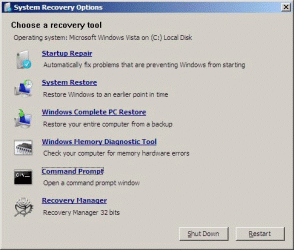
When you get to this screen use the Recovery.

RecoveryPartition03.gif
 

My Computer My Computer

OS
ME/XP/Vista/Win7
When you get to this screen use the Recovery.

View attachment 332589

The windows 7 discs I have none of them has this 6th recovery manager option. My discs shows only 5 options till Command prompt. I will download another updated copy of windows 7 soon and try that option.

Thanks
 

My Computer My Computer

Computer type
Tablet
Computer Manufacturer/Model Number
Fujisu f-07c
OS
windows 7 home premium 32bit
CPU
Intel Atom z600
Motherboard
unknown
Memory
1 GB
Graphics Card(s)
intel GMA
Hard Drives
eMMC SSD
Antivirus
unknown
Browser
unknown
You will only see the 6th Recovery Manager option, with the Fujitsu Recovery. Press the F8 key at boot up.
 

My Computer My Computer

OS
ME/XP/Vista/Win7
You will only see the 6th Recovery Manager option, with the Fujitsu Recovery. Press the F8 key at boot up.

No key is working at startup only f12 is working for boot options mentioned above. When I entered in boot options there are 2 tabs

1- Boot menu
2- Recovery menu

In recovery menu there is that option "recovery and utility". When I select recovery and utility options it gets to windows startup repair. As I have mentioned you before that I have changed its language from japanees so all stuff is in japanees I am unbale to understand. In startup repair it searches for something for a longtime and then gives error with some options. I have selected all possible options including recovery options the image you pasted above. But,

In recovery options it only shows only 2 options "Startup restore" and another "ambulance" symbol (never seen it before). not even command prompt no recovery manager.

When I select startup repair after (recognized by symbol) after long time it gives error.
In ambulance options it shows some tools for hardware diaganostic and in other options it shows drive I have selected all drives it searches for something (I guess restore point) and then gives error and it simply just restarts.

I really appreciate all your replies.

Thanks
 

My Computer My Computer

Computer type
Tablet
Computer Manufacturer/Model Number
Fujisu f-07c
OS
windows 7 home premium 32bit
CPU
Intel Atom z600
Motherboard
unknown
Memory
1 GB
Graphics Card(s)
intel GMA
Hard Drives
eMMC SSD
Antivirus
unknown
Browser
unknown
Try the hardware diagnostics.

I have tried it too. No error.

In hardware diagnostics it show 8 devices in which 4 are built in (I mean like keyboard mouse RAM etc.) and 4 devices are others (like CD ROM, Floppy Drive etc.). On board devices are checked already and others are unchecked. When I run diagnostic It load and check things for around 10 minutes and then it closes. and when I select all devices including those which are not connected then after 10 minutes it gives error by making a red symbol on all disconnected devices.

In hirens boot I have run diagnostics and all things seems fine.

From other forums and net surfing... They clearly said that without drivers you can not install windows in it. Try find suitable driver for your drive (eMMC SSD) with respect to your hardware there is no other way.

I think finding driver is the only solution for it. I am unable to find it till now.

Thanks
 

My Computer My Computer

Computer type
Tablet
Computer Manufacturer/Model Number
Fujisu f-07c
OS
windows 7 home premium 32bit
CPU
Intel Atom z600
Motherboard
unknown
Memory
1 GB
Graphics Card(s)
intel GMA
Hard Drives
eMMC SSD
Antivirus
unknown
Browser
unknown
You could try the Fujtsu website for the drivers, but may send you to a page in Japanese.
 

My Computer My Computer

OS
ME/XP/Vista/Win7
You could try the Fujtsu website for the drivers, but may send you to a page in Japanese.

I had visited Fujitsu site but there is only a little info regarding F-07c. Then after surfing google I noticed that Fujitsu phones regarding detailed site is "fmworld.net". In this SITE (translated the page), in FAQs they clearly said that you cant update windows and you can niether downgrade windows any thing happens then perform recovery. There are no drivers no nothing
I have seen Youtube videos in which users have ported windows 8. I have asked them how you ported it but I got no response from them.
 

My Computer My Computer

Computer type
Tablet
Computer Manufacturer/Model Number
Fujisu f-07c
OS
windows 7 home premium 32bit
CPU
Intel Atom z600
Motherboard
unknown
Memory
1 GB
Graphics Card(s)
intel GMA
Hard Drives
eMMC SSD
Antivirus
unknown
Browser
unknown
What an interesting issue!

I looked around and found User's Manual for Windows(R)7 F-07C | Support | NTT DOCOMO

It wouldn't load in my browsers (or it took too long), so I downloaded the PDF.

There is recovery space on the drive which can be used to Restore the device to Factory defaults. I did not read the entire document, so you should probably back up what you can in case this operation resets all the data, not just Windows7.

I printed the pertinent pages to a separate PDF in case you cannot download the whole file, but I suggest you get the entire document - it is always better to reference the original source. The recovery information begins on page 87, but I included the precautions and backup pages.

That's about all I can offer - good luck.

Bill
.
 

Attachments

My Computer My Computer

Computer type
Laptop
Computer Manufacturer/Model Number
HP Pavilion dv6-6c10us
OS
x64 (6.3.9600) Win8.1 Pro & soon dual boot x64 (6.1.7601) Win7_SP1 HomePrem
CPU
AMD A6-3420M APU with Radeon(tm) HD Graphics
Motherboard
Hewlett-Packard 1805
Memory
6.00 GB
Graphics Card(s)
AMD Radeon(TM) HD 6520G
Sound Card
(1) AMD High Definition Audio Device (2) IDT High Definiti
Monitor(s) Displays
HP W2072a 20" LCD (1600 x 900) @ 60 Hz
Screen Resolution
1366 x 768 x 32 bits (4294967296 colors) @ 60 Hz
Hard Drives
ST640LM0 00 HM641JI SATA Disk Device
Keyboard
Logitech k520 wireless KB
Mouse
Logitech m320 wireless mouse (bundled with KB)
Internet Speed
15/5 | 54 MB Wireless 'n'
Antivirus
Realtime: Defender or Avast | On-demand: Malwarebytes, ESET
Browser
IE 11 on Win8, IE 10 on win 7
Other Info
Media: [Gimp, Audacity, VLC] || Comm: [WEmail 2012, Skype] || Productivity: [OpenOffice,| Textpad] || Utils: [Sysinternals, cCleaner, Speccy, Defraggler]
Back
Top