How to keep both audios while converting?

akbagaria

New member
Member
Local time
3:39 AM
Messages
39
I have downloaded one movie file in mkv h264 format which does not play on my Seagate FreeAgent Theatre+ hd player. I have converted the same into again mkv h264 format - strangely which plays after conversion but only with one audio track i.e english. But I want to have both audio tracks in the converted file. There is no option in A. T.video converter to select both audio tracks at the time of conversion. I can select only one audio . Could someone help me suggest how to go about it to have both audio tracks while converting. Please suggest the name of the softwares and step by step guidance.
I would also like to have your guidance for the following:
Sometimes I want to convert only the audio tracks from aac or ac3 to mp3 while keeping the video format as it is. Please let me know the name of the softwares and step by step guidance.
I would appreciate your valuable guidance and help.
akb
 
Last edited:

My Computer

Computer Manufacturer/Model Number
Assembled
OS
Windows 7 x 64 Bit
CPU
Intel E2180
Motherboard
Intel D945GCPE
Memory
1 GB
Graphics Card(s)
None. Built in
Sound Card
None. Built in
Monitor(s) Displays
Samsung SyncMaster 920NW
Hard Drives
Samsung HD503HI - 500 GB
Case
Chinese
Cooling
Non extra
I've no idea whether it's the best option (its certainly one of the best), but HandBrake will do those things - in fact, its default behaviour is to include all audio streams.

Note that it doesn't do the effects, watermarking and other stuff that the software you use now can do. It's just a high quality transcoder.

As for step-by-step instructions - https://trac.handbrake.fr/wiki/HandBrakeGuide
 

My Computer

Computer Manufacturer/Model Number
AOpen MP45
OS
Windows 7 Pro x86
CPU
T6600 @ 0.975V
Motherboard
i45GMx-I
Memory
4GB DDRII-800
Graphics Card(s)
Onboard Intel 4500mhd
Sound Card
Onboard Realtek + SteelSeries USB
Monitor(s) Displays
Asus ProArt 246
Screen Resolution
1920x1200
Hard Drives
Seagate Momentus XT 750
Keyboard
Cherry G230
Mouse
MS Wireless 3500
Thanks Mr Murmatron for your valuable help. This software did help me keeping both the audio files while converting. I have started using HandBrake. I would be grateful if you suggest me some more softwares.
Also please look into my second problem:

Sometimes I want to convert only the audio tracks from aac or ac3 to mp3 while keeping the video format as it is. Please let me know the name of the softwares and step by step guidance.

Many thanks in advace.

akb:D
 

My Computer

Computer Manufacturer/Model Number
Assembled
OS
Windows 7 x 64 Bit
CPU
Intel E2180
Motherboard
Intel D945GCPE
Memory
1 GB
Graphics Card(s)
None. Built in
Sound Card
None. Built in
Monitor(s) Displays
Samsung SyncMaster 920NW
Hard Drives
Samsung HD503HI - 500 GB
Case
Chinese
Cooling
Non extra
Also please look into my second problem:

-snip-

akb:D

Hello akbagaria, there are 2 programs that will accomplish what you seek,

MKVMerge (from the mkvtoolnix package) and

http://www.bunkus.org/videotools/mkvtoolnix/win32/mkvtoolnix-unicode-5.6.0.7z

Audacity (the software that will let you remix/downsample your audio to other formats)

Audacity: Free Audio Editor and Recorder


Firstly, you need to rip/demux the audio out of the video using MKVMerge GUI:-


Unzip the downloaded package and run mmg.exe (MKVMerge GUI)

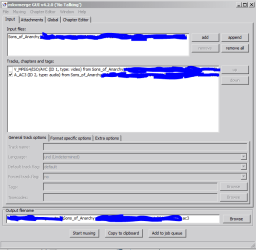
Drag the mkv file into the GUI (go to the folder where you downloaded the tools for it to be read, untick the video track and leave the audio track ticked, and in the output filename, just type in whatever you want with the audio extension at the end.

In the example i've shown you, i'm ripping out the 5.1 ac3 track of this Sons of Anarchy episode I got from Itunes.


Capture2.PNG


Notice the file extension at the end is ac3, if the track's source is MP3, label it as .mp3, AAC, label it as .aac and so on and so forth.

Click start muxing, and after a short while your newly splitted audio track will be ready to be used for next step...


Secondly you need to use Audacity to convert the audio into whatever format you want:


Install then run Audacity. Drag the audio file into Audacity's main window.

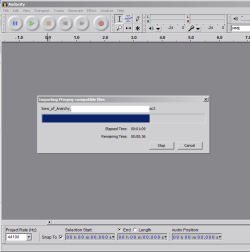
Depending on the length of the track it might take some time to import it.

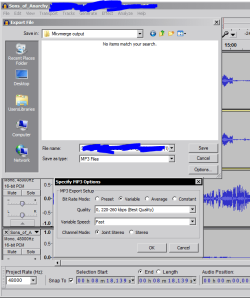
Then export the file into the format you want to convert it to. Eg save to mp3 if you want mp3 and so on...

Don't forget to install these lame and ffmpeg plugins for Audacity to allow Audacity to recognise more audio tracks:-

View attachment Audacity plugins.zip

For this example, i'm downmixing the ac3 file i got from mkvmerge into an mp3 file..

Capture4.PNG


When it's done, click on File --> export then choose the format you want to export it to as in this diagram (change the save as type to export to that format); click on options for further choices for the particular file type.


Capture5.PNG


Wait till it's done (might take a while depending on the size).

When it's finished, it's time for the last step!


Lastly, merge/mux the audio track back into the video you originally split the audio from


Open up MKVMerge (mmg.exe) again, drag the original video in, drag your newly created audio file from Audacity, untick the audio file that came with the video and tick the audio track that you have just created from Audacity, and start muxing..

The final product is your intended video. It may seem complicated to do, but the total time spent is much much lower than if you had to transcode the video and audio in Handbrake!


That's all there is to it!


Hope that helps!
 
Last edited:

My Computer

Computer Manufacturer/Model Number
DELL SXPS 1640
OS
Windows 7 x64 Professional SP1
CPU
Intel C2D T9550 2.66 GHz @ 2.793 GHz (Thanks ThrottleStop!!)
Motherboard
Intel PM45
Memory
8 GB DDR3
Graphics Card(s)
ATI MOBILITY RADEON 4670
Sound Card
CREATIVE XFI AUDIO NOTEBOOK
Monitor(s) Displays
16.1 WLED
Screen Resolution
1920x1080
Hard Drives
Seagate ST9500420AS 500GB (465GiBi) 7200 RPM Drive

External Drives:-
2 TB WD Essentials x 3
1 TB WD Mybook Gen 1
1 TB WD Mybook Gen 2
1 TB Seagate
1 TB Seagate
320 GB WD Scorpio Black (enclosed)
PSU
90W Dell Power Brick
Case
Dell Chassis
Cooling
Coolermaster Cooling Pad
Keyboard
Built-in backlighted Keyboard
Mouse
Logitech Wireless Mini Mouse
Internet Speed
4/0.5
Thanks for quick help Mr SolarMistic. I will download the software and try to do as you have suggested. Let us see whether I can perform exactly.
 

My Computer

Computer Manufacturer/Model Number
Assembled
OS
Windows 7 x 64 Bit
CPU
Intel E2180
Motherboard
Intel D945GCPE
Memory
1 GB
Graphics Card(s)
None. Built in
Sound Card
None. Built in
Monitor(s) Displays
Samsung SyncMaster 920NW
Hard Drives
Samsung HD503HI - 500 GB
Case
Chinese
Cooling
Non extra
Not a problem.

Report your findings back to us whenever you can. I'd be interested to know if it works for you like it did for me.
 

My Computer

Computer Manufacturer/Model Number
DELL SXPS 1640
OS
Windows 7 x64 Professional SP1
CPU
Intel C2D T9550 2.66 GHz @ 2.793 GHz (Thanks ThrottleStop!!)
Motherboard
Intel PM45
Memory
8 GB DDR3
Graphics Card(s)
ATI MOBILITY RADEON 4670
Sound Card
CREATIVE XFI AUDIO NOTEBOOK
Monitor(s) Displays
16.1 WLED
Screen Resolution
1920x1080
Hard Drives
Seagate ST9500420AS 500GB (465GiBi) 7200 RPM Drive

External Drives:-
2 TB WD Essentials x 3
1 TB WD Mybook Gen 1
1 TB WD Mybook Gen 2
1 TB Seagate
1 TB Seagate
320 GB WD Scorpio Black (enclosed)
PSU
90W Dell Power Brick
Case
Dell Chassis
Cooling
Coolermaster Cooling Pad
Keyboard
Built-in backlighted Keyboard
Mouse
Logitech Wireless Mini Mouse
Internet Speed
4/0.5
I've no idea whether it's the best option (its certainly one of the best), but HandBrake will do those things - in fact, its default behaviour is to include all audio streams.

Note that it doesn't do the effects, watermarking and other stuff that the software you use now can do. It's just a high quality transcoder.

As for step-by-step instructions - https://trac.handbrake.fr/wiki/HandBrakeGuide

I have downloaded HandBrake and converted few movie files. But I have found some anomalies in the converted files.
When I play the converted files and fast forward it by 20 minutes with right arrow key or back track it by 20 minutes with left arrow key - the file advances by 20 minutes but keeps on advancing instead of stopping and playing the video files. Then I have to pause the video and then re-play it with the same key.
Either I have not converted the video properly or there are some anomalies in the software itself.
Any help would be highly appreciated
 

My Computer

Computer Manufacturer/Model Number
Assembled
OS
Windows 7 x 64 Bit
CPU
Intel E2180
Motherboard
Intel D945GCPE
Memory
1 GB
Graphics Card(s)
None. Built in
Sound Card
None. Built in
Monitor(s) Displays
Samsung SyncMaster 920NW
Hard Drives
Samsung HD503HI - 500 GB
Case
Chinese
Cooling
Non extra
If I may help you out in the place murmatron since he's offline, I have 2 questions.

1. Which preset/settings did you use for Handbrake to encode your file(s)?

2. Which media player and/or codecs are you using playback the files that you've just converted?


EDIT:-

I've just played back a file i just encoded from Handbrake using my media player which is Media Player Classic Home Cinema, and tried what you did, the fast forwarding and rewinding using the left and right arrow keys work fine for me.
 

My Computer

Computer Manufacturer/Model Number
DELL SXPS 1640
OS
Windows 7 x64 Professional SP1
CPU
Intel C2D T9550 2.66 GHz @ 2.793 GHz (Thanks ThrottleStop!!)
Motherboard
Intel PM45
Memory
8 GB DDR3
Graphics Card(s)
ATI MOBILITY RADEON 4670
Sound Card
CREATIVE XFI AUDIO NOTEBOOK
Monitor(s) Displays
16.1 WLED
Screen Resolution
1920x1080
Hard Drives
Seagate ST9500420AS 500GB (465GiBi) 7200 RPM Drive

External Drives:-
2 TB WD Essentials x 3
1 TB WD Mybook Gen 1
1 TB WD Mybook Gen 2
1 TB Seagate
1 TB Seagate
320 GB WD Scorpio Black (enclosed)
PSU
90W Dell Power Brick
Case
Dell Chassis
Cooling
Coolermaster Cooling Pad
Keyboard
Built-in backlighted Keyboard
Mouse
Logitech Wireless Mini Mouse
Internet Speed
4/0.5
Excellent Mr SolarMystic. I have downloaded MKVToolnix, Audacity and its plug-ins as you suggested and carried out precisely as per your instructions. The end result was excellent as far as playing the same on my PC is concerned. Now I will have to check the video file on my Seagate Free Agent Theatre. Yes it takes less time.
Could you please guide me for extracting the video file and convert it to some other video format and merge it with the original audio files.

Thanks for your help.

akb
 

My Computer

Computer Manufacturer/Model Number
Assembled
OS
Windows 7 x 64 Bit
CPU
Intel E2180
Motherboard
Intel D945GCPE
Memory
1 GB
Graphics Card(s)
None. Built in
Sound Card
None. Built in
Monitor(s) Displays
Samsung SyncMaster 920NW
Hard Drives
Samsung HD503HI - 500 GB
Case
Chinese
Cooling
Non extra
If I may help you out in the place murmatron since he's offline, I have 2 questions.

1. Which preset/settings did you use for Handbrake to encode your file(s)?

2. Which media player and/or codecs are you using playback the files that you've just converted?

EDIT:-

I've just played back a file i just encoded from Handbrake using my media player which is Media Player Classic Home Cinema, and tried what you did, the fast forwarding and rewinding using the left and right arrow keys work fine for me.

I am using Seagate Free Agent Theatre + HD Media Player on my Sony LCD Tv for playback. I had tried 3 or 4 video files and alll of them gives the same anomaly. If I directly play the video without going into fastforwarding or backtracking (20 minutes option) then the file plays ok. I have been using this Seagate Media player since last 18 months or so and did not find any problem with the same. Also the other video files which have not been converted with the help of HandBrake are playing perfectly fine.
 

My Computer

Computer Manufacturer/Model Number
Assembled
OS
Windows 7 x 64 Bit
CPU
Intel E2180
Motherboard
Intel D945GCPE
Memory
1 GB
Graphics Card(s)
None. Built in
Sound Card
None. Built in
Monitor(s) Displays
Samsung SyncMaster 920NW
Hard Drives
Samsung HD503HI - 500 GB
Case
Chinese
Cooling
Non extra
I'm glad it worked out for you!


How to demux a video stream from a video file and combine it later with unaltered audio


The principles are the same, but this time you'll have to use MKVToolnix and Handbrake.
(which was linked to in our previous posts)

Since you're familiar with the principles of MKVToolnix and Handbrake as suggested by the 1st helper, i'll be more brief this time around.


Steps to follow:-


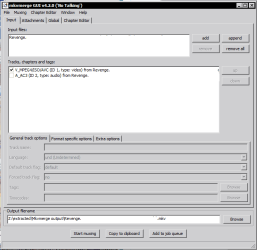
Example this time is a mkv video file of an episode from the series Revenge.

1) Demux the video from the audio using MKVToolnix; instead of ticking the audio file, you will now tick just the video file and leave the audio file unticked.


Capture2.PNG


2) This time around you want the output file to have an extension of .mkv, as it's the only container supported by MKVToolnix (as the name suggests)


3) Click start muxing and wait while the video file is output


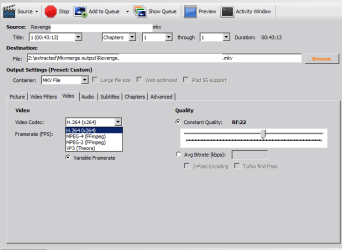
Next step is to convert the video file format to another one of your choice using Handbrake.


4) Open Handbrake


5) Drag the newly created video file (the one without any audio) into Handbrake


6) Choose your preferred video format from the video tab in Handbrake (you should know better than i do which formats your Free Agent Theatre supports)


Capture3.PNG


7) When you're satisfied with the desired codec and quality settings (make sure the settings/profiles are supported by your respective media device), and destination, click the green start button at the top


8) Wait until it's done. (This will take much longer because you are transcoding video this time, audio takes much faster to process than video)


Finally, It's time to combine the two:-


9) Open MKVToolnix again, drag the newly processed mp4/mkv/m4va file you made in Handbrake into MKVToolnix


10) This next step is important; tick the original audio track(s) you want, and also the video track of the video file you dragged into MKVToolnix, don't forget to untick the original video track.


11) Click start muxing and wait for the output to finish.


That's it! You're all done!


Hope that helps!
 
Last edited:

My Computer

Computer Manufacturer/Model Number
DELL SXPS 1640
OS
Windows 7 x64 Professional SP1
CPU
Intel C2D T9550 2.66 GHz @ 2.793 GHz (Thanks ThrottleStop!!)
Motherboard
Intel PM45
Memory
8 GB DDR3
Graphics Card(s)
ATI MOBILITY RADEON 4670
Sound Card
CREATIVE XFI AUDIO NOTEBOOK
Monitor(s) Displays
16.1 WLED
Screen Resolution
1920x1080
Hard Drives
Seagate ST9500420AS 500GB (465GiBi) 7200 RPM Drive

External Drives:-
2 TB WD Essentials x 3
1 TB WD Mybook Gen 1
1 TB WD Mybook Gen 2
1 TB Seagate
1 TB Seagate
320 GB WD Scorpio Black (enclosed)
PSU
90W Dell Power Brick
Case
Dell Chassis
Cooling
Coolermaster Cooling Pad
Keyboard
Built-in backlighted Keyboard
Mouse
Logitech Wireless Mini Mouse
Internet Speed
4/0.5
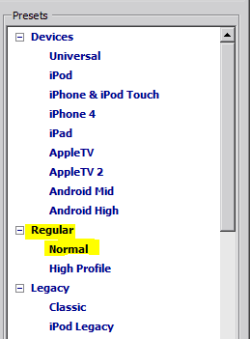
I have used - Regular - Normal under mkv container.
 

My Computer

Computer Manufacturer/Model Number
Assembled
OS
Windows 7 x 64 Bit
CPU
Intel E2180
Motherboard
Intel D945GCPE
Memory
1 GB
Graphics Card(s)
None. Built in
Sound Card
None. Built in
Monitor(s) Displays
Samsung SyncMaster 920NW
Hard Drives
Samsung HD503HI - 500 GB
Case
Chinese
Cooling
Non extra
Thanks for sending me promptly the details of demuxing video streams. I will try this also and give you feedback.
The video file which I had converted using mkvtoolnix and audacity - did not play on my Seagate Free Agent Theatre. This time Video was not playing. Therefore I will have to convert the video now and merge the audio with the converted video file and see if it works.
Could you please also help me in finding out the following :

Following mkv format does not play on my Seagate Free Agent:-
Format : Matroska
Format version : Version 2
File size : 696 MiB
Duration : 1h 44mn
Overall bit rate mode : Variable
Overall bit rate : 930 Kbps
Encoded date : UTC 2012-07-07 11:17:24
Writing application : mkvmerge v5.4.0 ('Piper') built on Mar 10 2012 13:34:39
Writing library : libebml v1.2.3 + libmatroska v1.3.0
Video
ID : 1
Format : AVC
Format/Info : Advanced Video Codec
Format profile : [email protected]
Format settings, CABAC : Yes
Format settings, ReFrames : 3 frames
Muxing mode : Header stripping
Codec ID : V_MPEG4/ISO/AVC
Duration : 1h 44mn
Bit rate mode : Variable
Nominal bit rate : 801 Kbps
Maximum bit rate : 40.0 Mbps
Width : 720 pixels
Height : 464 pixels
Display aspect ratio : 2.35:1
Original display aspect ratio : 1.552
Frame rate : 29.970 fps
Color space : YUV
Chroma subsampling : 4:2:0
Bit depth : 8 bits
Scan type : Progressive
Bits/(Pixel*Frame) : 0.080
Title : aaaevilacharya
Writing library : x264 core 80 r1376M 3feaec2
Encoding settings : cabac=1 / ref=4 / deblock=1:0:0 / analyse=0x3:0x113 / me=hex / subme=7 / psy=1 / psy_rd=1.0:0.0 / mixed_ref=1 / me_range=16 / chroma_me=1 / trellis=0 / 8x8dct=1 / cqm=0 / deadzone=21,11 / fast_pskip=1 / chroma_qp_offset=-2 / threads=12 / sliced_threads=0 / slices=4 / nr=0 / decimate=1 / mbaff=0 / constrained_intra=0 / bframes=3 / b_pyramid=1 / b_adapt=1 / b_bias=0 / direct=1 / wpredb=1 / wpredp=2 / keyint=24 / keyint_min=2 / scenecut=40 / rc_lookahead=24 / rc=2pass / mbtree=1 / bitrate=801 / ratetol=1.0 / qcomp=0.60 / qpmin=10 / qpmax=51 / qpstep=4 / cplxblur=20.0 / qblur=0.5 / vbv_maxrate=40000 / vbv_bufsize=30000 / ip_ratio=1.40 / aq=1:1.00
Language : English
Default : No
Forced : No

But the following mkv format plays:
Format : Matroska
Format version : Version 2
File size : 703 MiB
Duration : 1h 42mn
Overall bit rate : 956 Kbps
Video
ID : 1
Format : AVC
Format/Info : Advanced Video Codec
Format profile : [email protected]
Format settings, CABAC : Yes
Format settings, ReFrames : 2 frames
Format settings, GOP : M=3, N=12
Codec ID : V_MPEG4/ISO/AVC
Duration : 1h 42mn
Bit rate : 768 Kbps
Width : 1 280 pixels
Height : 688 pixels
Display aspect ratio : 1.860
Frame rate : 24.000 fps
Color space : YUV
Chroma subsampling : 4:2:0
Bit depth : 8 bits
Scan type : Progressive
Bits/(Pixel*Frame) : 0.036
Stream size : 548 MiB (78%)
Writing library : x264 core 77
Encoding settings : cabac=1 / ref=1 / deblock=1:0:0 / analyse=0x1:0x11 / me=hex / subme=5 / psy=1 / psy_rd=0.0:0.0 / mixed_ref=0 / me_range=16 / chroma_me=1 / trellis=1 / 8x8dct=0 / cqm=0 / deadzone=21,11 / chroma_qp_offset=0 / threads=2 / nr=0 / decimate=1 / mbaff=0 / constrained_intra=0 / bframes=2 / b_pyramid=0 / b_adapt=1 / b_bias=0 / direct=1 / wpredb=0 / keyint=12 / keyint_min=7 / scenecut=40 / rc_lookahead=12 / rc=abr / mbtree=1 / bitrate=768 / ratetol=1.0 / qcomp=0.60 / qpmin=10 / qpmax=51 / qpstep=4 / ip_ratio=1.41 / aq=1:1.00
Language : English
Default : Yes
Forced : No

Could you please enlighten me the difference in the above two formats. Both are mkv. Also the fastest way to convert the un-playable mkv format to playable mkv format.
Many thanks in advance

 

My Computer

Computer Manufacturer/Model Number
Assembled
OS
Windows 7 x 64 Bit
CPU
Intel E2180
Motherboard
Intel D945GCPE
Memory
1 GB
Graphics Card(s)
None. Built in
Sound Card
None. Built in
Monitor(s) Displays
Samsung SyncMaster 920NW
Hard Drives
Samsung HD503HI - 500 GB
Case
Chinese
Cooling
Non extra
It looks like your player does not support the .h264 L4.1 High Profile with Variable Bitrate from handbrake. The High Profile is often only compatible with devices like Bluray players and computers.

Format profile : [email protected] Bit rate mode : Variable
The file that plays properly on your Seagate device is encoded in a .h264 L3.1 Main Profile and a constant bitrate which is less taxing, and supported by more streaming devices and Apple products

Format profile : [email protected] Bit rate : 768 Kbps
In that case, the easiest way to convert the unplayable file is to put it back into Handbrake, and select the Normal profile from the preset selection on the right hand side of the screen.

Also, don't forget to select Constant Framerate and an Average Bitrate in the video section

Capture2.PNG

Capture3.PNG

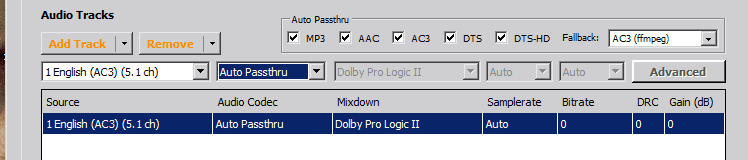
If you want to keep the audio the same quality and not have Handbrake touch it again all you have to do is select Auto Passthrough on the Audio drop down tab in the Audio section.

Capture5.PNG

Then start your encode using the normal profile (which is equivalent to the main profile), and hopefully the file should work on your device!

Hope that helps!
 
Last edited:

My Computer

Computer Manufacturer/Model Number
DELL SXPS 1640
OS
Windows 7 x64 Professional SP1
CPU
Intel C2D T9550 2.66 GHz @ 2.793 GHz (Thanks ThrottleStop!!)
Motherboard
Intel PM45
Memory
8 GB DDR3
Graphics Card(s)
ATI MOBILITY RADEON 4670
Sound Card
CREATIVE XFI AUDIO NOTEBOOK
Monitor(s) Displays
16.1 WLED
Screen Resolution
1920x1080
Hard Drives
Seagate ST9500420AS 500GB (465GiBi) 7200 RPM Drive

External Drives:-
2 TB WD Essentials x 3
1 TB WD Mybook Gen 1
1 TB WD Mybook Gen 2
1 TB Seagate
1 TB Seagate
320 GB WD Scorpio Black (enclosed)
PSU
90W Dell Power Brick
Case
Dell Chassis
Cooling
Coolermaster Cooling Pad
Keyboard
Built-in backlighted Keyboard
Mouse
Logitech Wireless Mini Mouse
Internet Speed
4/0.5
Thanks for feedback.
I usually prefer A.T.Video converter which gives excellent video reproduction of the converted file(100% identitical conversion of the original file) and the conversion rate is much faster than the other converters.
HandBrake seems to me very useful if I could just solve the problem I am facing while advancing and backtracking by 20 minutes. Maybe you could help me in near future.
Thanks once again for taking interest in my queries.
akb
 
Last edited:

My Computer

Computer Manufacturer/Model Number
Assembled
OS
Windows 7 x 64 Bit
CPU
Intel E2180
Motherboard
Intel D945GCPE
Memory
1 GB
Graphics Card(s)
None. Built in
Sound Card
None. Built in
Monitor(s) Displays
Samsung SyncMaster 920NW
Hard Drives
Samsung HD503HI - 500 GB
Case
Chinese
Cooling
Non extra
Thanks for feedback.
I usually prefer Aiss.Total Video converter which gives excellent video reproduction of the converted file(100% identitical conversion of the original file) and the conversion rate is much faster than the other converters.
HandBrake seems to me very useful if I could just solve the problem I am facing while advancing and backtracking by 20 minutes. Maybe you could help me in near future.
Thanks once again for taking interest in my queries.
akb

When playing the file on your computer do you get the same problems with the 20 minutes back tracking?

Try using another media player like Media Player Classic or VLC.
 

My Computer

Computer Manufacturer/Model Number
DELL SXPS 1640
OS
Windows 7 x64 Professional SP1
CPU
Intel C2D T9550 2.66 GHz @ 2.793 GHz (Thanks ThrottleStop!!)
Motherboard
Intel PM45
Memory
8 GB DDR3
Graphics Card(s)
ATI MOBILITY RADEON 4670
Sound Card
CREATIVE XFI AUDIO NOTEBOOK
Monitor(s) Displays
16.1 WLED
Screen Resolution
1920x1080
Hard Drives
Seagate ST9500420AS 500GB (465GiBi) 7200 RPM Drive

External Drives:-
2 TB WD Essentials x 3
1 TB WD Mybook Gen 1
1 TB WD Mybook Gen 2
1 TB Seagate
1 TB Seagate
320 GB WD Scorpio Black (enclosed)
PSU
90W Dell Power Brick
Case
Dell Chassis
Cooling
Coolermaster Cooling Pad
Keyboard
Built-in backlighted Keyboard
Mouse
Logitech Wireless Mini Mouse
Internet Speed
4/0.5
Thanks Mr SolarMystic. Please note down the following points with regard to HandBrake:
1 Video file converted with the help of above software plays welll in all media players including Seagate Free Agent Theatre.
2 It is only the fast forwarding and backtracking (20 minutes) option which is causing anomalies. Here I am using Seagate Free Agent Theatre with my Sony LCD TV.
3 There are no such options of fast forwarding or backtracking by 20 minutes in Windows Media Player or VLC. Hence cannot compare. I can move the slider of WMP or VLC by 20 or 30 minutes by jerk and while doing so there are no anomlies whatsoever.
4 I am totally confused now since using mkvmerge and audacity did not solve the problem. Now the video(converted one) does not play in Seagate Free Agent after merging with the converted (mp3 from aac) whereas it plays in PC. So no end to the problem.
However I am enjoying learning so many things with your help. Please keep on guiding me. It could be possible that I am facing the problem only in Seagate Theatre. But the other formats including mkv plays well and there are no anomalies in FF and BT (20 minutes) option in Seagate FA. So this makes me think that my Seagate Free Agent is functioning well.
Thanks
 

My Computer

Computer Manufacturer/Model Number
Assembled
OS
Windows 7 x 64 Bit
CPU
Intel E2180
Motherboard
Intel D945GCPE
Memory
1 GB
Graphics Card(s)
None. Built in
Sound Card
None. Built in
Monitor(s) Displays
Samsung SyncMaster 920NW
Hard Drives
Samsung HD503HI - 500 GB
Case
Chinese
Cooling
Non extra
You're welcome, and it's not Mr. ;)

Those are some interesting observations, but honestly, i'm afraid that I've reached the somewhat limited end of my knowledge into the matter. Especially with regards to the intricacies of the specific formats and settings in Handbrake that Seagate Theatre may or may not accept.

I stream my videos/films from my computer using a PS3 as my media extender employing PS3 Media Server for that purpose, so the videos often do not require any transcoding by Handbrake and only in the few that do I use Handbrake. For video watching on the go, I use Handbrake's built in presets (my device is an archiac Nokia N95 which only supports baseline h264 profiles, and uses the same preset like the older Apple iPods)

For that, I sincerely offer you my deepest apologies; you have been a good student and following up on my thread quite diligently. My knowledge is kinda limited when it comes to the vast range of external media devices like your Seagate.
 

My Computer

Computer Manufacturer/Model Number
DELL SXPS 1640
OS
Windows 7 x64 Professional SP1
CPU
Intel C2D T9550 2.66 GHz @ 2.793 GHz (Thanks ThrottleStop!!)
Motherboard
Intel PM45
Memory
8 GB DDR3
Graphics Card(s)
ATI MOBILITY RADEON 4670
Sound Card
CREATIVE XFI AUDIO NOTEBOOK
Monitor(s) Displays
16.1 WLED
Screen Resolution
1920x1080
Hard Drives
Seagate ST9500420AS 500GB (465GiBi) 7200 RPM Drive

External Drives:-
2 TB WD Essentials x 3
1 TB WD Mybook Gen 1
1 TB WD Mybook Gen 2
1 TB Seagate
1 TB Seagate
320 GB WD Scorpio Black (enclosed)
PSU
90W Dell Power Brick
Case
Dell Chassis
Cooling
Coolermaster Cooling Pad
Keyboard
Built-in backlighted Keyboard
Mouse
Logitech Wireless Mini Mouse
Internet Speed
4/0.5
Thanks for your sincere admission. But I have not stopped experimenting with Handbrake software.
In the mean time I have converted 3 more files with the following result:

File: video file
Container: MP4
Codec: H264
Audio: AAC
Orig.File size: 746 MB
Conv File size: 1.27 GB (74% incrase in size)
Time taken to convert: 2 hours
Compression Ratio: 1 (Under Advanced Option)
Frame Rate: As source, Variable, Constant
Final Report : Playable in Seagate without any anomalies, Good Picture quality.
Disadvantage: File size too big than the original ( 74% increase)


File: Video file
Container: MP4
Codec: MPEG4
Audio: MP3
Orig file size: 661 MB
Converted file size: 773 MB
Time Taken To convert: 30 Minutes
Compression Ratio: 1 Under Advanced Option
Frame Rate: As source, Variable, constant,
Final Report: Playable in Seagate without any anomalies, Picture quality not as good
As the first one using codec h264. But good viewing in Theatre Mode of
TV. File size under control.

File: video file
Container: MP4
Codec: H264
Audio: MP3 Gain 10db
Orig. File Size: 697 MB
Conv File Size: 1.16 GB (70% increase in size)
Time Taken to convert: 38 minutes
Compression Ratio: 3 Under Advance Option
Frame Rate Original: 859 Bit rate
Encoded Bit Rate: 1200 Bit Rate Variable & Average Bit Rate
No check on 2 Pass encoding.
Final Report: Playable in Seagate without any anomalies. Picture Quality V Good.
Disadvantage: File size too big (70% increase than the original)

I think I can continue encoding with mp4 instead of mkv container and will have to decide between h264 and mpeg4 codec. My dilemma seems to be solved for the time being.
Thanks.
 

My Computer

Computer Manufacturer/Model Number
Assembled
OS
Windows 7 x 64 Bit
CPU
Intel E2180
Motherboard
Intel D945GCPE
Memory
1 GB
Graphics Card(s)
None. Built in
Sound Card
None. Built in
Monitor(s) Displays
Samsung SyncMaster 920NW
Hard Drives
Samsung HD503HI - 500 GB
Case
Chinese
Cooling
Non extra
It's great that you've figured it out.

The choice between .mp4 and .mkv seems to make all the difference from your observations!

I totally forgot about that bit; not all external media devices can handle the .mkv container natively, which is why i had to use PS3 Media Server to transcode videos to a format the PS3 can understand!

Good job on that discovery, it made me remember that little detail.
 

My Computer

Computer Manufacturer/Model Number
DELL SXPS 1640
OS
Windows 7 x64 Professional SP1
CPU
Intel C2D T9550 2.66 GHz @ 2.793 GHz (Thanks ThrottleStop!!)
Motherboard
Intel PM45
Memory
8 GB DDR3
Graphics Card(s)
ATI MOBILITY RADEON 4670
Sound Card
CREATIVE XFI AUDIO NOTEBOOK
Monitor(s) Displays
16.1 WLED
Screen Resolution
1920x1080
Hard Drives
Seagate ST9500420AS 500GB (465GiBi) 7200 RPM Drive

External Drives:-
2 TB WD Essentials x 3
1 TB WD Mybook Gen 1
1 TB WD Mybook Gen 2
1 TB Seagate
1 TB Seagate
320 GB WD Scorpio Black (enclosed)
PSU
90W Dell Power Brick
Case
Dell Chassis
Cooling
Coolermaster Cooling Pad
Keyboard
Built-in backlighted Keyboard
Mouse
Logitech Wireless Mini Mouse
Internet Speed
4/0.5
Back
Top