How To Keep Desktop PC On During Anti-Virus Scan?

woodbine

New member
Member
VIP
Local time
7:17 AM
Messages
178
Location
Bristol, UK
Would appreciate some help to make security scans easier for me. I have an Acer Aspire desktop pc and use Superantispyware. Scanning requires all internet browsers to be closed, so there isn't anything I can do on the computer.

As the scanning can take a while, I have to sit by the pc and move the mouse occasionally, or the pc will go into sleep mode through inactivity. Is there a way to keep the pc on for the whole scan (just for the scan - not to use for anything else), because if it goes into sleep, obviously the scan is paused? Whilst the scan is running, I would turn the monitor off in case there are problems with the screen image damaging/burning the screen.

Thanks for any advice.
 

My Computer My Computer

At a glance

Windows 7 Home Premium 64 bit SP1Intel i3 5403GB DDR3SD
Computer type
PC/Desktop
Computer Manufacturer/Model Number
Acer Aspire Desktop M3910
OS
Windows 7 Home Premium 64 bit SP1
CPU
Intel i3 540
Memory
3GB DDR3SD
Monitor(s) Displays
LG Flatron L1960TR
Screen Resolution
1280x1024
Keyboard
Acer
Mouse
Genius
Antivirus
Avast (Free)
Browser
I E 11
You could disable sleep mode on your computer - set it to "always on". I would strongly recommend that for a long, unattended activity like a full virus scan.

Is there a "smart" scan feature in SuperAntiSpyware? If there is, it will be a lot quicker than a full scan. You don't need to do a full scan everytime; doing so wastes a lot of time and puts a lot of wear and tear on your hard drive.
 

My Computer My Computer

At a glance

Linux Mint 18.2 xfce 64-bit (VMWare host) / W...Haswell4 GB
Computer type
PC/Desktop
Computer Manufacturer/Model Number
Dell
OS
Linux Mint 18.2 xfce 64-bit (VMWare host) / Windows 8.1 Pro 32-bit (VMWare guest)
CPU
Haswell
Memory
4 GB
Monitor(s) Displays
Acer 23"
Screen Resolution
1920 x 1080
Hard Drives
Two hard drives, 1TB each: One for Linux, one for my data.
Keyboard
IBM Model M
Antivirus
Sophos (Linux), Trend Micro (Windows)
Browser
Firefox, Opera
Other Info
I use Samba to share my data drive with the other computers at my house and with my guest session in VMWare Workstation Player.
Hi Woodbine,

first off SAS is NOT an A/V.
If thats all you've got get a proper one, plenty of free ones available, my AV of choice is Bitdefender and it can run whilst your using other programs.

As for your machine going into sleep mode during periods of inactivity - change the idle time settings in power options.

Roy
 

My Computer My Computer

At a glance

W7 home premium 32bit/W7HP 64bit/w10 tp insid...E5300 dual core3gbNvidia Geforce 7100 Nforce 630i
Computer type
PC/Desktop
Computer Manufacturer/Model Number
medionl/Aspire 6930G/acer x55a
OS
W7 home premium 32bit/W7HP 64bit/w10 tp insider ring
CPU
E5300 dual core
Motherboard
medion MS7366
Memory
3gb
Graphics Card(s)
Nvidia Geforce 7100 Nforce 630i
Monitor(s) Displays
avixc
Internet Speed
n (isp resticted to 72)
Antivirus
mse/pands
Browser
palemoon
Other Info
Belkin Fd7050 n USB using Railink RT2870 drivers, more upto date
Agree on getting something (s) other than Super AntiSpyware. And I know of no major scanners that won't work in the background while you do something else.
 

My Computer My Computer

At a glance

Windows 7 Pro 64
Computer type
PC/Desktop
OS
Windows 7 Pro 64
Hi woodbine,

A long time ago I felt like you do and I came up with a solution that works for me.

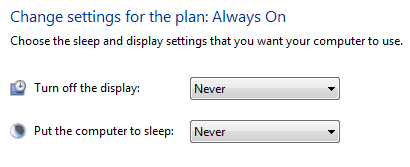
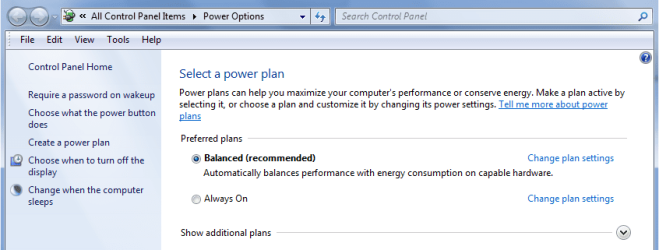
  • First I went into Control Panel\All Control Panel Items\Power Options and created a power plan called Always On.

  • In the linked tutorial above I left the radio button on Balanced and named the plan Always On, of course you can name your plan anyway you want.

  • In the next section I clicked on the down arrows and chose Never for each then tapped the create button.
ao.PNG

powopt.PNG

That created the plan, but I didn't want to have to drill into power options every time I was installing, uninstalling, running scans, or anything that I needed to have the machine on constantly so I created a shortcut called Power and pinned it to my taskbar. I used Option Four in this tutorial.

powshtct.png As far as pinning goes, you can sometimes see the CMD in the right-click context menu but I find it easier to just drag the newly created shortcut to the taskbar and drop it there.

When/If you decide to go this route and create the shortcut use this C:\Windows\System32\powercfg.cpl as the location.

~~~ ~~~~ ~~~

You can also change the plan instantly by using Option Two of this Tutorial, I say option two because you will have to know the GUID number of the Always Open CMD and place that GUID into the location for the shortcut.

   Note
If you go this route you will need to create another shortcut with the GUID number of your normally running power plan to take you back.
 

My Computer My Computer

At a glance

Originally Win 7 Hm Prem x64 Ver 6.1.7600 Bui...Intel i3 530 2.93GHz, 2933MHz 2 Cores 4 Logic...6GB of 1,333MHz DDR3 SDRAM32MB Intel Graphics Media Accelerator HD IGChip
Computer type
PC/Desktop
Computer Manufacturer/Model Number
Gateway DX4831-01e (Mid-Tower Desktop)
OS
Originally Win 7 Hm Prem x64 Ver 6.1.7600 Build 7601-SP1 | Upgraded to Windows 10 December 14, 2019
CPU
Intel i3 530 2.93GHz, 2933MHz 2 Cores 4 Logical Processors
Motherboard
Gateway H57M01 133 megahertz
Memory
6GB of 1,333MHz DDR3 SDRAM
Graphics Card(s)
32MB Intel Graphics Media Accelerator HD IGChip
Sound Card
Realtek High Definition Audio
Monitor(s) Displays
Gateway HX2000 20inch TFT active matrix TN
Screen Resolution
1600 x 900 x 59 hertz
Hard Drives
WDC WD10EADS-00M2B0 [HDD] (1000.20 GB) -- drive 0,
HL-DT-ST DVDRAM GH41N [CD-ROM dr]
Four card readers, and Four USB 2.0
PSU
300watts.
Case
Mid-Tower Desktop
Cooling
Stock from Gateway
Keyboard
Natural Ergonomic Keyboard 4000, see Other Info
Mouse
Orig. Gateway wore out now using Insignia USB wired optical
Internet Speed
Vz FIOS 10ms png 57.64Mbps down 65.53Mbps up Speedtest.org
Antivirus
Zamana Anti-logger with Anti-malware, MSE, Windows Firewall,
Browser
IE11.0.9600.19399-Upd ver11.0.135, Firefox 68.0.1 x64
Other Info
System Specs by Belarc.

BIOS: American Megatrends Inc. P01-A0 11/17/2009

Replaced the MS 'Natural' Standard PS/2 Enhanced 101-102 Keyboard with a new Natural Ergonomic Keyboard 4000 on August 1st 2014.

Canon Pixma MG3222 Printer.

Updated to IE11 on 12102015 | Fios Quantum Router g1100

Additional AV: SpywareBlaster, manual Mbam, SAS
Scanning requires all internet browsers to be closed

This is a red flag to me immediately, hinting that you're using a particularly broken antivirus. Never knew of one that requires, or even suggest to close everything for a scan. While an AV scan will obviously slow down the computer while using it, it shouldn't prevent using it. Maybe there is a setting regarding that? Just a guess anyway.
Another thing is that if an antivirus scan provides any security value at all..........
 

My Computer My Computer

At a glance

Windows 7 Ultimate x64Intel Core i7-740QM8 GB DDR3NVIDIA GeForce 330GT
Computer type
Laptop
Computer Manufacturer/Model Number
Toshiba Sattelite A665-S6092
OS
Windows 7 Ultimate x64
CPU
Intel Core i7-740QM
Memory
8 GB DDR3
Graphics Card(s)
NVIDIA GeForce 330GT
Screen Resolution
1366x768
Hard Drives
Samsung 840 SSD 500GB
1TB USB3 external HD
Cooling
Coolermaster Notepal U3 notebook cooling pad
Internet Speed
3mbps ASDL
Antivirus
ClamWin 0.98.7
Browser
Opera 12.17 x86 (main), Firefox 38 (sec), IE11 (last resort)
I have used Super Anti Spyware (Free) for years and the program has never ask to stop all internet connections.
I just did a scan to verify. It does the scan so quick your system shouldn't shut down. About 60 to 90 seconds.

If it does shut down follow the suggestion given above by other members.


Just set SAS to it's default settings and try the scan again.

Jack
 

My Computer My Computer

At a glance

Windows 10 Pro. 64/ version 1709 Windows 7 Pr...Intel i7-6800K @ 4.3Corsair Platinum 16 gig @2400EVGA GTX 1070 OC
Computer type
PC/Desktop
Computer Manufacturer/Model Number
Home made Desktop
OS
Windows 10 Pro. 64/ version 1709 Windows 7 Pro/64
CPU
Intel i7-6800K @ 4.3
Motherboard
ASUS X-99 Deluxe II
Memory
Corsair Platinum 16 gig @2400
Graphics Card(s)
EVGA GTX 1070 OC
Monitor(s) Displays
Asus 27" LED LCD/VE278Q
Screen Resolution
1920-1080 or 1280-720 HDMI
Hard Drives
INTEL SSD 730-240 Gb Sata 3.0/
PSU
EVGA Platium 1200W
Case
Phanteks Luxe Tempered Glass 8 fans/ one radiator
Cooling
XSPC/ Water Cooled CPU
Keyboard
Das 4 Professional
Mouse
Logitech M705/MX Anywhere 2-S
Internet Speed
100 mbits
Antivirus
Microsoft Security Essentials/ Malwarebytes Premium 3.0/ SAS
Browser
I.E. 11 default/Firefox/ ISP Time Warner Cable/Spectrum
Other Info
LG BluRay Burner/
Sound system-KLipsch-THX/
Icy Dock ssd Hot Swap bays.
Back
Top