How to legitimise Win7 license

wickens

New member
Local time
1:53 AM
Messages
2
Hi,
I have been asked to help a lady who has been defrauded with her system. She originally had a Vista based Acer laptop, which was upgraded by a 'friend' to Windows 7 (for which she was charged). It turns out that the Win7 version is an Enterprise edition and she doesn't have a licence key, any paperwork or software CD!
I would like to help her legitimise the Win7 licence but I am unsure if she should purchase an upgrade version or a full retail product. As this is in the UK the full retail version is very expensive and we would like to use an upgrade version if at all possible. Obviously, we would also like to avoid doing a clean installation if possible, but would appreciate views on which version to purchase. Finally, as the system currently runs the Enterprise version, can we replace this with a Home Premium version without doing a clean installation?
 

My Computer My Computer

At a glance

windows 7 Enterprise 32bit
Computer type
Laptop
Computer Manufacturer/Model Number
acer
OS
windows 7 Enterprise 32bit
Unfortunately-the Windows 7 Enterprise version is exactly that. The License is tied to a large firm under contract with Microsoft. With that said-you would do well to obtain the OEM edition of Windows 7 Professional, which has the feature set included in Enterprise. Most people don't need Ultimate or its cost. I never install Home Premium for clients unless they absolutely insist (true it is cheaper).
Another thing-the only way to do this will be a clean install. This is according to Microsoft. The only direct path for upgrades is Home-Pro-Ultimate. Make sure you have a disc with all of the drivers from Acer before starting. Windows 7 is very good with them but the vendor ones are usually better. Also, keep in mind that a new copy of Windows 7 (any version) should have SP-1 included. There will be a large group of updates to do after the machine is running. This will be a Clean install!

Good luck
 
Last edited:

My Computer My Computer

At a glance

Windows 7 Enterprise 64bit Desktops; Windows ...AMD Athlon 2 X3; I5-6200 6th gen (Dell)8 Gig Desktop, 8Gig Laptop, 16Gig LaptopRadeon R5450 1Gig
Computer type
PC/Desktop
Computer Manufacturer/Model Number
Custom Desktop (2 alike) Dell inspiron 13" W10 Laptop Dell Inspiron 17 5759
OS
Windows 7 Enterprise 64bit Desktops; Windows 7 Professional 64Bit 17"Laptop
CPU
AMD Athlon 2 X3; I5-6200 6th gen (Dell)
Motherboard
Gigabyte GA 78LMT-USB3 (2 Desktops)
Memory
8 Gig Desktop, 8Gig Laptop, 16Gig Laptop
Graphics Card(s)
Radeon R5450 1Gig
Sound Card
Creative SB X-Fi Titanium Extreme Audio Desktop 1
Monitor(s) Displays
Dell 2419
Screen Resolution
1920x1080
Hard Drives
Crucial M500 500GB SSD Desktop 1 and Laptops
Samsung 850EVO 250GB - Desktop 2
PSU
Thermaltake 600watt
Case
Rosewill
Cooling
Scythe Typhoon 120mm
Keyboard
Kensington
Mouse
Logitech M310
Internet Speed
50/50
Antivirus
Avast
Browser
Firefox 68

My Computer My Computer

At a glance

Windows 10 Pro. 64/ version 1709 Windows 7 Pr...Intel i7-6800K @ 4.3Corsair Platinum 16 gig @2400EVGA GTX 1070 OC
Computer type
PC/Desktop
Computer Manufacturer/Model Number
Home made Desktop
OS
Windows 10 Pro. 64/ version 1709 Windows 7 Pro/64
CPU
Intel i7-6800K @ 4.3
Motherboard
ASUS X-99 Deluxe II
Memory
Corsair Platinum 16 gig @2400
Graphics Card(s)
EVGA GTX 1070 OC
Monitor(s) Displays
Asus 27" LED LCD/VE278Q
Screen Resolution
1920-1080 or 1280-720 HDMI
Hard Drives
INTEL SSD 730-240 Gb Sata 3.0/
PSU
EVGA Platium 1200W
Case
Phanteks Luxe Tempered Glass 8 fans/ one radiator
Cooling
XSPC/ Water Cooled CPU
Keyboard
Das 4 Professional
Mouse
Logitech M705/MX Anywhere 2-S
Internet Speed
100 mbits
Antivirus
Microsoft Security Essentials/ Malwarebytes Premium 3.0/ SAS
Browser
I.E. 11 default/Firefox/ ISP Time Warner Cable/Spectrum
Other Info
LG BluRay Burner/
Sound system-KLipsch-THX/
Icy Dock ssd Hot Swap bays.
A clean reinstall may not be required... There is a tutorial on the Windows 8 forums that shows how to install Win8pro over Win8Media edition, which may work...

Media Center - Remove and Go Back to Windows 8 Pro

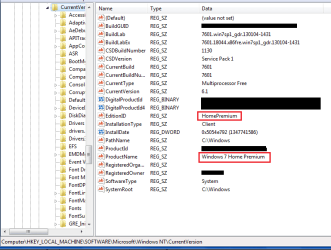
I don't know if it'll work for sure, but hypothetically you could change the registry values to match home premium, which would allow you to install professional or hp without losing anything.

If you feel you have no other options: try following the tutorial I linked to, but use this reference picture (click to zoom in):
 

Attachments

  • Untitled.png
    Untitled.png
    18 KB · Views: 6

My Computer My Computer

At a glance

Windows 8 Pro (32-bit)1.83GHz Intel Core Duo2GB 667MHz DDR2 SDRAM (PC2-5300) (upgrade)ATI Radeon X1600 with 128MB GDDR3 memory
Computer type
PC/Desktop
Computer Manufacturer/Model Number
Apple 17" iMac MA199LL (Early 2006)
OS
Windows 8 Pro (32-bit)
CPU
1.83GHz Intel Core Duo
Memory
2GB 667MHz DDR2 SDRAM (PC2-5300) (upgrade)
Graphics Card(s)
ATI Radeon X1600 with 128MB GDDR3 memory
Monitor(s) Displays
17-inch TFT active-matrix LCD, millions of colors
Screen Resolution
1440 x 900
Hard Drives
Hitachi 320GB HDT721032SLA360 7200RPM SATA II (upgrade)
Keyboard
Microsoft Wired Keyboard 600
Mouse
Microsoft Basic Optical Mouse v2.0
Internet Speed
4 Mbps
Antivirus
Microsoft Security Essentials
Browser
Google Chrome
Other Info
WEI:
Base Score: 3.9 Processor: 4.4 Memory 4.7
Graphics: 3.9 Gaming Graphics: 4.1 Primary HD: 5.9
Unfortunately-the Wondows 7 Enterprise ve4rsion is exactly that. The License is tied to a large firm under contract with Microsoft. With that said-you would do well to obtain the OEM edition of Windows 7 Professional, which has the feature set included in Enterprise. Most people don't need Ultimate or its cost. I never install Home Premium for clients unless they absolutely insist (true it is cheaper).
Another thing-the only way to do this will be a clean install. This is according to Microsoft. The only direct path for upgrades is Home-Pro-Ultimate. Make sure you have a disc with all of the drivers from Acer before starting. Windows 7 is very good with them but the vendor ones are usually better. Also, keep in mind that a new copy of Windows 7 (any version0 should have SP-1 included. There will be a large group of updates to do after the machine is running.

Good luck

Hi,
Many thanks for the rapid response. I guess I'm not surprised about the clean installation, based on the stuff I have read elsewhere. However, I was surprised that you suggest that an OEM version would work. I was anticipating that using an OEM version would be rejected when the activation process occurred, as this system was built approx. 5 years ago with Vista and presumably registered as such. If we go down the OEM route (which is my normal path when I build a system), I dont want to waste the lady's money when it is rejected by the Microsoft activation process. Any views on this would be appreciated.
 

My Computer My Computer

At a glance

windows 7 Enterprise 32bit
Computer type
Laptop
Computer Manufacturer/Model Number
acer
OS
windows 7 Enterprise 32bit
OEM edition doesn't really care when the computer was built, or if a different OS had registered that computer before. All it cares about is that the system it's running on is essentially the same system it's registered to.
 

My Computer My Computer

At a glance

Windows 8 Pro (32-bit)1.83GHz Intel Core Duo2GB 667MHz DDR2 SDRAM (PC2-5300) (upgrade)ATI Radeon X1600 with 128MB GDDR3 memory
Computer type
PC/Desktop
Computer Manufacturer/Model Number
Apple 17" iMac MA199LL (Early 2006)
OS
Windows 8 Pro (32-bit)
CPU
1.83GHz Intel Core Duo
Memory
2GB 667MHz DDR2 SDRAM (PC2-5300) (upgrade)
Graphics Card(s)
ATI Radeon X1600 with 128MB GDDR3 memory
Monitor(s) Displays
17-inch TFT active-matrix LCD, millions of colors
Screen Resolution
1440 x 900
Hard Drives
Hitachi 320GB HDT721032SLA360 7200RPM SATA II (upgrade)
Keyboard
Microsoft Wired Keyboard 600
Mouse
Microsoft Basic Optical Mouse v2.0
Internet Speed
4 Mbps
Antivirus
Microsoft Security Essentials
Browser
Google Chrome
Other Info
WEI:
Base Score: 3.9 Processor: 4.4 Memory 4.7
Graphics: 3.9 Gaming Graphics: 4.1 Primary HD: 5.9
You stated that the machine originally came with Vista and it was upgraded to Windows 7 Enterprise. If you buy an OEM edition-it will come with its own Serial Number/Key. Very important that you buy thru a Microsoft reseller/partner and have them guarantee that this will be included. It is essentially the same as the Full Retail version with several exceptions.
1. The OEM product is not supported by Microsoft-you become the responsible party for that. The cost of support calls, if needed will be higher than those for the retail edition.
2. The Retail license is handled in a somewhat different way from the OEM in that the OEM is tied to the motherboard serial number for the life of the machine. This should not be an issue with a laptop.

Hope this helps
 

My Computer My Computer

At a glance

Windows 7 Enterprise 64bit Desktops; Windows ...AMD Athlon 2 X3; I5-6200 6th gen (Dell)8 Gig Desktop, 8Gig Laptop, 16Gig LaptopRadeon R5450 1Gig
Computer type
PC/Desktop
Computer Manufacturer/Model Number
Custom Desktop (2 alike) Dell inspiron 13" W10 Laptop Dell Inspiron 17 5759
OS
Windows 7 Enterprise 64bit Desktops; Windows 7 Professional 64Bit 17"Laptop
CPU
AMD Athlon 2 X3; I5-6200 6th gen (Dell)
Motherboard
Gigabyte GA 78LMT-USB3 (2 Desktops)
Memory
8 Gig Desktop, 8Gig Laptop, 16Gig Laptop
Graphics Card(s)
Radeon R5450 1Gig
Sound Card
Creative SB X-Fi Titanium Extreme Audio Desktop 1
Monitor(s) Displays
Dell 2419
Screen Resolution
1920x1080
Hard Drives
Crucial M500 500GB SSD Desktop 1 and Laptops
Samsung 850EVO 250GB - Desktop 2
PSU
Thermaltake 600watt
Case
Rosewill
Cooling
Scythe Typhoon 120mm
Keyboard
Kensington
Mouse
Logitech M310
Internet Speed
50/50
Antivirus
Avast
Browser
Firefox 68
As this was originally a vista system that should have a COA available for it - the most cost effective route for your client would be an upgrade to windows home premium using a standard upgrade disk as this would be an acceptable upgrade under the licence terms.

You can either completely wipe the system re-install vista and then follow the standard upgrade procedure or alternatively wipe the system and check out the linked tutorial to speed up the process

http://www.sevenforums.com/tutorials/31402-clean-install-upgrade-windows-7-version.html
 

My Computers My Computers

  • At a glance

    Windows 11 Pro x64 [Latest Release and Releas...Ryzen 9 5950X, 3.8 - 5.2 MHz64GB [2 x 32GB] DDR4 3200MHz4GB NVIDIA GEFORCE GTX 1650 Ti
    Computer type
    PC/Desktop
    Computer Manufacturer/Model Number
    ChillBlast - Custom to my design
    OS
    Windows 11 Pro x64 [Latest Release and Release Preview]
    CPU
    Ryzen 9 5950X, 3.8 - 5.2 MHz
    Motherboard
    Asus Prime X570-Pro
    Memory
    64GB [2 x 32GB] DDR4 3200MHz
    Graphics Card(s)
    4GB NVIDIA GEFORCE GTX 1650 Ti
    Sound Card
    On-board SPDIF to 5.1 System + HDMI [5.1 system]
    Monitor(s) Displays
    32" UHD 32 Bit HDR Monitor + 43" UHD 4K 32Bit HDR TV
    Screen Resolution
    2 x 3840 x 2160 @60Hz
    Hard Drives
    1TB M2 SSD OS, 500GB Fast Access SSD, 2 x 8TB Data + Various Externals from 1TB to 4TB, 10TB NAS
    PSU
    NZXT C750 80 PLUS Gold 750W Modular PSU
    Case
    Workstation Case [Matt Black]
    Cooling
    NZXT Kraken X63 280mm CPU Cooler +2x Quiet Case fans
    Keyboard
    Logitech Wireless MX Keys & K400 + others
    Mouse
    Logitech Wireless MX Master 3S
    Internet Speed
    920 MB Down 50 MB Up
    Antivirus
    BitDefender Total Security Pro
    Browser
    Chrome (always run latest Non-Beta)
    Other Info
    Also run ...
    Laptop - Quad 8GB - Windows 10 Pro x64
    Nexus 7 Android tablet x2
    Samsung 10.2" tablet
    Blackview TAB 8 4G Android Tablet c/w Keyboard
    Wacom Intuos Pro Medium Pen Pad
    Wacom Intuos Pro Small Pen Pad
    Wacom Expresskeys Remote
    Loopdeck+ Graphics Controller
    Shuttle Pro v2 Control
  • At a glance

    Windows 11 Pro x64 Latest RPIntel I7 10750H 5.0GHz32GB [2x16GB] DDR4 2933 MHznVidia GTX1650Ti 4 GB GDDR6
    Computer type
    Laptop
    System Manufacturer/Model Number
    Dell XPS 17 10750H
    OS
    Windows 11 Pro x64 Latest RP
    CPU
    Intel I7 10750H 5.0GHz
    Motherboard
    Dell XPS
    Memory
    32GB [2x16GB] DDR4 2933 MHz
    Graphics Card(s)
    nVidia GTX1650Ti 4 GB GDDR6
    Sound Card
    Stock [Realtek] 4 Speaker
    Monitor(s) Displays
    17" IPS UHD+ Infinity Edge Touchscreen
    Screen Resolution
    3840 x 2400
    Hard Drives
    2TB M2 NVMe, 4TB External + various 500GB & 1TB External NVMe (also have access to spinner HDD from
    PSU
    Stock
    Case
    Stock XPS Aluminium & Carbon Fibre
    Cooling
    Stock - Active Fan Control
    Keyboard
    Backlit + Various Logitech
    Mouse
    Stock Track Pad + Logitech MX Trackball
    Internet Speed
    72 MB Down 18MB Up
    Browser
    Chrome
    Other Info
    Also run ...
    Laptop - Quad 8GB - Windows 10 Pro x64
    Nexus 7 Android tablet x2
    10.2" tablet
    Sony Z3 Android Smartphone
    Wacom Intuos Pro Medium Pen Pad
    Wacom Intuos Pro Small Pen Pad
    Wacom Expresskeys Remote
    Loopdeck+ Graphics Controller
    Shuttle Pro v2 Control Pad
    10TB NAS
Back
Top