How to look at BIOS (not modify) from within Windows 7

pintree3

Mich
Member
VIP
Local time
9:13 PM
Messages
394
Location
Canada
Is it possible to look at my BIOS settings from within windows 7? My Google search says 'No' it can't be done, but I am hoping I didn't look well enough.
Why would I want to do so?
In order to do proper research as to what I have and my settings are and then make changes if needed (later from within BIOS from boot)
As it is now I need to go into BIOS and then write by hand this and that. then boot up and do my research, then realize ''Oh wait I forgot a detail that seems important'', reboot and start again. etc. etc. And this happens of course every time a need occurs: a new sound card, a new HD, a replaced DVD, new found info which may be of interest, and so on. Wouldn't it be easier to simply look into it from within Windows and see; Oh! OK I do need to go into my BIOS and make a change OR, Oh! I guess I do not need to go into my BIOS and make a change.
Thanks
 

My Computer My Computer

At a glance

Windows 7 Home Premium 64Intel Core i5 760 @ 2800MHz12288MBAMD Radeon HD 7800 Series
Computer type
PC/Desktop
Computer Manufacturer/Model Number
OEM Designed by me :-)
OS
Windows 7 Home Premium 64
CPU
Intel Core i5 760 @ 2800MHz
Motherboard
Asus P7P55D-E LX
Memory
12288MB
Graphics Card(s)
AMD Radeon HD 7800 Series
Sound Card
ASUS Xonar DG
Monitor(s) Displays
ViewSonic VX2453 Series, HDMI 1080p Full HD
Screen Resolution
1920X1080
Hard Drives
Samsung SSD 840 EVO 250GB& two others
PSU
Tagan BZ Series, TG800-BZ 800W
Keyboard
Logitech MK250
Mouse
Logitech M310
Internet Speed
toppest, mostest :-) <-- bad, but fun English
Browser
Firefox, Crrome, IE
Generally No. The issue is that the BIOS/Basic Input Output System [stored on the CMOS] runs before any Operating System loads, lets the OS know about the motherboard resources/devices available. The only time I've seen the BIOS available is at the initial bootup when prompted to press a key to run Setup, could be F2, Del, Esc, etc. Once the OS loads the user can't access the BIOS. However, I've heard that may be coming but no reference for it.
 

My Computer My Computer

At a glance

Windows 7 Ultimate 64-bit, Windows 8.1 64-bit...
Computer type
PC/Desktop
Computer Manufacturer/Model Number
Customs, Dell, Gateway, HP, Toshiba, Acer, ASUS
OS
Windows 7 Ultimate 64-bit, Windows 8.1 64-bit, Mac OS X 10.10, Linux Mint 17, Windows 10 Pro TP
Keyboard
Microsoft
Mouse
Microsoft
Thanks for your help. OK then I was wondering if it is then possible, once in the BIOS to perhaps store a copy of the readings from there to the OS, or perhaps print it. Preferably to 'Microsoft XPS Document Writer or to 'Send to OneNote' which would give me a record or to the printer whereby I could reference it later.
 

My Computer My Computer

At a glance

Windows 7 Home Premium 64Intel Core i5 760 @ 2800MHz12288MBAMD Radeon HD 7800 Series
Computer type
PC/Desktop
Computer Manufacturer/Model Number
OEM Designed by me :-)
OS
Windows 7 Home Premium 64
CPU
Intel Core i5 760 @ 2800MHz
Motherboard
Asus P7P55D-E LX
Memory
12288MB
Graphics Card(s)
AMD Radeon HD 7800 Series
Sound Card
ASUS Xonar DG
Monitor(s) Displays
ViewSonic VX2453 Series, HDMI 1080p Full HD
Screen Resolution
1920X1080
Hard Drives
Samsung SSD 840 EVO 250GB& two others
PSU
Tagan BZ Series, TG800-BZ 800W
Keyboard
Logitech MK250
Mouse
Logitech M310
Internet Speed
toppest, mostest :-) <-- bad, but fun English
Browser
Firefox, Crrome, IE
Being able to modify the BIOS settings from within Windows would seem like a good idea. But it isn't.

The BIOS of a computer is proprietary and only the manufacturer knows what settings are available and where and how they are stored. This information is deliberately not documented. The only way to modify the BIOS settings is with the setup utility built into the BIOS itself. Windows and Windows applications have no idea how to change these settings. The only exception would be if the computer manufacturer were to make such a utility available that could run in Windows. But it would have to be for your exact BIOS version. A utility that wasn't aware of your exact BIOS version could store the settings in the wrong place or the wrong form and the results of that could be disastrous.

It is a good thing that Windows can't make BIOS settings. If a Windows application could make BIOS settings you can be sure that malware would also be able to do this. This would open up a whole new world of mayhem for malware authors. Systems could be set in place to make this difficult but they could be circumvented.

Some BIOSs may have the capability to store settings to a flash drive. Saving this information to the OS file system is pretty much out of the question. The NTFS file system (required for Windows 7) is very complex. Safely writing anything to an NTFS file system is far beyond the capabilities of the BIOS.

Most people simply take note of the settings or take a picture with a digital camera.
 

My Computer My Computer

At a glance

Windows 7 Pro 64 bitXeon W35208 GBNvidia Geforce 210
Computer type
PC/Desktop
Computer Manufacturer/Model Number
HP
OS
Windows 7 Pro 64 bit
CPU
Xeon W3520
Memory
8 GB
Graphics Card(s)
Nvidia Geforce 210
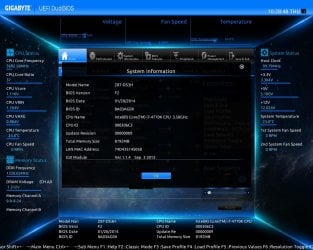
You can do a screen shot of the BIOS when you are in it on my Gigabyte board which is copied to an attached flash drive (see attached). That at least will prevent the need to write everything down by hand but it does mean that any changes made will require a new screen shot to be taken so how much use this is is debatable. ;)
 

Attachments

  • BIOS-Screenshot.jpg
    BIOS-Screenshot.jpg
    143.1 KB · Views: 0

My Computer My Computer

At a glance

Windows 7 64bitIntel(R) Core(TM) i7-4770K CPU @ 3.50GHzCorsair XMS3 16GB kit (2x8GB) DDR3 1333MHz Un...(1) Intel(R) HD Graphics 4600 (2) NVIDIA GeFo...
Computer type
PC/Desktop
Computer Manufacturer/Model Number
Custom Build
OS
Windows 7 64bit
CPU
Intel(R) Core(TM) i7-4770K CPU @ 3.50GHz
Motherboard
Gigabyte Technology Co., Ltd. Z87-DS3H
Memory
Corsair XMS3 16GB kit (2x8GB) DDR3 1333MHz Unbuffered CL9 DI
Graphics Card(s)
(1) Intel(R) HD Graphics 4600 (2) NVIDIA GeForce GT 640
Hard Drives
(1) Samsung SSD 840 EVO 250G SCSI Disk Device (2) Samsung SSD 850 EVO 250G SCSI Disk Device (3) WDC WD10EZEX-00KUWA0 SCSI Disk Device
Antivirus
MSE
Browser
Pale Moon
Most BIOSes are not as nice as that one posted . It would work when booted into DOS 6.22 and earlier but required a Parallel Port connected printer and the PrintScrn quit working when Win95 took over that function but Win95/98/ME could be booted to DOS [before Windows loaded]. DOS didn't work with USB ports/printers and drivers needed to be installed if they could be found. I use a digital camera to record the settings that Users can make/change.
 

My Computer My Computer

At a glance

Windows 7 Ultimate 64-bit, Windows 8.1 64-bit...
Computer type
PC/Desktop
Computer Manufacturer/Model Number
Customs, Dell, Gateway, HP, Toshiba, Acer, ASUS
OS
Windows 7 Ultimate 64-bit, Windows 8.1 64-bit, Mac OS X 10.10, Linux Mint 17, Windows 10 Pro TP
Keyboard
Microsoft
Mouse
Microsoft
LMiller7: Good idea about using a digital camera. :-) BTW I never said I wanted to make modifications (it says so in my subject title), only needed to be able to look at it, and, as to why I already explained this and it makes sense to me--quite a bit :-)
 

My Computer My Computer

At a glance

Windows 7 Home Premium 64Intel Core i5 760 @ 2800MHz12288MBAMD Radeon HD 7800 Series
Computer type
PC/Desktop
Computer Manufacturer/Model Number
OEM Designed by me :-)
OS
Windows 7 Home Premium 64
CPU
Intel Core i5 760 @ 2800MHz
Motherboard
Asus P7P55D-E LX
Memory
12288MB
Graphics Card(s)
AMD Radeon HD 7800 Series
Sound Card
ASUS Xonar DG
Monitor(s) Displays
ViewSonic VX2453 Series, HDMI 1080p Full HD
Screen Resolution
1920X1080
Hard Drives
Samsung SSD 840 EVO 250GB& two others
PSU
Tagan BZ Series, TG800-BZ 800W
Keyboard
Logitech MK250
Mouse
Logitech M310
Internet Speed
toppest, mostest :-) <-- bad, but fun English
Browser
Firefox, Crrome, IE
I didn't distinguish between reading and writing the BIOS data because in practice there isn't much difference. Once an application has the knowledge to read and interpret the BIOS settings changing them is just a short step away.
 

My Computer My Computer

At a glance

Windows 7 Pro 64 bitXeon W35208 GBNvidia Geforce 210
Computer type
PC/Desktop
Computer Manufacturer/Model Number
HP
OS
Windows 7 Pro 64 bit
CPU
Xeon W3520
Memory
8 GB
Graphics Card(s)
Nvidia Geforce 210
Back
Top