How to make a Pop-Up Keyboard?

dkplayaclub

New member
Local time
5:50 PM
Messages
24
I have been reading all over the web today and, though I have found many people with a similar question, I have not seen any that got a direct answer. So let me tell you what I am trying to accomplish.
I am setting up a home theater PC for my living room. I don't want a keyboard and mouse cluttering things up and games will also be a big part of the setup so I am attempting to make the entire setup controllable with an XBOX 360 remote.
I use JoyToKey to control almost everything with my 360 remote and would recommend it to all. The only issue I really have is with text entry. All I want is a keyboard that pops up on screen when I select a text input box, but can't find one that works.
Is this even possible? I can't seem to find anything that helps me.
 

My Computer My Computer

At a glance

Windows 7 Ultimate x64
OS
Windows 7 Ultimate x64
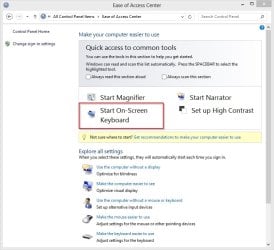
What about the built-in one?

Control Panel, Ease of Access, Start On-screen Keyboard.

OnScreenKeyboard.jpg
 

My Computer My Computer

At a glance

Windows 10 Pro X64Intel Quad Core i7-4770 @ 3.4Ghz16.0GB PC3-12800 DDR3 SDRAM 1600 MHzIntel Integrated HD Graphics
Computer type
PC/Desktop
Computer Manufacturer/Model Number
Lenovo IdeaCenter 450
OS
Windows 10 Pro X64
CPU
Intel Quad Core i7-4770 @ 3.4Ghz
Memory
16.0GB PC3-12800 DDR3 SDRAM 1600 MHz
Graphics Card(s)
Intel Integrated HD Graphics
Sound Card
Realtek HD Audio
Monitor(s) Displays
HP 22" LCD
Screen Resolution
1680 x 1050
Hard Drives
250GB Samsung EVO SATA-3 SSD
2TB Seagate ST2000DM001 SATA-2
1.5TB Seagate ST3150041AS SATA
Keyboard
Dell USB
Mouse
Lenovo USB
Internet Speed
Cable via Road Runner 3MB Upload, 30MB Download
Antivirus
Windows Defender, MBAM Pro, MBAE
Browser
Seamonkey
Other Info
UEFI/GPT
PLDS DVD-RW DH16AERSH
~~~
All I want is a keyboard that pops up on screen when I select a text input box,
~~~

What about the built-in one?

Control Panel, Ease of Access, Start On-screen Keyboard.

View attachment 308082
That is the sticky part of this request. My guess is that the OP wants the virtual keyboard to automatically appear when needed. Let's hope that I'm wrong :-)

The only thing that I can suggest for the OP is to learn AutoIt. Write some code that loops. Each loop evaluates what has focus. If an editable field is in focus, then start and position the native on-screen keyboard. Wait for that keyboard to exit before continuing the loop. Add enough delay to let the user exit the keyboard and exit the edit field so as not to immediately restart the keyboard.

I know how to have AutoIt detect if a field is in focus.
I know how to have AutoIt detect if a field can be edited.
I don't know how to apply that code to every possible edit field that could come into focus.
:-(
 

My Computer My Computer

At a glance

W7 Pro SP1 64biti78GBIntel HD Graphics
Computer type
Laptop
Computer Manufacturer/Model Number
Employer provided Dell Latitude
OS
W7 Pro SP1 64bit
CPU
i7
Memory
8GB
Graphics Card(s)
Intel HD Graphics
Hard Drives
crappy SSD
Antivirus
Employer mandated Symantec Endpoint Protection
Browser
Pale Moon 64bit, IE11 64bit & Chrome 64bit
I have no idea if this is possible - why 'type it' at all, maybe you can just 'say it'

pjd
 

My Computer My Computer

At a glance

Win 7 Professional 64bitI5 650 @ 3.2GHz6GAMD Radeon R7 200 Series
Computer type
PC/Desktop
Computer Manufacturer/Model Number
generic - made to spec
OS
Win 7 Professional 64bit
CPU
I5 650 @ 3.2GHz
Motherboard
Gigabyte H55M-UD2H
Memory
6G
Graphics Card(s)
AMD Radeon R7 200 Series
Sound Card
whatever is on mobo
Monitor(s) Displays
1 x 24" Samsung
Screen Resolution
1920x1200
Hard Drives
Internal 1x256GB Toshiba SSD
Internal 1x2TB
External 2 slot USB 3.0 dock (various drives)
External 1 500GB USB 2.0 drive
PSU
850W Antech Modular
Case
Shiny Black Aluminium
Cooling
extra fans - sucker in front, blower at back - noisy & cool
Keyboard
Microsoft USB Dual Receiver Wireless Keyboard
Mouse
Microsoft USB Dual Receiver Wireless Mouse
Internet Speed
20/1Mbps down/up
Antivirus
MSE
Browser
Firefox and Chrome
Other Info
Hitachi USB 3.0 adapter
I'm not sure if this will get you closer or not: Use an Xbox 360 Controller as a Mouse | Instructables It also uses joytokey (JTK).

If I read it right you would assign the Windows on-screen keyboard to pop-up with JTK, but then I'm not sure how you would type with the controller. There is a configuration file included.

Looking through the comments section I found:
works like a charm! im using my controller to type this. i just assigned a button on my controller to open up the onscreen keyboard!.....
.......I assigned the onscreen keyboard as a button as well but upon clicking it with my mouse (controller) it stops working altogether and I need to reside back to my mousepad on my laptop, any help?
 

My Computer My Computer

At a glance

Originally Win 7 Hm Prem x64 Ver 6.1.7600 Bui...Intel i3 530 2.93GHz, 2933MHz 2 Cores 4 Logic...6GB of 1,333MHz DDR3 SDRAM32MB Intel Graphics Media Accelerator HD IGChip
Computer type
PC/Desktop
Computer Manufacturer/Model Number
Gateway DX4831-01e (Mid-Tower Desktop)
OS
Originally Win 7 Hm Prem x64 Ver 6.1.7600 Build 7601-SP1 | Upgraded to Windows 10 December 14, 2019
CPU
Intel i3 530 2.93GHz, 2933MHz 2 Cores 4 Logical Processors
Motherboard
Gateway H57M01 133 megahertz
Memory
6GB of 1,333MHz DDR3 SDRAM
Graphics Card(s)
32MB Intel Graphics Media Accelerator HD IGChip
Sound Card
Realtek High Definition Audio
Monitor(s) Displays
Gateway HX2000 20inch TFT active matrix TN
Screen Resolution
1600 x 900 x 59 hertz
Hard Drives
WDC WD10EADS-00M2B0 [HDD] (1000.20 GB) -- drive 0,
HL-DT-ST DVDRAM GH41N [CD-ROM dr]
Four card readers, and Four USB 2.0
PSU
300watts.
Case
Mid-Tower Desktop
Cooling
Stock from Gateway
Keyboard
Natural Ergonomic Keyboard 4000, see Other Info
Mouse
Orig. Gateway wore out now using Insignia USB wired optical
Internet Speed
Vz FIOS 10ms png 57.64Mbps down 65.53Mbps up Speedtest.org
Antivirus
Zamana Anti-logger with Anti-malware, MSE, Windows Firewall,
Browser
IE11.0.9600.19399-Upd ver11.0.135, Firefox 68.0.1 x64
Other Info
System Specs by Belarc.

BIOS: American Megatrends Inc. P01-A0 11/17/2009

Replaced the MS 'Natural' Standard PS/2 Enhanced 101-102 Keyboard with a new Natural Ergonomic Keyboard 4000 on August 1st 2014.

Canon Pixma MG3222 Printer.

Updated to IE11 on 12102015 | Fios Quantum Router g1100

Additional AV: SpywareBlaster, manual Mbam, SAS
Back
Top