Solved How to make File Explorer display full address of files in search

wonmanfactory

New member
Local time
12:59 PM
Messages
1
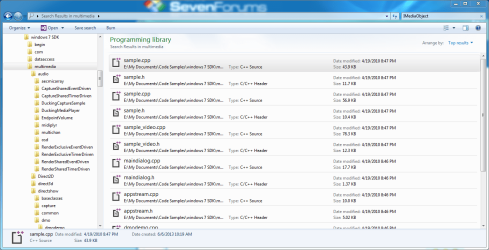
I have done a search and file explorer returns some results.
You can see the locations of each file are chopped off. But there is no grid splitter allowing me to expand the filename column.
How can I view the whole address of the files in Search results?
 

Attachments

  • Capture.PNG
    Capture.PNG
    69.1 KB · Views: 4

My Computer My Computer

At a glance

Windows 7 Enterprise x64Inter Core i5-357016GBNVDIA Quardo 2000D
Computer type
PC/Desktop
Computer Manufacturer/Model Number
custom build
OS
Windows 7 Enterprise x64
CPU
Inter Core i5-3570
Motherboard
Asus P8H77-v
Memory
16GB
Graphics Card(s)
NVDIA Quardo 2000D
At the top right of the window, click the black down arror head and choose "Details" then you can drag the column size as below:
search.PNG
 

My Computer My Computer

At a glance

Microsoft Windows 7 Home Premium 64-bit 7601 ...Intel(R) Core(TM) i7-3770 CPU @ 3.40GHz8.00 GBIntel(R) HD Graphics 4000
Computer type
PC/Desktop
OS
Microsoft Windows 7 Home Premium 64-bit 7601 Multiprocessor Free Service Pack 1
CPU
Intel(R) Core(TM) i7-3770 CPU @ 3.40GHz
Motherboard
ASUSTeK COMPUTER INC. P8H77-M
Memory
8.00 GB
Graphics Card(s)
Intel(R) HD Graphics 4000
Sound Card
On Board
Monitor(s) Displays
Dell 24"
Screen Resolution
1920 x 1080
Hard Drives
(1) INTEL SSDSC2CT180A3 ATA Device (2) ST500DM002-1BD142 ATA Device (3) WDC WD3200AAKS-75L9A0 ATA Device (4) Generic- Compact Flash USB Device (5) Generic- MS/MS-Pro USB Device (6) Generic- SD/MMC USB Device (7) Generic- SM/xD-Picture USB
PSU
500w Corsair
Case
Cooler Master
Cooling
3 Fans
Keyboard
Logitech MK300
Mouse
Logitech WOM
Internet Speed
75Mb
Antivirus
Norton 360
Browser
Firefox, Opera, IE
Back
Top