How to make Firefox

acsteve

New member
Local time
2:16 PM
Messages
10
How to make Firefox
Was trying to understand how to make Fire fox icon associate with .htm or .html doc's. If I make IE8 (crashes all the time, no time to figure out why yet) the default browser, the IE8 icon is associated with all the .htm,.html files i have onboard. As soon as I make FF default browser it goes to the default little white doc looking icon. No big deal, but don't want to live with this if I don't have to. Thanks in advance.
BTW: Brand new to Windows 7 with my new box, and loving both so far.
Win 7 home premium.

Steve
 

My Computer

Computer Manufacturer/Model Number
Dell
OS
win7 64 bit home premium
CPU
intel i5 650 3.2 mhz
Memory
6gig
Graphics Card(s)
rad 5430
Sound Card
7.1 ss intregreated
Monitor(s) Displays
24" dell
Hard Drives
1TB

My Computer

Computer Manufacturer/Model Number
HP m8000n
OS
Windows 7 Ultimate x86
CPU
DualCore AMD Athlon 64 X2, 2600 MHz 5200+
Motherboard
Asus M2N68-LA (Narra)
Memory
Samsung 2GB DDR2
Graphics Card(s)
Onboard NVIDIA GeForce 6150SE nForce 430
Sound Card
Onboard nVIDIA nForce 6100-430 (MCP61P)
Monitor(s) Displays
Westinghouse 19" LED
Screen Resolution
1280x1024
Hard Drives
SATA II Seagate Barracuda 500GB
USB II WD Elements 500GB
USB II WD My Book 1TB
USB II WD My Book 2TB
PSU
Stock (HP)
Case
Stock (HP)
Cooling
Stock
Keyboard
Logitech Classic KB 200
Mouse
Standard HP opticle USB mouse
Thanks

Thanks Sledge but i can associate FF ok enough., Its the FF icon I am referring to. Instead of the FF icon showing on my .html files its the little white icon doc looking one. Like i said already, if IE is made the default browser the IE icon will show up on all my html files. But the FF one will not even though its associated with it. Any ideas?

Steve
 

My Computer

Computer Manufacturer/Model Number
Dell
OS
win7 64 bit home premium
CPU
intel i5 650 3.2 mhz
Memory
6gig
Graphics Card(s)
rad 5430
Sound Card
7.1 ss intregreated
Monitor(s) Displays
24" dell
Hard Drives
1TB
Have you tried re-installing FF - or at least making sure your FF is the latest version?

I'm running Minefield x64 4.0b8pre as my default browser and any Internet Shortcuts I make are clearly associated with it via its icon:

ScreenShot00178.jpg
 

My Computer

Computer Manufacturer/Model Number
Toshiba L355D
OS
Windows 7 Ultimate x64 SP1
CPU
Core2 Duo
Motherboard
Intel
Memory
4 GB
Graphics Card(s)
GM965 on-board
Sound Card
RealTek on-board
Monitor(s) Displays
19"+17"(laptop)
Screen Resolution
1440x900 (x 2)
Hard Drives
500GB Ext. 200GB Internal
PSU
N/A
Case
N/A
Cooling
N/A
Thanks for the reply. I have not re-installed yet but i do have the latest version. I just noticed as well that I am not getting some others icons either. I use edit pad as an example. I dont have the icon associated with edit pad either.. hummmm,

Thanks again
Steve

Update. Just reinstalled no luck
 

My Computer

Computer Manufacturer/Model Number
Dell
OS
win7 64 bit home premium
CPU
intel i5 650 3.2 mhz
Memory
6gig
Graphics Card(s)
rad 5430
Sound Card
7.1 ss intregreated
Monitor(s) Displays
24" dell
Hard Drives
1TB
I'm sorry to hear that, Steve.

BTW, Steve, in case you have not already been warmly welcomed, let me say: Welcome to the Seven Forums! :)

Have a look here. Let us know if it helps. :D
 

My Computer

Computer Manufacturer/Model Number
Toshiba L355D
OS
Windows 7 Ultimate x64 SP1
CPU
Core2 Duo
Motherboard
Intel
Memory
4 GB
Graphics Card(s)
GM965 on-board
Sound Card
RealTek on-board
Monitor(s) Displays
19"+17"(laptop)
Screen Resolution
1440x900 (x 2)
Hard Drives
500GB Ext. 200GB Internal
PSU
N/A
Case
N/A
Cooling
N/A
Milked,
Thank you for your kind response. It is very strange indeed as I made Internet explorer my default browser and no problem with the icon. Since, I have made Oprah my default browser again no problem with the icon identification. I also installed mine field. It reacts the same way Firefox does with improper icon display. I suppose I could reinstall Windows, or follow the instructions on the link you provided but I doubt I will do that. In fact, I seen already the links you provided and in this case, that be way too much trouble. I have given Oprah a new look as a result of reading these threads and, WOW is all I have to say. I've been disappointed in Firefox for about a year now. Internet Explorer with my new OS and box crashes at least once every session. I no longer even bring it up, and I guess not interested in a fix for it as I never used it before anyway. I would fix it if I thought it was an indication of my operating system, however I've only had one blue screen of death and could not get that to repeat itself. So at this point I'm pretty happy with the performance of Windows 7, even though there are a couple of minor issues for me. As I posted in another thread under customization, I don't understand why I cannot move folders anywhere I want to inside another folder. Again, thanks for the warm welcome and your help.

Steve,

EDIT: Just in case I will add this link to the problem I mentioned about file location in a folder and the solution....http://www.sevenforums.com/customization/128211-seems-odd-me.html
 
Last edited:

My Computer

Computer Manufacturer/Model Number
Dell
OS
win7 64 bit home premium
CPU
intel i5 650 3.2 mhz
Memory
6gig
Graphics Card(s)
rad 5430
Sound Card
7.1 ss intregreated
Monitor(s) Displays
24" dell
Hard Drives
1TB
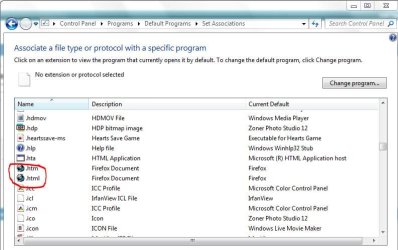
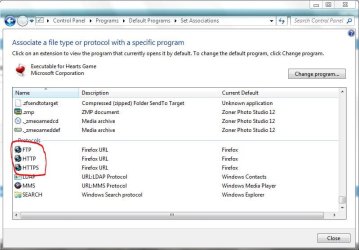
There are more than one place to register an extension as belonging to a specific program and I assume you associated the extensions but not the protocols
I did i via Start/Default Programs/Associate a filetype or protocol....
once here
Capture.JPG

and further down at Protocols
Capture1.JPG

If that's not it, short of a re-install you probably have to change those things directly in the registry
for .htm, .html, .shtml etc.

-DG
 

My Computer

Computer Manufacturer/Model Number
HP m8000n
OS
Windows 7 Ultimate x86
CPU
DualCore AMD Athlon 64 X2, 2600 MHz 5200+
Motherboard
Asus M2N68-LA (Narra)
Memory
Samsung 2GB DDR2
Graphics Card(s)
Onboard NVIDIA GeForce 6150SE nForce 430
Sound Card
Onboard nVIDIA nForce 6100-430 (MCP61P)
Monitor(s) Displays
Westinghouse 19" LED
Screen Resolution
1280x1024
Hard Drives
SATA II Seagate Barracuda 500GB
USB II WD Elements 500GB
USB II WD My Book 1TB
USB II WD My Book 2TB
PSU
Stock (HP)
Case
Stock (HP)
Cooling
Stock
Keyboard
Logitech Classic KB 200
Mouse
Standard HP opticle USB mouse
Back
Top