
How to make Flash player's hardware accelerated rendering enabled

tkrojam

New member
Member
Local time
4:05 PM
Messages
96
Location
Hong Kong
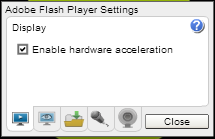
Is there any way to make Flash player's hardware-accelerated rendering enabled in non-Full Screen mode (wmode) in IE9/FF18, Windows 7, like this?

Thanks in advance.

13010112284bb698bc2184e090.jpg
 

My Computer

OS
Windows 7 VL (64-bit)
Internet Speed
PCCW Global IMS Ultraline@500Mbps (FTTH)

I know this script can do it for me but I mean I just want wMode enabled without other functions from Yousabletubefix, Thanks.

yousabletubefix.png
 

My Computer

OS
Windows 7 VL (64-bit)
Internet Speed
PCCW Global IMS Ultraline@500Mbps (FTTH)
WQCmO.png


Is this what you're talking about?
 

My Computer

Computer Manufacturer/Model Number
Me
OS
Windows 7 Pro x64
CPU
Intel Core i7 920
Motherboard
ASUS P6T Deluxe V2
Memory
Corsair XMS3 12GB (3x2GB) DDR3 1333
Graphics Card(s)
EVGA GTX 470 1280MB GDDR5 DX11
Monitor(s) Displays
ASUS VW246H | ACER AL2216W
Screen Resolution
3600x1080
Hard Drives
1x Corsair Vertex 3 SSD (120GB)
1x Corsair Vertex 2 SSD (60GB)
2x Western Digital Black (500GB/1TB)
1x External WD Green eSATA (1TB)
PSU
Corsair 850HX
Case
Velocity Micro FullTower
Keyboard
Logitech G110
Mouse
Logitech G500
Internet Speed
http://www.speedtest.net/result/1226664359.png
Antivirus
MSE
Browser
Chrome
Other Info
Logitech Z-5500 5.1 Surround Sound
Logitech C260 Webcam
Creative Fatal1ty Headset
Anyone helps?
 

My Computer

OS
Windows 7 VL (64-bit)
Internet Speed
PCCW Global IMS Ultraline@500Mbps (FTTH)
Back
Top