how to make idle time before sleep ignore mouse input

it doesn't have to be sleep necessarily
it can be turned off as well
The main thing is I want to monitor only the keyboard idle time ignoring the mouse movement
And I don't want to put a shut down timer either from the shutdown command

I'm not saying use a shutdown timer. I'm just saying that I turn my computer off the moment I know that I am done with it. I have honestly never needed Sleep or Hibernation.
 

My Computer My Computer

Computer type
PC/Desktop
and I just checked it in Windows XP
It just has the option to ask for password on resuming from hibernation
and Power management is only present under user configuration and not Computer Configuration
Are you really trying to argue with me about this?

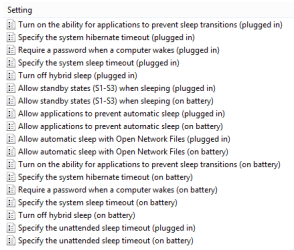
Sleep settigs are exactly where I said them to be:

2013-04-21_103241.png

And there are a lot of more options than password for returning from hibernation:

2013-04-21_103410.png

Check you facts before posting. How can you even think that if you check something using XP, as you said, you can then post to say the information you got for 7 was wrong?

Have studied this a bit more, what you want is simply not possible.

Kari
 
Last edited:

My Computer My Computer

At a glance

Windows 10 Pro x64 EN-GB1.6 GHz Intel Core i7-720QM Processor6 GBATI Mobility Radeon HD 5850 Graphics
Computer type
Laptop
Computer Manufacturer/Model Number
HP ENVY 17-1150eg
OS
Windows 10 Pro x64 EN-GB
CPU
1.6 GHz Intel Core i7-720QM Processor
Memory
6 GB
Graphics Card(s)
ATI Mobility Radeon HD 5850 Graphics
Sound Card
Beats sound system with integrated subwoofer
Monitor(s) Displays
17" laptop display, 22" LED and 32" Full HD TV through HDMI
Screen Resolution
1600*900 (1), 1920*1080 (2&3)
Hard Drives
Internal: 2 x 500 GB SATA Hard Disk Drive 7200 rpm
External: 2TB for backups, 3TB USB3 network drive for media
Cooling
As Envy runs a bit warm, I have it on a Cooler Master pad
Keyboard
Logitech diNovo Media Desktop Laser (bluetooth)
Mouse
Logitech Performance Mouse MX
Internet Speed
50/10 Mbps VDSL
Antivirus
Windows Defender 4.3.9431.0
Browser
Maxthon 3.5.2., IE11
He doesn't have the Group Policy Editor because he has Windows 7 Home Premium (that's what he said even though his postbit says that he has Professional). He even tried to open it but it's not there, so that proves that he really does have Home Premium. So now he is asking if this can be done in the Registry instead.
 

My Computer My Computer

Computer type
PC/Desktop
no one said your information on 7 was wrong
My windows version does not have gpedit installed so just checked in XP to see what settings were available for sleep
and I think think you may be right, what I want is simply not be possible in Windows
May be I should check out Linux options
 

My Computer My Computer

At a glance

Windows: Windows 7 Professional, Version 6.1....Intel(R) Core(TM) i5 CPU 760 @ 2.80GHz4 GBNVIDIA GeForce GT 220
Computer Manufacturer/Model Number
Dell Inc., Vostro 430
OS
Windows: Windows 7 Professional, Version 6.1.7600, , 32 Bit. Internet Explorer: 8.0.7
CPU
Intel(R) Core(TM) i5 CPU 760 @ 2.80GHz
Motherboard
I don't know
Memory
4 GB
Graphics Card(s)
NVIDIA GeForce GT 220
Sound Card
Digital Audio (S/PDIF) (High De
Monitor(s) Displays
Generic PnP monitor (DELL)
Hard Drives
500GB + 160 GB Sata
PSU
Don't know
Case
Don't know
Cooling
on board fan
I apologize if I overreacted.

My point is, and was, that the logical place to look a setting like this is Group Policy, where if it existed it would be found where I told.

Checked also the Power Configuration options as I remembered that you can for instance disable mouse from waking up the computer with powercfg /devicedisablewake Device_Name command. But no, no option as what OP needs there.

Kari
 

My Computer My Computer

At a glance

Windows 10 Pro x64 EN-GB1.6 GHz Intel Core i7-720QM Processor6 GBATI Mobility Radeon HD 5850 Graphics
Computer type
Laptop
Computer Manufacturer/Model Number
HP ENVY 17-1150eg
OS
Windows 10 Pro x64 EN-GB
CPU
1.6 GHz Intel Core i7-720QM Processor
Memory
6 GB
Graphics Card(s)
ATI Mobility Radeon HD 5850 Graphics
Sound Card
Beats sound system with integrated subwoofer
Monitor(s) Displays
17" laptop display, 22" LED and 32" Full HD TV through HDMI
Screen Resolution
1600*900 (1), 1920*1080 (2&3)
Hard Drives
Internal: 2 x 500 GB SATA Hard Disk Drive 7200 rpm
External: 2TB for backups, 3TB USB3 network drive for media
Cooling
As Envy runs a bit warm, I have it on a Cooler Master pad
Keyboard
Logitech diNovo Media Desktop Laser (bluetooth)
Mouse
Logitech Performance Mouse MX
Internet Speed
50/10 Mbps VDSL
Antivirus
Windows Defender 4.3.9431.0
Browser
Maxthon 3.5.2., IE11
no apology needed we're good :)
I know it's a weird requirement and I think I should accept that it's not possible, at least on windows
 

My Computer My Computer

At a glance

Windows: Windows 7 Professional, Version 6.1....Intel(R) Core(TM) i5 CPU 760 @ 2.80GHz4 GBNVIDIA GeForce GT 220
Computer Manufacturer/Model Number
Dell Inc., Vostro 430
OS
Windows: Windows 7 Professional, Version 6.1.7600, , 32 Bit. Internet Explorer: 8.0.7
CPU
Intel(R) Core(TM) i5 CPU 760 @ 2.80GHz
Motherboard
I don't know
Memory
4 GB
Graphics Card(s)
NVIDIA GeForce GT 220
Sound Card
Digital Audio (S/PDIF) (High De
Monitor(s) Displays
Generic PnP monitor (DELL)
Hard Drives
500GB + 160 GB Sata
PSU
Don't know
Case
Don't know
Cooling
on board fan
Back
Top