
Hi people,
I am really sorry if someone has already covered this but I am new to this forum.
I have and HP Envy 17-2000, which has two ports for harddisks or SSDs (or any combination of).
The new SSD is a Samsung 840 (120GB) and the existing HHD uses 90GB.
I used the Samsung cloning software to copy all C drive information from the HDD to the SSD.
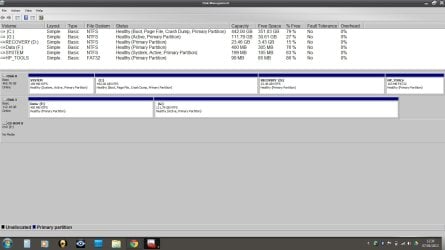
See the image for Disk Management information.
PROBLEM: I cannot work out how to make the new SSD the Boot Disk.
After (hopefully) solving the issue, I will leave all programs on the SSD and use the original HDD only for data and back-up.
Thanks
I am really sorry if someone has already covered this but I am new to this forum.
I have and HP Envy 17-2000, which has two ports for harddisks or SSDs (or any combination of).
The new SSD is a Samsung 840 (120GB) and the existing HHD uses 90GB.
I used the Samsung cloning software to copy all C drive information from the HDD to the SSD.
See the image for Disk Management information.
PROBLEM: I cannot work out how to make the new SSD the Boot Disk.
After (hopefully) solving the issue, I will leave all programs on the SSD and use the original HDD only for data and back-up.
Thanks
Attachments
My Computer
At a glance
Windows 7, 64bit, Home PremiumIntel(R) Core(TM) i7-2630QM CPU @2.00GHz6.00GBRadeon (TM) HD 6850M and Mobile Intel(R) HD G...
- Computer type
- Laptop
- Computer Manufacturer/Model Number
- HP Envy 17-2000
- OS
- Windows 7, 64bit, Home Premium
- CPU
- Intel(R) Core(TM) i7-2630QM CPU @2.00GHz
- Memory
- 6.00GB
- Graphics Card(s)
- Radeon (TM) HD 6850M and Mobile Intel(R) HD Graphics
- Hard Drives
- TOSHIBA MK5061GSYN (500GB)
Samsung SSD 840 Series (120GB)
- Antivirus
- Norton Internet Security
- Browser
- Google Chrome

