But I am still perturbed that I cannot do option #3.
Is something wrong with my PC?...because I acquired this used two year old HP Pavilion three months ago (I always have some kind of trepidation buying used anything) and although it seems running properly (actually excellently), I wonder when I encounter something like this...the computer unable to execute what seems to be routine function.
Shawn, have you tried copy/pasting the same code you posted in the forum to your command prompt? Is it possible you might have posted a typo?
My Computer
At a glance
W7 pro 32-bit.4GBATI Mobility Radeon HD 4650 (M96)
Computer type
Laptop
Computer Manufacturer/Model Number
HP Pavilion dv7-2173cl Entertainment Notebook PC
OS
W7 pro 32-bit.
Memory
4GB
Graphics Card(s)
ATI Mobility Radeon HD 4650 (M96)
Sound Card
•Altec Lansing with SRS Premium Sound and Sub-Woofer
Monitor(s) Displays
17.3” Diagonal HD+ High-Definition HP LED BrightView W
I must admit that I'm not sure why it's not working for you if you are not in safe mode and logged in to an administrator account when you run the command in an elevated command prompt.
My Computer
At a glance
64-bit Windows 11 Pro for WorkstationsIntel i7-8700K OC'd to 5 GHz64 GB (4x16GB) G.SKILL TridentZ RGB DDR4 3600...ASUS ROG-STRIX-GTX1080TI-O11G-GAMING
Computer type
PC/Desktop
Computer Manufacturer/Model Number
Self built custom
OS
64-bit Windows 11 Pro for Workstations
CPU
Intel i7-8700K OC'd to 5 GHz
Motherboard
ASUS ROG Maximus XI Formula Z390
Memory
64 GB (4x16GB) G.SKILL TridentZ RGB DDR4 3600 MHz
Graphics Card(s)
ASUS ROG-STRIX-GTX1080TI-O11G-GAMING
Sound Card
Integrated
Monitor(s) Displays
2 x Samsung Odyssey G7 27"
Screen Resolution
2560x1440
Hard Drives
1TB Samsung 990 PRO M.2,
4TB Samsung 990 PRO PRO M.2,
TerraMaster F8 SSD Plus NAS
PSU
Seasonic Prime Titanium 850W
Case
Thermaltake Core P3
Cooling
Corsair Hydro H115i
Keyboard
Logitech wireless K800
Mouse
Logitech MX Master 4
Internet Speed
2 Gb/s Download and 100 Mb/s Upload
Antivirus
Malwarebyte Anti-Malware Premium
Browser
Google Chrome
Other Info
Logitech Z625 speaker system,
Logitech BRIO 4K Pro webcam,
HP Color LaserJet Pro MFP M477fdn,
APC SMART-UPS RT 1000 XL - SURT1000XLI,
Galaxy S23 Plus phone
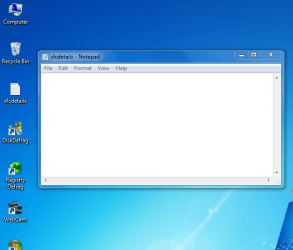
I just realized that an icon sub-titled sfcdetails is shown aligned together with other desktop icons on Administrator (Home)account. Totally missed it. It shows an empty chkdsk pad.
It does not show on (Tony).
My Computer
At a glance
W7 pro 32-bit.4GBATI Mobility Radeon HD 4650 (M96)
Computer type
Laptop
Computer Manufacturer/Model Number
HP Pavilion dv7-2173cl Entertainment Notebook PC
OS
W7 pro 32-bit.
Memory
4GB
Graphics Card(s)
ATI Mobility Radeon HD 4650 (M96)
Sound Card
•Altec Lansing with SRS Premium Sound and Sub-Woofer
Monitor(s) Displays
17.3” Diagonal HD+ High-Definition HP LED BrightView W
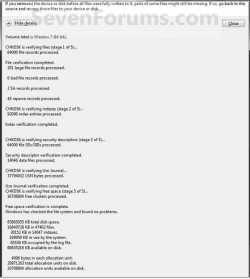
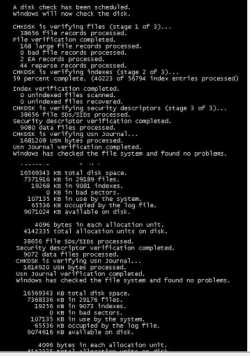
I wonder because with Vista there were always some files that were needing repair(and most, not all were repaired). With this current used W7 laptop I acquired last December all I am getting is "no integrity violation" results. Nothing to repair?
That brings to mind, should these scans be done only when there seems to be wrong ...and not routinely as I always do? Is there a downside to over-scanning(like, weekly)?
My Computer
At a glance
W7 pro 32-bit.4GBATI Mobility Radeon HD 4650 (M96)
Computer type
Laptop
Computer Manufacturer/Model Number
HP Pavilion dv7-2173cl Entertainment Notebook PC
OS
W7 pro 32-bit.
Memory
4GB
Graphics Card(s)
ATI Mobility Radeon HD 4650 (M96)
Sound Card
•Altec Lansing with SRS Premium Sound and Sub-Woofer
Monitor(s) Displays
17.3” Diagonal HD+ High-Definition HP LED BrightView W
See, you guys think everybody knows there is such a thing as PrintScreen Key. I did not until just now and I had to google(actually Bing) to find where it is.
This is the answer I was looking for with this thread. (Thanks, Shawn). I have always sensed there must be a key or key combo to freeze these scan results.
What do I do with PrintScreen key? Should I press it as soon as the details of scan starts on screen? Or as soon as it ends...just before quick disappearance ? Short tap or keep on pressing? And then what happens next? My printer has no ink, printing is not an option. I guess what happens next can be saved? And will it work with the result on the command prompt black screen?
My Computer
At a glance
W7 pro 32-bit.4GBATI Mobility Radeon HD 4650 (M96)
Computer type
Laptop
Computer Manufacturer/Model Number
HP Pavilion dv7-2173cl Entertainment Notebook PC
OS
W7 pro 32-bit.
Memory
4GB
Graphics Card(s)
ATI Mobility Radeon HD 4650 (M96)
Sound Card
•Altec Lansing with SRS Premium Sound and Sub-Woofer
Monitor(s) Displays
17.3” Diagonal HD+ High-Definition HP LED BrightView W
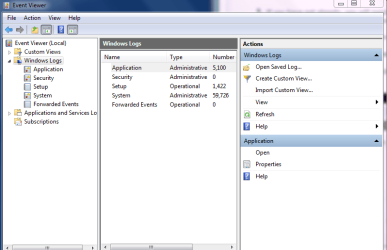
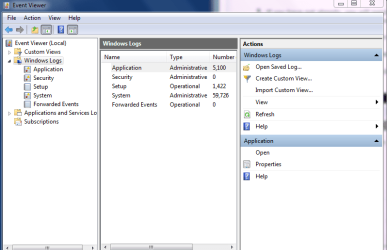
Grayed out Find option is concerning. I tried it in both users accounts, and even in safe mode... to no avail. I went to folder option in control panel and checked Show hidden files, folders and drives...again, to no avail.
I ran both sfc /scannow and chkdsk scans but came out empty for anything that needs repair. So what's wrong? How do I un-gray the Find option?
My Computer
At a glance
W7 pro 32-bit.4GBATI Mobility Radeon HD 4650 (M96)
Computer type
Laptop
Computer Manufacturer/Model Number
HP Pavilion dv7-2173cl Entertainment Notebook PC
OS
W7 pro 32-bit.
Memory
4GB
Graphics Card(s)
ATI Mobility Radeon HD 4650 (M96)
Sound Card
•Altec Lansing with SRS Premium Sound and Sub-Woofer
Monitor(s) Displays
17.3” Diagonal HD+ High-Definition HP LED BrightView W
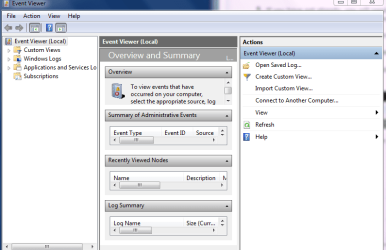
They are identical to your snipped shots except I cannot go past right clicking Application(which results in pop out box that has menu of options that includes Find because the moment I click Snipping tool app, the menu box disappears).
I tried to do screenshot with PrintScreen key but nothing happens when I press it. When I press fn+PrintScreen keys together, Scroll lock on warning pops out. Maybe I am pressing on the wrong key?(it's next to f12 and labeled Insert.scroll.
My Computer
At a glance
W7 pro 32-bit.4GBATI Mobility Radeon HD 4650 (M96)
Computer type
Laptop
Computer Manufacturer/Model Number
HP Pavilion dv7-2173cl Entertainment Notebook PC
OS
W7 pro 32-bit.
Memory
4GB
Graphics Card(s)
ATI Mobility Radeon HD 4650 (M96)
Sound Card
•Altec Lansing with SRS Premium Sound and Sub-Woofer
Monitor(s) Displays
17.3” Diagonal HD+ High-Definition HP LED BrightView W
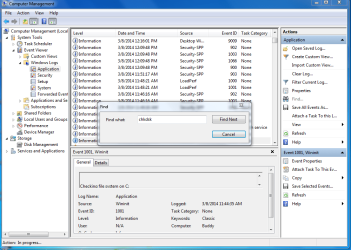
I just noticed a difference between our snipped shots. Mine does not show Find untilI accidentally tapped Application
Then it opened to more detailed right pane now showing find. And when I right clicked Application, Find is no longer grayed out. So now I can click it from both left and right lanes.
However, when I clicked it and entered chkdsk, and clicked Find again nothing happens.
Why?
My Computer
At a glance
W7 pro 32-bit.4GBATI Mobility Radeon HD 4650 (M96)
Computer type
Laptop
Computer Manufacturer/Model Number
HP Pavilion dv7-2173cl Entertainment Notebook PC
OS
W7 pro 32-bit.
Memory
4GB
Graphics Card(s)
ATI Mobility Radeon HD 4650 (M96)
Sound Card
•Altec Lansing with SRS Premium Sound and Sub-Woofer
Monitor(s) Displays
17.3” Diagonal HD+ High-Definition HP LED BrightView W