How to make taskbar invisible?

mick1705

New member
Local time
5:58 PM
Messages
1
Hi guys, new here, though I drop in regularly.

So what I was wondering is whether its possible to completely remove the windows 7 taskbar image? So in other words, make the taskbar background invisible so that only the icons/start menu/time etc is visible?

I just think that it could look good, along with centering the icons it could even be used as a dock ;)

I've searched around and come up with nothing so far. Any help? :)
 

My Computer

OS
Windows 7
It was an option in some of the previous beta builds, but for some reason was dropped out in 7100, RTM & retail.
I read somewhere that you can copy the two files "DWM.exe" and "uDWM.dll" from folder c:\windows\system32\ and paste them into the same folder for 7100. This might work for the RTM/Retail as well.

"the file "DWM.exe" is responsible for the evaluation of the registry key ("HideBlur=1") and the file "uDWM.dll" for full transparency.

In order to overwrite these files at all, you first must acquire the full access rights at these files. Then "stop the service": "Desktop Windows Manager Session Manager" for a short time and copy the files from build 7127 into 7100. After that "restart the service": "Desktop Windows Manager Session Manager" again."
 

My Computer

OS
XP Pro/Vista Ultimate (64)/Windows 7 Ultimate Signature Edition(64)
CPU
Core 2 Duo E8500 @ stock
Motherboard
Gigabyte EP45-UD3R
Memory
8Gb (4 X 2Gb) Corsair Dominator 1066Mhz DDR2
Graphics Card(s)
XFX ATI Radeon 4870 1Gb
Sound Card
Onboard 7.1
Monitor(s) Displays
BenQ E2200Hd, Asus VW161D, HP L1506
Screen Resolution
1920 X 1080
Hard Drives
Seagate 7200.12 500Gb
2 X Hitachi 1Tb
PSU
CoolerMaster 650 EPD
Case
Thermaltake
Cooling
2 X Noctua 120mm's, Stock Intel
Keyboard
Logitech
Mouse
Logitech
Thats not what he wants, he wants the taskbar but only the Orb an programs visible, try Windows Blinds, I think that should have a setting to make it totally transparent but you will have to find a suitable theme.
 

My Computer

Computer Manufacturer/Model Number
Home Brew
OS
Windows 7 Ultimate Vista Ultimate x64
CPU
Core 2 Duo E8500 3.16Ghz @ 3.8Ghz
Motherboard
eVGA 750i FTW
Memory
2x2Gigs Patriot PC2-6400 LL
Graphics Card(s)
Inno3D GeForce GTX260 216 SP
Monitor(s) Displays
ASUS VW222U 22" 2ms Response time
Screen Resolution
1680x1050
Hard Drives
SATA 150GB
SATA II 250GB
USB IDE 750GB Ext.
PSU
HYTEC 600W & Thermaltake 650W Toughpower Power Exp
Case
Thermaltake Armor LCS (Liquid Cooling System)
Cooling
Liquid Cooling System
Keyboard
Logitech G15 Gaming Keyboard
Mouse
Logitech G9 Gaming Mouse
Sry to bump up a year old thread but it's kinda what I need also ..
I was wondering if there is any way to make the taskbar tray invisible, but to leave active icons/start/quichlaunch and clock visible ?..

tnx :P
 

My Computer

OS
Windows 7 Ultimate 32bit
Sry to bump up a year old thread but it's kinda what I need also ..
I was wondering if there is any way to make the taskbar tray invisible, but to leave active icons/start/quichlaunch and clock visible ?..

tnx :P

Welcome to the Seven Forums
Next time please start a new thread.
If you are using the default/original aero theme I can make one for you but you will need to do
1 of these 2 ways of Enabling custom themes

http://www.sevenforums.com/tutorials/34579-enabling-custom-themes-windows-7-a.html
Or
http://www.sevenforums.com/tutorials/28377-theme-how-apply-custom-themes.html?filter

Here are 2 screenshots 1 original & 1 as transparent as I can get
Let me know
Jerry
 

Attachments

  • task1.PNG
    task1.PNG
    27.7 KB · Views: 689
  • task2.PNG
    task2.PNG
    30.9 KB · Views: 828

My Computer

Computer type
Laptop
Computer Manufacturer/Model Number
Sager NP9170
OS
Win 7 Pro x64 / Win 10 Pro
CPU
Intel(R) Core(TM) i7-3630QM CPU @ 2.40GHz
Motherboard
CLEVO P170EM
Memory
12 GB
Graphics Card(s)
(1) Intel(R) HD Graphics 4000 (2) NVIDIA GeForce GTX 675M
Sound Card
(1) Realtek High Definition Audio (2) Intel(R) Display Aud
Monitor(s) Displays
17.3
Screen Resolution
1920x1080
Hard Drives
(1) Samsung 860 EVO 500GB(OS) (1) Samsung 860 EVO 500GB(Data)
Keyboard
Backlite
Antivirus
MSE, Malwarebytes Pro
Browser
Firefox
Other Info
DESKTOP: Custom-built.
OS: Win 10 Pro x64.
CASE: Rosewill R5.
CPU: Intel I5 4670K CPU @ 3.40GHz.
CPU COOLER: Cool Master Hyper 212 EVO.
MOTHERBOARD: Asus Z87-A.
MEMORY: Kingston HyperX 2x4 GB.
GPU: Nvidia Geforce 650 TI.
PSU: Corsair TX750.
DRIVES: (1) Samsung 840 120 GB SSD (2) Western Digital blue 500 GB 7200 RPM.
Tnx for the quick reply, and next time I'll open new thread, sry bout that :) ..
I'm using custom theme already .. I think it's this one here ..
I was wondering if there's any way to remove the red square part (or at least make it less visible), and leave the green squares (active programs, start, quicklaunch, clock etc..)

Picture ..
 

My Computer

OS
Windows 7 Ultimate 32bit
Tnx for the quick reply, and next time I'll open new thread, sry bout that :) ..
I'm using custom theme already .. I think it's this one here ..
I was wondering if there's any way to remove the red square part (or at least make it less visible), and leave the green squares (active programs, start, quicklaunch, clock etc..)

Picture ..
Being a custom theme you will need to ask the maker to change it, it's not cool to change someone else's work. But you can change it for yourself using Ave's Windows7 Style Builder I know how to use or restorator& I do not know how to use
Some of what you want can be done but not all of it.
Sorry
Jerry

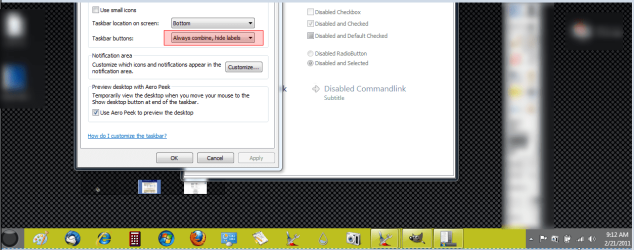
Edit here is what can be changed, using Always combine, hide labels.
 

Attachments

  • Regiontask.png
    Regiontask.png
    72.8 KB · Views: 409
Last edited:

My Computer

Computer type
Laptop
Computer Manufacturer/Model Number
Sager NP9170
OS
Win 7 Pro x64 / Win 10 Pro
CPU
Intel(R) Core(TM) i7-3630QM CPU @ 2.40GHz
Motherboard
CLEVO P170EM
Memory
12 GB
Graphics Card(s)
(1) Intel(R) HD Graphics 4000 (2) NVIDIA GeForce GTX 675M
Sound Card
(1) Realtek High Definition Audio (2) Intel(R) Display Aud
Monitor(s) Displays
17.3
Screen Resolution
1920x1080
Hard Drives
(1) Samsung 860 EVO 500GB(OS) (1) Samsung 860 EVO 500GB(Data)
Keyboard
Backlite
Antivirus
MSE, Malwarebytes Pro
Browser
Firefox
Other Info
DESKTOP: Custom-built.
OS: Win 10 Pro x64.
CASE: Rosewill R5.
CPU: Intel I5 4670K CPU @ 3.40GHz.
CPU COOLER: Cool Master Hyper 212 EVO.
MOTHERBOARD: Asus Z87-A.
MEMORY: Kingston HyperX 2x4 GB.
GPU: Nvidia Geforce 650 TI.
PSU: Corsair TX750.
DRIVES: (1) Samsung 840 120 GB SSD (2) Western Digital blue 500 GB 7200 RPM.
Tnx for the tip .. I'll do my best :)
 

My Computer

OS
Windows 7 Ultimate 32bit
Back
Top