How to make Windows 7 task pause when user logs onto computer

VMP

New member
Local time
1:04 PM
Messages
8
First time poster, long time reader : )

My friend has Norton 360 v5 on her computer and I have turned off Idle Time Scans and have set up a task using Windows 7 task scheduler to run a full system virus scan on her computer once a week starting at 10pm. The scan was still running when she logged onto her computer in the morning after the day the scan was scheduled for and was still running at 1:00 pm. The scan takes up all her cpu which leaves her computer basically useless and she uses this computer for work. It is an AMD quad core with 8 gb of ram. She has almost 200 gb of data on her computer and it takes a really long time to run the full system scan. My question is, is it possible to make the scheduled task pause when she logs onto her computer and then continue the scan after she logs off again using task scheduler? Her OS is Windows 7 sp1 32 bit.

Thanks much for any help!

Veronica
 
Last edited:

My Computer

OS
Windows 7 sp1 64 bit
Have you tried to set it up to a "manual" scan at her convenience?

Norton WILL use every resourse it can grab from her computer.
 

My Computer

Computer type
PC/Desktop
Computer Manufacturer/Model Number
Bruce ... somewhere in his 40's
OS
Windows 7 Ultimate 32bit SP1
CPU
Intel(R) Core(TM)2 Quad CPU @ 2.40GHz, 2400 MHz
Motherboard
INTEL/D975XBX2
Memory
4 GB
Graphics Card(s)
ATI Radeon HD 2600 Pro
Monitor(s) Displays
Samsung SyncMaster 914v
Screen Resolution
1280 x 1024
Hard Drives
2/500GB each ... ST3500630AS ATA Device.
One is not connected
PSU
Rocketfish 700 W
Case
G.Skill Gigabyte Chassis
Keyboard
Standard PS/2 Keyboard
Mouse
Microsoft PS/2 Mouse
Internet Speed
DSL
Antivirus
Avira Internet Security
Browser
IE 11
Other Info
ATI HDMI Audio
No, I haven't had her do a manual scan. Reason being, she needs the computer all day/evening long during the week and on and off during the weekends and there's never enough computer down time for the scan to finish without interferring with her work. I scheduled the scan to start on a day when she is off the computer for the longest time but it is still not enough time for the scan to complete.

In task scheduler there is the conditions tab option, where it will only start the scan if the computer has been idle for a length of time and stop the scan when the idle condition stops and then restart it again when the idle condition exists again but I don't want it to stop the scan and restart the scan from the beginning, which is what I think this option does. If anyone knows whether or not this option is actually just stopping the scan and restarting it where it left off, please let me know.

Thanks,
Veronica
 

My Computer

OS
Windows 7 sp1 64 bit
Readers Always Welcome!

15 hours for any scan is way out of line. I suspect something else is running during that period that's causing a severe system load. I'm not familiar with Norton but the specs indicate that it has a "Smart Scheduler". Have you checked to make sure it's not running two scans?

As far as Windows Task Scheduler, you can stop a task if it runs longer than X (hours, days, etc) but you can't make it resume from that point. You can also stop a task if the PC comes off idle state.

If Norton has a scanner with parameters (I assume it does if you're using WTS), one suggestion would be to break the scan into different tasks. Say system files on one day each week and libraries/files the next day.
 

My Computer

Computer type
PC/Desktop
Computer Manufacturer/Model Number
Built 2/11/2011
OS
Windows 7 Pro-x64
CPU
i7-2600 3.4GHz - 3.8GHz Turbo
Motherboard
Intel DH67BL-B3
Memory
8Gb - 2x4GB, Muskin 991770 PC3-1333
Graphics Card(s)
Integrated Intel HD 2000
Sound Card
Integrated Intel 10.1 HD, RealTek ALC892
Monitor(s) Displays
Asus LCD VH222H, Haier HL24XSL2a
Screen Resolution
1920x1080, 1920x1080
Hard Drives
Crucial SSD C300-128Gb,
Western Digital WD5002AALX - 500Gb,
Western Digital WD7501AALS - 750Gb
PSU
Seasonic 650W 80+ Gold Modular
Case
Rosewill Defender
Cooling
Stock CPU, Four 120mm case fans, PCH fan added
Keyboard
Logitech EX100 Y-RBH94 Wireless
Mouse
Logitech EX100 M-RCE95 Wireless
Internet Speed
3.0/1.5 Mbs
Antivirus
Microsoft Security Essentials
Browser
Microsoft Internet Explorer 11
Other Info
Antec Veris Premier-Multimedia IR Station,
Cyber Accoustics-3602 Speakers,
AFT XM-5U Card Reader,
Hauppauge TV-HVR-2250,
Sony LX300 USB Turntable
Thanks, I'll check for other things running at the same time. I scheduled her backup program to run on different days and I disabled all the other tasks that Norton 360 runs, like disk optimization but I didn't check Windows defrag, etc. now that you mention other running tasks.

Any info on how to set it up to run system files one day and programs files another would be greatly appreciated.

Thanks!
 

My Computer

OS
Windows 7 sp1 64 bit
Any info on how to set it up to run system files one day and programs files another would be greatly appreciated.
Yeah, I'm not familiar with Norton. Does it have scan parameters that can be entered in say, batch mode? How did you setup the scan in Task Scheduler?
 

My Computer

Computer type
PC/Desktop
Computer Manufacturer/Model Number
Built 2/11/2011
OS
Windows 7 Pro-x64
CPU
i7-2600 3.4GHz - 3.8GHz Turbo
Motherboard
Intel DH67BL-B3
Memory
8Gb - 2x4GB, Muskin 991770 PC3-1333
Graphics Card(s)
Integrated Intel HD 2000
Sound Card
Integrated Intel 10.1 HD, RealTek ALC892
Monitor(s) Displays
Asus LCD VH222H, Haier HL24XSL2a
Screen Resolution
1920x1080, 1920x1080
Hard Drives
Crucial SSD C300-128Gb,
Western Digital WD5002AALX - 500Gb,
Western Digital WD7501AALS - 750Gb
PSU
Seasonic 650W 80+ Gold Modular
Case
Rosewill Defender
Cooling
Stock CPU, Four 120mm case fans, PCH fan added
Keyboard
Logitech EX100 Y-RBH94 Wireless
Mouse
Logitech EX100 M-RCE95 Wireless
Internet Speed
3.0/1.5 Mbs
Antivirus
Microsoft Security Essentials
Browser
Microsoft Internet Explorer 11
Other Info
Antec Veris Premier-Multimedia IR Station,
Cyber Accoustics-3602 Speakers,
AFT XM-5U Card Reader,
Hauppauge TV-HVR-2250,
Sony LX300 USB Turntable
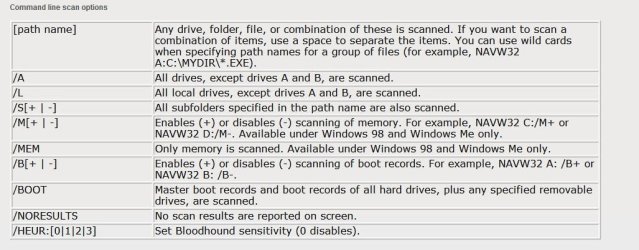
I followed directions on another link I found and set it up to run the file navw32.exe with the /L argument. I don't know what that argument means.
 

My Computer

OS
Windows 7 sp1 64 bit

Attachments

  • 00-Norton.JPG
    00-Norton.JPG
    86.1 KB · Views: 9
Last edited:

My Computer

Computer type
PC/Desktop
Computer Manufacturer/Model Number
Built 2/11/2011
OS
Windows 7 Pro-x64
CPU
i7-2600 3.4GHz - 3.8GHz Turbo
Motherboard
Intel DH67BL-B3
Memory
8Gb - 2x4GB, Muskin 991770 PC3-1333
Graphics Card(s)
Integrated Intel HD 2000
Sound Card
Integrated Intel 10.1 HD, RealTek ALC892
Monitor(s) Displays
Asus LCD VH222H, Haier HL24XSL2a
Screen Resolution
1920x1080, 1920x1080
Hard Drives
Crucial SSD C300-128Gb,
Western Digital WD5002AALX - 500Gb,
Western Digital WD7501AALS - 750Gb
PSU
Seasonic 650W 80+ Gold Modular
Case
Rosewill Defender
Cooling
Stock CPU, Four 120mm case fans, PCH fan added
Keyboard
Logitech EX100 Y-RBH94 Wireless
Mouse
Logitech EX100 M-RCE95 Wireless
Internet Speed
3.0/1.5 Mbs
Antivirus
Microsoft Security Essentials
Browser
Microsoft Internet Explorer 11
Other Info
Antec Veris Premier-Multimedia IR Station,
Cyber Accoustics-3602 Speakers,
AFT XM-5U Card Reader,
Hauppauge TV-HVR-2250,
Sony LX300 USB Turntable
Thanks for that link. That may explain why the scan is taking so long, it is scanning her whole computer plus the external iomega drive where her system image is saved. Those external drives takes forever to scan. I'm going to change the task to scan just the c: and d: drives.

Thanks!!!
Veronica
 

My Computer

OS
Windows 7 sp1 64 bit
Let us know how it turns out. :party:
 

My Computer

Computer type
PC/Desktop
Computer Manufacturer/Model Number
Built 2/11/2011
OS
Windows 7 Pro-x64
CPU
i7-2600 3.4GHz - 3.8GHz Turbo
Motherboard
Intel DH67BL-B3
Memory
8Gb - 2x4GB, Muskin 991770 PC3-1333
Graphics Card(s)
Integrated Intel HD 2000
Sound Card
Integrated Intel 10.1 HD, RealTek ALC892
Monitor(s) Displays
Asus LCD VH222H, Haier HL24XSL2a
Screen Resolution
1920x1080, 1920x1080
Hard Drives
Crucial SSD C300-128Gb,
Western Digital WD5002AALX - 500Gb,
Western Digital WD7501AALS - 750Gb
PSU
Seasonic 650W 80+ Gold Modular
Case
Rosewill Defender
Cooling
Stock CPU, Four 120mm case fans, PCH fan added
Keyboard
Logitech EX100 Y-RBH94 Wireless
Mouse
Logitech EX100 M-RCE95 Wireless
Internet Speed
3.0/1.5 Mbs
Antivirus
Microsoft Security Essentials
Browser
Microsoft Internet Explorer 11
Other Info
Antec Veris Premier-Multimedia IR Station,
Cyber Accoustics-3602 Speakers,
AFT XM-5U Card Reader,
Hauppauge TV-HVR-2250,
Sony LX300 USB Turntable
I thought that in order to scan the c drive only using Task Scheduler, I would use c:/path/navw32.exe c: but got an incorrect syntax error and can't find the switch to scan just the c drive for Norton 360 v5.

What I did notice this morning was that she had Microsoft Security Essentials also installed on her computer and real time protection was turned on and a scan was scheduled for Sundays at 2:00 am, so that could have been part of the problem too ... if both programs were scanning at the same time. Don't know who installed MSE!

I'll see what happens tonight after she gets off the computer.

If anyone knows the switch to scan the c drive only, please let me know and I'll add it to the Task Scheduler task.

Thanks,
Veronica
 
Last edited:

My Computer

OS
Windows 7 sp1 64 bit
You might try navw32.exe /? or navw32.exe ? in the Run command box and see if the program will list the options. It might be better to go to the Norton support site and see if someone knows. :confused:

Two AV scanners are bad enough but you sure don't want to run two real-time scanners on a PC. They can interfere with each other and cause data corruption and/or crashes. She really should make a choice or ONE. If it were me, I'd flush Norton and go with MSE anyway. It's faster, less obtrusive and it's free. It also has the advantage of having Microsoft engineers with the inside scoop on the team. It gets definition updates every day and software updates once or twice a year.
 

My Computer

Computer type
PC/Desktop
Computer Manufacturer/Model Number
Built 2/11/2011
OS
Windows 7 Pro-x64
CPU
i7-2600 3.4GHz - 3.8GHz Turbo
Motherboard
Intel DH67BL-B3
Memory
8Gb - 2x4GB, Muskin 991770 PC3-1333
Graphics Card(s)
Integrated Intel HD 2000
Sound Card
Integrated Intel 10.1 HD, RealTek ALC892
Monitor(s) Displays
Asus LCD VH222H, Haier HL24XSL2a
Screen Resolution
1920x1080, 1920x1080
Hard Drives
Crucial SSD C300-128Gb,
Western Digital WD5002AALX - 500Gb,
Western Digital WD7501AALS - 750Gb
PSU
Seasonic 650W 80+ Gold Modular
Case
Rosewill Defender
Cooling
Stock CPU, Four 120mm case fans, PCH fan added
Keyboard
Logitech EX100 Y-RBH94 Wireless
Mouse
Logitech EX100 M-RCE95 Wireless
Internet Speed
3.0/1.5 Mbs
Antivirus
Microsoft Security Essentials
Browser
Microsoft Internet Explorer 11
Other Info
Antec Veris Premier-Multimedia IR Station,
Cyber Accoustics-3602 Speakers,
AFT XM-5U Card Reader,
Hauppauge TV-HVR-2250,
Sony LX300 USB Turntable
I already uninstalled MSE. She wanted to keep Norton. She's been having tons of problems with her computer so she took it into some "Pro's" to be fixed and I have been troubleshooting the virus problem ever since. She said they told her she had several virus programs on her computer and they deleted them because she should only have 1 and they somehow missed MSE.

Thanks for the tip on the switches, I really appreciate all your help!

Veronica
 

My Computer

OS
Windows 7 sp1 64 bit
Since /L scans all local drives, the usb external hard drive is not being scanned because it's not a local drive. Is that a correct assumption?
 

My Computer

OS
Windows 7 sp1 64 bit
Back
Top