Solved How to monitor disk health in raid config?

Rockydog1947

New member
Member
Local time
10:58 PM
Messages
49
I have set up 2 seagate drives in raid 0 stripe on an Intel Rapid Storage controller and would like to be able to monitor the health of these drives.

Any program that I've tried reports it as a SCSI Disk Device and offers no info.

I've also tried to find something that would monitor the controller but no luck.

If anyone could offer me some advice it would be greatly appreciated.

Thank you, Ken
 

My Computer My Computer

At a glance

Win 7 Pro 64 bitI7 3770k Ivy @ 4.2 GHzKingston Hyper X2 x EVGA GeForce GTX 560 Ti Superclocked
Computer type
PC/Desktop
Computer Manufacturer/Model Number
Home Made
OS
Win 7 Pro 64 bit
CPU
I7 3770k Ivy @ 4.2 GHz
Motherboard
ASRock Z77 OC Formula
Memory
Kingston Hyper X
Graphics Card(s)
2 x EVGA GeForce GTX 560 Ti Superclocked
Sound Card
On board Realtek
Monitor(s) Displays
LG Flatron WD2753V / Lg Flatron W1943TB
Screen Resolution
1929x1080
Hard Drives
Op System Seagate 2 x 1 TB Raid 0 Stripe
2 x Seagate 3 TB internal drives
2 x Seagate GoFlex 1.5 TB external drives
2 x Seagate 3TB External Backup drives
PSU
Antec Truepower Quattro 1000W
Case
Cooler Master Cosmos II
Cooling
Processor Corsair Hydro Series H100 Extreme w/Corsair Link

Keyboard
Logitech G15
Mouse
Logitech G5
Internet Speed
50 MB
Antivirus
Microsoft Security Essentials
Browser
Google Chrome

My Computer My Computer

At a glance

Windows 10 Pro x64 ; Xubuntu x64Intel i7 860 @ 2.80 GHz O/C'ed to 4.0GHz16GB Corsair Vengance DDR3 @ 661 MHz Dual Cha...EVGA NVidia GTX 560 1024MB
Computer type
PC/Desktop
Computer Manufacturer/Model Number
Golden Mk. I.4
OS
Windows 10 Pro x64 ; Xubuntu x64
CPU
Intel i7 860 @ 2.80 GHz O/C'ed to 4.0GHz
Motherboard
Gigabyte P55A-UD3R Rev.1. Award BIOS F13
Memory
16GB Corsair Vengance DDR3 @ 661 MHz Dual Channel (9-9-9-24)
Graphics Card(s)
EVGA NVidia GTX 560 1024MB
Sound Card
Realtek Integrated
Monitor(s) Displays
Dual Samsung SyncMaster 2494HS
Screen Resolution
1920*1080 and 1920*1080
Hard Drives
1*Samsung 840 EVO 120GB SSD;
1*OCZ Vertex 2 60GB SSD;
2*Samsung F3 SpinPoint 1TB in RAID0;
1*Samsung F1 SpinPoint 1TB;
2*Western Digital 1TB External USB 3.0
1*Western Digital 500GB External USB 3.0
1*Seagate 500GB External USB 2.0
PSU
Thermaltake ToughPower QFan 750W
Case
Thermaltake Element S VK60001W2Z
Cooling
Corsair H60 Water Cooling, 2*230mm and 2*80mm case fans
Keyboard
Logitech G110
Mouse
Logitech MX518
Thanks, that's where I got the latest drivers (11.​6.​0.​1030) but it was just drivers no utility. Anything that looks like a utility (Manager) has old drivers.

What should I do?

Thanks, Ken
 

My Computer My Computer

At a glance

Win 7 Pro 64 bitI7 3770k Ivy @ 4.2 GHzKingston Hyper X2 x EVGA GeForce GTX 560 Ti Superclocked
Computer type
PC/Desktop
Computer Manufacturer/Model Number
Home Made
OS
Win 7 Pro 64 bit
CPU
I7 3770k Ivy @ 4.2 GHz
Motherboard
ASRock Z77 OC Formula
Memory
Kingston Hyper X
Graphics Card(s)
2 x EVGA GeForce GTX 560 Ti Superclocked
Sound Card
On board Realtek
Monitor(s) Displays
LG Flatron WD2753V / Lg Flatron W1943TB
Screen Resolution
1929x1080
Hard Drives
Op System Seagate 2 x 1 TB Raid 0 Stripe
2 x Seagate 3 TB internal drives
2 x Seagate GoFlex 1.5 TB external drives
2 x Seagate 3TB External Backup drives
PSU
Antec Truepower Quattro 1000W
Case
Cooler Master Cosmos II
Cooling
Processor Corsair Hydro Series H100 Extreme w/Corsair Link
Keyboard
Logitech G15
Mouse
Logitech G5
Internet Speed
50 MB
Antivirus
Microsoft Security Essentials
Browser
Google Chrome
Should I over install the old drivers to get the utility then update the drivers??
 

My Computer My Computer

At a glance

Win 7 Pro 64 bitI7 3770k Ivy @ 4.2 GHzKingston Hyper X2 x EVGA GeForce GTX 560 Ti Superclocked
Computer type
PC/Desktop
Computer Manufacturer/Model Number
Home Made
OS
Win 7 Pro 64 bit
CPU
I7 3770k Ivy @ 4.2 GHz
Motherboard
ASRock Z77 OC Formula
Memory
Kingston Hyper X
Graphics Card(s)
2 x EVGA GeForce GTX 560 Ti Superclocked
Sound Card
On board Realtek
Monitor(s) Displays
LG Flatron WD2753V / Lg Flatron W1943TB
Screen Resolution
1929x1080
Hard Drives
Op System Seagate 2 x 1 TB Raid 0 Stripe
2 x Seagate 3 TB internal drives
2 x Seagate GoFlex 1.5 TB external drives
2 x Seagate 3TB External Backup drives
PSU
Antec Truepower Quattro 1000W
Case
Cooler Master Cosmos II
Cooling
Processor Corsair Hydro Series H100 Extreme w/Corsair Link
Keyboard
Logitech G15
Mouse
Logitech G5
Internet Speed
50 MB
Antivirus
Microsoft Security Essentials
Browser
Google Chrome
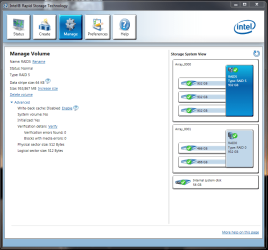
Ok, took a chance and installed package with older set of drivers. I have the monitoring tool and everything seems to be working great. Not going to update the drivers just yet.
 

My Computer My Computer

At a glance

Win 7 Pro 64 bitI7 3770k Ivy @ 4.2 GHzKingston Hyper X2 x EVGA GeForce GTX 560 Ti Superclocked
Computer type
PC/Desktop
Computer Manufacturer/Model Number
Home Made
OS
Win 7 Pro 64 bit
CPU
I7 3770k Ivy @ 4.2 GHz
Motherboard
ASRock Z77 OC Formula
Memory
Kingston Hyper X
Graphics Card(s)
2 x EVGA GeForce GTX 560 Ti Superclocked
Sound Card
On board Realtek
Monitor(s) Displays
LG Flatron WD2753V / Lg Flatron W1943TB
Screen Resolution
1929x1080
Hard Drives
Op System Seagate 2 x 1 TB Raid 0 Stripe
2 x Seagate 3 TB internal drives
2 x Seagate GoFlex 1.5 TB external drives
2 x Seagate 3TB External Backup drives
PSU
Antec Truepower Quattro 1000W
Case
Cooler Master Cosmos II
Cooling
Processor Corsair Hydro Series H100 Extreme w/Corsair Link
Keyboard
Logitech G15
Mouse
Logitech G5
Internet Speed
50 MB
Antivirus
Microsoft Security Essentials
Browser
Google Chrome
Back
Top