
I have a problem that is exactly like described here:
Switching my Windows 7 Boot Disk from D to C with BCDBoot rather than BCDEdit - Scott Hanselman
in that my E: drive is marked as 'System' (and has a BOOT folder containing BCD info) while Windows 7 64 bit was installed on my C: drive (Intel SSD).
I followed the process described, ie, ran command:
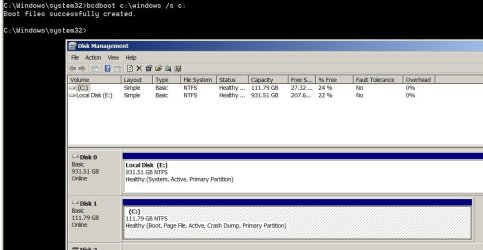
bcdboot c:\windows /s c:
however Disk 0 E: drive is still marked as 'system'. (See attached jpg)
Can anyone advise why this worked for others but is not working for me, or an alternative approach?
My BIOS only has a boot option for Hard Drive, not an option to select C: or E:
Thanks in advance, Bernie.
Switching my Windows 7 Boot Disk from D to C with BCDBoot rather than BCDEdit - Scott Hanselman
in that my E: drive is marked as 'System' (and has a BOOT folder containing BCD info) while Windows 7 64 bit was installed on my C: drive (Intel SSD).
I followed the process described, ie, ran command:
bcdboot c:\windows /s c:
however Disk 0 E: drive is still marked as 'system'. (See attached jpg)
Can anyone advise why this worked for others but is not working for me, or an alternative approach?
My BIOS only has a boot option for Hard Drive, not an option to select C: or E:
Thanks in advance, Bernie.
Attachments
My Computer
- Computer type
- PC/Desktop
- Computer Manufacturer/Model Number
- Custom
- OS
- Windows 7 Proffesional 64 bit
- Hard Drives
- Intel SSD
WD 1TB dive
- Antivirus
- AVG
- Browser
- Firefox