how to move/delete "System Volume Information" [PLEASE]

Wilman

New member
Local time
9:11 AM
Messages
5
Location
West Java, IDN
hi guys,

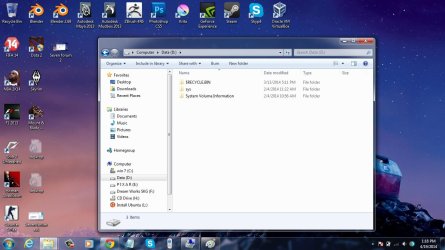
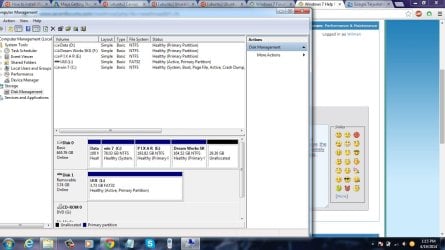
Today I would like to do a dual boot on my laptop. Windows and ubuntu .. my laptop is a lenovo. I have a problem on my partition. I have 4 partitions on my hdd, C:, D:, E:, F:. and I want to move or maybe remove the system volume information folder on the "D:" and will also remove the "D:" and finally I have 3 partitions namely c, e, and f. so I can have a free space for ubuntu. it seems my laptop can not have more than 4 partitions.

BUT, i don't know how to do that?

it is screenshot
Seven forum ask.jpg

Seven forum 2.jpg

Seven forum 3.jpg

Thanks advance,
Wilman
 

My Computer My Computer

Computer type
Laptop
Computer Manufacturer/Model Number
Lenovo
OS
Windows 7 Professional x32
CPU
Core i3-3110M 2.4 GHz
Memory
2 Gb
Graphics Card(s)
Nvidia Geforce 705M 1Gb
Hard Drives
ATA 500Gb
Antivirus
Avast Premier 2014
Browser
Chrome
Was the D partition on this Lenovo when you bought it new?

Or did you add the D partition yourself?

It is not flagged as active or boot or system, so I'm wondering about its purpose? It's not quite empty.

I notice you have an external drive marked as "active" and am wondering how that has happened. Is Ubuntu already on this drive?

Are you locked into the idea of Pixar and Dream Works being on their own partitions?
 

My Computer My Computer

Computer type
PC/Desktop
Computer Manufacturer/Model Number
Ignatz Special; 4 speed manual gearbox; factory air conditioning; one of one
OS
Windows 7 Home Premium SP1, 64-bit
CPU
Intel Skylake i5-6600K, not overclocked
Motherboard
AsRock Z170M Extreme 4, micro ATX
Memory
8 GB HyperX DDR4-2666 (2 x 4 GB)
Graphics Card(s)
none; graphics are integrated on CPU
Sound Card
onboard: Realtek ALC1150; external: USB Behringer UF0-202
Monitor(s) Displays
Dell S2340M 23 inch IPS
Screen Resolution
1600 x 900
Hard Drives
System: Crucial MX100 series SSD, 128 GB;
Data: Samsung Spinpoint 103SJ, 1 TB;
Backup: WD Caviar Green WD30EZRX-00D8PB0, 3 TB
PSU
Rosewill SilentNight 500 watt fanless, semi-modular
Case
Antec Solo II
Cooling
Noctua NH-U12S; Noctua F12 intake, Noctua S12A exhaust
Keyboard
Microsoft 200 6JH-00001 USB
Mouse
Dell or Microsoft optical wired; USB
Antivirus
Microsoft Security Essentials and Malwarebytes Premium
Browser
Pale Moon
Other Info
All fans PWM; speeds at idle: CPU circa 500 rpm; intake circa 600 rpm; exhaust circa 600 rpm; CPU temps 27 idle and 47 C load in a warm room (27 C/81 F) when running Intel Extreme Tuning Utility stress test.
Was the D partition on this Lenovo when you bought it new?

Or did you add the D partition yourself?

It is not flagged as active or boot or system, so I'm wondering about its purpose? It's not quite empty.

I notice you have an external drive marked as "active" and am wondering how that has happened. Is Ubuntu already on this drive?

Are you locked into the idea of Pixar and Dream Works being on their own partitions?

no i'm not create the D. that suddenly there after I re-install windows 7.

that ubuntu just in my flash drive. i do booting ubuntu using fd.
 

My Computer My Computer

Computer type
Laptop
Computer Manufacturer/Model Number
Lenovo
OS
Windows 7 Professional x32
CPU
Core i3-3110M 2.4 GHz
Memory
2 Gb
Graphics Card(s)
Nvidia Geforce 705M 1Gb
Hard Drives
ATA 500Gb
Antivirus
Avast Premier 2014
Browser
Chrome
I'm not sure, but I think Ubuntu can be installed in a logical partition.

Have you tried to create an extended partition from the "unallocated space" of 29.3 GB?

I'm not sure what that D was created when you reinstalled Windows and am not sure if you need it.
 

My Computer My Computer

Computer type
PC/Desktop
Computer Manufacturer/Model Number
Ignatz Special; 4 speed manual gearbox; factory air conditioning; one of one
OS
Windows 7 Home Premium SP1, 64-bit
CPU
Intel Skylake i5-6600K, not overclocked
Motherboard
AsRock Z170M Extreme 4, micro ATX
Memory
8 GB HyperX DDR4-2666 (2 x 4 GB)
Graphics Card(s)
none; graphics are integrated on CPU
Sound Card
onboard: Realtek ALC1150; external: USB Behringer UF0-202
Monitor(s) Displays
Dell S2340M 23 inch IPS
Screen Resolution
1600 x 900
Hard Drives
System: Crucial MX100 series SSD, 128 GB;
Data: Samsung Spinpoint 103SJ, 1 TB;
Backup: WD Caviar Green WD30EZRX-00D8PB0, 3 TB
PSU
Rosewill SilentNight 500 watt fanless, semi-modular
Case
Antec Solo II
Cooling
Noctua NH-U12S; Noctua F12 intake, Noctua S12A exhaust
Keyboard
Microsoft 200 6JH-00001 USB
Mouse
Dell or Microsoft optical wired; USB
Antivirus
Microsoft Security Essentials and Malwarebytes Premium
Browser
Pale Moon
Other Info
All fans PWM; speeds at idle: CPU circa 500 rpm; intake circa 600 rpm; exhaust circa 600 rpm; CPU temps 27 idle and 47 C load in a warm room (27 C/81 F) when running Intel Extreme Tuning Utility stress test.
I'm not sure, but I think Ubuntu can be installed in a logical partition.

Have you tried to create an extended partition from the "unallocated space" of 29.3 GB?

I'm not sure what that D was created when you reinstalled Windows and am not sure if you need it.

that "unallocated space" is an extended partition of F.

of course i'm not need the D. but i can't delete the D because there was "system volume information"? if i delete the D in the disk management, it'll be okay? or not?
 

My Computer My Computer

Computer type
Laptop
Computer Manufacturer/Model Number
Lenovo
OS
Windows 7 Professional x32
CPU
Core i3-3110M 2.4 GHz
Memory
2 Gb
Graphics Card(s)
Nvidia Geforce 705M 1Gb
Hard Drives
ATA 500Gb
Antivirus
Avast Premier 2014
Browser
Chrome
that "unallocated space" is an extended partition of F.

of course i'm not need the D. but i can't delete the D because there was "system volume information"? if i delete the D in the disk management, it'll be okay? or not?

I'm just not sure if D is needed because I don't understand why it was created when Windows was reinstalled. I doubt it's needed, but I can't be sure you should delete it.

"Unallocated space" is not a partition. I see no evidence from your screen shots that you have any extended or logical partitions.
 

My Computer My Computer

Computer type
PC/Desktop
Computer Manufacturer/Model Number
Ignatz Special; 4 speed manual gearbox; factory air conditioning; one of one
OS
Windows 7 Home Premium SP1, 64-bit
CPU
Intel Skylake i5-6600K, not overclocked
Motherboard
AsRock Z170M Extreme 4, micro ATX
Memory
8 GB HyperX DDR4-2666 (2 x 4 GB)
Graphics Card(s)
none; graphics are integrated on CPU
Sound Card
onboard: Realtek ALC1150; external: USB Behringer UF0-202
Monitor(s) Displays
Dell S2340M 23 inch IPS
Screen Resolution
1600 x 900
Hard Drives
System: Crucial MX100 series SSD, 128 GB;
Data: Samsung Spinpoint 103SJ, 1 TB;
Backup: WD Caviar Green WD30EZRX-00D8PB0, 3 TB
PSU
Rosewill SilentNight 500 watt fanless, semi-modular
Case
Antec Solo II
Cooling
Noctua NH-U12S; Noctua F12 intake, Noctua S12A exhaust
Keyboard
Microsoft 200 6JH-00001 USB
Mouse
Dell or Microsoft optical wired; USB
Antivirus
Microsoft Security Essentials and Malwarebytes Premium
Browser
Pale Moon
Other Info
All fans PWM; speeds at idle: CPU circa 500 rpm; intake circa 600 rpm; exhaust circa 600 rpm; CPU temps 27 idle and 47 C load in a warm room (27 C/81 F) when running Intel Extreme Tuning Utility stress test.
Back
Top