Solved How to move the operating system from 4 TB drive to 2TB drive.

igeorge

New member
Local time
1:25 AM
Messages
32
Hi,
I have a 4tb drive with the windows 7 installed and all the programs. From it of course it is used just 2 tb. the rest is empty. Also, the drive is listed as H and not C.
I would like to move the content to a 2TB drive, and also to change the name from H to C
I tried to clone but the program stopped and told me i cannot clone 4TB to 2TB.
Does anybody has a suggestion to help me ?
Thank you
 

My Computer My Computer

At a glance

xp , vista
OS
xp , vista
Hi

The inbuilt Windows option will not work.
Macrium/Paragon, both FREE, have the option to downsize

note
it would be easier if you resize the disc into 2 partitions


Roy
 

My Computer My Computer

At a glance

W7 home premium 32bit/W7HP 64bit/w10 tp insid...E5300 dual core3gbNvidia Geforce 7100 Nforce 630i
Computer type
PC/Desktop
Computer Manufacturer/Model Number
medionl/Aspire 6930G/acer x55a
OS
W7 home premium 32bit/W7HP 64bit/w10 tp insider ring
CPU
E5300 dual core
Motherboard
medion MS7366
Memory
3gb
Graphics Card(s)
Nvidia Geforce 7100 Nforce 630i
Monitor(s) Displays
avixc
Internet Speed
n (isp resticted to 72)
Antivirus
mse/pands
Browser
palemoon
Other Info
Belkin Fd7050 n USB using Railink RT2870 drivers, more upto date
Hello Roy,
Thank you for reply.
Small issues.
Macrium or Paragon they are not anymore free, and the trial version does not work for shrinking.
The 4TB HD i cannot make it on 2 partitions. When i try, windows said the maximum partition is 207 MB.
It does not works.
As i boot from it, and i have all my projects and programing software (for microprocessors, not windows), i am scared to do something which it might destroy the disk.
I will start doing first a full image of the partition, to have it in case of disaster.
After that i will follow your advice.
The bad part is that Hdrive is part of dual boot. The PC boot on a different drive and i have the option to select H drive at boot.
If i remove the first drive with the BCD configuration, the PC does not boot on H.
 

My Computer My Computer

At a glance

xp , vista
OS
xp , vista
It looks to me like it is still free, Pick the "Home" version

Macrium Software | Macrium Reflect Free


It will ask you if you want to recieve ocansional Emails -- you can choose Yes or No if you like

Would you like to receive occasional news about Macrium software?


Then you will recieve a Email with a link, Check your Junk Email folder if you don't get it right away.
 

My Computer My Computer

At a glance

Microsoft Windows 7 Ultimate 32-bit 7601Intel(R) Pentium(R) Dual CPU E2160 @ 1.80GHz4.00 GB(1) VNC Mirror Driver (2) Intel(R) G33/G31 Ex...
Computer type
PC/Desktop
Computer Manufacturer/Model Number
Compac
OS
Microsoft Windows 7 Ultimate 32-bit 7601
CPU
Intel(R) Pentium(R) Dual CPU E2160 @ 1.80GHz
Motherboard
MSI Boston
Memory
4.00 GB
Graphics Card(s)
(1) VNC Mirror Driver (2) Intel(R) G33/G31 Express Chipset
Sound Card
Disabled
Monitor(s) Displays
Headless
Screen Resolution
1280 x 960 x 32 bits (4294967296 colors) @ 60 Hz
Hard Drives
ST3320820AS ATA Device
Keyboard
Headless
Mouse
Headless
Antivirus
Malwarebytes pro
Other Info
Also
Windows 8.1 Laptop and Desktop both Acer

My Computers My Computers

  • At a glance

    7 X64i5 84002x8gb 3200mhz
    Computer type
    PC/Desktop
    OS
    7 X64
    CPU
    i5 8400
    Motherboard
    gigabyte b365m ds3h
    Memory
    2x8gb 3200mhz
    Hard Drives
    various
    PSU
    pure power 11 400w cm
    Case
    Coolermaster
    Cooling
    cryorig m9i
  • At a glance

    7x64g54008gb ddr4 2400
    Computer type
    PC/Desktop
    OS
    7x64
    CPU
    g5400
    Motherboard
    ga b365m ds3h
    Memory
    8gb ddr4 2400
    PSU
    xfx pro 450w
Thank you for suggestion
I will try. I found that Aomei partition assistant can clone from a big drive to a small one.
I have this and i am in the process to do it.50% and going.
Now question. If i remove the other drive with the EasyBCD on it and let just the new one, will boot or not ?
 

My Computer My Computer

At a glance

xp , vista
OS
xp , vista
Bad news,
It took me 4 hours to complete the process and just at 99% it report some errors and crash.
I will do it tomorrow again with Backupper
 

My Computer My Computer

At a glance

xp , vista
OS
xp , vista
End of a Saga or middle road.
Lets, explain in detail the process i had to redo it 50 times.
Most important to know that i was in windows 7 but a different drive than one i want to clone.
First, i found a software Aomei partition assistant which could clone from a big drive to a small one.
1.First mistake : i wanted to make the partition smaller to save time at transfer and i used the same software to shrink partition. Wrong... It did it, but took 2 1/2 hours so no saving. In top of that made some errors which i discovered later.
2. I start the cloning process, 3 hours or more, and almost in the end, at 99% crashed with an error.
3. I decided to make first an image of the drive, and i used Casper which i have.
4. 2 hour and i got the image.
5. Using again Casper i restored the image on the small drive with no errors.
6. I tried to boot from it, but it did not.
7. Used Windows installation disc , select repaire, then command prompt.
8. Typed the following commands (pay attention to the space between BOOTREC AND /)
BOOTREC /FIXMBR
BOOTREC /FIXBOOT
BOOTREC /REBUILDBCD
Exit, then reboot.
First it did a chkdsk and found a lots of errors from the shrinking .
It put the files on a FOUND directory which i cannot open yet, but i will.
BINGO , my old windows from the old disk shows up on the new disk.
What is curious, it even kept the old drive letter H like on the old drive.
One day, after a solid backup, maybe i will try to change the letter to C, or try to find a software to do it.
That is the whole story
 

My Computer My Computer

At a glance

xp , vista
OS
xp , vista
First it did a chkdsk and found a lots of errors

That was the problem.

What is curious, it even kept the old drive letter H like on the old drive.

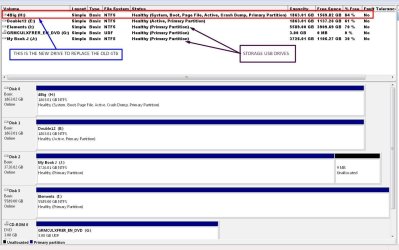
Post a screenshot of disk management.
 

My Computers My Computers

  • At a glance

    7 X64i5 84002x8gb 3200mhz
    Computer type
    PC/Desktop
    OS
    7 X64
    CPU
    i5 8400
    Motherboard
    gigabyte b365m ds3h
    Memory
    2x8gb 3200mhz
    Hard Drives
    various
    PSU
    pure power 11 400w cm
    Case
    Coolermaster
    Cooling
    cryorig m9i
  • At a glance

    7x64g54008gb ddr4 2400
    Computer type
    PC/Desktop
    OS
    7x64
    CPU
    g5400
    Motherboard
    ga b365m ds3h
    Memory
    8gb ddr4 2400
    PSU
    xfx pro 450w
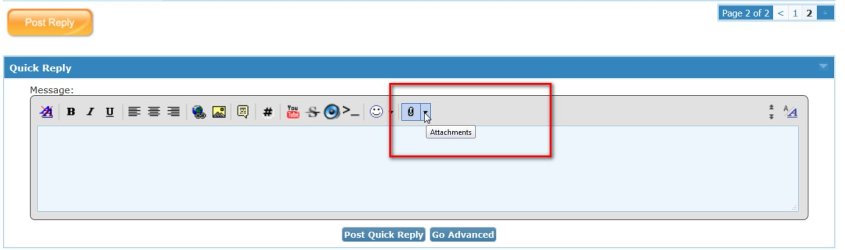
I do not know how to attach picture.
It is in my computer but when i click picture icon it ask me about HTTP ????
 

My Computer My Computer

At a glance

xp , vista
OS
xp , vista
attachments.jpg
 

My Computers My Computers

  • At a glance

    7 X64i5 84002x8gb 3200mhz
    Computer type
    PC/Desktop
    OS
    7 X64
    CPU
    i5 8400
    Motherboard
    gigabyte b365m ds3h
    Memory
    2x8gb 3200mhz
    Hard Drives
    various
    PSU
    pure power 11 400w cm
    Case
    Coolermaster
    Cooling
    cryorig m9i
  • At a glance

    7x64g54008gb ddr4 2400
    Computer type
    PC/Desktop
    OS
    7x64
    CPU
    g5400
    Motherboard
    ga b365m ds3h
    Memory
    8gb ddr4 2400
    PSU
    xfx pro 450w
Thank you
Here it is
 

Attachments

  • Management.jpg
    Management.jpg
    131.6 KB · Views: 2

My Computer My Computer

At a glance

xp , vista
OS
xp , vista
It looks like the OS letter is indeed H.

In theory it is possible to change, but very complicated and not worth trying.

Not necessary to change the OS letter, it will work fine with any letter.
 

My Computers My Computers

  • At a glance

    7 X64i5 84002x8gb 3200mhz
    Computer type
    PC/Desktop
    OS
    7 X64
    CPU
    i5 8400
    Motherboard
    gigabyte b365m ds3h
    Memory
    2x8gb 3200mhz
    Hard Drives
    various
    PSU
    pure power 11 400w cm
    Case
    Coolermaster
    Cooling
    cryorig m9i
  • At a glance

    7x64g54008gb ddr4 2400
    Computer type
    PC/Desktop
    OS
    7x64
    CPU
    g5400
    Motherboard
    ga b365m ds3h
    Memory
    8gb ddr4 2400
    PSU
    xfx pro 450w
Thank you SIW2
After all i read about programs stopping to works and need to reinstall them, i just gave up.
 

My Computer My Computer

At a glance

xp , vista
OS
xp , vista
Back
Top