How to open IE 8 in full screen mode every time?

ThaChad

New member
Local time
11:10 PM
Messages
33
Hey all,

I am actually trying to get this to work on a Windows XP laptop running windows XP Pro.

It's my daughters laptop I passed down to her.

I have it set to automatically launch IE and open abcmouse.com on startup.

However I want to set it up to open in full screen mode. Currently it just keeps opening in regular maximized mode.

Thanks,

-Chad
 

My Computer My Computer

At a glance

Windows 7 Professional x64Intel Core 2 Duo E8400 Wolfdale 3.00GHz8GB OCZ Reaper HPC (4 x 2GB) DDR2 1066 (PC2 8...EVGA 512-P2-N757-TR GeForce 8600 GT 512MB 128...
OS
Windows 7 Professional x64
CPU
Intel Core 2 Duo E8400 Wolfdale 3.00GHz
Motherboard
GIGABYTE GA-EP35-DS3P
Memory
8GB OCZ Reaper HPC (4 x 2GB) DDR2 1066 (PC2 8500)
Graphics Card(s)
EVGA 512-P2-N757-TR GeForce 8600 GT 512MB 128-bit GDDR3
Sound Card
Built-In - Realtek ALC889A
Monitor(s) Displays
LG Flatron W2252TQ
Hard Drives
1 x Seagate Barracuda ST3000DM001 3TB 7200 RPM SATA 6.0Gb/s 3.5" Internal Hard Drive

1 x Seagate Barracuda ST3750330AS 750GB 7200 RPM SATA 3.0Gb/s 3.5" Internal Hard Drive
See if this helps:

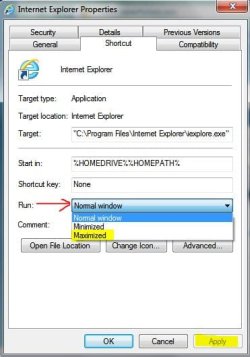
Locate Internet Explorer in your start menu (possibly under all programs.) Right click on it and in the context menu that opens, click on properties.

ie.JPG

The internet explorer properties dialog box will open. From the "run" drop down box select maximized, then click apply, then OK.

ie properties.JPG
 

My Computer My Computer

At a glance

Win 7 Pro 64-bitIntel i5 2.4 Ghz8GB DDR3Intel HD 3000
Computer type
Laptop
Computer Manufacturer/Model Number
Sony Vaio VPCEB47GM Laptop
OS
Win 7 Pro 64-bit
CPU
Intel i5 2.4 Ghz
Memory
8GB DDR3
Graphics Card(s)
Intel HD 3000
Sound Card
IDT High Definition
Monitor(s) Displays
15.6 WGXA Anti-Glare LED
Screen Resolution
1280x800
Hard Drives
640Gb 7200rpm
Antivirus
MSE
Browser
Opera (primary) with IE9 backup
Simple solution:

  1. Click Start :orb:
  2. Drag "Internet Explorer" to the desktop.
  3. Now right-click the shortcut > Click Properties.
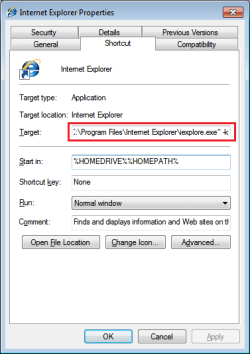
  4. At the end of the target line, add a space and then, this: -k so that it looks like:

    Untitled.png
  5. Now click OK.
  6. Now add this shortcut to your startup items.
  7. Done. Easy and simple.

NOTE: You'll need to use Alt+F4 key combination to close Internet Explorer.
 
Last edited:
@ nilank

That works perfect! That's exactly what I wanted..

However, that requires that you set the default home page to said website.

Is there any way to make that shortcut open a speciffic website other than the default homepage?

Thanks!

-ThaChad
 

My Computer My Computer

At a glance

Windows 7 Professional x64Intel Core 2 Duo E8400 Wolfdale 3.00GHz8GB OCZ Reaper HPC (4 x 2GB) DDR2 1066 (PC2 8...EVGA 512-P2-N757-TR GeForce 8600 GT 512MB 128...
OS
Windows 7 Professional x64
CPU
Intel Core 2 Duo E8400 Wolfdale 3.00GHz
Motherboard
GIGABYTE GA-EP35-DS3P
Memory
8GB OCZ Reaper HPC (4 x 2GB) DDR2 1066 (PC2 8500)
Graphics Card(s)
EVGA 512-P2-N757-TR GeForce 8600 GT 512MB 128-bit GDDR3
Sound Card
Built-In - Realtek ALC889A
Monitor(s) Displays
LG Flatron W2252TQ
Hard Drives
1 x Seagate Barracuda ST3000DM001 3TB 7200 RPM SATA 6.0Gb/s 3.5" Internal Hard Drive

1 x Seagate Barracuda ST3750330AS 750GB 7200 RPM SATA 3.0Gb/s 3.5" Internal Hard Drive
Absolutely, just add your website in the same target. It would look like this:

"C:\Program Files\Internet Explorer\iexplore.exe" -k http://google.com

Just replace the website with whatever you'd like the shortcut to open.
 

My Computer My Computer

At a glance

Windows 8Intel Core 2 Duo T7200 (2 GHz)4 GBnVidia GeForce GO 7700
Computer type
Laptop
Computer Manufacturer/Model Number
Asus G1
OS
Windows 8
CPU
Intel Core 2 Duo T7200 (2 GHz)
Memory
4 GB
Graphics Card(s)
nVidia GeForce GO 7700
Antivirus
Windows Defender
Browser
IE10 or Chrome, depending on mood
Use your mouse to resize the IE window to full screen then close it. It will open to that size from then on. The window you've resized must be the last one to be closed for IE to retain the size of a window.
 

My Computer My Computer

At a glance

Windows 11 Home x64AMD Ryzen 5 5600GG.SKILL Ripjaws Gaming Series (2x8G) DDR4None (AMD Radeon Graphics on MB and CPU)
Computer type
PC/Desktop
Computer Manufacturer/Model Number
Self built
OS
Windows 11 Home x64
CPU
AMD Ryzen 5 5600G
Motherboard
ASUSTeK Prime B450M-A II
Memory
G.SKILL Ripjaws Gaming Series (2x8G) DDR4
Graphics Card(s)
None (AMD Radeon Graphics on MB and CPU)
Sound Card
None (integrated on MB)
Monitor(s) Displays
Acer S200HLAbd Black 20"
Screen Resolution
1600 x 900
Hard Drives
Samsung SSD 840 EVO 120GB (W10)
WD Blue 500G SATA 6G WDBAAX5000ENC-NRSN (Backup/Storage)
PSU
Corsair CX500 500W ATX12V v2.3 80 Plus Bronze Active PFC
Case
Unknown
Cooling
CPU-stock cooling fan, 1 extra 80mm case fan
Keyboard
Azio KB505U Large Print Tri-Color Illuminated USB Keyboard
Mouse
MS Optical Wheel Mouse (USB)
Internet Speed
ATT Fiber 5000/VOIP 5G down/5G up
Antivirus
Win Defender, SAS, Spyware Blaster all free editions
Browser
Firefox, Waterfox, sometimes Edge
Back
Top