Solved How to open one program multiple times independent of each other

Vexxum

New member
Local time
5:12 AM
Messages
62
i know i am not able to express myself so here it is:confused:
I want to open Skype 2-3 windows separately and they should be independent so i may make 2-3 calls simultaneously..:D:D
not only for skype but other softwares too..
 

My Computer My Computer

At a glance

Windows 7 Ultimate x644gbAMD radeon HD 7670m 2gb
Computer type
Laptop
Computer Manufacturer/Model Number
Samsung N/B SERIES 3 350V4X-SOCTH
OS
Windows 7 Ultimate x64
Memory
4gb
Graphics Card(s)
AMD radeon HD 7670m 2gb
Hard Drives
750gb
It depends on the program. E.g for Word you can have multiple instances but for PowerPoint that is not possible. For Skype I don't know - matter of trying.
 

My Computer My Computer

At a glance

Vista, Windows7, Mint Mate, Zorin, Windows 8from 1.6GHz Duo to i7
Computer Manufacturer/Model Number
HP, Dell, Gateway, Toshiba - 4 laptops and 2 desktops
OS
Vista, Windows7, Mint Mate, Zorin, Windows 8
CPU
from 1.6GHz Duo to i7
Monitor(s) Displays
2x HP w2207
Hard Drives
5x HDD, 7x SSD, 12x Externals
Keyboard
with trackball - no mices
Mouse
Trackball mice
Internet Speed
DSL 6000
You can open multiple instances of programs. Once you open the first instance, right-click on the program's icon on the Task Bar and then select the program from that popup menu.

You may be able to open multiple instances of Skype but you won't be able to make multiple calls simultaneously.
 

My Computer My Computer

At a glance

W10 Pro desktop, W11 laptop, W11 Pro tablet (...3.7Ghz 8700K i7, i7-11800H, i7-1065G716G desktop, 16G laptop, 4G tabletAMD Radeon RX580, RTX 3060, Intel Iris Plus
Computer type
PC/Desktop
Computer Manufacturer/Model Number
Home Built desktop, Dell G15 5511 Gaming laptop,MS Surface Pro 7 tablet
OS
W10 Pro desktop, W11 laptop, W11 Pro tablet (all 64-bit)
CPU
3.7Ghz 8700K i7, i7-11800H, i7-1065G7
Motherboard
ASUS TUF Z370-Pro Gaming in desktop
Memory
16G desktop, 16G laptop, 4G tablet
Graphics Card(s)
AMD Radeon RX580, RTX 3060, Intel Iris Plus
Sound Card
High Definition Audio (Built-in to mobo)
Monitor(s) Displays
Samsung U32J59 32" (2x), 15.6", 12"
Screen Resolution
3840x2160, 3840x2160, 1920x1080, 2160x1440
Hard Drives
500G SSD for OS; 2T, 10T & 15T HDDs for Data on Desktop, 1TB SSD laptop, 128G SSD tablet.
PSU
Corsair CX 750M
Case
Antec 100
Cooling
CM 212+
Keyboard
IBM Model M - used continuously since 1986
Mouse
Microsoft Pro IntelliMouse
Internet Speed
400M down 8M up
Antivirus
Windows Defender
Browser
FireFox
Other Info
Built my first computer (8Mhz 8088cpu, 640K RAM, 20MB HDD, 2 360K floppy drives) in 1985 and have been building them for myself, relatives and friends ever since.

My Computer My Computer

At a glance

W7 Pro SP1 64biti78GBIntel HD Graphics
Computer type
Laptop
Computer Manufacturer/Model Number
Employer provided Dell Latitude
OS
W7 Pro SP1 64bit
CPU
i7
Memory
8GB
Graphics Card(s)
Intel HD Graphics
Hard Drives
crappy SSD
Antivirus
Employer mandated Symantec Endpoint Protection
Browser
Pale Moon 64bit, IE11 64bit & Chrome 64bit
Having multiple instances of an application open at the same time can cause problems for some kinds of applications. Often the application developer will choose not to deal with these issues and not allow multiple instances. When the application starts it will check if an instance is already running. If this is detected the application may activate the window of the running instance, terminate itself, or anything else the developer may choose. Sometimes the applications preferences will have an option to permit multiple instances but often not. If an application does not permit multiple instances you cannot override this. If you were somehow able to manage this the results are unpredictable.
 

My Computer My Computer

At a glance

Windows 7 Pro 64 bitXeon W35208 GBNvidia Geforce 210
Computer type
PC/Desktop
Computer Manufacturer/Model Number
HP
OS
Windows 7 Pro 64 bit
CPU
Xeon W3520
Memory
8 GB
Graphics Card(s)
Nvidia Geforce 210
Having multiple instances of an application open at the same time can cause problems for some kinds of applications. Often the application developer will choose not to deal with these issues and not allow multiple instances. When the application starts it will check if an instance is already running. If this is detected the application may activate the window of the running instance, terminate itself, or anything else the developer may choose. Sometimes the applications preferences will have an option to permit multiple instances but often not. If an application does not permit multiple instances you cannot override this. If you were somehow able to manage this the results are unpredictable.
Yep - but Skype claims to support multiple instances. I just cannot fathom why. I'm hoping that the OP will return, test this out and let us know if multiple calls really can be made at the same time.


I went hunting for Skype CLI info because of this thread:
http://www.sevenforums.com/general-discussion/316983-hotkey-disable-audio-device-choice.html

When I found the CL that allowed multiple instances, that brought this old thread to mind :-)
 

My Computer My Computer

At a glance

W7 Pro SP1 64biti78GBIntel HD Graphics
Computer type
Laptop
Computer Manufacturer/Model Number
Employer provided Dell Latitude
OS
W7 Pro SP1 64bit
CPU
i7
Memory
8GB
Graphics Card(s)
Intel HD Graphics
Hard Drives
crappy SSD
Antivirus
Employer mandated Symantec Endpoint Protection
Browser
Pale Moon 64bit, IE11 64bit & Chrome 64bit
If all this doesn't work, use VMs. You'll have multiple instances of different VMs running, each running it's own skype client. Now, ask me if I know for sure that Oracle VM VirtualBox or something similar have the capability of running multiple MVs.....that's another story, and a question for someone who's tried it.

Another suggestion. Try running your skype clients through your browser. You set it up so that each different browser plugin runs a different skype username/pwd combination. Run USER1 in Firefox, using their plugin. You run USER2 in Chrome, USER3 in IE,...etc.
 

My Computer My Computer

At a glance

Microsoft Windows 10 Home Build 15036Intel(R) Core(TM) i7-860 @ 2.80GHz4.00 GBNVIDIA GeForce GTX 750
Computer type
PC/Desktop
Computer Manufacturer/Model Number
iBuyPower NZXT
OS
Microsoft Windows 10 Home Build 15036
CPU
Intel(R) Core(TM) i7-860 @ 2.80GHz
Motherboard
Gigabyte Technology Co., Ltd. P55-UD3L
Memory
4.00 GB
Graphics Card(s)
NVIDIA GeForce GTX 750
Sound Card
(1) Line 6 UX2 (2) Realtek High Definition Audio
Monitor(s) Displays
23" acer
Screen Resolution
1920 x 1080 x 32 bits (4294967296 colors) @ 60 Hz
Hard Drives
(1) WDC WD5000AAKS-00D2B0 ATA Device (2) Seagate FreeAgent Go 250G USB Device
Cooling
Corsair H75 liquid cooler (Very easy to install, actually)
Internet Speed
60M cable modem-->Linksys E1200-->1Gbps net card
Browser
Chrome
Other Info
This is probably the longest I've ever had a Windows machine run without having to restore it to scratch. I'm used to restoring to "factory" about every 2 yrs. I've run with Win7 since new in 2009 and only recently (Nov, '14) restored to clean up the machine from all my 'xperimenting. LOL!! I may never need another machine.

Upgraded to 10 when it was still free, then installed 2017 update.
I wonder what you can do with multiple Skype windows?

https://support.skype.com/en/faq/FA171/can-i-run-skype-for-windows-desktop-from-the-command-line

Code:
/secondary   Allows you to start an additional skype.exe instance.

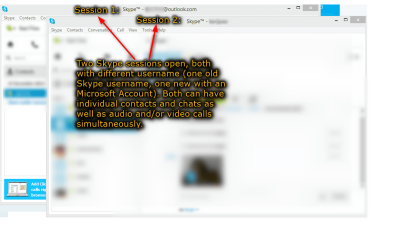
That is exactly how it's done, it is sometimes useful if you have two different Skype usernames with different contacts.

The command on x64 systems:
Code:
"C:\Program Files (x86)\Skype\Phone\Skype.exe" /secondary

And on x86 systems:
Code:
"C:\Program Files\Skype\Phone\Skype.exe" /secondary
Notice the quotation marks around the path; as the path contains spaces it must be within quotation marks.

2014-01-03_01h15_30.png

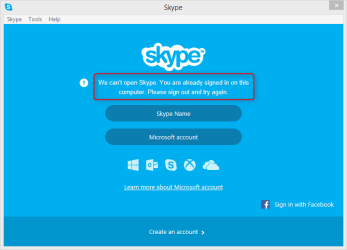
However this is useless if the user only has one Skype account as you cannot sign in on the secondary session using the same username than the primary session is using:

2014-01-03_01h21_08.png

Kari
 

My Computer My Computer

At a glance

Windows 10 Pro x64 EN-GB1.6 GHz Intel Core i7-720QM Processor6 GBATI Mobility Radeon HD 5850 Graphics
Computer type
Laptop
Computer Manufacturer/Model Number
HP ENVY 17-1150eg
OS
Windows 10 Pro x64 EN-GB
CPU
1.6 GHz Intel Core i7-720QM Processor
Memory
6 GB
Graphics Card(s)
ATI Mobility Radeon HD 5850 Graphics
Sound Card
Beats sound system with integrated subwoofer
Monitor(s) Displays
17" laptop display, 22" LED and 32" Full HD TV through HDMI
Screen Resolution
1600*900 (1), 1920*1080 (2&3)
Hard Drives
Internal: 2 x 500 GB SATA Hard Disk Drive 7200 rpm
External: 2TB for backups, 3TB USB3 network drive for media
Cooling
As Envy runs a bit warm, I have it on a Cooler Master pad
Keyboard
Logitech diNovo Media Desktop Laser (bluetooth)
Mouse
Logitech Performance Mouse MX
Internet Speed
50/10 Mbps VDSL
Antivirus
Windows Defender 4.3.9431.0
Browser
Maxthon 3.5.2., IE11

My Computer My Computer

At a glance

W7 Pro SP1 64biti78GBIntel HD Graphics
Computer type
Laptop
Computer Manufacturer/Model Number
Employer provided Dell Latitude
OS
W7 Pro SP1 64bit
CPU
i7
Memory
8GB
Graphics Card(s)
Intel HD Graphics
Hard Drives
crappy SSD
Antivirus
Employer mandated Symantec Endpoint Protection
Browser
Pale Moon 64bit, IE11 64bit & Chrome 64bit
Yeah. Windows 8 / 8.1 makes this even easier: I have the Windows 8 Skype app always logged in using my Microsoft account for my private contacts, and the Skype desktop app open when needed with another Skype account for work related contacts.
 

My Computer My Computer

At a glance

Windows 10 Pro x64 EN-GB1.6 GHz Intel Core i7-720QM Processor6 GBATI Mobility Radeon HD 5850 Graphics
Computer type
Laptop
Computer Manufacturer/Model Number
HP ENVY 17-1150eg
OS
Windows 10 Pro x64 EN-GB
CPU
1.6 GHz Intel Core i7-720QM Processor
Memory
6 GB
Graphics Card(s)
ATI Mobility Radeon HD 5850 Graphics
Sound Card
Beats sound system with integrated subwoofer
Monitor(s) Displays
17" laptop display, 22" LED and 32" Full HD TV through HDMI
Screen Resolution
1600*900 (1), 1920*1080 (2&3)
Hard Drives
Internal: 2 x 500 GB SATA Hard Disk Drive 7200 rpm
External: 2TB for backups, 3TB USB3 network drive for media
Cooling
As Envy runs a bit warm, I have it on a Cooler Master pad
Keyboard
Logitech diNovo Media Desktop Laser (bluetooth)
Mouse
Logitech Performance Mouse MX
Internet Speed
50/10 Mbps VDSL
Antivirus
Windows Defender 4.3.9431.0
Browser
Maxthon 3.5.2., IE11
Depends. In a program like IE, Open up one instance and create a new tab. Pull that new tab down a bit and you have a new instance. In another program, like word. Open up one instance and middle click the icon. (If using a laptop you might be able to setup something like having right and left click pressed at the same time be middle click.)
 

My Computer My Computer

At a glance

Windows 8.1 Pro x86 (Temporary)AMD Phenom ll x4 840 clocked at 3.2 GHz (AM3)4.00 gigs (Two SAMSUNG 2.00 gig modules) (DDR...NVIDIA GeForce GTX 560 TI (Zotac)
Computer type
PC/Desktop
Computer Manufacturer/Model Number
Custom Build
OS
Windows 8.1 Pro x86 (Temporary)
CPU
AMD Phenom ll x4 840 clocked at 3.2 GHz (AM3)
Motherboard
Pegatron Corperation NARRA5 (AM2+)
Memory
4.00 gigs (Two SAMSUNG 2.00 gig modules) (DDR2) (802 Mhz)
Graphics Card(s)
NVIDIA GeForce GTX 560 TI (Zotac)
Sound Card
Realtek High Defintion Audio (On board)
Monitor(s) Displays
Dell E772c
Screen Resolution
1024 x 768
Hard Drives
Seagate Momentus (80 gb) (Boot) (Temporary)
Western Digital WDC WD6400AAKS-22A7B0 (596.2GB)
PSU
Corsair CX 600
Case
Some really old PC case
Cooling
AMD stock cooler,two fans from AMD heatsinks(front and back)
Keyboard
Logitech K400r
Mouse
Logitech K400r
Internet Speed
9.87 Mbps
Antivirus
Microsoft Security Essentials
Browser
Microsoft Internet Explorer 11, Google Chrome
Other Info
HP DVD drive,
Pinnacle Systems 1394 controller,
Sony 3.5 inch floppy drive,
Startech 5.25 front panel I/O
Wi-fi card
Depends. In a program like IE, Open up one instance and create a new tab. Pull that new tab down a bit and you have a new instance....
Dragging an IE tab into a new window should not create a new instance. An instance = a separate process. What version of IE are you referring to?
 

My Computer My Computer

At a glance

W7 Pro SP1 64biti78GBIntel HD Graphics
Computer type
Laptop
Computer Manufacturer/Model Number
Employer provided Dell Latitude
OS
W7 Pro SP1 64bit
CPU
i7
Memory
8GB
Graphics Card(s)
Intel HD Graphics
Hard Drives
crappy SSD
Antivirus
Employer mandated Symantec Endpoint Protection
Browser
Pale Moon 64bit, IE11 64bit & Chrome 64bit
Depends. In a program like IE, Open up one instance and create a new tab. Pull that new tab down a bit and you have a new instance....
Dragging an IE tab into a new window should not create a new instance. An instance = a separate process. What version of IE are you referring to?

IE 9 and up (Sorry for the wrong info. I cant think straight :))
 

My Computer My Computer

At a glance

Windows 8.1 Pro x86 (Temporary)AMD Phenom ll x4 840 clocked at 3.2 GHz (AM3)4.00 gigs (Two SAMSUNG 2.00 gig modules) (DDR...NVIDIA GeForce GTX 560 TI (Zotac)
Computer type
PC/Desktop
Computer Manufacturer/Model Number
Custom Build
OS
Windows 8.1 Pro x86 (Temporary)
CPU
AMD Phenom ll x4 840 clocked at 3.2 GHz (AM3)
Motherboard
Pegatron Corperation NARRA5 (AM2+)
Memory
4.00 gigs (Two SAMSUNG 2.00 gig modules) (DDR2) (802 Mhz)
Graphics Card(s)
NVIDIA GeForce GTX 560 TI (Zotac)
Sound Card
Realtek High Defintion Audio (On board)
Monitor(s) Displays
Dell E772c
Screen Resolution
1024 x 768
Hard Drives
Seagate Momentus (80 gb) (Boot) (Temporary)
Western Digital WDC WD6400AAKS-22A7B0 (596.2GB)
PSU
Corsair CX 600
Case
Some really old PC case
Cooling
AMD stock cooler,two fans from AMD heatsinks(front and back)
Keyboard
Logitech K400r
Mouse
Logitech K400r
Internet Speed
9.87 Mbps
Antivirus
Microsoft Security Essentials
Browser
Microsoft Internet Explorer 11, Google Chrome
Other Info
HP DVD drive,
Pinnacle Systems 1394 controller,
Sony 3.5 inch floppy drive,
Startech 5.25 front panel I/O
Wi-fi card
Back
Top