Solved How to perfectly clone my HD...HELP...

My Computer My Computer

At a glance

Windows7 Pro 64bit SP-1; Windows XP Pro 32bitIntel Core i7-870 Lynnfield 2.93GHz LGA 1156 ...8GB@1400MHz Crucial Ballistix DDR3-1600 4x2GBASUS ENGTX460 DirectCU/2DI/1GD5 1GB 256-bit G...
Computer Manufacturer/Model Number
Hopalong/ Godzilla
OS
Windows7 Pro 64bit SP-1; Windows XP Pro 32bit
CPU
Intel Core i7-870 Lynnfield 2.93GHz LGA 1156 95W Quad-Core
Motherboard
ASUS P7P55D-E PRO
Memory
8GB@1400MHz Crucial Ballistix DDR3-1600 4x2GB
Graphics Card(s)
ASUS ENGTX460 DirectCU/2DI/1GD5 1GB 256-bit GDDR5
Sound Card
VIA Onboard
Monitor(s) Displays
Asus VS248H-P 24"; Samsung SyncMaster 941BW 19"ws
Screen Resolution
1920x1080; 1440x900
Hard Drives
Samsung 830 120GB SSD
Intel 320 120GB SSD
Western Digital Caviar Black WD7501AALS 750GB 7200 RPM SATA 3.0Gb/s
Western Digital Caviar Black WD6401AALS 640GB 7200 RPM SATA 3.0Gb/s
PSU
COOLER MASTER Silent Pro RS850-AMBAJ3-US 850W Modular
Case
COOLER MASTER HAF 932 RC-932-KKN5-GP Black
Cooling
Scythe "Mugen-2 Rev.B" (2 ScytheKaze-Jyuni PWM fans)
Keyboard
Logitech K-320
Mouse
Kensington
Antivirus
Avast Inernet Suite
Browser
IE 9 ; Chrome
Recently upgraded to version 11, better integration into Windows 7 but I miss the UI of 10.

I'm still at v2009. Skipped 2010, but am pondering 2011. Any caveats? What do you miss?

James
 

My Computer My Computer

At a glance

Win7U 64 RTMQ95508GB GskillASUS|EAH4850/HTDI/1GD3/A
OS
Win7U 64 RTM
CPU
Q9550
Motherboard
GA-EP45-UD3R
Memory
8GB Gskill
Graphics Card(s)
ASUS|EAH4850/HTDI/1GD3/A
Sound Card
xfi Plat
Monitor(s) Displays
Dell 2405fpw
Screen Resolution
1920x1200
Hard Drives
Seagate & WD sata Drives
PSU
Antec
Case
Antec
Keyboard
MS Natural Ergonomic 4000
Mouse
Logitech MX610 USB Cordless
Not familiar with cloneHD.

Did you only have one HD to begin with?

Could be the disk ID.
If so , running startup repair from 7 dvd should fix it.


SH!t clonehd doesn't work when I clone it and after that turn PC off and then plug out the old one and leave the cloned one in then it only shows a white - and nothing boots up and I did check the boot settings
 

My Computers My Computers

  • At a glance

    7 X64i5 84002x8gb 3200mhz
    Computer type
    PC/Desktop
    OS
    7 X64
    CPU
    i5 8400
    Motherboard
    gigabyte b365m ds3h
    Memory
    2x8gb 3200mhz
    Hard Drives
    various
    PSU
    pure power 11 400w cm
    Case
    Coolermaster
    Cooling
    cryorig m9i
  • At a glance

    7x64g54008gb ddr4 2400
    Computer type
    PC/Desktop
    OS
    7x64
    CPU
    g5400
    Motherboard
    ga b365m ds3h
    Memory
    8gb ddr4 2400
    PSU
    xfx pro 450w

My Computer My Computer

At a glance

Win7U 64 RTMQ95508GB GskillASUS|EAH4850/HTDI/1GD3/A
OS
Win7U 64 RTM
CPU
Q9550
Motherboard
GA-EP45-UD3R
Memory
8GB Gskill
Graphics Card(s)
ASUS|EAH4850/HTDI/1GD3/A
Sound Card
xfi Plat
Monitor(s) Displays
Dell 2405fpw
Screen Resolution
1920x1200
Hard Drives
Seagate & WD sata Drives
PSU
Antec
Case
Antec
Keyboard
MS Natural Ergonomic 4000
Mouse
Logitech MX610 USB Cordless

My Computers My Computers

  • At a glance

    7 X64i5 84002x8gb 3200mhz
    Computer type
    PC/Desktop
    OS
    7 X64
    CPU
    i5 8400
    Motherboard
    gigabyte b365m ds3h
    Memory
    2x8gb 3200mhz
    Hard Drives
    various
    PSU
    pure power 11 400w cm
    Case
    Coolermaster
    Cooling
    cryorig m9i
  • At a glance

    7x64g54008gb ddr4 2400
    Computer type
    PC/Desktop
    OS
    7x64
    CPU
    g5400
    Motherboard
    ga b365m ds3h
    Memory
    8gb ddr4 2400
    PSU
    xfx pro 450w

Looks like more than I require at the moment. And it's definitely not cheap! :huh:

I've been using Acronis TI since 2004. It really serves my purposes, but they're just so hit and miss. Skipped 2010 since it was so buggy. Investigating 2011.

The clone function is on other ( less esoteric ) Pargon apps, too - dunno if it's on the free one.

Yes, it's on the free version, but the free version is missing some features (of course), of which one is 64 bit support, but that can be found in the 'Personal version', which is only $10 (but, as one might expect for that price, still missing some features). 'Pro' version is $80.

James
 

My Computer My Computer

At a glance

Win7U 64 RTMQ95508GB GskillASUS|EAH4850/HTDI/1GD3/A
OS
Win7U 64 RTM
CPU
Q9550
Motherboard
GA-EP45-UD3R
Memory
8GB Gskill
Graphics Card(s)
ASUS|EAH4850/HTDI/1GD3/A
Sound Card
xfi Plat
Monitor(s) Displays
Dell 2405fpw
Screen Resolution
1920x1200
Hard Drives
Seagate & WD sata Drives
PSU
Antec
Case
Antec
Keyboard
MS Natural Ergonomic 4000
Mouse
Logitech MX610 USB Cordless
Not familiar with cloneHD.

Did you only have one HD to begin with?

Could be the disk ID.
If so , running startup repair from 7 dvd should fix it.


SH!t clonehd doesn't work when I clone it and after that turn PC off and then plug out the old one and leave the cloned one in then it only shows a white - and nothing boots up and I did check the boot settings

no i want to clone the one to my clean one that is all
 

My Computer My Computer

At a glance

Window 7 Ultimate 32bitIntel core 2 duo @ 2.40 GhzHynix 2X1GBThe Club 3D GTS250 256bit
Computer Manufacturer/Model Number
Gigabyte
OS
Window 7 Ultimate 32bit
CPU
Intel core 2 duo @ 2.40 Ghz
Motherboard
Gigabyte
Memory
Hynix 2X1GB
Graphics Card(s)
The Club 3D GTS250 256bit
Sound Card
laptech
Monitor(s) Displays
Acer
Screen Resolution
1440X900
Hard Drives
Seagate 350gig
Seagate 250gig
PSU
Coolermaster GX 650
Case
Acer
Cooling
2 80mm fans
Keyboard
Acer
Mouse
Logitech
Internet Speed
54kb/s
Did you try plugging in only the cloned HD and running startup repir?

Might take 2 or 3 runs.
 

My Computers My Computers

  • At a glance

    7 X64i5 84002x8gb 3200mhz
    Computer type
    PC/Desktop
    OS
    7 X64
    CPU
    i5 8400
    Motherboard
    gigabyte b365m ds3h
    Memory
    2x8gb 3200mhz
    Hard Drives
    various
    PSU
    pure power 11 400w cm
    Case
    Coolermaster
    Cooling
    cryorig m9i
  • At a glance

    7x64g54008gb ddr4 2400
    Computer type
    PC/Desktop
    OS
    7x64
    CPU
    g5400
    Motherboard
    ga b365m ds3h
    Memory
    8gb ddr4 2400
    PSU
    xfx pro 450w

My Computers My Computers

  • At a glance

    7 X64i5 84002x8gb 3200mhz
    Computer type
    PC/Desktop
    OS
    7 X64
    CPU
    i5 8400
    Motherboard
    gigabyte b365m ds3h
    Memory
    2x8gb 3200mhz
    Hard Drives
    various
    PSU
    pure power 11 400w cm
    Case
    Coolermaster
    Cooling
    cryorig m9i
  • At a glance

    7x64g54008gb ddr4 2400
    Computer type
    PC/Desktop
    OS
    7x64
    CPU
    g5400
    Motherboard
    ga b365m ds3h
    Memory
    8gb ddr4 2400
    PSU
    xfx pro 450w
Recently upgraded to version 11, better integration into Windows 7 but I miss the UI of 10.

I'm still at v2009. Skipped 2010, but am pondering 2011. Any caveats? What do you miss?

James

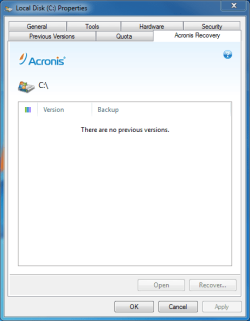
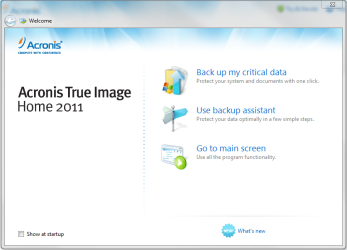
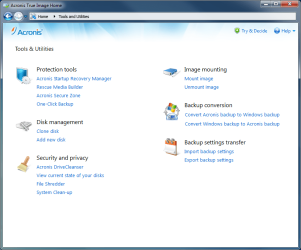
The performance of 2011 is a little better, I am just adjusting to a new menu layout is all. Another new feature is the Acronis tab in the disk properties window
 

Attachments

  • Capture1.PNG
    Capture1.PNG
    11.9 KB · Views: 10
  • Capture2.PNG
    Capture2.PNG
    39.7 KB · Views: 6
  • Capture3.PNG
    Capture3.PNG
    38.4 KB · Views: 7
Last edited:

My Computer My Computer

At a glance

windows 7 Pro 64Bit2.2 GHz Intel Core i7-2675QM8GBIntel HD Graphics 3000/Radeon HD 6490M
Computer Manufacturer/Model Number
Samsung Chronos 7
OS
windows 7 Pro 64Bit
CPU
2.2 GHz Intel Core i7-2675QM
Memory
8GB
Graphics Card(s)
Intel HD Graphics 3000/Radeon HD 6490M
Sound Card
Realtek High Definition Audio
Monitor(s) Displays
Built in LCD and external Dell 22 inch LCD
Screen Resolution
1600x900
Hard Drives
1 TB HDD
Internet Speed
20 MBPS Down 1500 KBPS Up
Thanks nitroman84, for posting the screenshots. 2009 is working great, but I may have to check out 2011.

James
 

My Computer My Computer

At a glance

Win7U 64 RTMQ95508GB GskillASUS|EAH4850/HTDI/1GD3/A
OS
Win7U 64 RTM
CPU
Q9550
Motherboard
GA-EP45-UD3R
Memory
8GB Gskill
Graphics Card(s)
ASUS|EAH4850/HTDI/1GD3/A
Sound Card
xfi Plat
Monitor(s) Displays
Dell 2405fpw
Screen Resolution
1920x1200
Hard Drives
Seagate & WD sata Drives
PSU
Antec
Case
Antec
Keyboard
MS Natural Ergonomic 4000
Mouse
Logitech MX610 USB Cordless

My Computer My Computer

At a glance

windows 7 Pro 64Bit2.2 GHz Intel Core i7-2675QM8GBIntel HD Graphics 3000/Radeon HD 6490M
Computer Manufacturer/Model Number
Samsung Chronos 7
OS
windows 7 Pro 64Bit
CPU
2.2 GHz Intel Core i7-2675QM
Memory
8GB
Graphics Card(s)
Intel HD Graphics 3000/Radeon HD 6490M
Sound Card
Realtek High Definition Audio
Monitor(s) Displays
Built in LCD and external Dell 22 inch LCD
Screen Resolution
1600x900
Hard Drives
1 TB HDD
Internet Speed
20 MBPS Down 1500 KBPS Up
I've used Acronis True Image a few times, works perfect! The clone was absolutely 100% same, even the fragmentation was same (I guess it allocated the cloned data in the same order...)
 

My Computer My Computer

At a glance

Windows 7 Ultimate X64q6600 ~3,0ghz4x 1GB PC6400Sapphire Radeon HD 6870
OS
Windows 7 Ultimate X64
CPU
q6600 ~3,0ghz
Motherboard
P5KC
Memory
4x 1GB PC6400
Graphics Card(s)
Sapphire Radeon HD 6870
Sound Card
Creative X-Fi Surround 5.1
Did you try plugging in only the cloned HD and running startup repir?

Might take 2 or 3 runs.

Yah I did try that problem still exits
 

My Computer My Computer

At a glance

Window 7 Ultimate 32bitIntel core 2 duo @ 2.40 GhzHynix 2X1GBThe Club 3D GTS250 256bit
Computer Manufacturer/Model Number
Gigabyte
OS
Window 7 Ultimate 32bit
CPU
Intel core 2 duo @ 2.40 Ghz
Motherboard
Gigabyte
Memory
Hynix 2X1GB
Graphics Card(s)
The Club 3D GTS250 256bit
Sound Card
laptech
Monitor(s) Displays
Acer
Screen Resolution
1440X900
Hard Drives
Seagate 350gig
Seagate 250gig
PSU
Coolermaster GX 650
Case
Acer
Cooling
2 80mm fans
Keyboard
Acer
Mouse
Logitech
Internet Speed
54kb/s
I've used Windows Imaging, Macrium, Paragon.
I now use Windows imaging primarily, Macrium as a precaution and for partition specific operations.
I decided to have a cold standby disk so that when my HDD fails it will take me 10 minutes to install the copy.
If MS imaging is normally working for you then
Here's how to make a copy disk:
1) Windows image the HDD you want a copy of.
2) Put in the new HDD (by itself on same sata port)
3) Boot from System repair, reinstall image.
DONE.
 

My Computer My Computer

At a glance

Windows 7x64 Home Premium SP1Intel i7 2600kG.Skill Ripjaws (DDR3-1600) 2x4GBNvidia GeForce GTS 450; Intel HD Graphics 300...
Computer type
PC/Desktop
Computer Manufacturer/Model Number
Own build
OS
Windows 7x64 Home Premium SP1
CPU
Intel i7 2600k
Motherboard
ASUS P8Z68 Deluxe
Memory
G.Skill Ripjaws (DDR3-1600) 2x4GB
Graphics Card(s)
Nvidia GeForce GTS 450; Intel HD Graphics 3000(GT2+)
Monitor(s) Displays
Dell Ultrasharp IPS panel U2311H, Samsung SyncMaster P2350
Screen Resolution
1920x1080
Hard Drives
Samsung 850 Pro SSD 256GB, Samsung SSD 840 120GB, Seagates 1TB Barracuda ST31000528AS x2
PSU
Seasonic M12II 520W
Case
Lian Li Lancool PC-K60
Cooling
Case: 1x120mm, 3x140mm CPU: Hyper 212+
Keyboard
Logitech MK520 (wireless)
Mouse
Logitech MK520
Internet Speed
6-7 Mbps
Antivirus
Norton Security Premium, Malwarebytes on 2 (MSE on 3rd PC)
Browser
FireFox
Other Info
Audio: Logitech Z523 2.1
I've used Windows Imaging, Macrium, Paragon.
I now use Windows imaging primarily, Macrium as a precaution and for partition specific operations.
I decided to have a cold standby disk so that when my HDD fails it will take me 10 minutes to install the copy.
If MS imaging is normally working for you then
Here's how to make a copy disk:
1) Windows image the HDD you want a copy of.
2) Put in the new HDD (by itself on same sata port)
3) Boot from System repair, reinstall image.
DONE.

I used Windows built in tools religiously in the beginning, but I began getting errors complaining that no Windows image could be found (and yes they were in the same location as when created and not re named). It was just a little too hit and miss for me. Acronis has yet to let me down, I would recommend it to anyone.
 

My Computer My Computer

At a glance

windows 7 Pro 64Bit2.2 GHz Intel Core i7-2675QM8GBIntel HD Graphics 3000/Radeon HD 6490M
Computer Manufacturer/Model Number
Samsung Chronos 7
OS
windows 7 Pro 64Bit
CPU
2.2 GHz Intel Core i7-2675QM
Memory
8GB
Graphics Card(s)
Intel HD Graphics 3000/Radeon HD 6490M
Sound Card
Realtek High Definition Audio
Monitor(s) Displays
Built in LCD and external Dell 22 inch LCD
Screen Resolution
1600x900
Hard Drives
1 TB HDD
Internet Speed
20 MBPS Down 1500 KBPS Up
Did you try plugging in only the cloned HD and running startup repir?

Might take 2 or 3 runs.

Yah I did try that problem still exits

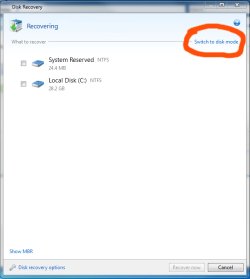
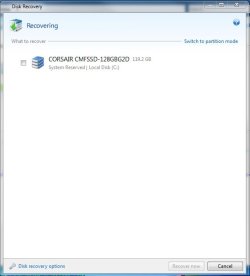
What program did you end up using? It should have made a perfect bootable copy. I had a small issue when upgrading from Acronis 2010 to 2011 as it has more options. You now have to switch from partition mode which is the default to Disk mode otherwise the MBR will not be restored and you will end up with a non bootable image
 

Attachments

  • Capture1.PNG
    Capture1.PNG
    16.5 KB · Views: 11
  • Capture2.jpg
    Capture2.jpg
    20 KB · Views: 7

My Computer My Computer

At a glance

windows 7 Pro 64Bit2.2 GHz Intel Core i7-2675QM8GBIntel HD Graphics 3000/Radeon HD 6490M
Computer Manufacturer/Model Number
Samsung Chronos 7
OS
windows 7 Pro 64Bit
CPU
2.2 GHz Intel Core i7-2675QM
Memory
8GB
Graphics Card(s)
Intel HD Graphics 3000/Radeon HD 6490M
Sound Card
Realtek High Definition Audio
Monitor(s) Displays
Built in LCD and external Dell 22 inch LCD
Screen Resolution
1600x900
Hard Drives
1 TB HDD
Internet Speed
20 MBPS Down 1500 KBPS Up
Did you try plugging in only the cloned HD and running startup repir?

Might take 2 or 3 runs.

Yah I did try that problem still exits

What program did you end up using? It should have made a perfect bootable copy. I had a small issue when upgrading from Acronis 2010 to 2011 as it has more options. You now have to switch from partition mode which is the default to Disk mode otherwise the MBR will not be restored and you will end up with a non bootable image

All software I tried was HD Clone I am going to try out the Acronis later today
 

My Computer My Computer

At a glance

Window 7 Ultimate 32bitIntel core 2 duo @ 2.40 GhzHynix 2X1GBThe Club 3D GTS250 256bit
Computer Manufacturer/Model Number
Gigabyte
OS
Window 7 Ultimate 32bit
CPU
Intel core 2 duo @ 2.40 Ghz
Motherboard
Gigabyte
Memory
Hynix 2X1GB
Graphics Card(s)
The Club 3D GTS250 256bit
Sound Card
laptech
Monitor(s) Displays
Acer
Screen Resolution
1440X900
Hard Drives
Seagate 350gig
Seagate 250gig
PSU
Coolermaster GX 650
Case
Acer
Cooling
2 80mm fans
Keyboard
Acer
Mouse
Logitech
Internet Speed
54kb/s
Yah I did try that problem still exits

What program did you end up using? It should have made a perfect bootable copy. I had a small issue when upgrading from Acronis 2010 to 2011 as it has more options. You now have to switch from partition mode which is the default to Disk mode otherwise the MBR will not be restored and you will end up with a non bootable image

All software I tried was HD Clone I am going to try out the Acronis later today
So you didn't even bother trying the MS imaging solution............
 

My Computer My Computer

At a glance

Windows 7x64 Home Premium SP1Intel i7 2600kG.Skill Ripjaws (DDR3-1600) 2x4GBNvidia GeForce GTS 450; Intel HD Graphics 300...
Computer type
PC/Desktop
Computer Manufacturer/Model Number
Own build
OS
Windows 7x64 Home Premium SP1
CPU
Intel i7 2600k
Motherboard
ASUS P8Z68 Deluxe
Memory
G.Skill Ripjaws (DDR3-1600) 2x4GB
Graphics Card(s)
Nvidia GeForce GTS 450; Intel HD Graphics 3000(GT2+)
Monitor(s) Displays
Dell Ultrasharp IPS panel U2311H, Samsung SyncMaster P2350
Screen Resolution
1920x1080
Hard Drives
Samsung 850 Pro SSD 256GB, Samsung SSD 840 120GB, Seagates 1TB Barracuda ST31000528AS x2
PSU
Seasonic M12II 520W
Case
Lian Li Lancool PC-K60
Cooling
Case: 1x120mm, 3x140mm CPU: Hyper 212+
Keyboard
Logitech MK520 (wireless)
Mouse
Logitech MK520
Internet Speed
6-7 Mbps
Antivirus
Norton Security Premium, Malwarebytes on 2 (MSE on 3rd PC)
Browser
FireFox
Other Info
Audio: Logitech Z523 2.1
I've used Windows Imaging, Macrium, Paragon.
I now use Windows imaging primarily, Macrium as a precaution and for partition specific operations.
I decided to have a cold standby disk so that when my HDD fails it will take me 10 minutes to install the copy.
If MS imaging is normally working for you then
Here's how to make a copy disk:
1) Windows image the HDD you want a copy of.
2) Put in the new HDD (by itself on same sata port)
3) Boot from System repair, reinstall image.
DONE.

I used Windows built in tools religiously in the beginning, but I began getting errors complaining that no Windows image could be found (and yes they were in the same location as when created and not re named). It was just a little too hit and miss for me. Acronis has yet to let me down, I would recommend it to anyone.
If this happens to me then I will devote considerable effort to attempting to find the problem because MS imaging has been so reliable up to now.
As I type I'm using the new disk I made using the 3 steps above with MS imaging.
 

My Computer My Computer

At a glance

Windows 7x64 Home Premium SP1Intel i7 2600kG.Skill Ripjaws (DDR3-1600) 2x4GBNvidia GeForce GTS 450; Intel HD Graphics 300...
Computer type
PC/Desktop
Computer Manufacturer/Model Number
Own build
OS
Windows 7x64 Home Premium SP1
CPU
Intel i7 2600k
Motherboard
ASUS P8Z68 Deluxe
Memory
G.Skill Ripjaws (DDR3-1600) 2x4GB
Graphics Card(s)
Nvidia GeForce GTS 450; Intel HD Graphics 3000(GT2+)
Monitor(s) Displays
Dell Ultrasharp IPS panel U2311H, Samsung SyncMaster P2350
Screen Resolution
1920x1080
Hard Drives
Samsung 850 Pro SSD 256GB, Samsung SSD 840 120GB, Seagates 1TB Barracuda ST31000528AS x2
PSU
Seasonic M12II 520W
Case
Lian Li Lancool PC-K60
Cooling
Case: 1x120mm, 3x140mm CPU: Hyper 212+
Keyboard
Logitech MK520 (wireless)
Mouse
Logitech MK520
Internet Speed
6-7 Mbps
Antivirus
Norton Security Premium, Malwarebytes on 2 (MSE on 3rd PC)
Browser
FireFox
Other Info
Audio: Logitech Z523 2.1
Back
Top