Hello members,
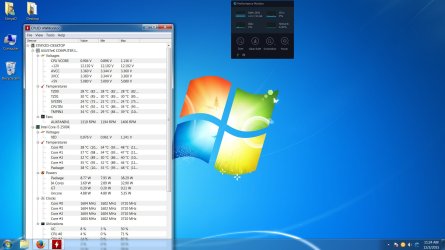
Please guide on "How to pin or align a startup applications on windows 7 desktop area"? I have currently installed HWmonitor to view temperatures and sent as shortcut to startup menu. Well! HWmonitor is launching after reboot but it always align on the left side of desktop area. Is there any way, i can give instructions to windows 7 startup to always align my desired startup app to show on the right side of desktop area. Please check my screenshot for a glimpse.
Thanks!!
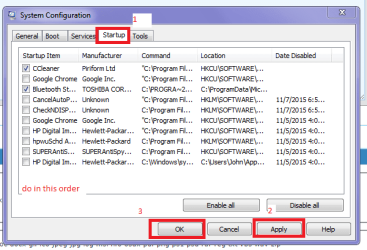
Hello and welcome Stmyzd mate go to Start > type msconfig in the box and click on the blue msconfig box that appears at the top of the Start menu > go to the Start up tab and just untick that software and then click Apply then OK it will ask you to reboot or reboot later pick what you like. I have everything unticked apart form what you see.
One other Desktop (tester) and spare Toshba laptop both with SSD's
Running Kaspersky 2016 ISS on all machines config'd identically
Logitec audio stereo systems on each machine (x3)
Canon MG5250MFC
Router/modem TP-Link running WPA2SK
Hello @ICIT2LOL,
Thanks for your reply but kindly read my original post again. My program is successfully launching at start up but i want its alignment at my desired desktop location. Thus kindly give suggestions to give instructions to windows start up so that my desired program launch at the specific location of the desktop.
Ok mate well I am not sure how you place it centre left or right - my only thought is to place it where you wish and then reboot and as you do with icons they appear at the same location. Well I am assuming this is what you mean.
One other Desktop (tester) and spare Toshba laptop both with SSD's
Running Kaspersky 2016 ISS on all machines config'd identically
Logitec audio stereo systems on each machine (x3)
Canon MG5250MFC
Router/modem TP-Link running WPA2SK