Solved How to prepare in use, Samsung 840 120GB ssd for new motherboard & cpu

p5200

New member
Member
VIP
Local time
9:57 PM
Messages
255
How to prepare in use, Samsung 840 120GB ssd for new motherboard & cpu

I just installed the ssd not too long ago but, will be replacing the mothetboard & cpu soon. Can I remove the ssd and install it in my backup pc tower to format or,do what ever needs to be done to make it to where all I have to do is reinstall in case, and then install fresh copy of Win 7 pro OS? I'm not quite sure what I have to do to the ssd (which is the one I'm using right now) before installing fresh win. copy again after the new motherboard and cpu install. When I look in diskmgt. it shows 100mb at the beginning of the disk as reserved. Will Windows do this by it's self during fresh install? Or, do I have to set the disk up myself in order to have the 100mb. reserved partition again? It will be a while till my components get here and any help will be greatly appreciated! Thank You! :) I will provide more info if needed!
 

My Computer My Computer

At a glance

windows 7 Professional 64-bitintel i5 4670kG.SKILL 1866mhz. 16GB. (4 x 4GB) 240-Pin DDR3...HIS RADEON 4850 PCIE 2.0 ver.
Computer type
PC/Desktop
Computer Manufacturer/Model Number
custom build
OS
windows 7 Professional 64-bit
CPU
intel i5 4670k
Motherboard
ASUS Z87-A
Memory
G.SKILL 1866mhz. 16GB. (4 x 4GB) 240-Pin DDR3 SDRAM DDR3
Graphics Card(s)
HIS RADEON 4850 PCIE 2.0 ver.
Sound Card
onboard
Monitor(s) Displays
HP w2408h HDMI
Screen Resolution
1024 x 768
Hard Drives
SamSung 840 ssd 120 GB
PSU
Corsair HX 1050 Gold
Case
ALUMINUS FULL ATX
Cooling
Cooler Master Hyper 212 EVO
Keyboard
Logitech 520
Mouse
Logitech 310
Internet Speed
10 mbs
Antivirus
Avast full version
Browser
Firefox

My Computer My Computer

At a glance

win 7 ultimate32bit, Win8.1pro wmc 32bitamd phenom x4 9600corsair twinxs 2x2gb2x nvidia 1gb 8500gt
Computer type
PC/Desktop
Computer Manufacturer/Model Number
self build
OS
win 7 ultimate32bit, Win8.1pro wmc 32bit
CPU
amd phenom x4 9600
Motherboard
asus m2n32-sli deluxe
Memory
corsair twinxs 2x2gb
Graphics Card(s)
2x nvidia 1gb 8500gt
Sound Card
onboard
Monitor(s) Displays
23" PB Viseo 233d
Screen Resolution
1920x1080
Hard Drives
maxtor sata 500gb
maxtor sata 320gb
fujitsu sata200gb
PSU
oryxx tornado 750w
Case
thermaltake xaser lll
Cooling
artic freezer64 pro + 7 case fans

My Computer My Computer

At a glance

windows 7 Professional 64-bitintel i5 4670kG.SKILL 1866mhz. 16GB. (4 x 4GB) 240-Pin DDR3...HIS RADEON 4850 PCIE 2.0 ver.
Computer type
PC/Desktop
Computer Manufacturer/Model Number
custom build
OS
windows 7 Professional 64-bit
CPU
intel i5 4670k
Motherboard
ASUS Z87-A
Memory
G.SKILL 1866mhz. 16GB. (4 x 4GB) 240-Pin DDR3 SDRAM DDR3
Graphics Card(s)
HIS RADEON 4850 PCIE 2.0 ver.
Sound Card
onboard
Monitor(s) Displays
HP w2408h HDMI
Screen Resolution
1024 x 768
Hard Drives
SamSung 840 ssd 120 GB
PSU
Corsair HX 1050 Gold
Case
ALUMINUS FULL ATX
Cooling
Cooler Master Hyper 212 EVO
Keyboard
Logitech 520
Mouse
Logitech 310
Internet Speed
10 mbs
Antivirus
Avast full version
Browser
Firefox
You're very welcome p5200, You will get a lot more help when our resident experts get online so keep checking back here :)
 

My Computer My Computer

At a glance

win 7 ultimate32bit, Win8.1pro wmc 32bitamd phenom x4 9600corsair twinxs 2x2gb2x nvidia 1gb 8500gt
Computer type
PC/Desktop
Computer Manufacturer/Model Number
self build
OS
win 7 ultimate32bit, Win8.1pro wmc 32bit
CPU
amd phenom x4 9600
Motherboard
asus m2n32-sli deluxe
Memory
corsair twinxs 2x2gb
Graphics Card(s)
2x nvidia 1gb 8500gt
Sound Card
onboard
Monitor(s) Displays
23" PB Viseo 233d
Screen Resolution
1920x1080
Hard Drives
maxtor sata 500gb
maxtor sata 320gb
fujitsu sata200gb
PSU
oryxx tornado 750w
Case
thermaltake xaser lll
Cooling
artic freezer64 pro + 7 case fans
your best bet is to just install the cpu and mobo, then reformat it through windows installation.
 

My Computer My Computer

At a glance

Windows 10 ProIntel i7-3770K 4.4GHz8GB G.SKILL Ripjaws 1866 MHzEVGA GTX 980 Classified
Computer type
PC/Desktop
Computer Manufacturer/Model Number
Weekend Warrior Rig
OS
Windows 10 Pro
CPU
Intel i7-3770K 4.4GHz
Motherboard
ASUS P8Z77-V Pro
Memory
8GB G.SKILL Ripjaws 1866 MHz
Graphics Card(s)
EVGA GTX 980 Classified
Monitor(s) Displays
Asus VH238H 23" 2ms
Screen Resolution
1920x1080
Hard Drives
Intel 330 120GB SSD /
WD Blue 1TB /
WD Black 500GB
PSU
Corsair CX750M
Case
NZXT H440
Cooling
Corsair H80i- CPU / Corsair H90- GPU
Keyboard
Logitech K360 LE
Mouse
Logitech G500
Antivirus
Avast
Browser
Chrome
Other Info
1200W 2.1 Surround Sound Audio
your best bet is to just install the cpu and mobo, then reformat it through windows installation.
Will that give the 100mb. reserve partition or, will windows set that up if I go into bios and set up for AHCI mode? Thanks! :)
 

My Computer My Computer

At a glance

windows 7 Professional 64-bitintel i5 4670kG.SKILL 1866mhz. 16GB. (4 x 4GB) 240-Pin DDR3...HIS RADEON 4850 PCIE 2.0 ver.
Computer type
PC/Desktop
Computer Manufacturer/Model Number
custom build
OS
windows 7 Professional 64-bit
CPU
intel i5 4670k
Motherboard
ASUS Z87-A
Memory
G.SKILL 1866mhz. 16GB. (4 x 4GB) 240-Pin DDR3 SDRAM DDR3
Graphics Card(s)
HIS RADEON 4850 PCIE 2.0 ver.
Sound Card
onboard
Monitor(s) Displays
HP w2408h HDMI
Screen Resolution
1024 x 768
Hard Drives
SamSung 840 ssd 120 GB
PSU
Corsair HX 1050 Gold
Case
ALUMINUS FULL ATX
Cooling
Cooler Master Hyper 212 EVO
Keyboard
Logitech 520
Mouse
Logitech 310
Internet Speed
10 mbs
Antivirus
Avast full version
Browser
Firefox
your best bet is to just install the cpu and mobo, then reformat it through windows installation.
Will that give the 100mb. reserve partition or, will windows set that up if I go into bios and set up for AHCI mode? Thanks! :)

when you go to reinstall windows set bios to AHCI then, format and delete ALL partitions(you WILL loose ALL data on the drive. when windows installs, it will create 2 partitions automatically. 1 OS and 2 System Reserved.
 

My Computer My Computer

At a glance

Windows 10 ProIntel i7-3770K 4.4GHz8GB G.SKILL Ripjaws 1866 MHzEVGA GTX 980 Classified
Computer type
PC/Desktop
Computer Manufacturer/Model Number
Weekend Warrior Rig
OS
Windows 10 Pro
CPU
Intel i7-3770K 4.4GHz
Motherboard
ASUS P8Z77-V Pro
Memory
8GB G.SKILL Ripjaws 1866 MHz
Graphics Card(s)
EVGA GTX 980 Classified
Monitor(s) Displays
Asus VH238H 23" 2ms
Screen Resolution
1920x1080
Hard Drives
Intel 330 120GB SSD /
WD Blue 1TB /
WD Black 500GB
PSU
Corsair CX750M
Case
NZXT H440
Cooling
Corsair H80i- CPU / Corsair H90- GPU
Keyboard
Logitech K360 LE
Mouse
Logitech G500
Antivirus
Avast
Browser
Chrome
Other Info
1200W 2.1 Surround Sound Audio
your best bet is to just install the cpu and mobo, then reformat it through windows installation.
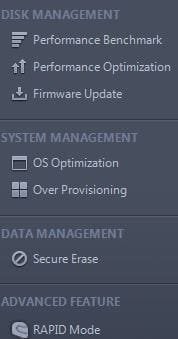
Will that give the 100mb. reserve partition or, will windows set that up if I go into bios and set up for AHCI mode? Thanks! :) I noticed, in my samsung magicion program it has an option for secure data erase does anyone know what that does? It may not be of any use for what I'm planing to do?
 

Attachments

  • samsung magicion.JPG
    samsung magicion.JPG
    14.5 KB · Views: 14

My Computer My Computer

At a glance

windows 7 Professional 64-bitintel i5 4670kG.SKILL 1866mhz. 16GB. (4 x 4GB) 240-Pin DDR3...HIS RADEON 4850 PCIE 2.0 ver.
Computer type
PC/Desktop
Computer Manufacturer/Model Number
custom build
OS
windows 7 Professional 64-bit
CPU
intel i5 4670k
Motherboard
ASUS Z87-A
Memory
G.SKILL 1866mhz. 16GB. (4 x 4GB) 240-Pin DDR3 SDRAM DDR3
Graphics Card(s)
HIS RADEON 4850 PCIE 2.0 ver.
Sound Card
onboard
Monitor(s) Displays
HP w2408h HDMI
Screen Resolution
1024 x 768
Hard Drives
SamSung 840 ssd 120 GB
PSU
Corsair HX 1050 Gold
Case
ALUMINUS FULL ATX
Cooling
Cooler Master Hyper 212 EVO
Keyboard
Logitech 520
Mouse
Logitech 310
Internet Speed
10 mbs
Antivirus
Avast full version
Browser
Firefox
your best bet is to just install the cpu and mobo, then reformat it through windows installation.
Will that give the 100mb. reserve partition or, will windows set that up if I go into bios and set up for AHCI mode? Thanks! :)

when you go to reinstall windows set bios to AHCI then, format and delete ALL partitions(you WILL loose ALL data on the drive. when windows installs, it will create 2 partitions automatically. 1 OS and 2 System Reserved.
I see, Thank you very much! :)
 

My Computer My Computer

At a glance

windows 7 Professional 64-bitintel i5 4670kG.SKILL 1866mhz. 16GB. (4 x 4GB) 240-Pin DDR3...HIS RADEON 4850 PCIE 2.0 ver.
Computer type
PC/Desktop
Computer Manufacturer/Model Number
custom build
OS
windows 7 Professional 64-bit
CPU
intel i5 4670k
Motherboard
ASUS Z87-A
Memory
G.SKILL 1866mhz. 16GB. (4 x 4GB) 240-Pin DDR3 SDRAM DDR3
Graphics Card(s)
HIS RADEON 4850 PCIE 2.0 ver.
Sound Card
onboard
Monitor(s) Displays
HP w2408h HDMI
Screen Resolution
1024 x 768
Hard Drives
SamSung 840 ssd 120 GB
PSU
Corsair HX 1050 Gold
Case
ALUMINUS FULL ATX
Cooling
Cooler Master Hyper 212 EVO
Keyboard
Logitech 520
Mouse
Logitech 310
Internet Speed
10 mbs
Antivirus
Avast full version
Browser
Firefox
your best bet is to just install the cpu and mobo, then reformat it through windows installation.
Will that give the 100mb. reserve partition or, will windows set that up if I go into bios and set up for AHCI mode? Thanks! :) I noticed, in my samsung magicion program it has an option for secure data erase does anyone know what that does? It may not be of any use for what I'm planing to do?

thats really only used for if you are going to sell the drive. it erases all the data on the drive, and tries to make it unrecoverable. no need to use it here.
 

My Computer My Computer

At a glance

Windows 10 ProIntel i7-3770K 4.4GHz8GB G.SKILL Ripjaws 1866 MHzEVGA GTX 980 Classified
Computer type
PC/Desktop
Computer Manufacturer/Model Number
Weekend Warrior Rig
OS
Windows 10 Pro
CPU
Intel i7-3770K 4.4GHz
Motherboard
ASUS P8Z77-V Pro
Memory
8GB G.SKILL Ripjaws 1866 MHz
Graphics Card(s)
EVGA GTX 980 Classified
Monitor(s) Displays
Asus VH238H 23" 2ms
Screen Resolution
1920x1080
Hard Drives
Intel 330 120GB SSD /
WD Blue 1TB /
WD Black 500GB
PSU
Corsair CX750M
Case
NZXT H440
Cooling
Corsair H80i- CPU / Corsair H90- GPU
Keyboard
Logitech K360 LE
Mouse
Logitech G500
Antivirus
Avast
Browser
Chrome
Other Info
1200W 2.1 Surround Sound Audio
your best bet is to just install the cpu and mobo, then reformat it through windows installation.
Will that give the 100mb. reserve partition or, will windows set that up if I go into bios and set up for AHCI mode? Thanks! :) I noticed, in my samsung magicion program it has an option for secure data erase does anyone know what that does? It may not be of any use for what I'm planing to do?

thats really only used for if you are going to sell the drive. it erases all the data on the drive, and tries to make it unrecoverable. no need to use it here.
OK, Thanks again! :)
 

My Computer My Computer

At a glance

windows 7 Professional 64-bitintel i5 4670kG.SKILL 1866mhz. 16GB. (4 x 4GB) 240-Pin DDR3...HIS RADEON 4850 PCIE 2.0 ver.
Computer type
PC/Desktop
Computer Manufacturer/Model Number
custom build
OS
windows 7 Professional 64-bit
CPU
intel i5 4670k
Motherboard
ASUS Z87-A
Memory
G.SKILL 1866mhz. 16GB. (4 x 4GB) 240-Pin DDR3 SDRAM DDR3
Graphics Card(s)
HIS RADEON 4850 PCIE 2.0 ver.
Sound Card
onboard
Monitor(s) Displays
HP w2408h HDMI
Screen Resolution
1024 x 768
Hard Drives
SamSung 840 ssd 120 GB
PSU
Corsair HX 1050 Gold
Case
ALUMINUS FULL ATX
Cooling
Cooler Master Hyper 212 EVO
Keyboard
Logitech 520
Mouse
Logitech 310
Internet Speed
10 mbs
Antivirus
Avast full version
Browser
Firefox
Will that give the 100mb. reserve partition or, will windows set that up if I go into bios and set up for AHCI mode? Thanks! :) I noticed, in my samsung magicion program it has an option for secure data erase does anyone know what that does? It may not be of any use for what I'm planing to do?

thats really only used for if you are going to sell the drive. it erases all the data on the drive, and tries to make it unrecoverable. no need to use it here.
OK, Thanks again! :)

Np. Have fun with new parts!
 

My Computer My Computer

At a glance

Windows 10 ProIntel i7-3770K 4.4GHz8GB G.SKILL Ripjaws 1866 MHzEVGA GTX 980 Classified
Computer type
PC/Desktop
Computer Manufacturer/Model Number
Weekend Warrior Rig
OS
Windows 10 Pro
CPU
Intel i7-3770K 4.4GHz
Motherboard
ASUS P8Z77-V Pro
Memory
8GB G.SKILL Ripjaws 1866 MHz
Graphics Card(s)
EVGA GTX 980 Classified
Monitor(s) Displays
Asus VH238H 23" 2ms
Screen Resolution
1920x1080
Hard Drives
Intel 330 120GB SSD /
WD Blue 1TB /
WD Black 500GB
PSU
Corsair CX750M
Case
NZXT H440
Cooling
Corsair H80i- CPU / Corsair H90- GPU
Keyboard
Logitech K360 LE
Mouse
Logitech G500
Antivirus
Avast
Browser
Chrome
Other Info
1200W 2.1 Surround Sound Audio
Back
Top