I have used Karen's Replicator in the past, but I changed all of "my users" (those that I support) to use Cobian Backup a many years ago.
Warning: The following info is from memory...
...I am not in a place where I can test before making a post:
By default, when you change the destination folder, Cobian Backup will do one full backup to the new location.
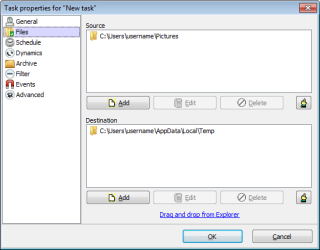
In the screenshot that I provided, Cobian Backup made a folder named Pictures in this location:
C:\Users\username\AppData\Local\Temp
So, there was a folder named C:\Users\username\AppData\Local\Temp\Pictures
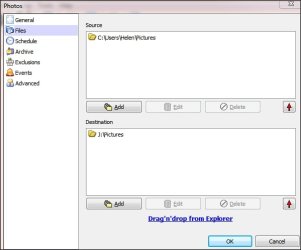
If I'm understanding you correctly, you have a folder named
J:\Pictures\Pictures
You want to get rid of the second folder named Pictures
If you change the Destination to simply be J:\
Then you should end up with all of you pictures in a folder named
J:\Pictures
You can manually delete the entire backup that Cobian Backup did before.
Delete the first/top level folder named Pictures in this path:
J:\Pictures\Pictures
That will also delete duplicate folder named Pictures
Then let Cobian Backup complete one full backup to the new location.