how to prevent outlook from altering mails it moves to junk

zdoe

New member
Member
Local time
10:42 PM
Messages
94
how to prevent outlook from altering mails it moves to junk, or, alternately use its junkmail functions but force it to move the messages to a folder i designate, not the junk mail folder that damages mails by converting them to plain text.

i'm on outlook 2007, but suspect the problematic is the same on other post-2003 versions.

background:
i want only whitelisted senders' mails to end up in the inbox. but i do NOT want to alter the non-whitelisted mails, in case something useful is coming from a stranger.

in the past i've achieved this by using spampal and disabling outlook's junk-functions, but it's time to retire spampal as it's no longer being developed, and it conflicts with something else i want to run.

in theory i guess this could be achievable by a rule, but as outlook doesn't allow using its "safe senders" -list as a criteria for a rule, it becomes quite tedious to manage the whitelisted addresses.

thoughts?
 

My Computer My Computer

At a glance

Windows 7 Ultimate x64
OS
Windows 7 Ultimate x64
how to prevent outlook from altering mails it moves to junk, or, alternately use its junkmail functions but force it to move the messages to a folder i designate, not the junk mail folder that damages mails by converting them to plain text.

i'm on outlook 2007, but suspect the problematic is the same on other post-2003 versions.

background:
i want only whitelisted senders' mails to end up in the inbox. but i do NOT want to alter the non-whitelisted mails, in case something useful is coming from a stranger.

in the past i've achieved this by using spampal and disabling outlook's junk-functions, but it's time to retire spampal as it's no longer being developed, and it conflicts with something else i want to run.

in theory i guess this could be achievable by a rule, but as outlook doesn't allow using its "safe senders" -list as a criteria for a rule, it becomes quite tedious to manage the whitelisted addresses.

thoughts?

Dear zdoe,

You can Change the level of protection in the Junk Email Filter
 

My Computer My Computer

At a glance

Windows 7 Ultimate x64
Computer type
PC/Desktop
OS
Windows 7 Ultimate x64
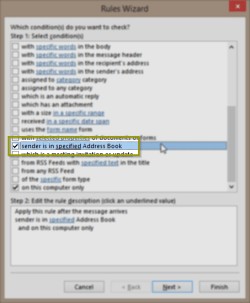
What you want to achieve is quite easy to do with Outlook Rules. Add whitelisted senders to address book, create a rule to move all other messages to a specific folder instead of handling them as junk.

2013-11-23 16_57_03-Rules Wizard.png

Kari
 

My Computer My Computer

At a glance

Windows 10 Pro x64 EN-GB1.6 GHz Intel Core i7-720QM Processor6 GBATI Mobility Radeon HD 5850 Graphics
Computer type
Laptop
Computer Manufacturer/Model Number
HP ENVY 17-1150eg
OS
Windows 10 Pro x64 EN-GB
CPU
1.6 GHz Intel Core i7-720QM Processor
Memory
6 GB
Graphics Card(s)
ATI Mobility Radeon HD 5850 Graphics
Sound Card
Beats sound system with integrated subwoofer
Monitor(s) Displays
17" laptop display, 22" LED and 32" Full HD TV through HDMI
Screen Resolution
1600*900 (1), 1920*1080 (2&3)
Hard Drives
Internal: 2 x 500 GB SATA Hard Disk Drive 7200 rpm
External: 2TB for backups, 3TB USB3 network drive for media
Cooling
As Envy runs a bit warm, I have it on a Cooler Master pad
Keyboard
Logitech diNovo Media Desktop Laser (bluetooth)
Mouse
Logitech Performance Mouse MX
Internet Speed
50/10 Mbps VDSL
Antivirus
Windows Defender 4.3.9431.0
Browser
Maxthon 3.5.2., IE11
but how to accesss / manipulate "address books"

What you want to achieve is quite easy to do with Outlook Rules. Add whitelisted senders to address book, create a rule to move all other messages to a specific folder instead of handling them as junk.
Kari

your advice is conceptually exactly what i'm looking for. but i don't know how to manipulate the "address books" easily. how to accesss a specific address book for editing?

i believe the default "Outlook Address Book" contains the email addresses of all the contacts in the contacts database. but only one address per contact entry, so it's not suitable for whitelisting - having a contact entry for each whitelisted email is not always necessary.

further - in my outlook it refuses to add a new address book saying that "the account you added is not fully configured."

thoughts?
 

My Computer My Computer

At a glance

Windows 7 Ultimate x64
OS
Windows 7 Ultimate x64
Back
Top