How to prevent standard user from terminating processes?

dummydecoy

New member
Local time
3:04 AM
Messages
4
Hello everyone! Can anyone please help me with this annoyance I have?
How can I prevent standard users from closing certain processes in task manager? I don't want to restrict them from using task manager, but I would like to prevent them from terminating processes that I want to be always running.

I have Windows 7 Ultimate 64bit btw.

It would be awesome if I can hide certain programs and processes in a standard user's task manager, but still be able to see the processes when I click the "Show processes from all users" button which comes with an admin password prompt.
 
Last edited:

My Computer My Computer

OS
Windows 7 Ultimate x64
What processes are beining terminated?
Are you the Administrator?

It would be awesome if I can hide certain programs and processes in a standard user's task manager, but still be able to see the processes when I click the "Show processes from all users" button which comes with an admin password prompt.
I'm not at all sure what you're asking for here... Is the "standard user" online along with you, or are you both using the same computer at the same time? :confused:
 

My Computer My Computer

Computer type
PC/Desktop
Computer Manufacturer/Model Number
Bruce ... somewhere in his 40's
OS
Windows 7 Ultimate 32bit SP1
CPU
Intel(R) Core(TM)2 Quad CPU @ 2.40GHz, 2400 MHz
Motherboard
INTEL/D975XBX2
Memory
4 GB
Graphics Card(s)
ATI Radeon HD 2600 Pro
Monitor(s) Displays
Samsung SyncMaster 914v
Screen Resolution
1280 x 1024
Hard Drives
2/500GB each ... ST3500630AS ATA Device.
One is not connected
PSU
Rocketfish 700 W
Case
G.Skill Gigabyte Chassis
Keyboard
Standard PS/2 Keyboard
Mouse
Microsoft PS/2 Mouse
Internet Speed
DSL
Antivirus
Avira Internet Security
Browser
IE 11
Other Info
ATI HDMI Audio
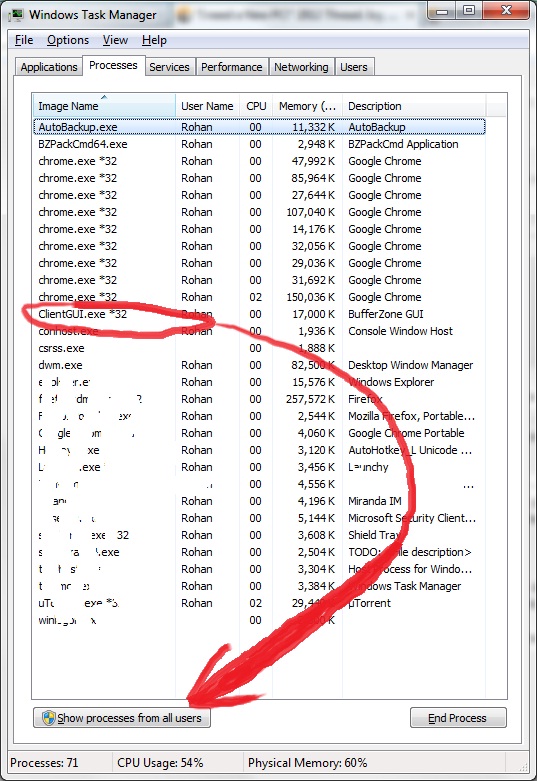
Yes, I am the administrator. I own the computer. My computer is not on a network. It just has one other account on it that is a standard user. I want to prevent that user from terminating processes, specifically that of the program called Bufferzone and some others. Those programs are automatically run on the standard account via msconfig.

This is a screenshot of the task manager from the standard account. I want to move that process so only I the admin can be able to see it when I click the button pointed by the arrow.
vj0tj.jpg
 
Last edited:

My Computer My Computer

OS
Windows 7 Ultimate x64
Do these programs you want to keep running present any kind of user interface? If not, then you may consider running them as services instead of using msconfig. Standard users cannot see service processes in task manager unless they accept the UAC prompt (and therefore know the administrator password) and cannot terminate them in any other way (they get an access denied error).

Here is a guide to use programs as such:
How To Create a User-Defined Service

(while it states "Windows 2000" it's perfectly valid for Win7 too).

You have to test your particular programs, as some may break if ran this way.
Hope it helps.
 

My Computer My Computer

Computer type
Laptop
Computer Manufacturer/Model Number
Toshiba Sattelite A665-S6092
OS
Windows 7 Ultimate x64
CPU
Intel Core i7-740QM
Memory
8 GB DDR3
Graphics Card(s)
NVIDIA GeForce 330GT
Screen Resolution
1366x768
Hard Drives
Samsung 840 SSD 500GB
1TB USB3 external HD
Cooling
Coolermaster Notepal U3 notebook cooling pad
Internet Speed
3mbps ASDL
Antivirus
ClamWin 0.98.7
Browser
Opera 12.17 x86 (main), Firefox 38 (sec), IE11 (last resort)
Yes the program in question has a UI. I want to prevent the user from terminating it. Is that possible? Will a program with a UI work with that tutorial?
 

My Computer My Computer

OS
Windows 7 Ultimate x64
Then no, that method will only work for programs with no user interaction at all. If program displays any UI, it will never appear and the user won't be able to use it.

But another question that I have now. If the program does have an UI, what will prevent the user from clicking the "close" menu? They don't even need to kill it by task manager, but can simply quit it in the good way. Do the programs have something that prevents the user from simply closing them?
 

My Computer My Computer

Computer type
Laptop
Computer Manufacturer/Model Number
Toshiba Sattelite A665-S6092
OS
Windows 7 Ultimate x64
CPU
Intel Core i7-740QM
Memory
8 GB DDR3
Graphics Card(s)
NVIDIA GeForce 330GT
Screen Resolution
1366x768
Hard Drives
Samsung 840 SSD 500GB
1TB USB3 external HD
Cooling
Coolermaster Notepal U3 notebook cooling pad
Internet Speed
3mbps ASDL
Antivirus
ClamWin 0.98.7
Browser
Opera 12.17 x86 (main), Firefox 38 (sec), IE11 (last resort)
More to the point, does turning off the clientGUI actually affect the function of the sandboxing? With Sandboxie terminating the client GUI does not effect the sandboxing of applications.
 

My Computer My Computer

Computer type
PC/Desktop
Computer Manufacturer/Model Number
Alienware Aurora ALX R4
OS
Windows 10 Pro (x64)
CPU
Intel Core i7-3930K (3.2GHz - 4.5GHz)
Motherboard
Alienware Aurora-R4 x79
Memory
4x Samsung 4GB PC3-12800 DDR3 (16GB 1600MHz)
Graphics Card(s)
Nvidia Geforce GTX 690
Sound Card
SteelSeries Siberia Elite
Monitor(s) Displays
Dell UltraSharp U3011
Screen Resolution
2560x1600
Hard Drives
Samsung 850 Pro 256 GB, Seagate 1TB Desktop Hybrid HDD, 2x Western Digital 4TB Green HDD
PSU
875W Some Dell PSU <.<
Case
Alienware Aurora ALX
Cooling
Custom Liquid Cooling (EK CPU & GPU blocks) dual EK 480RAD
Keyboard
Logitech G710+ Mechanical
Mouse
Logitech G700s
Internet Speed
Verizon Fios (50 mbps average)
Other Info
Server: Intel NUC D54250WYK: i5-4250U, 16GB, 256 GB mSATA, Windows Server 2012 R2
Back
Top