How to prevent W7 Live Mail from removing emails older than 1 yr

Flightlessbird

New member
Local time
1:23 PM
Messages
2
I've had all the Windows OSs and now have Windows 7 64-bit Pro and use the resident email client Windows Live Mail. I haven't merged any other online email accounts with Live Mail. I looked for a specific email for a purchase I made in 2011 only to find that I have no emails for 2011 at all - none. I only have emails from 2012. I want to keep many travel and purchase emails. I have tried to research this issue and read that Windows 7 Live Mail automatically archives older emails but despite following the path provided, I could not view any old emails from 2011 or before.

What can I do to retrieve all my old emails and bring them back to my current Windows Live Mail? What can I do to prevent the 2012 emails from being archived, removed?
 

My Computer My Computer

At a glance

Windows 64 bit Pro
OS
Windows 64 bit Pro
Hello Flightlessbird and welcome to Seven Forums.

Let me say right away that I don't use WLM and I have no knowledge of how it works. But this response will hopefully put your question in the "active" list rather than having it stay in the "unanswered" category.

Microsoft Outlook has an AutoArchive feature. AutoArchive moves items from their original location in Outlook to an archive file folder when they expire. That is, when they pass their "aging period". But there's also an option for items to be deleted when they expire. I'm guessing that WLM may have this same feature. Maybe these guides for Outlook will give you some ideas of where to look in WLM.

Please accept my sincerest apology for not having anything worthwhile to contribute. I'm hoping that one of the more knowledgeable Forum members will jump in with a good response.

Automatically move or delete older items with AutoArchive - Outlook - Office.com

Open and find items in an archive Outlook Data File (.pst) - Outlook - Office.com
 

My Computer My Computer

At a glance

Win 7 Pro 64-bitIntel i5 2.4 Ghz8GB DDR3Intel HD 3000
Computer type
Laptop
Computer Manufacturer/Model Number
Sony Vaio VPCEB47GM Laptop
OS
Win 7 Pro 64-bit
CPU
Intel i5 2.4 Ghz
Memory
8GB DDR3
Graphics Card(s)
Intel HD 3000
Sound Card
IDT High Definition
Monitor(s) Displays
15.6 WGXA Anti-Glare LED
Screen Resolution
1280x800
Hard Drives
640Gb 7200rpm
Antivirus
MSE
Browser
Opera (primary) with IE9 backup
Windows Live Mail email client does not delete messages by itself.

Messages are deleted only when
  • User deletes them
  • User changes default settings
  • Message is deleted on server (IMAP)
  • Settings on email service provider's server are set to delete messages per instructions (IMAP); messages will also be deleted on WLM client due IMAP folder synchronization
As you did not tell what email provider you are using and if you use IMAP or POP3 mail protocol, it is impossible to say why your old messages have disappeared. Read more about IMAP vs. POP3: Email: What's the Difference Between POP3, IMAP, and Exchange? - How-To Geek

Short explanation:
POP3 stores the messages both locally and on server if the option Leave the copy of messages on the server is chosen. This is not synchronized; a message deleted locally is not deleted on server, neither is a message deleted on server deleted from your computer. If the option is not selected, messages are deleted from the server when Live Mail (or any other client) has read them.

IMAP stores the messages both locally and on the server, doing this in a synchronized way: if the message is deleted locally in Live Mail, it is also deleted from the server, and vice versa.

When using IMAP, a deleted message remains in Deleted Items folder on WLM, and in Deleted folder on server (the name in Hotmail / Live, other service providers might have a different name for this folder on server). It is only completely removed when it is deleted from this folder, not before, for instance when you empty the Deleted Items folder on your mail client. When this is done, it will be removed from the client (WLM) as well as from server because one of the most characterizing features of IMAP is that it keeps both mailboxes synchronized, the one on your client (WLM or any other mail client) and the one by your service provider's mail server.

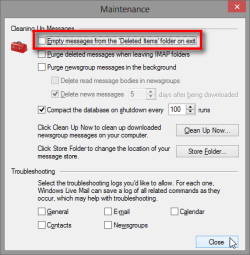
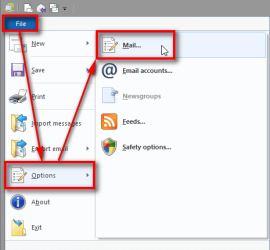
To change this default setting, go to File > Options > Mail, select Advanced > Maintenance and select Empty items from "Deleted Items" folder on exit. This will remove all deleted messages completely every time you exit WLM:
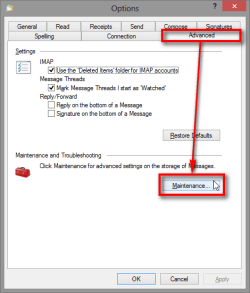
WLM_Client_IMAP_POP3_00001.png
WLM_Client_IMAP_POP3_00002.png
WLM_Client_IMAP_POP3_00003.png

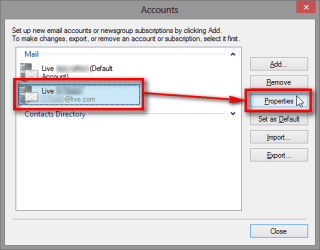
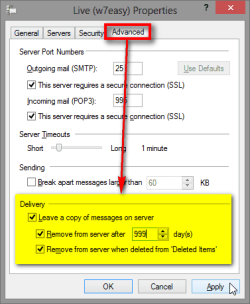
POP3 mail protocol allows you to have totally independent mailboxes locally on your client and on the server. To change POP3 settings to keep or delete messages on server, go to File > Options > Email Accounts, select your POP3 account and click Properties and change the delivery settings as you wish:
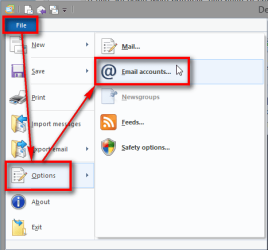
WLM_Client_IMAP_POP3_00004.png
WLM_Client_IMAP_POP3_00005.png
WLM_Client_IMAP_POP3_00006.png

I recommend you to check your mail settings on your service provider's webmail interface. For your issue the reason for disappeared messages is either a user setting, your mail provider's settings on server or that you have deleted the messages yourself, with or without intent.

Kari

 

My Computer My Computer

At a glance

Windows 10 Pro x64 EN-GB1.6 GHz Intel Core i7-720QM Processor6 GBATI Mobility Radeon HD 5850 Graphics
Computer type
Laptop
Computer Manufacturer/Model Number
HP ENVY 17-1150eg
OS
Windows 10 Pro x64 EN-GB
CPU
1.6 GHz Intel Core i7-720QM Processor
Memory
6 GB
Graphics Card(s)
ATI Mobility Radeon HD 5850 Graphics
Sound Card
Beats sound system with integrated subwoofer
Monitor(s) Displays
17" laptop display, 22" LED and 32" Full HD TV through HDMI
Screen Resolution
1600*900 (1), 1920*1080 (2&3)
Hard Drives
Internal: 2 x 500 GB SATA Hard Disk Drive 7200 rpm
External: 2TB for backups, 3TB USB3 network drive for media
Cooling
As Envy runs a bit warm, I have it on a Cooler Master pad
Keyboard
Logitech diNovo Media Desktop Laser (bluetooth)
Mouse
Logitech Performance Mouse MX
Internet Speed
50/10 Mbps VDSL
Antivirus
Windows Defender 4.3.9431.0
Browser
Maxthon 3.5.2., IE11
I totally agree, WLM does not delete messages unless you do it yourself or on your webmail for IMAP. I have messages from 2007 and further back, this may also have to do with something through your isp. You might want to go to your webmail and look at the filters that are set up, you might find there it is set to delete old messages.
Also if you check webmail and delete messages from there it will delete them from WLM.
 

My Computer My Computer

At a glance

Windows 7 Pro 32/64 bit and Windows 10 Pro 32...4gigsAMD Radeon HD and Nvidia
Computer type
PC/Desktop
Computer Manufacturer/Model Number
Dell Computers
OS
Windows 7 Pro 32/64 bit and Windows 10 Pro 32 Bit/64bit
Memory
4gigs
Graphics Card(s)
AMD Radeon HD and Nvidia
Monitor(s) Displays
Samsung 24". INC 19". Dell 22 ". Dell 17" & 19"
Windows 7 Live Mail is a resident mail program

I downloaded Windows 7 Live Mail after I purchased Windows 7 operating system. I used to have Outlook and prefer a resident email client on my home computer. I also have other Internet email accounts.

My ISP is Verizon and since my computer is on almost all the time (not asleep either), my emails are continuously downloaded to my computer where they are stored. So, the disappearance of email messages more than one year old has nothing to do with my ISP since I download or retrieve the messages constantly.

When I had Outlook, my emails did not disappear and were not archived. I would go through and manually delete what I no longer needed.

I need to keep certain emails like travel and purchase emails and do not want them to "disappear" or be archived. This is what I am asking. How can I make Windows 7 Live Mail not archive my messages that are stored on my computer by this resident email client.
 

My Computer My Computer

At a glance

Windows 64 bit Pro
OS
Windows 64 bit Pro
I downloaded Windows 7 Live Mail after I purchased Windows 7 operating system...How can I make Windows 7 Live Mail not archive my messages that are stored on my computer by this resident email client.
I'm still using the 2009 version of WLM, which has an option menu very similar to that of the old Outlook Express. I'm sure that my version does not delete or archive messages. There isn't even an option to do so. If you download messages to your PC via POP3, they should stay there (in WLM on your PC) until you delete them and empty the deleted items folder. If, OTOH, you set up your account as IMAP, you are merely viewing what was left on the mail server so you need to find out what your mail server's policy is wrt mail that you viewed but did not download. (Usually pop3 deletes from servers while imap does not, but after time the email service provider may delete them according to their own individual policy.) So far we have not discussed http type accounts (e.g. Microsoft's Hotmail/Outlook.com service) which synchronizes the server and client inboxes so that users can manage the mail on their server from any device they happen to use to "sign-in" with.

Personally, I do something a bit unusual since I don't use Hotmail or multiple devices and do not want to download a lot of junk in the first place. I set up my main account as both POP3 and IMAP. I look at what is on the server in the IMAP version first and "delete" and "purge from server" the stuff I don't want to download permanently to my PC. Then I go to the POP3 account and manually tell it to sync (which in WLM means "download and delete from server"). I don't let the POP3 account download anything on a schedule or at startup. But if I happen to leave my email program open, email headers will appear in the IMAP folder I was viewing as new mail arrives on the server.
 

My Computer My Computer

At a glance

Windows 8 Pro w/MC 32-bitIntel Atom 1.86 GHz2 GBIntel GMA 500
Computer type
PC/Desktop
Computer Manufacturer/Model Number
OQO 2+
OS
Windows 8 Pro w/MC 32-bit
CPU
Intel Atom 1.86 GHz
Motherboard
OQO 2+
Memory
2 GB
Graphics Card(s)
Intel GMA 500
Sound Card
IDT
Monitor(s) Displays
LCD
Screen Resolution
800 x 480 (portable) 1280 x 1024 (docked)
Hard Drives
64 GB SSD
PSU
9 Ah Battery (portable) or OQO Brick (docked)
Case
Shirt Pocket Sized
Cooling
Tiny Fan
Keyboard
Slide out (portable) DiNovo Edge (docked)
Mouse
Eraser head (portable) Logitech Bluetooth (docked)
Internet Speed
WWAN or 802.11G (portable) T1 (docked)
Browser
IE 10
Other Info
DVD-RW OQO Docking Station
In the left pane, you can look in the "Storage Folders" and see if there is anything in "Recovered Items".
If you don't see Storage Folders in the left pane, on the View Tab / Ribbon make sure Storage Folders is enabled.

You can create your own folders in Storage Folders to store email locally.

My primary program is Outlook and I don't use WLM (2012) to store any emails on my PC.
I've never used Storage Folders to make sure they work correctly!

I found this about Storage Folders:
Storage folders enable you to store messages locally that you don't want to keep on the server. Moving a message from an account folder to a user-created folder under storage folders will remove it from the server.
Source: Storage folders in Windows Live Mail - Microsoft Community

WLMSP19.PNG
 

My Computer My Computer

At a glance

Multi-Boot W7_Pro_x64 W8.1_Pro_x64 W10_Pro_x6...AMD Athlon II x4 6206GB GSkill DDR2 800AMD 4670 GPU + AMD 4200 IGP
Computer type
PC/Desktop
Computer Manufacturer/Model Number
home built
OS
Multi-Boot W7_Pro_x64 W8.1_Pro_x64 W10_Pro_x64 +Linux_VMs +Chromium_VM
CPU
AMD Athlon II x4 620
Motherboard
Gigabyte GA-MA785G-UD3H
Memory
6GB GSkill DDR2 800
Graphics Card(s)
AMD 4670 GPU + AMD 4200 IGP
Sound Card
on board Realtek ALC889A
Monitor(s) Displays
RCA 40" LCD TV, Insignia 32" LCD TV, HP 15" LCD monitor
Screen Resolution
1680 x 1050
Hard Drives
OCZ Vertex 3 120GB,
Samsung F3 1TB (3),
Several others - WD, Seagate, Hitachi, ...
PSU
Corsair 500 W
Case
Rosewill mid tower
Cooling
CM 90mm rifle
Keyboard
Gyration wireless, Logitech wireless, Dell USB wired
Mouse
Gyration wireless, Logitech wireless, V7 USB wired
Internet Speed
Spectrum - 100Mbps D / 10Mbps U
Antivirus
Avast, MBAM3, EMET, WinPatrol
Browser
Pale Moon, Firefox, IE
Other Info
2 multi-boot PC's
Mainly HTPC/Office/Gen purpose (no gaming).
Trendnet USB KVM.
LG DVD burner/Blue Ray Player.
Tray system for removable SATA backup drives.

Not currently OCd, under-volted.
I use Hybrid sleep, rarely re-boot or shutdown.

Hauppauge HD-PVR, Avermedia PCIe TV Tuner, Hauppauge PCI TV Tuner.
Perhaps it should be pointed out that that the first post in that thread says "... I only wish to use WLM as a client for Hotmail...". Since Hotmail accounts are normally set up as an HTTP type, they are synchronized with the server in such a way that the client and server are kept in sync with each other. If a message is moved away from a Hotmail account in WLM it will be deleted from the server. OTOH, with a POP3 account, it's deleted upon download (by default) even though it remains in the account's inbox, and with an IMAP account it is only deleted if you move it away from the IMAP folder group (causing a line to be drawn through the header) and that action is followed up by "purge messages from server". In other words the behavior depends on the type of accout (http, imap, or pop3) as well as the options that apply to that type of account, and the policy of the email server wrt messages left on the server.
 

My Computer My Computer

At a glance

Windows 8 Pro w/MC 32-bitIntel Atom 1.86 GHz2 GBIntel GMA 500
Computer type
PC/Desktop
Computer Manufacturer/Model Number
OQO 2+
OS
Windows 8 Pro w/MC 32-bit
CPU
Intel Atom 1.86 GHz
Motherboard
OQO 2+
Memory
2 GB
Graphics Card(s)
Intel GMA 500
Sound Card
IDT
Monitor(s) Displays
LCD
Screen Resolution
800 x 480 (portable) 1280 x 1024 (docked)
Hard Drives
64 GB SSD
PSU
9 Ah Battery (portable) or OQO Brick (docked)
Case
Shirt Pocket Sized
Cooling
Tiny Fan
Keyboard
Slide out (portable) DiNovo Edge (docked)
Mouse
Eraser head (portable) Logitech Bluetooth (docked)
Internet Speed
WWAN or 802.11G (portable) T1 (docked)
Browser
IE 10
Other Info
DVD-RW OQO Docking Station
Back
Top