How to properly set my folder settings?

ljanbe

New member
Local time
2:17 AM
Messages
4
Hi guys. I'm new here, and basically i registered so you can help me solve my problem :D

Here it is. My folder looks like this.

iulk3Uf.png


But when i copy this folder, or change one letter, or anything else, this happens.

851b9e69a8cf428ebddba4f.png


I don't know if this can be sort out, but if you could help me i would be very grateful :)
 

My Computer

Computer type
Laptop
Computer Manufacturer/Model Number
Hp g62 a70 - sm
OS
Windows 7 Ultimate x86
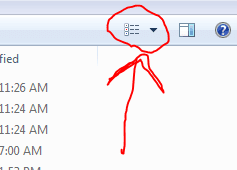
Click this icon till the view changes. Does it help?
 

Attachments

  • Capture.PNG
    Capture.PNG
    3.1 KB · Views: 47

My Computer

Computer type
PC/Desktop
Computer Manufacturer/Model Number
Golden Mk. I.4
OS
Windows 10 Pro x64 ; Xubuntu x64
CPU
Intel i7 860 @ 2.80 GHz O/C'ed to 4.0GHz
Motherboard
Gigabyte P55A-UD3R Rev.1. Award BIOS F13
Memory
16GB Corsair Vengance DDR3 @ 661 MHz Dual Channel (9-9-9-24)
Graphics Card(s)
EVGA NVidia GTX 560 1024MB
Sound Card
Realtek Integrated
Monitor(s) Displays
Dual Samsung SyncMaster 2494HS
Screen Resolution
1920*1080 and 1920*1080
Hard Drives
1*Samsung 840 EVO 120GB SSD;
1*OCZ Vertex 2 60GB SSD;
2*Samsung F3 SpinPoint 1TB in RAID0;
1*Samsung F1 SpinPoint 1TB;
2*Western Digital 1TB External USB 3.0
1*Western Digital 500GB External USB 3.0
1*Seagate 500GB External USB 2.0
PSU
Thermaltake ToughPower QFan 750W
Case
Thermaltake Element S VK60001W2Z
Cooling
Corsair H60 Water Cooling, 2*230mm and 2*80mm case fans
Keyboard
Logitech G110
Mouse
Logitech MX518
you could also try (from the 3idiots window)

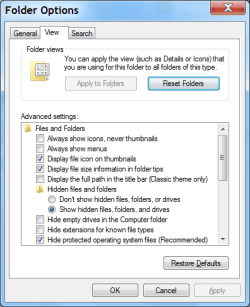
click organize then click folder and search options, then in the window that opens click the set this folder view as default or words to that effect.
im using windows 8 at the moment so i cant remember the exact wording , its all there though .
the idea is to set up a window the way you like it then set it as the default across all your folders,
 

My Computer

Computer Manufacturer/Model Number
Hewlett packard/p6512uk
OS
Microsoft Windows 7 Home Premium 64-bit 7600
CPU
IIx4 amd athelon 635 processor
Motherboard
FOXCONN 2AA9
Memory
2x2gb
Graphics Card(s)
ati radeon HD 5450
Sound Card
(1) Realtek High Definition Audio (2) AMD High Definition
Monitor(s) Displays
samsung lcd tv 32"
Screen Resolution
1360x 768
Hard Drives
(1) WDC WD10 01FAES-60Z2A0 SATA Disk Device (2) Maxtor OneTouch USB Device (3) ST310003 33AS USB Device (4) WD My Book 1111 USB Device
PSU
?
Cooling
air!
Keyboard
wireless hp
Mouse
wireless Hp,optical
Internet Speed
1.10mb/s
Antivirus
MSE
Browser
Firefox
Yes i tried this already but it doesn't help. It's working when my movie folder is on, example D disc, but when i copy it on C disc, or USB, windows itself set that other view, i was talking about.

I'm looking for something like that bat. file i downloaded, so i can arrange folders, and files how i want it, not by name or so. I know how to set view of files i like, but they don't stay in that order for long, windows changes it.
 

My Computer

Computer type
Laptop
Computer Manufacturer/Model Number
Hp g62 a70 - sm
OS
Windows 7 Ultimate x86

My Computer

Computer Manufacturer/Model Number
Hewlett packard/p6512uk
OS
Microsoft Windows 7 Home Premium 64-bit 7600
CPU
IIx4 amd athelon 635 processor
Motherboard
FOXCONN 2AA9
Memory
2x2gb
Graphics Card(s)
ati radeon HD 5450
Sound Card
(1) Realtek High Definition Audio (2) AMD High Definition
Monitor(s) Displays
samsung lcd tv 32"
Screen Resolution
1360x 768
Hard Drives
(1) WDC WD10 01FAES-60Z2A0 SATA Disk Device (2) Maxtor OneTouch USB Device (3) ST310003 33AS USB Device (4) WD My Book 1111 USB Device
PSU
?
Cooling
air!
Keyboard
wireless hp
Mouse
wireless Hp,optical
Internet Speed
1.10mb/s
Antivirus
MSE
Browser
Firefox
I give up, thanks for your help guys, i will try not to move this folders, and then this will work properly. :)
 

My Computer

Computer type
Laptop
Computer Manufacturer/Model Number
Hp g62 a70 - sm
OS
Windows 7 Ultimate x86
Last edited by a moderator:

My Computer

Computer type
PC/Desktop
Computer Manufacturer/Model Number
n/a
OS
W7 Ultimate SP1, LM19.2 MATE, W10 Home 1703, W10 Pro 1703 VM, #All 64 bit
CPU
AMD Phenom II x6 1100T, 3.3 GHz
Motherboard
ASUS M4A88T-M/USB3 (AM3)
Memory
12GB DDR3 1333 G-Skill (4GB x 2), G-Skill (2GB x 2)
Graphics Card(s)
NVIDIA GeForce GTX 660
Sound Card
Realtek?
Monitor(s) Displays
Samsung S23B350
Screen Resolution
1920x1080
Hard Drives
WD Green 2TB (SATA), WD Green 3TB (SATA), WD Blue 4TB (SATA), WD Blue 6TB (SATA)
PSU
Cooler Master
Case
Antec GX300 Tower
Cooling
3x Antec TRICOOL 120mm Fans
Mouse
Wired Optical
Internet Speed
DSL
Antivirus
Avast
Browser
Pale Moon (64 bit)
Other Info
2018-12-27 Upgraded HDDs
2015-12-10 Upgraded case, graphics card, storage
2015-08-15 Upgraded motherboard & RAM
2015-07-15 Upgraded LM17.1 to LM17.2
Yea, i get this, i get all of this. I set it like you said, but when i change something (a letter in a folder) or move that folder, everything resets. I was just wondering how (and can i) stop windows from doing this.
 

My Computer

Computer type
Laptop
Computer Manufacturer/Model Number
Hp g62 a70 - sm
OS
Windows 7 Ultimate x86
Disable Auto-Folder Discovery

Yea, i get this, i get all of this. I set it like you said, but when i change something (a letter in a folder) or move that folder, everything resets. I was just wondering how (and can i) stop windows from doing this.

Assuming that the http://www.sevenforums.com/tutorials/1538-sfc-scannow-command-system-file-checker.html reported no errors, you probably need to disable Auto-Folder discovery.
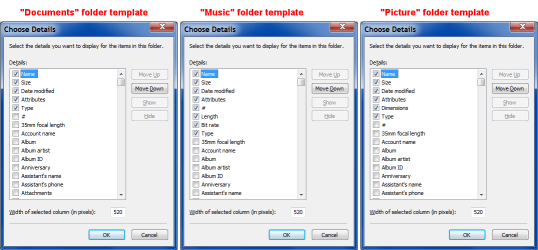
Once you have done that, set your views and templates.

However on my PC, the "Recycle Bin" will still change views (usually if it only contains images).
All other folders remember their settings though.

WARNING!
Use this reg file at your own risk!

Create a System Restore Point, or better yet, a backup HDD image, BEFORE using the reg file!
:eek:
View attachment DisableAutoFolderDiscovery.reg

The file should contain the following code:
Code:
Windows Registry Editor Version 5.00

[HKEY_CURRENT_USER\Software\Classes\Local Settings\Software\Microsoft\Windows\Shell\Bags\AllFolders\Shell]
"FolderType"="NotSpecified"
 

My Computer

Computer type
PC/Desktop
Computer Manufacturer/Model Number
n/a
OS
W7 Ultimate SP1, LM19.2 MATE, W10 Home 1703, W10 Pro 1703 VM, #All 64 bit
CPU
AMD Phenom II x6 1100T, 3.3 GHz
Motherboard
ASUS M4A88T-M/USB3 (AM3)
Memory
12GB DDR3 1333 G-Skill (4GB x 2), G-Skill (2GB x 2)
Graphics Card(s)
NVIDIA GeForce GTX 660
Sound Card
Realtek?
Monitor(s) Displays
Samsung S23B350
Screen Resolution
1920x1080
Hard Drives
WD Green 2TB (SATA), WD Green 3TB (SATA), WD Blue 4TB (SATA), WD Blue 6TB (SATA)
PSU
Cooler Master
Case
Antec GX300 Tower
Cooling
3x Antec TRICOOL 120mm Fans
Mouse
Wired Optical
Internet Speed
DSL
Antivirus
Avast
Browser
Pale Moon (64 bit)
Other Info
2018-12-27 Upgraded HDDs
2015-12-10 Upgraded case, graphics card, storage
2015-08-15 Upgraded motherboard & RAM
2015-07-15 Upgraded LM17.1 to LM17.2
Back
Top