How to put image on desktop - Not a background image

ixodid

New member
Member
Local time
6:14 AM
Messages
54
How can I put an image on my desktop background?

I don't want it to be the whole background - just a 400-pixel image on the desktop background.

If possible, I would like to place it not in the center and to be able to choose which monitor to put it on.

Windows 7 Pro 64-bit

Thanks!
 

My Computer My Computer

At a glance

Windows 7 Professional x648 GB
Computer Manufacturer/Model Number
HP p6350z
OS
Windows 7 Professional x64
Memory
8 GB
Monitor(s) Displays
2 x Dell 2007WFPb
OK this might help.
Resize the image to the size you want and Right Click Desktop > Personalize > Desktop Background > Choose Your Image(s) > Select "Centered" in Picture Position (bottom).
 

My Computer My Computer

At a glance

Microsoft Windows 7 Ultimate 64-bitIntel Core i3-3110M @ 2.40 Ghz Ivy Bridge 22n...4.00 GB Dual-Channel DDR3 @ 665MHz (9-9-9-24)Intel HD Graphics 4000
Computer Manufacturer/Model Number
HP ProBook 4540s
OS
Microsoft Windows 7 Ultimate 64-bit
CPU
Intel Core i3-3110M @ 2.40 Ghz Ivy Bridge 22nm Technology
Motherboard
Hewlett-Packard 17F6 (U3E1)
Memory
4.00 GB Dual-Channel DDR3 @ 665MHz (9-9-9-24)
Graphics Card(s)
Intel HD Graphics 4000
Sound Card
IDT High Definition Audio CODEC
Monitor(s) Displays
Generic PnP Monitor
Screen Resolution
1366x768@60Hz
Hard Drives
466GB Hitachi HTS727550A9E364 (SATA)
Keyboard
Standard PS/2 Keyboard Fixed
Mouse
Dell HID-compliant mouse
Internet Speed
3 Mbs/s Down, 1Mbs/s Up.
Other Info
Bought by Laptop on 24 December 2012, after making sure the world wasn't going to end.
Resize the image to the size you want and Right Click Desktop > Personalize > Desktop Background > Choose Your Image(s) > Select "Centered" in Picture Position (bottom).
Thank you for your response. I already tried what you suggest, but that centers my image. I do not want it centered.

And, if possible, I would like to be able to choose which monitor it's on.
 

My Computer My Computer

At a glance

Windows 7 Professional x648 GB
Computer Manufacturer/Model Number
HP p6350z
OS
Windows 7 Professional x64
Memory
8 GB
Monitor(s) Displays
2 x Dell 2007WFPb
Oops sorry, my bad, I thought you wanted to center it.
On the other hand, where do you wanna place it? I don't exactly understand your desired layout.
 

My Computer My Computer

At a glance

Microsoft Windows 7 Ultimate 64-bitIntel Core i3-3110M @ 2.40 Ghz Ivy Bridge 22n...4.00 GB Dual-Channel DDR3 @ 665MHz (9-9-9-24)Intel HD Graphics 4000
Computer Manufacturer/Model Number
HP ProBook 4540s
OS
Microsoft Windows 7 Ultimate 64-bit
CPU
Intel Core i3-3110M @ 2.40 Ghz Ivy Bridge 22nm Technology
Motherboard
Hewlett-Packard 17F6 (U3E1)
Memory
4.00 GB Dual-Channel DDR3 @ 665MHz (9-9-9-24)
Graphics Card(s)
Intel HD Graphics 4000
Sound Card
IDT High Definition Audio CODEC
Monitor(s) Displays
Generic PnP Monitor
Screen Resolution
1366x768@60Hz
Hard Drives
466GB Hitachi HTS727550A9E364 (SATA)
Keyboard
Standard PS/2 Keyboard Fixed
Mouse
Dell HID-compliant mouse
Internet Speed
3 Mbs/s Down, 1Mbs/s Up.
Other Info
Bought by Laptop on 24 December 2012, after making sure the world wasn't going to end.
I have two monitors. I want to be able to put the image on one monitor somewhere other than being limited to the center.

I want to position it relative to the way I have my desktop icons laid out. For instance, centered approximately in the lower left-hand quadrant or somewhere on the left side of the right-hand monitor.
 

My Computer My Computer

At a glance

Windows 7 Professional x648 GB
Computer Manufacturer/Model Number
HP p6350z
OS
Windows 7 Professional x64
Memory
8 GB
Monitor(s) Displays
2 x Dell 2007WFPb
Well, you can open MS paint, then extend the area to your desktop size e.g. 1024x768 (and fill in the color you want) then paste your image and place it wherever you want.
Hope that helps.
P.S Sorry but I can't help you with the Monitor prob, I've never had the least experience of using any screen except my good ol' monitor.
 

My Computer My Computer

At a glance

Microsoft Windows 7 Ultimate 64-bitIntel Core i3-3110M @ 2.40 Ghz Ivy Bridge 22n...4.00 GB Dual-Channel DDR3 @ 665MHz (9-9-9-24)Intel HD Graphics 4000
Computer Manufacturer/Model Number
HP ProBook 4540s
OS
Microsoft Windows 7 Ultimate 64-bit
CPU
Intel Core i3-3110M @ 2.40 Ghz Ivy Bridge 22nm Technology
Motherboard
Hewlett-Packard 17F6 (U3E1)
Memory
4.00 GB Dual-Channel DDR3 @ 665MHz (9-9-9-24)
Graphics Card(s)
Intel HD Graphics 4000
Sound Card
IDT High Definition Audio CODEC
Monitor(s) Displays
Generic PnP Monitor
Screen Resolution
1366x768@60Hz
Hard Drives
466GB Hitachi HTS727550A9E364 (SATA)
Keyboard
Standard PS/2 Keyboard Fixed
Mouse
Dell HID-compliant mouse
Internet Speed
3 Mbs/s Down, 1Mbs/s Up.
Other Info
Bought by Laptop on 24 December 2012, after making sure the world wasn't going to end.

My Computer My Computer

At a glance

Microsoft Windows 10 Pro Insider Preview 64-bitIntel(R) Core(TM) i3-4130 CPU @ 3.40GHzCorsair Vengence 4GB x2 (8.00GB Dual-Channel ...2047MB GeForce GTS 450 (ZOTAC International)
Computer type
PC/Desktop
Computer Manufacturer/Model Number
Self Assembled
OS
Microsoft Windows 10 Pro Insider Preview 64-bit
CPU
Intel(R) Core(TM) i3-4130 CPU @ 3.40GHz
Motherboard
Gigabyte Technology Co., Ltd. B85M-D3H
Memory
Corsair Vengence 4GB x2 (8.00GB Dual-Channel DDR3 @ 798MHz)
Graphics Card(s)
2047MB GeForce GTS 450 (ZOTAC International)
Sound Card
Onboard (Realtek High Definition Audio)
Monitor(s) Displays
LG Flatron E2040T
Screen Resolution
1600x900
Hard Drives
Western Digital 1 TB
Seagate 500 GB
PSU
Corsair VS550
Case
Cooler Master K380
Cooling
Cooler Master Seidon 120V Plus
Keyboard
Logitech MK260r
Mouse
Logitech MK260r
Internet Speed
PMPL Broadband
Antivirus
Windows Defender + MBAM
Browser
Firefox
Other Info
Dell Studio 15" Laptop
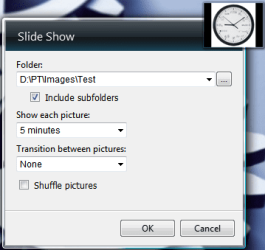
You can do that using the "Slide Show Gadget".

1. Make a folder somewhere and put the image you want in that folder. (Only that image)
2. Open up settings in Slide Show gadget and select the folder. Since there is only one image in that folder, there will be no slide show ;)
3. Make the Slide Show gadget bigger.
4. Move the gadget anywhere you want.
5. Done :)

C1.PNG

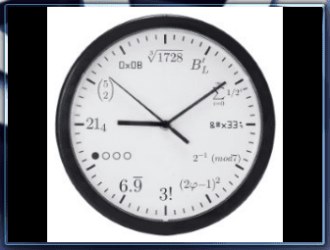
C2.PNG
 

My Computer My Computer

At a glance

Windows 7 Ultimate x64 (XP, 98SE, 95, 3.11, D...Intel Core 2 Duo Processor P8600 (2.40 GHz, 3...4GB 800 MHz DDR2 SDRAMATI Mobility FireGL V5700 with 256 MB
Computer type
Laptop
Computer Manufacturer/Model Number
HP EliteBook 8530w Mobile Workstation
OS
Windows 7 Ultimate x64 (XP, 98SE, 95, 3.11, DOS 7.10 on VM) + Ubuntu 10.04 LTS Lucid Lynx
CPU
Intel Core 2 Duo Processor P8600 (2.40 GHz, 3 MB L2 cache)
Motherboard
Mobile Intel PM45 Express Chipset ICH9M-Enhanced
Memory
4GB 800 MHz DDR2 SDRAM
Graphics Card(s)
ATI Mobility FireGL V5700 with 256 MB
Sound Card
SoundMAX Integrated Digital HD Audio
Monitor(s) Displays
15.4-inch WXGA anti-glare (1280 x 800 resolution)
Screen Resolution
1280 x 800
Hard Drives
500GB + 1TB
Mouse
Synaptics PS/2 Port Touchpad, USB Mouse
Internet Speed
4 Mbps
Antivirus
MSE
Browser
Firefox, Chrome, IE
Other Info
Authentec AES2810 Fingerprint Reader
Thank you, gladson1976 - is there a way to make the images original size?

It appears that the Slide Show Gadget allows images to display in two sizes and the larger size is still quite small.
 

My Computer My Computer

At a glance

Windows 7 Professional x648 GB
Computer Manufacturer/Model Number
HP p6350z
OS
Windows 7 Professional x64
Memory
8 GB
Monitor(s) Displays
2 x Dell 2007WFPb
The size seems to be fixed in the gadget, but it should be possible to change the gadget code since its only HTML, Javascript and CSS.
Will check it out in the weekend.
 

My Computer My Computer

At a glance

Windows 7 Ultimate x64 (XP, 98SE, 95, 3.11, D...Intel Core 2 Duo Processor P8600 (2.40 GHz, 3...4GB 800 MHz DDR2 SDRAMATI Mobility FireGL V5700 with 256 MB
Computer type
Laptop
Computer Manufacturer/Model Number
HP EliteBook 8530w Mobile Workstation
OS
Windows 7 Ultimate x64 (XP, 98SE, 95, 3.11, DOS 7.10 on VM) + Ubuntu 10.04 LTS Lucid Lynx
CPU
Intel Core 2 Duo Processor P8600 (2.40 GHz, 3 MB L2 cache)
Motherboard
Mobile Intel PM45 Express Chipset ICH9M-Enhanced
Memory
4GB 800 MHz DDR2 SDRAM
Graphics Card(s)
ATI Mobility FireGL V5700 with 256 MB
Sound Card
SoundMAX Integrated Digital HD Audio
Monitor(s) Displays
15.4-inch WXGA anti-glare (1280 x 800 resolution)
Screen Resolution
1280 x 800
Hard Drives
500GB + 1TB
Mouse
Synaptics PS/2 Port Touchpad, USB Mouse
Internet Speed
4 Mbps
Antivirus
MSE
Browser
Firefox, Chrome, IE
Other Info
Authentec AES2810 Fingerprint Reader
Back
Top