How to put the menu in paint at the side?

Haggstrom

New member
Local time
1:00 AM
Messages
4
The usual widescreens on laptops nowadays compress the height to inconveniently low vertical limits. Therefore, I can't understand why the menu in Paint is located on top in Windows 7, limiting the height even further, so that the actual paint space gets an aspect ratio of 25:10. It's okay if you just want to paint a sleeping snake, but I'd like to use it for other purposes too, and therefore I'd really like to know: How to put the menu at any side of the screen instead?
 

My Computer My Computer

At a glance

Windows 7
OS
Windows 7
The menu in paint is called the Ribbon. You are familiar with this thing form the introduction of Office 2007. But it differs from Office 2007's ribbon in one respect. In office, you have a chance to hide it, but in paint you are not allowed to do so. i think it is noy possible to put the menu in a side too. I feel your problem.

That's why I dont use a widescreen monitor ;)
 

My Computer My Computer

At a glance

Microsoft Windows 10 Pro Insider Preview 64-bitIntel(R) Core(TM) i3-4130 CPU @ 3.40GHzCorsair Vengence 4GB x2 (8.00GB Dual-Channel ...2047MB GeForce GTS 450 (ZOTAC International)
Computer type
PC/Desktop
Computer Manufacturer/Model Number
Self Assembled
OS
Microsoft Windows 10 Pro Insider Preview 64-bit
CPU
Intel(R) Core(TM) i3-4130 CPU @ 3.40GHz
Motherboard
Gigabyte Technology Co., Ltd. B85M-D3H
Memory
Corsair Vengence 4GB x2 (8.00GB Dual-Channel DDR3 @ 798MHz)
Graphics Card(s)
2047MB GeForce GTS 450 (ZOTAC International)
Sound Card
Onboard (Realtek High Definition Audio)
Monitor(s) Displays
LG Flatron E2040T
Screen Resolution
1600x900
Hard Drives
Western Digital 1 TB
Seagate 500 GB
PSU
Corsair VS550
Case
Cooler Master K380
Cooling
Cooler Master Seidon 120V Plus
Keyboard
Logitech MK260r
Mouse
Logitech MK260r
Internet Speed
PMPL Broadband
Antivirus
Windows Defender + MBAM
Browser
Firefox
Other Info
Dell Studio 15" Laptop
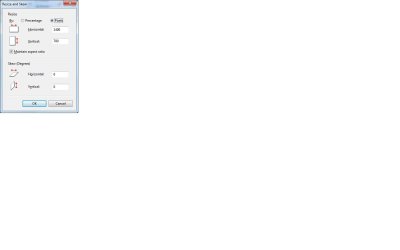
The paint space is approximately 2:1 width:height but you can change that to any size you want by resizing the paint space to any aspect ratio you want. Just change the horizontal and vertical pixels as shown in the attachment. Scroll bars are added if the resulting paint space is larger than the default for the screen.
 

Attachments

  • Capture.jpg
    Capture.jpg
    29.1 KB · Views: 33
  • Capture1.jpg
    Capture1.jpg
    58.9 KB · Views: 31

My Computer My Computer

At a glance

Windows 7
OS
Windows 7
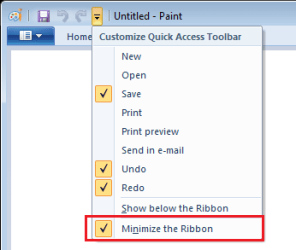
You can also hide the ribbon.
 

Attachments

  • Paint_Hide_Ribbon.png
    Paint_Hide_Ribbon.png
    5.2 KB · Views: 39

My Computer My Computer

At a glance

Windows 10 Pro x64 EN-GB1.6 GHz Intel Core i7-720QM Processor6 GBATI Mobility Radeon HD 5850 Graphics
Computer type
Laptop
Computer Manufacturer/Model Number
HP ENVY 17-1150eg
OS
Windows 10 Pro x64 EN-GB
CPU
1.6 GHz Intel Core i7-720QM Processor
Memory
6 GB
Graphics Card(s)
ATI Mobility Radeon HD 5850 Graphics
Sound Card
Beats sound system with integrated subwoofer
Monitor(s) Displays
17" laptop display, 22" LED and 32" Full HD TV through HDMI
Screen Resolution
1600*900 (1), 1920*1080 (2&3)
Hard Drives
Internal: 2 x 500 GB SATA Hard Disk Drive 7200 rpm
External: 2TB for backups, 3TB USB3 network drive for media
Cooling
As Envy runs a bit warm, I have it on a Cooler Master pad
Keyboard
Logitech diNovo Media Desktop Laser (bluetooth)
Mouse
Logitech Performance Mouse MX
Internet Speed
50/10 Mbps VDSL
Antivirus
Windows Defender 4.3.9431.0
Browser
Maxthon 3.5.2., IE11
  • Like
Reactions: Arc
You can also hide the ribbon.

Thanks , Kari ! Nice Input! I didn't know that it may be done in paint. You may look at a earlier post that I told him that ribbon may be minimized in office 2007, but not in paint :o
 

My Computer My Computer

At a glance

Microsoft Windows 10 Pro Insider Preview 64-bitIntel(R) Core(TM) i3-4130 CPU @ 3.40GHzCorsair Vengence 4GB x2 (8.00GB Dual-Channel ...2047MB GeForce GTS 450 (ZOTAC International)
Computer type
PC/Desktop
Computer Manufacturer/Model Number
Self Assembled
OS
Microsoft Windows 10 Pro Insider Preview 64-bit
CPU
Intel(R) Core(TM) i3-4130 CPU @ 3.40GHz
Motherboard
Gigabyte Technology Co., Ltd. B85M-D3H
Memory
Corsair Vengence 4GB x2 (8.00GB Dual-Channel DDR3 @ 798MHz)
Graphics Card(s)
2047MB GeForce GTS 450 (ZOTAC International)
Sound Card
Onboard (Realtek High Definition Audio)
Monitor(s) Displays
LG Flatron E2040T
Screen Resolution
1600x900
Hard Drives
Western Digital 1 TB
Seagate 500 GB
PSU
Corsair VS550
Case
Cooler Master K380
Cooling
Cooler Master Seidon 120V Plus
Keyboard
Logitech MK260r
Mouse
Logitech MK260r
Internet Speed
PMPL Broadband
Antivirus
Windows Defender + MBAM
Browser
Firefox
Other Info
Dell Studio 15" Laptop
Wide Screen

How about putting your monitor into Portrait
 

My Computer My Computer

At a glance

win 7 X64 Ultimate SP1I3770KG Skill F3-14900CL9-4GBXL x 4NVIDIA GeForce GTX670 + Intel 4000
Computer Manufacturer/Model Number
BGC (Bob's Garage Crew)
OS
win 7 X64 Ultimate SP1
CPU
I3770K
Motherboard
Asus P8Z77-V Deluxe
Memory
G Skill F3-14900CL9-4GBXL x 4
Graphics Card(s)
NVIDIA GeForce GTX670 + Intel 4000
Sound Card
Realtek HD 5.1 (MOB)
Monitor(s) Displays
Asus VW224T (1)
Screen Resolution
1920 x 1080
Hard Drives
SATA Corsair Force GT 2.5" 180GB (System) Sata 3
OCZ Vertex3 120GB
OCZ Vertex 2 120GB 2.5" SATA II
ST31000524AS 1000.2GB
WD15EARS (External)
PSU
CoolerMaster 1000 Watt
Case
CoolerMaster HAF X
Cooling
CPU -- CoolerMaster 520N
Keyboard
MS Wireless 3000 V2
Mouse
MS Wireless 3000 V2
Internet Speed
Cable
Antivirus
Norton Internet Security
Browser
IE9
Other Info
AMI Bios 1805
OC'd 3%
The paint space is approximately 2:1 width:height but you can change that to any size you want by resizing the paint space to any aspect ratio you want. Just change the horizontal and vertical pixels as shown in the attachment. Scroll bars are added if the resulting paint space is larger than the default for the screen.

Thanks, but that only resizes the image itself and not the actual paint space, like cutting your paper when it's actually your desk that is too small.
 

My Computer My Computer

At a glance

Windows 7
OS
Windows 7
You can also hide the ribbon.

Thanks , Kari ! Nice Input! I didn't know that it may be done in paint. You may look at a earlier post that I told him that ribbon may be minimized in office 2007, but not in paint :o

Thanks! It's not the optimal solution for me, but it's much better.
 

My Computer My Computer

At a glance

Windows 7
OS
Windows 7
Thanks, but that only resizes the image itself and not the actual paint space, like cutting your paper when it's actually your desk that is too small.

It does increase the paint space to anything you want it to be. You just have to scroll vertically or horizontally to access the larger paint space.

A better analogy is that you want to paint a picture on a piece of paper that is larger than your desk so you have to move the paper horizontally or vertically on the desk to complete the picture.
 

My Computer My Computer

At a glance

Windows 7
OS
Windows 7
Thanks, but that only resizes the image itself and not the actual paint space, like cutting your paper when it's actually your desk that is too small.

It does increase the paint space to anything you want it to be. You just have to scroll vertically or horizontally to access the larger paint space.

A better analogy is that you want to paint a picture on a piece of paper that is larger than your desk so you have to move the paper horizontally or vertically on the desk to complete the picture.


Thanks again. Still, I find it annoying to have to scroll whenever I want to paint on the other side of the picture - I want to see the full picture. So I'd still like to know how to put that damn menu at the side.
 

My Computer My Computer

At a glance

Windows 7
OS
Windows 7
Back
Top