How to re enable Microsoft Office 2010 updates?

killer bee

New member
Power User
VIP
Local time
11:55 PM
Messages
406
Hi!
Currently my Office 2010 package disable updates, but now i want get Microsoft Office 2010 updates? How do i do it?
 

My Computer My Computer

Computer Manufacturer/Model Number
Intel DG31PR (Intel Dual core 2.5 E5200 @ 2.5GHz)
OS
windows7 Ultimate SP1 x32bit
CPU
Intel
Motherboard
Intel DG31PR
Memory
Kinsgton 1GB an Transcend 2GB
Graphics Card(s)
Intel- onboard
Sound Card
Intel- onboard
Monitor(s) Displays
ViewSonic LCD Widescreen 19
Screen Resolution
1400x900
Hard Drives
Samsung 256GB
PSU
Legend
Case
Legend
Cooling
Intel
Keyboard
Seemo
Mouse
Prolink
Internet Speed
Download Speed-512Kbps, Upload Speed-128Kbps (ADSL wired)
Other Info
UPS- Prolink Pro650s
Router Prolink H5201
Sub Woofer - Creative 2.1
My updates arrive with the Microsoft automatic update process:

Go to the Control Panel - 'Windows Update' - select 'Change Settings' from the menu on the left. From the drop-down menu, select 'Install Updates Automatically'. :)
 

My Computer My Computer

Computer type
PC/Desktop
Computer Manufacturer/Model Number
Packard Bell
OS
Windows 7 Home Premium 64bit
CPU
Intel(R) Core(TM) i3-2120 CPU @ 3.30GHz
Motherboard
Packard Bell IPISB-AG
Memory
3.00 GB
Graphics Card(s)
(1) Intel(R) HD Graphics (2) VNC Mirror Driver
Sound Card
Realtek High Definition Audio
Monitor(s) Displays
AIO LCD
Screen Resolution
1920 x 1080
Hard Drives
WDC WD10EADX-22TDHB0 ATA Device
Fixed hard disk media
4 partitions
931.51 GB
Keyboard
Wireless
Mouse
Wireless
Antivirus
Microsoft Security Essentials
Browser
IE; Firefox
Other Info
Also:
Samsung N220 Plus Netbook - Windows 7 Home
HP laptop
iPad 5
My updates arrive with the Microsoft automatic update process:

Go to the Control Panel - 'Windows Update' - select 'Change Settings' from the menu on the left. From the drop-down menu, select 'Install Updates Automatically'. :)

My windows update center show this error. So how do i fix it?
 

My Computer My Computer

Computer Manufacturer/Model Number
Intel DG31PR (Intel Dual core 2.5 E5200 @ 2.5GHz)
OS
windows7 Ultimate SP1 x32bit
CPU
Intel
Motherboard
Intel DG31PR
Memory
Kinsgton 1GB an Transcend 2GB
Graphics Card(s)
Intel- onboard
Sound Card
Intel- onboard
Monitor(s) Displays
ViewSonic LCD Widescreen 19
Screen Resolution
1400x900
Hard Drives
Samsung 256GB
PSU
Legend
Case
Legend
Cooling
Intel
Keyboard
Seemo
Mouse
Prolink
Internet Speed
Download Speed-512Kbps, Upload Speed-128Kbps (ADSL wired)
Other Info
UPS- Prolink Pro650s
Router Prolink H5201
Sub Woofer - Creative 2.1
Are you logged in using an Administrator account?
 

My Computer My Computer

Computer Manufacturer/Model Number
Dell Studio 15
OS
Windows 7 Ultimate 64 bit
Are you logged on as an Administrator or just a standard user?

You may need to enable the Built-In Admin Account in order to change those settings.
 

My Computer My Computer

Computer Manufacturer/Model Number
Compaq Desktop
OS
Windows 7 Ultimate x64
CPU
AMD Sempron Dual Core
Memory
3GB
Graphics Card(s)
NVIDIA GeForce 6150SE nForce 430
Screen Resolution
1024x768
Hard Drives
150GB Sata

My Computer My Computer

Computer Manufacturer/Model Number
Intel DG31PR (Intel Dual core 2.5 E5200 @ 2.5GHz)
OS
windows7 Ultimate SP1 x32bit
CPU
Intel
Motherboard
Intel DG31PR
Memory
Kinsgton 1GB an Transcend 2GB
Graphics Card(s)
Intel- onboard
Sound Card
Intel- onboard
Monitor(s) Displays
ViewSonic LCD Widescreen 19
Screen Resolution
1400x900
Hard Drives
Samsung 256GB
PSU
Legend
Case
Legend
Cooling
Intel
Keyboard
Seemo
Mouse
Prolink
Internet Speed
Download Speed-512Kbps, Upload Speed-128Kbps (ADSL wired)
Other Info
UPS- Prolink Pro650s
Router Prolink H5201
Sub Woofer - Creative 2.1
Hmm, try this...

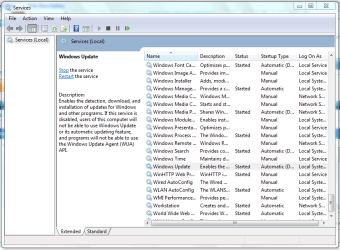
Click :orb: and type Services then click "Services" when it appears. Scroll down to Windows Update and see if the service is Started

Services.PNG
 

My Computer My Computer

Computer Manufacturer/Model Number
Compaq Desktop
OS
Windows 7 Ultimate x64
CPU
AMD Sempron Dual Core
Memory
3GB
Graphics Card(s)
NVIDIA GeForce 6150SE nForce 430
Screen Resolution
1024x768
Hard Drives
150GB Sata

My Computer My Computer

Computer Manufacturer/Model Number
Intel DG31PR (Intel Dual core 2.5 E5200 @ 2.5GHz)
OS
windows7 Ultimate SP1 x32bit
CPU
Intel
Motherboard
Intel DG31PR
Memory
Kinsgton 1GB an Transcend 2GB
Graphics Card(s)
Intel- onboard
Sound Card
Intel- onboard
Monitor(s) Displays
ViewSonic LCD Widescreen 19
Screen Resolution
1400x900
Hard Drives
Samsung 256GB
PSU
Legend
Case
Legend
Cooling
Intel
Keyboard
Seemo
Mouse
Prolink
Internet Speed
Download Speed-512Kbps, Upload Speed-128Kbps (ADSL wired)
Other Info
UPS- Prolink Pro650s
Router Prolink H5201
Sub Woofer - Creative 2.1
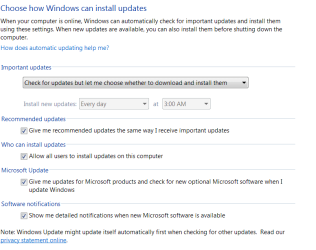
Go back to Update Settings and look for Microsoft Update setting.

Update Settings.PNG

Jim :geek:
 

My Computer My Computer

Computer type
PC/Desktop
Computer Manufacturer/Model Number
Home Built
OS
Windows 8.1 Pro w/Media Center 64bit, Windows 7 HP 64bit
CPU
Phenom II X6 1100T
Motherboard
ASUS M5A99X EVO
Memory
Crucial Balistic 8gb DDR3-1866 CL9
Graphics Card(s)
MSI R6850 Cyclone IGD5 PE
Sound Card
On Board
Monitor(s) Displays
ASUS VE258Q 25" LED with DVI-HDMI-DisplayPort
Screen Resolution
1920 x 1080
Hard Drives
Two WD Cavier Black 2TB Sata III, WD My Book Essential 2TB USB 3.0
PSU
Seasonic X650 80 Plus GOLD Modular
Case
Corsair 400R
Cooling
Antec Kuhler H2O 620, Two 120mm and four 140mm
Keyboard
Logitech K120
Mouse
Logitech Marble Mouse USB, Logitech Precision Game Pad
Internet Speed
15MB
Antivirus
Norton IS 2013, Malwarebytes Pro Beta 2
Browser
IE-11, FF-27
Other Info
APC UPS ES 750, Netgear WNR3500L Gigabit & Wireless N Router with SamKnows Test Program, Motorola SB6120 Gigabit Cable Modem. Brother HL-2170W Laser Printer, Epson V300 Scanner
.......same problem here.

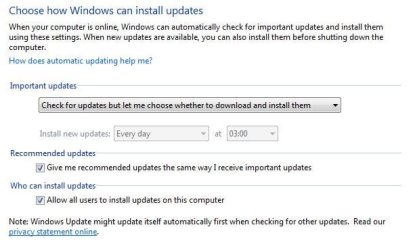
In my update control panel are 2 checkbox options missing.

Capture.JPG

Any help to get these options back would be greatly appreciated,
 

My Computer My Computer

OS
Windows 7 Ultimate x64
When you start Office 2010 for the first time, you get a popup screen giving you a choice of whether or not to install Office updates automatically. If you choose this, Microsoft Update is installed. Once Microsoft Update is installed, when you go into Windows Update, you'll see the additional checkboxes including "Give me updates for Microsoft products...." which would include Office.

If you don't choose the automatic update when starting Office the first time, Microsoft Update isn't installed, you are never asked about it again, and Windows Update won't update Office.

The solution to this is to install Microsoft Update, which is a little tricky to find.

Go here:
Microsoft Update

It only takes a moment to enable Microsoft Update, and then you can update Office using Windows Update.
 

My Computer My Computer

Computer Manufacturer/Model Number
Dell Inspiron 6400
OS
Windows 7
CPU
Intel Core 2 Duo 2GHz
Memory
2GB DDR2 SDRAM
Graphics Card(s)
ATI Mobility Radeon X1400
Sound Card
Sigmatel 9200
Monitor(s) Displays
15.4" SXGA
Screen Resolution
1680x1050
Hard Drives
160GB
Works in IE

Just an FYI, the Microsoft Update link provided by guitarfish does indeed solve the problem, but only works in Internet Explorer. In Firefox or other browsers, the link redirects to a page stating the Windows Update site is defunct and you should launch Windows Update from the Control Panel.

When you start Office 2010 for the first time, you get a popup screen giving you a choice of whether or not to install Office updates automatically. If you choose this, Microsoft Update is installed. Once Microsoft Update is installed, when you go into Windows Update, you'll see the additional checkboxes including "Give me updates for Microsoft products...." which would include Office.

If you don't choose the automatic update when starting Office the first time, Microsoft Update isn't installed, you are never asked about it again, and Windows Update won't update Office.

The solution to this is to install Microsoft Update, which is a little tricky to find.

Go here:
Microsoft Update

It only takes a moment to enable Microsoft Update, and then you can update Office using Windows Update.
 
I know the last post was along time ago but i have the same issue exactly mentioneed above and the link Microsoft Update just takes me to how to get to my windows updates form the start menu which i think everyone knows. (CAN SOMEONE PLEASE HELP HAS THIS FIX BEEN FOUND YET?) Maybe someone found a solution and they can post the link here right to a walk through. plese help thanks:)
P.S. IM INSTALLING OFFICE 2013 SO WILL IT MATTER ABOUT THE UPDATES IF I JUST UPGRADE TO 2013 ANY ONE KNOW?? THANKS TO ALL!
 

My Computer My Computer

Computer type
Laptop
OS
WINDOWS 7 X64
Memory
8GB RAM
Hard Drives
1TB
Mouse
BUILT IN AND I HATE IT LOL
Internet Speed
FREE COMCAST BUISNESS CLASS SINE IM A EMPLOYEE
Antivirus
bitdefender total security 2013 64 bit
Browser
FIREFOX
Hi

I had the same issue. In Firefox, the link redirects to a site with two pics describing how to oben windows update which is not very helpful. Using Internet Explorer 10 as it was mentioned in previous posts, the link led to an empty site. However, I noticed the option for the compability mode in the adress bar to the left of the reload button. In compability mode, the site was displayed correctly and the windows update could be installed successfully and solved the issue. Now the windows update panel shows properly all options and check boxes in order to en-or disable microsoft and software updates.

I hope this solution might help you and other people.

N.
 

My Computer My Computer

Computer type
PC/Desktop
OS
Win 7 Ultimate x64
I found on another post a tip to reset the flag in the registry to prompt MS Office to display the first-time prompt to opt-in to the Microsoft Updates. The registry entry in question is HKCU\Software\Microsoft\Office\{your version number here}\Common\General\ShowFirstRunOptin.

1. Close all MS Office applications.
2. In regedit, change the value from 1 to 0 for the aforementioned registry entry.
3. Run any MS Office application and you will be prompted to opt-in to the Microsoft Updates.
4. After opting-in, launch Control Panel > Windows Updates and you will see the two new checkboxes related to Microsoft Updates.
 

My Computer My Computer

Computer type
PC/Desktop
OS
Windows 7 Ultimate 64-bit
Compatibility mode in Internet Explorer worked for me as well to install Microsoft Update, like Niobe said. I had to add microsoft.com to the list of compatibility sites, but then it worked easily.

Did not try the registry change mentioned by intech.
 

My Computer My Computer

Computer type
Laptop
Computer Manufacturer/Model Number
Toshiba Satellite
OS
Windows 7 Pro 64-bit
CPU
Core i5-2430M
Memory
6 GB
Graphics Card(s)
nVidia GeForce GT 540M
Hard Drives
Samsung SSD 840 EVO 500 GB
Antivirus
AVG Business Edition
Browser
Mozilla Firefox
Intech's tweak worked perfectly. Thank you.
 

My Computer My Computer

Computer type
PC/Desktop
Computer Manufacturer/Model Number
Custom
OS
Windows 7 64 Home Premium
Back
Top