Solved How to re-image from external USB HD?

GusinCA

New member
Local time
7:17 PM
Messages
19
So a virus blew up my computer. I'm trying to re-image from an external USB hard drive, and I'm at the screen Re-Image your computer, and it doesn't seem to see any external HD. I have the USB active in setup, etc, do I need to install drivers for the external USB drive under "Advanced..."? When I go to Seagate's web site there are no drivers listed, it says they are not needed for Windows 7.

Help! :)
 

My Computer My Computer

Computer type
PC/Desktop
Computer Manufacturer/Model Number
Dell
OS
Windows 7
What program are you using to restore the backup image?

Where is the external USB hard drive plugged in. Power down and move it to a different USB port, see if that helps.
 

My Computer My Computer

Computer type
PC/Desktop
Computer Manufacturer/Model Number
Lenovo IdeaCenter 450
OS
Windows 10 Pro X64
CPU
Intel Quad Core i7-4770 @ 3.4Ghz
Memory
16.0GB PC3-12800 DDR3 SDRAM 1600 MHz
Graphics Card(s)
Intel Integrated HD Graphics
Sound Card
Realtek HD Audio
Monitor(s) Displays
HP 22" LCD
Screen Resolution
1680 x 1050
Hard Drives
250GB Samsung EVO SATA-3 SSD
2TB Seagate ST2000DM001 SATA-2
1.5TB Seagate ST3150041AS SATA
Keyboard
Dell USB
Mouse
Lenovo USB
Internet Speed
Cable via Road Runner 3MB Upload, 30MB Download
Antivirus
Windows Defender, MBAM Pro, MBAE
Browser
Seamonkey
Other Info
UEFI/GPT
PLDS DVD-RW DH16AERSH
Just the standard Windows image restore tool (pressing F8 and then going into repair computer, image restore).

I tried different USB ports, same issue. Do I need to install the USB driver? It gives the option to install drivers, but like I said, there aren't any...

Maybe copy the image file from the external drive to the drive inside the laptop? Does that work?
 

My Computer My Computer

Computer type
PC/Desktop
Computer Manufacturer/Model Number
Dell
OS
Windows 7

My Computer My Computer

Computer type
Laptop
Computer Manufacturer/Model Number
Sony Vaio VPCEB47GM Laptop
OS
Win 7 Pro 64-bit
CPU
Intel i5 2.4 Ghz
Memory
8GB DDR3
Graphics Card(s)
Intel HD 3000
Sound Card
IDT High Definition
Monitor(s) Displays
15.6 WGXA Anti-Glare LED
Screen Resolution
1280x800
Hard Drives
640Gb 7200rpm
Antivirus
MSE
Browser
Opera (primary) with IE9 backup
First I completely rebuilt the machine to factory state (format, etc) and then tried to reimage.
I'll have to try to see if it works on another laptop (going into F8 and then looking for the image on the external HD)...
 

My Computer My Computer

Computer type
PC/Desktop
Computer Manufacturer/Model Number
Dell
OS
Windows 7
So I tried the same process on another laptop using the same external USB HD, and it works fine, it sees the USB HD when you click on ReImage in the repair computer facility. Why oh why won't it show up on the other laptop? I looked in BIOS Setup, everything there is enabled, especially anything related to USB. If I look for drivers for the external USB HD I can't find any on the C drive (where should I look?). The USB HD works fine when Windows is running on that same laptop. I leave it plugged in when I reboot. This is just vexing! Thanks...
 

My Computer My Computer

Computer type
PC/Desktop
Computer Manufacturer/Model Number
Dell
OS
Windows 7
Doubtful you need USB drivers unless your using a USB 3 port.

Try using the disk as suggested.

If you need the installer it is in the Clean Reinstall tutorial below. If you don´t yet have the Clean Reinstall then I´d do that instead since it is the best install you can have, while factory recovery is the absolute worst.
 
Yes, but I have a perfect, clean image on the USB HD from two years ago when I installed all my software, all I need to do is get that onto the HD and I would be done. Oh man this is so frustrating...
The laptop functions perfectly, like I just opened it from the factory, the install worked correctly, I just wish I could figure out how to get it to see the USB HD when in Re-Image mode...
 

My Computer My Computer

Computer type
PC/Desktop
Computer Manufacturer/Model Number
Dell
OS
Windows 7

My Computer My Computer

Computer type
PC/Desktop
Computer Manufacturer/Model Number
Lenovo IdeaCenter 450
OS
Windows 10 Pro X64
CPU
Intel Quad Core i7-4770 @ 3.4Ghz
Memory
16.0GB PC3-12800 DDR3 SDRAM 1600 MHz
Graphics Card(s)
Intel Integrated HD Graphics
Sound Card
Realtek HD Audio
Monitor(s) Displays
HP 22" LCD
Screen Resolution
1680 x 1050
Hard Drives
250GB Samsung EVO SATA-3 SSD
2TB Seagate ST2000DM001 SATA-2
1.5TB Seagate ST3150041AS SATA
Keyboard
Dell USB
Mouse
Lenovo USB
Internet Speed
Cable via Road Runner 3MB Upload, 30MB Download
Antivirus
Windows Defender, MBAM Pro, MBAE
Browser
Seamonkey
Other Info
UEFI/GPT
PLDS DVD-RW DH16AERSH
That link takes me back to here?
 

My Computer My Computer

Computer type
PC/Desktop
Computer Manufacturer/Model Number
Dell
OS
Windows 7
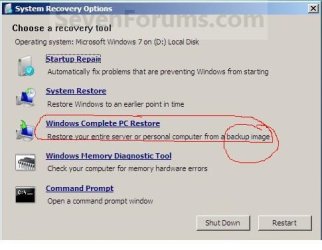
Oh I see, create the system recovery disc. Am I correct in looking at the screenshot that it does not allow for a re-image option, however?
 

My Computer My Computer

Computer type
PC/Desktop
Computer Manufacturer/Model Number
Dell
OS
Windows 7
The system repair disk allows you to boot directly into recovery options. One of those options allows you to re-image the computer using a previously created system image. If I misunderstood your question I apologize.

repairdisc.JPG
 

My Computer My Computer

Computer type
Laptop
Computer Manufacturer/Model Number
Sony Vaio VPCEB47GM Laptop
OS
Win 7 Pro 64-bit
CPU
Intel i5 2.4 Ghz
Memory
8GB DDR3
Graphics Card(s)
Intel HD 3000
Sound Card
IDT High Definition
Monitor(s) Displays
15.6 WGXA Anti-Glare LED
Screen Resolution
1280x800
Hard Drives
640Gb 7200rpm
Antivirus
MSE
Browser
Opera (primary) with IE9 backup
How many times do we need to suggest using the disk?

If you don´t have the Repair CD then I told you where to get the installer itself which has the Repair functions on second screen - including reimaging option Lee just showed you.
 
Ok, ok! I'll try the disc! :)
I first looked at the image and didn't see the separate "Re-Image" option so I thought it wasn't available with the disc...
 

My Computer My Computer

Computer type
PC/Desktop
Computer Manufacturer/Model Number
Dell
OS
Windows 7
Ok, so I created the DVD and booted from it, but I got the same result. Once in the Re-Image section it simply DOES NOT SEE the USB HD, even though if I try to do this from my other 2 laptops it sees it just fine and lists the images available. The only thing I can think of is that it needs drivers (Install Drivers is an option here, but I don't know where they would be for this USB HD). My other option is to image from a server, maybe I can copy the image file to one of my other machines and somehow share it so this computer can see it. Oy vey this is mind numbing. Lesson learned: don't always count on an external HD for a backup image solution... :(
 

My Computer My Computer

Computer type
PC/Desktop
Computer Manufacturer/Model Number
Dell
OS
Windows 7
Are you using a USB 3.0 port, which is all that would need drivers in Win7? You can still try using the USB drivers from the PC or mobo's Support downloads webpage.

If you can reimage to the target HD on one of your other PC's I can link you to an older Paragon Adaptive Restore freeware CD that perfectly adjusts the OS to changed hardware, in this case when you move it back to problem PC.
 
Nope, it's not a 3.0 port, just a regular 2.0. I've tried the different USB ports as well, always making sure it's plugged in when starting up.
This might just be too vexing of a problem to solve. It makes no sense that it shouldn't see the USB HD during System Repair mode. But then what is the "install driver" function for if not to install a driver for some kind of device it can read from? Maybe something is set incorrectly in the BIOS that it can't read the USB ports until Windows is fully loaded? I'm out of my depth here, apparently. Not only is it not seeing the drive, there's no drivers on Seagate's web site for that device. I guess I'll just start reinstalling all my software and realize that if I want to create a nice clean image for next time that I'll have to burn DVD's instead of using an external HD... :(
 

My Computer My Computer

Computer type
PC/Desktop
Computer Manufacturer/Model Number
Dell
OS
Windows 7
Is the drive a USB 3.0 device???? I've seen mention of having problems on XP when connecting to a USB 2.0 port for booting.
 

My Computer My Computer

Computer type
PC/Desktop
Computer Manufacturer/Model Number
Lenovo IdeaCenter 450
OS
Windows 10 Pro X64
CPU
Intel Quad Core i7-4770 @ 3.4Ghz
Memory
16.0GB PC3-12800 DDR3 SDRAM 1600 MHz
Graphics Card(s)
Intel Integrated HD Graphics
Sound Card
Realtek HD Audio
Monitor(s) Displays
HP 22" LCD
Screen Resolution
1680 x 1050
Hard Drives
250GB Samsung EVO SATA-3 SSD
2TB Seagate ST2000DM001 SATA-2
1.5TB Seagate ST3150041AS SATA
Keyboard
Dell USB
Mouse
Lenovo USB
Internet Speed
Cable via Road Runner 3MB Upload, 30MB Download
Antivirus
Windows Defender, MBAM Pro, MBAE
Browser
Seamonkey
Other Info
UEFI/GPT
PLDS DVD-RW DH16AERSH
Nope, just a 2.0 USB. And it's Windows 7 64 bit.
 

My Computer My Computer

Computer type
PC/Desktop
Computer Manufacturer/Model Number
Dell
OS
Windows 7

My Computer My Computer

Computer type
PC/Desktop
Computer Manufacturer/Model Number
Lenovo IdeaCenter 450
OS
Windows 10 Pro X64
CPU
Intel Quad Core i7-4770 @ 3.4Ghz
Memory
16.0GB PC3-12800 DDR3 SDRAM 1600 MHz
Graphics Card(s)
Intel Integrated HD Graphics
Sound Card
Realtek HD Audio
Monitor(s) Displays
HP 22" LCD
Screen Resolution
1680 x 1050
Hard Drives
250GB Samsung EVO SATA-3 SSD
2TB Seagate ST2000DM001 SATA-2
1.5TB Seagate ST3150041AS SATA
Keyboard
Dell USB
Mouse
Lenovo USB
Internet Speed
Cable via Road Runner 3MB Upload, 30MB Download
Antivirus
Windows Defender, MBAM Pro, MBAE
Browser
Seamonkey
Other Info
UEFI/GPT
PLDS DVD-RW DH16AERSH
Back
Top