
hello. I bought new PC and Installed windows 7 ultimate x64. This is my first x64 and I encountered a problem reading Russian texts. I have english US set as OS language.
I googled a lot and everyone says the same: "In order to read Russian, change display language to Russian-Restart PC" I've did that and it works, BUT I don't want to change options and restart PC every time I encounter Russian texts! When I had x32 windows 7 Ultimate Installed I could read Russian texts with ease, without changing OS language and stuff.
Still, there are some texts that I can read in Russian, but some display weird Symbols. I think this happens because some Russian fonts are missing? If so where can I download them?
Here are the attachments.
This is the same program I try to install.
1)This is what I can see when I run it.
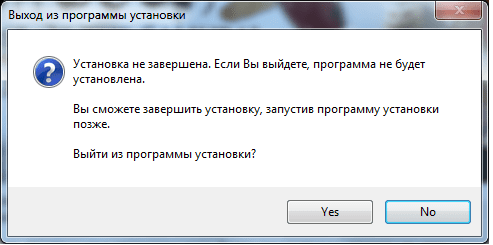
2)when I press X(cancel) Russian is displayed perfectly.
P.S This program IS NOT the only one with such "weird symbol" Issue.
Please help.
I googled a lot and everyone says the same: "In order to read Russian, change display language to Russian-Restart PC" I've did that and it works, BUT I don't want to change options and restart PC every time I encounter Russian texts! When I had x32 windows 7 Ultimate Installed I could read Russian texts with ease, without changing OS language and stuff.
Still, there are some texts that I can read in Russian, but some display weird Symbols. I think this happens because some Russian fonts are missing? If so where can I download them?
Here are the attachments.
This is the same program I try to install.
1)This is what I can see when I run it.
2)when I press X(cancel) Russian is displayed perfectly.
P.S This program IS NOT the only one with such "weird symbol" Issue.
Please help.
Attachments

My Computer
At a glance
Windows 7 ultimate x64
- Computer type
- PC/Desktop
- OS
- Windows 7 ultimate x64


