How to read SFC log?

giovy

New member
Local time
7:31 AM
Messages
15
Hi everybody!
I'm new here so please be patient and sympathetic to me....LOL!!

I've just used the SFC scannow prompt command because my (W7 Ultimate SP1 32 bit) system didn't work properly over the past few days. At the end of the scansion it found many DLL files missing and corrupted but in the end it was able to repair just some of them. So I now have to reinstall them manually in order to avoid a new reinstall of the entire system from scratch.

To do that I followed step by step this great tutorial :

http://www.sevenforums.com/tutorials/42776-extract-files-windows-7-installation-dvd.html

Now the problem is: how can I read and understand the SFC log file in order to identify the right corrupt/missing DLL files the SFC scannow command was not able to fix automatically?

Can somebody here please help me do that?

Just let me know if I can paste the entire log content here, ok?

And finally just out of curiosity: to settle things once and for all, is it possible to replace the entire (corrupt) System 32 folder, currently installed in my PC, with the one extracted from the W7 CD installation?

Can't wait to hear from you!!
 

My Computer

OS
Windows 7 Ultimate 32bit

My Computer

Computer type
PC/Desktop
Computer Manufacturer/Model Number
Self built custom
OS
64-bit Windows 11 Pro for Workstations
CPU
Intel i7-8700K OC'd to 5 GHz
Motherboard
ASUS ROG Maximus XI Formula Z390
Memory
64 GB (4x16GB) G.SKILL TridentZ RGB DDR4 3600 MHz
Graphics Card(s)
ASUS ROG-STRIX-GTX1080TI-O11G-GAMING
Sound Card
Integrated
Monitor(s) Displays
2 x Samsung Odyssey G7 27"
Screen Resolution
2560x1440
Hard Drives
1TB Samsung 990 PRO M.2,
4TB Samsung 990 PRO PRO M.2,
TerraMaster F8 SSD Plus NAS
PSU
Seasonic Prime Titanium 850W
Case
Thermaltake Core P3
Cooling
Corsair Hydro H115i
Keyboard
Logitech wireless K800
Mouse
Logitech MX Master 4
Internet Speed
2 Gb/s Download and 100 Mb/s Upload
Antivirus
Malwarebyte Anti-Malware Premium
Browser
Google Chrome
Other Info
Logitech Z625 speaker system,
Logitech BRIO 4K Pro webcam,
HP Color LaserJet Pro MFP M477fdn,
APC SMART-UPS RT 1000 XL - SURT1000XLI,
Galaxy S23 Plus phone
Hi Brink,
thank you very much for your prompt reply...this is an amazing Forum!
Here is the SFC log.
Wait for your instructions.
 

Attachments

My Computer

OS
Windows 7 Ultimate 32bit
It's a bit of a jumble to look at, but here's the basics below to help ID the files that cannot be repaired by SFC.


When you open the sfcdetails.txt file, you'll look for the Cannot repair member file entries. It gives you the file name and "of" what folder it's in. It will also give a reason why. (ex: file is missing)

When they cannot be repaired, then it means that copy of the file in the "store" is also corrupted. The This component was referenced by line directly under the one above gives you the folder name in the store the file is in.

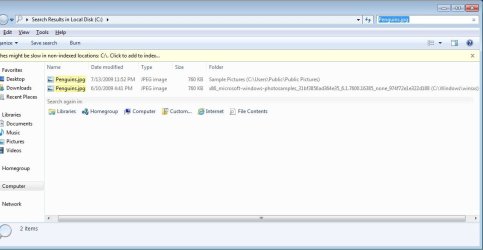
I find it easier to just do a search of the C: drive, with system directories included, for the file name (ex: Penguins.jpg) to find all locations.
Search.jpg
Example:
Code:
2013-02-14 18:12:11, Info   CSI    000002b6 [SR] [B]Cannot repair member file[/B] [l:24{12}]"[B][COLOR=red]Penguins.jpg[/COLOR][/B]" of Microsoft-Windows-[COLOR=red][B]PhotoSamples[/B][/COLOR], Version = 6.1.7600.16385, pA = PROCESSOR_ARCHITECTURE_INTEL (0), Culture neutral, VersionScope = 1 nonSxS, PublicKeyToken = {l:8 b:31bf3856ad364e35}, Type neutral, TypeName neutral, PublicKey neutral in the store, [B]file is missing[/B]
 
2013-02-14 18:12:11, Info  CSI    000002b7 [SR] [B]This component was referenced by[/B] [l:238{119}]"[B][COLOR=red]Microsoft-Windows-Client-Features-Package~31bf3856ad364e35~x86~~6.1.7601.17514.Microsoft-Windows-Client-Features-Update[/COLOR][/B]"
2

Cannot repair member file
"C:\Users\Public\Pictures\Sample Pictures\Penguins.jpg"

This component was referenced by
"C:\Windows\winsxs\x86_microsoft-windows-photosamples_31bf3856ad364e35_6.1.7600.16385_none_974f72e1e322d188\Penguins.jpg"


From looking at all of them, it appears that they are only the default files in the Sample Pictures, Videos, etc... folders included with Windows that were deleted and cannot be restored.

If you are not having any issues, then there's no need to worry about manually restoring them since there were so many.
 

My Computer

Computer type
PC/Desktop
Computer Manufacturer/Model Number
Self built custom
OS
64-bit Windows 11 Pro for Workstations
CPU
Intel i7-8700K OC'd to 5 GHz
Motherboard
ASUS ROG Maximus XI Formula Z390
Memory
64 GB (4x16GB) G.SKILL TridentZ RGB DDR4 3600 MHz
Graphics Card(s)
ASUS ROG-STRIX-GTX1080TI-O11G-GAMING
Sound Card
Integrated
Monitor(s) Displays
2 x Samsung Odyssey G7 27"
Screen Resolution
2560x1440
Hard Drives
1TB Samsung 990 PRO M.2,
4TB Samsung 990 PRO PRO M.2,
TerraMaster F8 SSD Plus NAS
PSU
Seasonic Prime Titanium 850W
Case
Thermaltake Core P3
Cooling
Corsair Hydro H115i
Keyboard
Logitech wireless K800
Mouse
Logitech MX Master 4
Internet Speed
2 Gb/s Download and 100 Mb/s Upload
Antivirus
Malwarebyte Anti-Malware Premium
Browser
Google Chrome
Other Info
Logitech Z625 speaker system,
Logitech BRIO 4K Pro webcam,
HP Color LaserJet Pro MFP M477fdn,
APC SMART-UPS RT 1000 XL - SURT1000XLI,
Galaxy S23 Plus phone
Ok thank you very much...so if I got it right there's no need to anything, even if SFC scannow warned me that some DLL files are corrupted and cannot be fixed...is that right?

Someone told me elsewhere that extracting files from an install DVD may cause troubles because the files may be older versions replaced/patched by hotfixes, & since those hotfixes have already been installed to a running copy of Windows, they’d not show up on Microsoft Update. Is that right?

As for issues, sometimes my laptop suddenly crashed (mouse, keyboard etc.... no longer work), forcing me to reboot it, but all my drivers seem to be updated: so what could be the cause of this issue if there's no need to manually restore such missing files?

Another issue is that sometimes my system does not recognize both my USB flash drive and my external HD, forcing me to reboot it...but once again USB PORT drivers seem to be OK: ow could I fix this problem? Via BIOS?
 

My Computer

OS
Windows 7 Ultimate 32bit
It really depends on the files that SFC cannot repair, and if they are worth manually replacing or not.

In your case, none of the files listed were, and are not related to the issues you having.

Those issues would be good to create a new thread for to see if we may be able to help with if you like. :)
 

My Computer

Computer type
PC/Desktop
Computer Manufacturer/Model Number
Self built custom
OS
64-bit Windows 11 Pro for Workstations
CPU
Intel i7-8700K OC'd to 5 GHz
Motherboard
ASUS ROG Maximus XI Formula Z390
Memory
64 GB (4x16GB) G.SKILL TridentZ RGB DDR4 3600 MHz
Graphics Card(s)
ASUS ROG-STRIX-GTX1080TI-O11G-GAMING
Sound Card
Integrated
Monitor(s) Displays
2 x Samsung Odyssey G7 27"
Screen Resolution
2560x1440
Hard Drives
1TB Samsung 990 PRO M.2,
4TB Samsung 990 PRO PRO M.2,
TerraMaster F8 SSD Plus NAS
PSU
Seasonic Prime Titanium 850W
Case
Thermaltake Core P3
Cooling
Corsair Hydro H115i
Keyboard
Logitech wireless K800
Mouse
Logitech MX Master 4
Internet Speed
2 Gb/s Download and 100 Mb/s Upload
Antivirus
Malwarebyte Anti-Malware Premium
Browser
Google Chrome
Other Info
Logitech Z625 speaker system,
Logitech BRIO 4K Pro webcam,
HP Color LaserJet Pro MFP M477fdn,
APC SMART-UPS RT 1000 XL - SURT1000XLI,
Galaxy S23 Plus phone
Back
Top