How to rearrange Hard Disk partitions?

killer bee

New member
Power User
VIP
Local time
2:21 AM
Messages
406
Hello!
My PC have 4 partitions (C-60GB,D-50GB, E-50GB, F-71GB ) i want reduce 20GB in "C" partition and that reduce 20GB i want add "E" partition. But i don't like remove files in that partitions. According to my knowledge it can do "Partition Magic" but i have to pay money for that software so are there any Free software for that? What are the reliable worry free software's?
 

My Computer My Computer

At a glance

windows7 Ultimate SP1 x32bitIntelKinsgton 1GB an Transcend 2GBIntel- onboard
Computer Manufacturer/Model Number
Intel DG31PR (Intel Dual core 2.5 E5200 @ 2.5GHz)
OS
windows7 Ultimate SP1 x32bit
CPU
Intel
Motherboard
Intel DG31PR
Memory
Kinsgton 1GB an Transcend 2GB
Graphics Card(s)
Intel- onboard
Sound Card
Intel- onboard
Monitor(s) Displays
ViewSonic LCD Widescreen 19
Screen Resolution
1400x900
Hard Drives
Samsung 256GB
PSU
Legend
Case
Legend
Cooling
Intel
Keyboard
Seemo
Mouse
Prolink
Internet Speed
Download Speed-512Kbps, Upload Speed-128Kbps (ADSL wired)
Other Info
UPS- Prolink Pro650s
Router Prolink H5201
Sub Woofer - Creative 2.1
Hello!
My PC have 4 partitions (C-60GB,D-50GB, E-50GB, F-71GB ) i want reduce 20GB in "C" partition and that reduce 20GB i want add "E" partition. But i don't like remove files in that partitions. According to my knowledge it can do "Partition Magic" but i have to pay money for that software so are there any Free software for that? What are the reliable worry free software's?

Do not use "Partition Magic". It does not work on Windows 7. == I would not make C: drive any smaller than it is. You are going to need space for Windows and your programs (that is normally what is put in C: drive). You can then put your Documents on one of your other partitions. == Why do you have four partitions that are so small? == You can either use Disk Management in Windows 7 to arrange your HD or you can download free BEST FREE Partition Manager Software for Windows supports all 32-bit & 64 bit Windows No-server OS.
 

My Computer My Computer

At a glance

Windows 7 Home Premium 32-Bit - Build 7600 SP1Intel Core i3-2120 3.30GhzKingston 4 GB DDR3 1333 mhzAMD Radeon HD6670
Computer type
PC/Desktop
Computer Manufacturer/Model Number
Custom Build
OS
Windows 7 Home Premium 32-Bit - Build 7600 SP1
CPU
Intel Core i3-2120 3.30Ghz
Motherboard
Asus P8Z68-V LX Intel Z68 Socket H2 ATX
Memory
Kingston 4 GB DDR3 1333 mhz
Graphics Card(s)
AMD Radeon HD6670
Sound Card
Sound Blaster Audigy SE 24-Bit
Monitor(s) Displays
Asus VE228
Screen Resolution
1440 X 900
Hard Drives
OCZ Vertex 3 120 GB Sata 3 SSD ==
Kingston SH103/S3 120 G Hyper X 120 GB SSD ==
Western Digital 500 GB Caviar Green 7200 RPM ==
PSU
Corsair CX600M == 600 Watt
Case
NZXT Apollo - Silver with Clear Side Panel
Cooling
Three 120 mm Fans
Keyboard
Microsoft Natural 4000
Mouse
Microsoft Custom Optical 3000
Internet Speed
AT&T Fiber Optic Wireless Network
Antivirus
Microsoft Security Essentials
Browser
Chrome
Other Info
120 mm Blue LED Fan -- Three Blue LED Lazer Light Sticks
I have 40GB free space in "C" partition, so that i think i should reduce 20GB. Actually I'm not arrange 4 partition in my hard disk, its do the vendor/seller who sell me this PC.
 

My Computer My Computer

At a glance

windows7 Ultimate SP1 x32bitIntelKinsgton 1GB an Transcend 2GBIntel- onboard
Computer Manufacturer/Model Number
Intel DG31PR (Intel Dual core 2.5 E5200 @ 2.5GHz)
OS
windows7 Ultimate SP1 x32bit
CPU
Intel
Motherboard
Intel DG31PR
Memory
Kinsgton 1GB an Transcend 2GB
Graphics Card(s)
Intel- onboard
Sound Card
Intel- onboard
Monitor(s) Displays
ViewSonic LCD Widescreen 19
Screen Resolution
1400x900
Hard Drives
Samsung 256GB
PSU
Legend
Case
Legend
Cooling
Intel
Keyboard
Seemo
Mouse
Prolink
Internet Speed
Download Speed-512Kbps, Upload Speed-128Kbps (ADSL wired)
Other Info
UPS- Prolink Pro650s
Router Prolink H5201
Sub Woofer - Creative 2.1
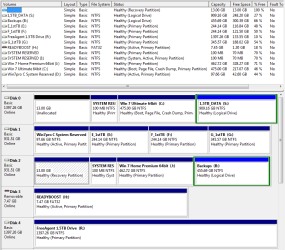
Before we go any further, I suggest you post a picture of Disk Management. And I agree with Bigmck, a 60GB partition for the OS is not very big. Some of your folders will rapidly grow, especiall winsxs (which is really a container) can become 15GBs big. And how about the shadowstorage (the space for the system restore points). You should have at least 10 to 15GBs for that.
 

My Computer My Computer

At a glance

Vista, Windows7, Mint Mate, Zorin, Windows 8from 1.6GHz Duo to i7
Computer Manufacturer/Model Number
HP, Dell, Gateway, Toshiba - 4 laptops and 2 desktops
OS
Vista, Windows7, Mint Mate, Zorin, Windows 8
CPU
from 1.6GHz Duo to i7
Monitor(s) Displays
2x HP w2207
Hard Drives
5x HDD, 7x SSD, 12x Externals
Keyboard
with trackball - no mices
Mouse
Trackball mice
Internet Speed
DSL 6000
This is my Disk management window!


My Computer My Computer

At a glance

windows7 Ultimate SP1 x32bitIntelKinsgton 1GB an Transcend 2GBIntel- onboard
Computer Manufacturer/Model Number
Intel DG31PR (Intel Dual core 2.5 E5200 @ 2.5GHz)
OS
windows7 Ultimate SP1 x32bit
CPU
Intel
Motherboard
Intel DG31PR
Memory
Kinsgton 1GB an Transcend 2GB
Graphics Card(s)
Intel- onboard
Sound Card
Intel- onboard
Monitor(s) Displays
ViewSonic LCD Widescreen 19
Screen Resolution
1400x900
Hard Drives
Samsung 256GB
PSU
Legend
Case
Legend
Cooling
Intel
Keyboard
Seemo
Mouse
Prolink
Internet Speed
Download Speed-512Kbps, Upload Speed-128Kbps (ADSL wired)
Other Info
UPS- Prolink Pro650s
Router Prolink H5201
Sub Woofer - Creative 2.1
This is my Disk management window!


Friend, as an out of work professional, I know the issues of managing money. But let me save you a lot of grief and say buy a bigger drive.

Here is my partition layout. In 6 months of use with all my data stored OFF of the C: drive, I have grown it to 200+GB due to software updates, restore points, etc. A 1,000 GB (aka 1 TB) is only about $100. If you cannot affort that, here is a link for a 500 GB drive for $54 at BBY.

I cannot emphasize the simplicity of throwing a few dollars at this to make the problem go away for a long time.
 

Attachments

  • Need TBs.png
    Need TBs.png
    28.2 KB · Views: 162

My Computer My Computer

At a glance

Win 7 Pro 64-bitIntel Core i516 GB Dell, 6 GB ToshibaIntel crap on both but Dell also has nVidia G...
Computer type
Laptop
Computer Manufacturer/Model Number
Dell Insprion 7559 next to a Toshiba Portege
OS
Win 7 Pro 64-bit
CPU
Intel Core i5
Motherboard
Intel
Memory
16 GB Dell, 6 GB Toshiba
Graphics Card(s)
Intel crap on both but Dell also has nVidia GeForce GTX960M
Sound Card
RealTek
Monitor(s) Displays
internal and external ACER KA270H 27"
Screen Resolution
1920x1080
Hard Drives
SSD 256 GB plus numerous WD Red or Purple on USB3 docks. Used to buy a lot of Seagate but tossed them the second time I got unrecoverable disc corruption in the midst of use.
Keyboard
Garage Mouse SW and some cheap Amazon China made USB device
Mouse
Garage Mouse and some cheap Amazon China made USB device
Internet Speed
50 Mbps (allegedly, depends on server)
Antivirus
Defender, Malwarebytes Premium and Kaspersky
Browser
IE 11, and Chrome something
Do not make your C: smaller. If anything you should make it bigger. That 39 GB of free space on C: will fill up pretty quick and then you will have a lot of trouble. Like the previous poster said. You can get a 500 GB for around $50, sometimes cheaper. Save your pennies and get one. You will be glad you did.
 

My Computer My Computer

At a glance

Windows 7 Home Premium 32-Bit - Build 7600 SP1Intel Core i3-2120 3.30GhzKingston 4 GB DDR3 1333 mhzAMD Radeon HD6670
Computer type
PC/Desktop
Computer Manufacturer/Model Number
Custom Build
OS
Windows 7 Home Premium 32-Bit - Build 7600 SP1
CPU
Intel Core i3-2120 3.30Ghz
Motherboard
Asus P8Z68-V LX Intel Z68 Socket H2 ATX
Memory
Kingston 4 GB DDR3 1333 mhz
Graphics Card(s)
AMD Radeon HD6670
Sound Card
Sound Blaster Audigy SE 24-Bit
Monitor(s) Displays
Asus VE228
Screen Resolution
1440 X 900
Hard Drives
OCZ Vertex 3 120 GB Sata 3 SSD ==
Kingston SH103/S3 120 G Hyper X 120 GB SSD ==
Western Digital 500 GB Caviar Green 7200 RPM ==
PSU
Corsair CX600M == 600 Watt
Case
NZXT Apollo - Silver with Clear Side Panel
Cooling
Three 120 mm Fans
Keyboard
Microsoft Natural 4000
Mouse
Microsoft Custom Optical 3000
Internet Speed
AT&T Fiber Optic Wireless Network
Antivirus
Microsoft Security Essentials
Browser
Chrome
Other Info
120 mm Blue LED Fan -- Three Blue LED Lazer Light Sticks
How much space you need for C ultimately depends on how many apps you install to it and whether or not you also keep your data on C.

If you don't want to buy another drive---at least right now, you could:

Delete F and E.

Make a single large data partition D, with a "movies" and "downloads" and "music" folders.

The HDD would then have a C partition of 60 GB and a D partition of 172 GB.

D would have 76 GB of free space and about 97 GB occupied.

You would have 76 GB free, rather than only 10 GB on F, which apparently has you worried.

This is a typical example of what happens when you chop drives up into smallish partitions and you then find out you guessed wrong as to how much to devote to each.
 

My Computer My Computer

At a glance

Windows 7 Home Premium SP1, 64-bitIntel Skylake i5-6600K, not overclocked8 GB HyperX DDR4-2666 (2 x 4 GB)none; graphics are integrated on CPU
Computer type
PC/Desktop
Computer Manufacturer/Model Number
Ignatz Special; 4 speed manual gearbox; factory air conditioning; one of one
OS
Windows 7 Home Premium SP1, 64-bit
CPU
Intel Skylake i5-6600K, not overclocked
Motherboard
AsRock Z170M Extreme 4, micro ATX
Memory
8 GB HyperX DDR4-2666 (2 x 4 GB)
Graphics Card(s)
none; graphics are integrated on CPU
Sound Card
onboard: Realtek ALC1150; external: USB Behringer UF0-202
Monitor(s) Displays
Dell S2340M 23 inch IPS
Screen Resolution
1600 x 900
Hard Drives
System: Crucial MX100 series SSD, 128 GB;
Data: Samsung Spinpoint 103SJ, 1 TB;
Backup: WD Caviar Green WD30EZRX-00D8PB0, 3 TB
PSU
Rosewill SilentNight 500 watt fanless, semi-modular
Case
Antec Solo II
Cooling
Noctua NH-U12S; Noctua F12 intake, Noctua S12A exhaust
Keyboard
Microsoft 200 6JH-00001 USB
Mouse
Dell or Microsoft optical wired; USB
Antivirus
Microsoft Security Essentials and Malwarebytes Premium
Browser
Pale Moon
Other Info
All fans PWM; speeds at idle: CPU circa 500 rpm; intake circa 600 rpm; exhaust circa 600 rpm; CPU temps 27 idle and 47 C load in a warm room (27 C/81 F) when running Intel Extreme Tuning Utility stress test.
Back
Top