
How to Recover a Primary Boot Partition

archp2008

New member
Local time
6:54 PM
Messages
23
Hello,

I have Windows XP64 and XP 2005 installed on adjacent partitions on an 80 GB IDE hard drive. I had been accustomed to using BIOS to choose the drive and EasyBCD to choose the OS. A few days ago I was unable to boot into this drive because I kept getting the error "NTLDR missing (press Ctrl-Alt-Del)." I tried using Microsoft's BCSetup2 (I think that's what it's called) but couldn't get a floppy disk to boot. Being that there wasn't much on this hard drive, other than the Windows OS's, I decided to reinstall the Win64 on the first partition. I find now that EasyBCD does not install on my XP64, so evidently I must have had it installed on the XP MCE partition. I'm wondering now how I can go about accessing the MCE on that other partition, or finding or remaking the boot loader. Any suggestions would be appreciated. Thanks in advance for any comments.
 

My Computer My Computer

At a glance

XP MCE/32/64 Vista 32/64 Win7 Ubuntu Linux Mint
OS
XP MCE/32/64 Vista 32/64 Win7 Ubuntu Linux Mint
Hi Arch,

Easybcd should install on 7.

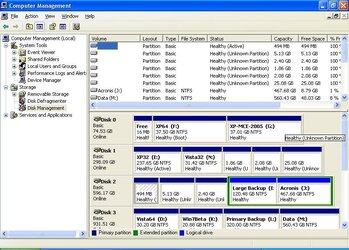
Please post a screenshot of Disk Management, like this:

DISKMANAGEMENT2009-02-04_031947.jpg

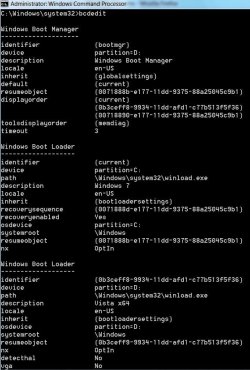
and of the bcd entries - type cmd in start search - when it pops up, RT click and run as admin.

Type:

bcdedit {enter}

BCDEDIT2009-03-07_235226.jpg
 

My Computers My Computers

  • At a glance

    7 X64i5 84002x8gb 3200mhz
    Computer type
    PC/Desktop
    OS
    7 X64
    CPU
    i5 8400
    Motherboard
    gigabyte b365m ds3h
    Memory
    2x8gb 3200mhz
    Hard Drives
    various
    PSU
    pure power 11 400w cm
    Case
    Coolermaster
    Cooling
    cryorig m9i
  • At a glance

    7x64g54008gb ddr4 2400
    Computer type
    PC/Desktop
    OS
    7x64
    CPU
    g5400
    Motherboard
    ga b365m ds3h
    Memory
    8gb ddr4 2400
    PSU
    xfx pro 450w
Thanks for the reply. I have 3 SATA drives in addition to the one IDE drive in question. I can boot into the XP64 on the IDE drive. This is where the Disk Management screen capture is from. It shows the IDE drive on the top. Windows 7 (test copy) is on a small partition on one SATA drive 3 that I am using mainly for backups and movies. I couldn't see the IDE drive in disk management from the main XP partion on Disk 1, which I use most of the time - only the 3 SATA drives. I'm not sure why. When I found bcedit (only found on Vista64) from this partition (XP64) and ran as admin I got the error shown (screen capture posted). (BTW I originally installed the Operating Systems on the IDE drive with the SATA drives disconnected, so I reinstalled the XP64 in the same way. I don't trust Windows for overwriting MBR's)
 

Attachments

  • dskmgt2.JPG
    dskmgt2.JPG
    93.3 KB · Views: 59
  • error.jpg
    error.jpg
    13.8 KB · Views: 28
Last edited:

My Computer My Computer

At a glance

XP MCE/32/64 Vista 32/64 Win7 Ubuntu Linux Mint
OS
XP MCE/32/64 Vista 32/64 Win7 Ubuntu Linux Mint
I made some blunders today that set me back further on my efforts to get these two operating systems dual booting on that IDE drive again. I decided to format the drive and use it for storage for home videos and personal photos. I have the two operating systems on cd's, so, in the unlikely event that I really need either of them I have the capability of reinstalling them in the future. I find it annoying that Microsoft Windows still has so many hundreds of things wrong with it, despite the hundreds of updates which force the user to install them in stage after stage after stage taking hours and hours. Too bad Linux is so technical. Anyway, thanks again for your reply.
 

My Computer My Computer

At a glance

XP MCE/32/64 Vista 32/64 Win7 Ubuntu Linux Mint
OS
XP MCE/32/64 Vista 32/64 Win7 Ubuntu Linux Mint
Back
Top