how to recreate Public Folder?

spandrel

New member
Local time
5:53 PM
Messages
5
I wanted to move the Public Folder from C:\Users to D:\, so I simply copied the folder, delete the original, and created a symbolic link (with -mklink-). A little knowledge was a dangerous thing - apparently I should have used -robocopy- to ensure the copy of Public had the correct characteristics. So, is there a way to fix D:\Public so that it has the correct permissions of a "Public" folder? If not, is there a way to recreate the original C:\Users\Public? I am not concerned about any data in this folder, as there was (so far) none there.

Apologies if this has been addressed here before, I tried searching the forums but with no luck. Thanks.
 

My Computer

Computer Manufacturer/Model Number
Xi computer
OS
Windows 7 64bit
CPU
AMD phenom II X4 955 3.2GHz
Memory
8 GB
Graphics Card(s)
Nvidia GForce GTS 250
Hello Spandrel, and welcome to Seven Forums.

You should be able to do a system restore using a restore point dated before you made these changes to the Public folder to undo them.

Hope this helps,
Shawn
 

My Computer

Computer type
PC/Desktop
Computer Manufacturer/Model Number
Self built custom
OS
64-bit Windows 11 Pro for Workstations
CPU
Intel i7-8700K OC'd to 5 GHz
Motherboard
ASUS ROG Maximus XI Formula Z390
Memory
64 GB (4x16GB) G.SKILL TridentZ RGB DDR4 3600 MHz
Graphics Card(s)
ASUS ROG-STRIX-GTX1080TI-O11G-GAMING
Sound Card
Integrated
Monitor(s) Displays
2 x Samsung Odyssey G7 27"
Screen Resolution
2560x1440
Hard Drives
1TB Samsung 990 PRO M.2,
4TB Samsung 990 PRO PRO M.2,
TerraMaster F8 SSD Plus NAS
PSU
Seasonic Prime Titanium 850W
Case
Thermaltake Core P3
Cooling
Corsair Hydro H115i
Keyboard
Logitech wireless K800
Mouse
Logitech MX Master 4
Internet Speed
2 Gb/s Download and 100 Mb/s Upload
Antivirus
Malwarebyte Anti-Malware Premium
Browser
Google Chrome
Other Info
Logitech Z625 speaker system,
Logitech BRIO 4K Pro webcam,
HP Color LaserJet Pro MFP M477fdn,
APC SMART-UPS RT 1000 XL - SURT1000XLI,
Galaxy S23 Plus phone
That worked.

thanks,
Jeph
 
Last edited:

My Computer

Computer Manufacturer/Model Number
Xi computer
OS
Windows 7 64bit
CPU
AMD phenom II X4 955 3.2GHz
Memory
8 GB
Graphics Card(s)
Nvidia GForce GTS 250
Jeph,

Sure thing. Be sure to backup anything in those folders that you do not want to lose, then open regedit.

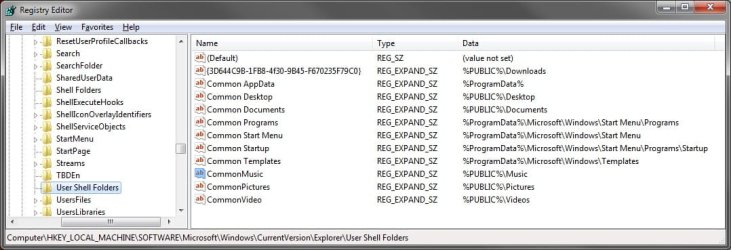
Make sure that these two registry locations below have these default locations set to them in yours as well for the Public (common) folders.

HKEY_LOCAL_MACHINE\SOFTWARE\Microsoft\Windows\CurrentVersion\Explorer\Shell Folders
Registry.jpg
HKEY_LOCAL_MACHINE\SOFTWARE\Microsoft\Windows\CurrentVersion\Explorer\User Shell Folders
Registry2.jpg
Afterwards delete all of your duplicate Public folders (not in registry), and restart the computer. You may need to restart a couple of times to fully apply though.
 

My Computer

Computer type
PC/Desktop
Computer Manufacturer/Model Number
Self built custom
OS
64-bit Windows 11 Pro for Workstations
CPU
Intel i7-8700K OC'd to 5 GHz
Motherboard
ASUS ROG Maximus XI Formula Z390
Memory
64 GB (4x16GB) G.SKILL TridentZ RGB DDR4 3600 MHz
Graphics Card(s)
ASUS ROG-STRIX-GTX1080TI-O11G-GAMING
Sound Card
Integrated
Monitor(s) Displays
2 x Samsung Odyssey G7 27"
Screen Resolution
2560x1440
Hard Drives
1TB Samsung 990 PRO M.2,
4TB Samsung 990 PRO PRO M.2,
TerraMaster F8 SSD Plus NAS
PSU
Seasonic Prime Titanium 850W
Case
Thermaltake Core P3
Cooling
Corsair Hydro H115i
Keyboard
Logitech wireless K800
Mouse
Logitech MX Master 4
Internet Speed
2 Gb/s Download and 100 Mb/s Upload
Antivirus
Malwarebyte Anti-Malware Premium
Browser
Google Chrome
Other Info
Logitech Z625 speaker system,
Logitech BRIO 4K Pro webcam,
HP Color LaserJet Pro MFP M477fdn,
APC SMART-UPS RT 1000 XL - SURT1000XLI,
Galaxy S23 Plus phone
That's what I've got. So I'm back where I started, which is better than no Public Folder at all. But I would really prefer to move the Public folder(s) to D:\Public; can I do so if I align these registry entries accordingly? Is there an easier way?

thanks,
Jeph
 

My Computer

Computer Manufacturer/Model Number
Xi computer
OS
Windows 7 64bit
CPU
AMD phenom II X4 955 3.2GHz
Memory
8 GB
Graphics Card(s)
Nvidia GForce GTS 250
Jeph,

It's not recommended to try and move the Public folders since they are shared by all users on the computer. Doing so renders them just about useless as public share folders, and can cause to many unknown issues.

You can safely move the User Folders instead though, and as a workaround, keep your data stored in your user folders and have a shortcut to them in the public folder. This way the data is stored in the location you moved your user folders to and not the Public folders, and you still can share through the Public folders.

Hope this helps,
Shawn
 
Last edited:

My Computer

Computer type
PC/Desktop
Computer Manufacturer/Model Number
Self built custom
OS
64-bit Windows 11 Pro for Workstations
CPU
Intel i7-8700K OC'd to 5 GHz
Motherboard
ASUS ROG Maximus XI Formula Z390
Memory
64 GB (4x16GB) G.SKILL TridentZ RGB DDR4 3600 MHz
Graphics Card(s)
ASUS ROG-STRIX-GTX1080TI-O11G-GAMING
Sound Card
Integrated
Monitor(s) Displays
2 x Samsung Odyssey G7 27"
Screen Resolution
2560x1440
Hard Drives
1TB Samsung 990 PRO M.2,
4TB Samsung 990 PRO PRO M.2,
TerraMaster F8 SSD Plus NAS
PSU
Seasonic Prime Titanium 850W
Case
Thermaltake Core P3
Cooling
Corsair Hydro H115i
Keyboard
Logitech wireless K800
Mouse
Logitech MX Master 4
Internet Speed
2 Gb/s Download and 100 Mb/s Upload
Antivirus
Malwarebyte Anti-Malware Premium
Browser
Google Chrome
Other Info
Logitech Z625 speaker system,
Logitech BRIO 4K Pro webcam,
HP Color LaserJet Pro MFP M477fdn,
APC SMART-UPS RT 1000 XL - SURT1000XLI,
Galaxy S23 Plus phone
Thanks. I'm the only user on this PC, and want to have a folder on my D:\ drive to place data that other network users can access. Seems like it shouldn't be so difficult to arrange, but I will try this.
 

My Computer

Computer Manufacturer/Model Number
Xi computer
OS
Windows 7 64bit
CPU
AMD phenom II X4 955 3.2GHz
Memory
8 GB
Graphics Card(s)
Nvidia GForce GTS 250

My Computer

Computer type
PC/Desktop
Computer Manufacturer/Model Number
Self built custom
OS
64-bit Windows 11 Pro for Workstations
CPU
Intel i7-8700K OC'd to 5 GHz
Motherboard
ASUS ROG Maximus XI Formula Z390
Memory
64 GB (4x16GB) G.SKILL TridentZ RGB DDR4 3600 MHz
Graphics Card(s)
ASUS ROG-STRIX-GTX1080TI-O11G-GAMING
Sound Card
Integrated
Monitor(s) Displays
2 x Samsung Odyssey G7 27"
Screen Resolution
2560x1440
Hard Drives
1TB Samsung 990 PRO M.2,
4TB Samsung 990 PRO PRO M.2,
TerraMaster F8 SSD Plus NAS
PSU
Seasonic Prime Titanium 850W
Case
Thermaltake Core P3
Cooling
Corsair Hydro H115i
Keyboard
Logitech wireless K800
Mouse
Logitech MX Master 4
Internet Speed
2 Gb/s Download and 100 Mb/s Upload
Antivirus
Malwarebyte Anti-Malware Premium
Browser
Google Chrome
Other Info
Logitech Z625 speaker system,
Logitech BRIO 4K Pro webcam,
HP Color LaserJet Pro MFP M477fdn,
APC SMART-UPS RT 1000 XL - SURT1000XLI,
Galaxy S23 Plus phone
They are XP users; but I found that I could share a folder by adding "Guest" as a shared user.

cheers,
Jeph
 

My Computer

Computer Manufacturer/Model Number
Xi computer
OS
Windows 7 64bit
CPU
AMD phenom II X4 955 3.2GHz
Memory
8 GB
Graphics Card(s)
Nvidia GForce GTS 250
hI Brink,
I too wanted to move my "public" folders to a new hard drive (E:) on my main PC so that I have room to store all that data from my 3 PC and have room to grow. I have 3 PCs on my "workgroup" network at home and I want to move all of My Docs, My Videos, etc. into public folders on this new drive so all 3 of my PCs can see & use them.

I've been searching thru forums all day and decided to go with your suggestion to not move the "public" folders, but instead move my "user" folders to the new drive. I did that, and now I am trying to create a shortcut (as you suggested) from the "public" folder to the new "user" folder on the new drive. The problem is, I cannot access the data from my other PCs (when I go to thru the "network" link, then "public"). I assume it's because my new users folders are not a public, shareable format?

My goal is to have a single, public "My Docs" folder & single, public "My Videos" folder, etc. that all 3 PCs use, and have that data reside on my new, big hard drive in my main PC. Is that not possible?
 

My Computer

Computer Manufacturer/Model Number
Fujitsu Lifebook A6210 laptop
OS
windows 7 Ultimate 32-bit
CPU
Intel Duo core p8600 @ 2.4Ghz
Motherboard
Fujitsu
Memory
3 Gb
Graphics Card(s)
Mobile Intel 4 series express chipset
Sound Card
Realtek Hi Def Audio
Monitor(s) Displays
laptop's 15.4 color enhanced
Hard Drives
Samsung HM251JJ ATA drive
Back
Top